
If you are looking for an easier way to create cartoon-style explainer videos, this Toonly review will help you decide whether the software is actually worth paying for.
Many video tools promise everything at once. They want to be a social media editor, a cinematic video suite, an AI generator, a screen recorder, and a design platform all in one. That sounds impressive, but in practice it often creates the same problem: too much complexity for people who simply want to make clear, engaging explainer videos.
Toonly takes a different approach. It focuses on a narrower goal: helping users build cartoon explainer videos with a drag-and-drop workflow, premade visual assets, voiceover support, and export-ready output. According to Toonly’s official pages, it is a desktop application for Windows and Mac, exports MP4 files, supports use on multiple computers, and includes tutorials covering interface basics, characters, objects, transitions, music, voiceover, preset scenes, zooming, panning, lip sync, and more.
That focused positioning is exactly why Toonly still has a market. Not everyone wants advanced animation software. Not everyone needs trendy AI avatar videos. Many users simply want a practical way to explain an idea, present an offer, improve a landing page, make onboarding content, or turn a boring topic into something more watchable.
In this review, I will break down what Toonly does, who it is best for, how its pricing works, what its biggest strengths and weaknesses are, and whether it still makes sense in 2026 for marketers, educators, coaches, course creators, and small businesses.
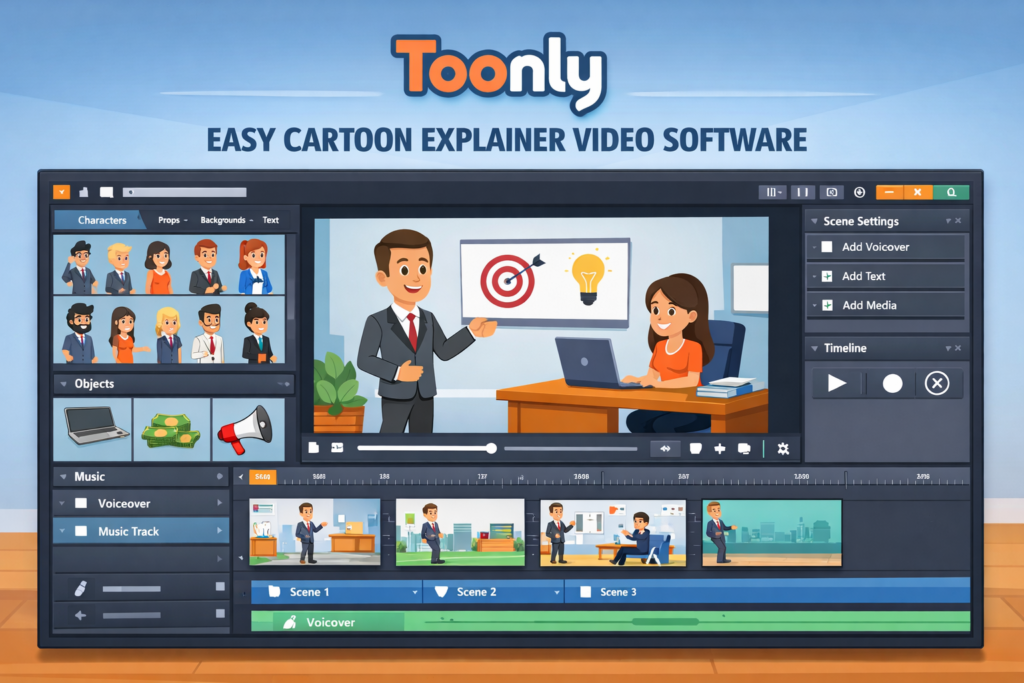
What Is Toonly?
Toonly is a cartoon explainer video software designed for people who want to create animated business-style videos without learning traditional animation.
Instead of drawing animations manually or editing live footage, you build scenes using premade visual assets. That usually means selecting a background, dragging in characters and props, arranging the scene, adding text, syncing voiceover or music, and exporting the result as a finished video.
The biggest reason this matters is speed. A lot of beginners are not blocked by creativity. They are blocked by workflow friction. They do not want to learn a professional animation stack just to make a two-minute explainer video. They want a tool that gets them from idea to publishable output faster.
That is the real appeal of Toonly. It is not trying to be everything. It is trying to make cartoon explainer video creation easier.
Why People Still Buy Toonly
There are a lot of newer tools in the video market, but Toonly still solves a specific problem well.
Many businesses, creators, and educators need videos that explain something clearly. They do not necessarily need viral short-form effects or highly polished motion design. They need clarity. They need structure. They need a visual format that makes a message easier to understand.
This is where cartoon explainers still work well.
A homepage explainer can simplify a service. A course intro can make a lesson feel more engaging. A short training video can help people understand a process faster. A product explainer can make a complicated offer easier to absorb. These are not glamorous use cases, but they are profitable ones.
Toonly fits that part of the market because it reduces the skill barrier. You do not need to be a designer to start building something useful. That alone makes it attractive to business owners and non-technical creators.
Toonly at a Glance
| Category | Summary |
|---|---|
| Product type | Desktop cartoon explainer video software |
| Best for | Beginners, marketers, coaches, educators, course creators, trainers, small businesses |
| Main strength | Drag-and-drop animated explainer creation |
| Core assets | Characters, props, backgrounds, premade scenes, audio support |
| Export format | MP4 |
| Compatibility | Windows and Mac |
| Internet requirement | Yes |
| Commercial use | User-created work belongs to the user, subject to the software license terms |
| Refund policy | 30-day money-back guarantee |
| Learning support | Official tutorial library |
Toonly’s public pricing page also currently shows monthly and annual Standard and Enterprise plans, while separate official promotional pages can show different offer structures.
Toonly’s Main Features
1. Drag-and-drop workflow
This is the core reason most people consider Toonly.
The platform is built around a visual workflow that feels more approachable than professional animation software. You are not expected to animate every movement manually from scratch. You are working inside a simplified scene-building environment.
For beginners, that is a huge advantage.
The easier a tool is to understand, the more likely it is to get used consistently. Software that feels intimidating often gets abandoned after the first few attempts. Toonly’s simplified structure is one of its strongest conversion points because it lowers the emotional friction of getting started.
2. Character, prop, and background libraries
Toonly includes cartoon-style visual assets that users can combine into animated scenes. This is important because one of the biggest hidden costs of creative work is asset sourcing.
If you need to find your own matching characters, props, icons, and backgrounds from multiple places, your production time rises fast. Toonly gives users a pre-built style system, which means scenes are easier to assemble and more visually consistent.
That consistency is valuable for non-designers. Even if your videos are not highly customized, they can still look clean and deliberate.
It is worth noting that official pages present asset counts differently depending on the specific plan or offer page, so buyers should always verify the current asset breakdown on the final checkout path they plan to use.
3. Premade scenes
Premade scenes are one of Toonly’s most useful beginner features.
Starting from a blank canvas is hard. Many users do not fail because the export process is difficult. They fail because the first step feels slow and uncertain. Premade scenes reduce that problem by giving users a starting structure they can customize instead of forcing them to build every scene from nothing.
That can dramatically improve speed, especially for busy users who do not want to spend hours on setup.
4. Voiceover and music support
Explainer videos depend heavily on narration and pacing. A video can look fine visually, but if the audio side is weak, the whole thing feels unfinished.
Toonly supports adding music and voiceover, which makes it much more practical than a basic “visual scenes only” tool. The tutorial library also specifically includes separate walkthroughs for adding music and adding a voiceover, which helps confirm that audio is not just an afterthought in the workflow.
This matters for real-world use because most people buying Toonly are not creating silent animations. They are creating explainers, training clips, marketing videos, and educational content.
5. MP4 export
Toonly’s FAQ states that the software creates standard MP4 files. That is an important practical detail because MP4 is exactly what most users need for websites, YouTube, course platforms, and general business publishing.
This may not sound exciting, but simple output matters. A tool becomes far more useful when the export format works smoothly across normal publishing channels.
6. Tutorial coverage
A lot of software is marketed as beginner-friendly without doing much to actually support beginners.
Toonly does a better job here because its official tutorial library covers the interface, characters, objects, transitions, music, voiceover, backgrounds and preset scenes, zooming and panning, text underlay, animation trimming, bulk operations, lip sync, and color changes.
That does not guarantee great results, but it lowers the risk for new users and makes the software easier to recommend.
Toonly Pricing
Toonly pricing needs to be explained carefully because there is more than one official pricing path.
The main public pricing page currently shows four subscription options:
| Plan | Billing | Publicly Shown Price |
|---|---|---|
| Standard | Monthly | $49/month |
| Enterprise | Monthly | $79/month |
| Standard | Annual | $490/year |
| Enterprise | Annual | $790/year |
The same page also lists plan differences in character images, animations, props, backgrounds, premade scenes, transitions, audio, text animations, cloud storage, and bundled access to related tools in the Voomly ecosystem.
However, at least one official promotional page also advertises a one-time $67 Standard offer instead of recurring billing. That means the pricing experience can vary depending on the link or campaign page a user lands on.
For affiliate content, the safest move is not to hard-sell one exact pricing structure as if it never changes. A better strategy is to explain the current publicly visible structure and then encourage readers to check the live offer page before purchasing.
Standard vs Enterprise
Most readers do not care about every feature count in isolation. What they really want to know is which plan fits them.
Here is the practical breakdown:
| Plan | Best for | Main value |
|---|---|---|
| Standard | Beginners, solo creators, lighter-use buyers | Lower entry cost and enough features to start creating explainers |
| Enterprise | Frequent users, heavier users, teams | Bigger asset library, more transitions, more audio, and more room to grow |
If you are only planning to make occasional videos and want to keep your cost lower, Standard is usually the logical starting point.
If you expect to create videos regularly, want more creative variety, or simply want fewer library limitations over time, Enterprise is the stronger long-term option.
Is Toonly Expensive?
That depends entirely on what you compare it to.
If you compare it to hiring a designer or animator for each explainer video, Toonly can be very affordable. One of Toonly’s official special-offer pages leans hard into this comparison by contrasting the product with the cost of custom video designers, even though that sales language is obviously promotional.
If you compare it to very cheap lightweight editing tools, Toonly may feel more specialized. But that is because it is not just another template-based social video app. Its value comes from being purpose-built for a specific kind of video communication.
The better question is not whether Toonly is cheap. The better question is whether you will use it enough for it to save time, improve communication, or reduce outsourcing costs.
For the right user, the answer can easily be yes.
Who Should Use Toonly?
Toonly is best for people who need to explain, teach, simplify, or present something clearly.
That includes:
| User type | Why Toonly fits |
|---|---|
| Small business owners | Helps explain services and offers more clearly |
| Coaches and consultants | Useful for client education and lead generation |
| Course creators | Good for lesson intros, summaries, and concept explainers |
| Marketers | Useful for landing page explainers and educational promo content |
| Agencies | Helpful for simple client-facing explainer production |
| HR and training teams | Good for onboarding and process explanation |
| Educators | Makes abstract or dry topics easier to understand |
The common thread is not job title. It is communication need.
If you repeatedly need to turn complex or boring information into something easier to follow, Toonly makes sense.
Who Should Skip Toonly?
Toonly is not the best fit for everyone.
You should probably skip it if you want:
- advanced cinematic editing
- highly customized motion design
- modern AI-generated talking head or avatar workflows
- heavy short-form social editing effects
- a non-cartoon visual style for premium brand presentation
This is not a weakness in the sense of “bad software.” It is simply a reminder that focused tools are best when your needs match their focus.
Toonly is a cartoon explainer video tool. If that style or structure does not fit your audience, your brand, or your content goals, another category of software may suit you better.
Best Use Cases for Toonly
One of the easiest ways to judge Toonly is to look at how it would actually be used.
Homepage and landing page explainers
Some offers are difficult to understand quickly. A short animated explainer can reduce bounce, improve message clarity, and help visitors understand why the offer matters.
Educational video content
If you run an online course or training-based business, Toonly can help make lessons less static and less text-heavy. It works especially well for introductions, summaries, simplified concept explanations, and lightweight learning modules.
Client education
Coaches, consultants, and agencies often repeat the same explanations to clients. A short animated explainer can save time and make the process feel more polished.
Internal training
Businesses can use explainer-style videos for onboarding, policy explanation, step-by-step process training, and repeated internal education.
Promotional content
For certain products or services, a cartoon explainer can make a dry topic more engaging. This is especially useful when your audience needs education before they are ready to buy.
Is Toonly Easy for Beginners?
Yes, and that is one of its biggest strengths.
Toonly is easier for beginners not because it magically creates great videos on its own, but because it reduces unnecessary production complexity. It narrows the workflow to something more manageable.
That matters because most beginners do not need more features. They need fewer obstacles.
The tutorial structure helps reinforce that beginner-friendly experience. When users can quickly learn the interface, scene building, audio setup, and other basics, they are much more likely to feel momentum instead of frustration.
That said, beginners still need to bring one thing themselves: clarity of message.
Toonly can help you present ideas better, but it cannot automatically fix weak thinking or poor scripting. The people who get the best results are usually the ones who already know what they want to explain.
Does Toonly Work for Commercial Use?
For business users, this is one of the most important questions.
Toonly’s FAQ states that the user owns the work product and content created using the software, while the software and supplied creative elements remain licensed under the company’s terms. The company also states that it does not re-use, distribute, or commercialize the user’s work product.
That is a strong practical point in Toonly’s favor.
It means the product is clearly intended for real business use cases rather than only casual hobby use. If you are creating marketing videos, educational content, internal training, or business-facing explainers, that ownership clarity matters.
System Requirements and Practical Limitations
Toonly is a desktop application, not just a browser-based editor. According to the public FAQ, it supports Windows 7 or higher and Mac OSX 10.10 or higher. It can also be used on multiple computers you own.
However, there is one limitation some buyers miss: it still requires an internet connection because it pulls images from the internet and saved projects from the cloud.
That means Toonly is not a fully offline desktop workflow.
For many users, that will not matter. But if you specifically want an offline-only setup, it is something to keep in mind before purchasing.
Pros and Cons of Toonly
| Pros | Cons |
|---|---|
| Easy drag-and-drop workflow | Limited compared with advanced animation tools |
| Beginner-friendly structure | Cartoon style will not fit every brand |
| Premade scenes save time | Internet connection required |
| Voiceover and music support | Pricing can look inconsistent across official offer pages |
| MP4 export is practical | Less flexible than fully custom animation |
| Works on Windows and Mac | Some users may outgrow it over time |
| Tutorials reduce learning friction | Not ideal for AI-video-first buyers |
The biggest strength is not just simplicity. It is purposeful simplicity.
The biggest weakness is not that the tool is narrow. It is that some buyers may expect it to do more than it is trying to do.
If you judge Toonly by the job it is actually built for, it becomes much easier to evaluate fairly.
Toonly vs Hiring an Animator
This is one of the most useful comparisons for business-minded readers.
| Option | Best part | Biggest downside |
|---|---|---|
| Toonly | Faster and easier for repeated explainer creation | Less custom than professional animation |
| Hiring an animator | More unique and polished output | Much higher cost and slower turnaround |
If you need one premium brand film, hiring a specialist may be the better choice.
If you need repeated explainers, educational videos, internal communication clips, or fast business content, Toonly becomes much more attractive.
This is where software like Toonly usually wins. It is not always about producing the most impressive animation. It is about producing useful videos more often, with less friction and lower cost.
Toonly for SEO and Conversion Content
This is an angle many reviews miss.
Toonly is not only about making videos. It can also support content performance.
Organic traffic does not convert just because it exists. Many readers land on a page and still do not fully understand the product, service, or offer. A short explainer video can help reduce that gap.
That makes Toonly relevant for:
- service landing pages
- software explanation pages
- FAQ pages
- onboarding pages
- educational lead magnets
- course sales pages
- customer education hubs
If your business depends on clarity, then explainer-style visual content is not just a nice extra. It can support conversion.
This does not mean every page needs an animated video. It means Toonly is useful when better explanation can improve buyer understanding.
Is Toonly Worth It in 2026?
For the right buyer, yes.
Toonly is worth it if you want a simpler, lower-friction way to create cartoon explainer videos for marketing, education, training, or customer communication. It stays relevant because it solves a real business problem: making explanations easier to produce and easier to understand.
It is not the most advanced video platform on the market.
It is not the trendiest AI video tool on the market.
But those are not necessarily problems. In many cases, a focused tool with a clear purpose is more valuable than a broad tool that does too many things poorly.
If you are a beginner, a marketer, a course creator, a coach, a consultant, a trainer, or a small business owner who needs repeatable explainer content, Toonly still deserves serious consideration.
If you need highly advanced editing, extreme visual flexibility, or a completely different content style, then it is probably not the right fit.
The key is to buy it for what it is, not for what it is not.
Frequently Asked Questions
Is Toonly a desktop app or a web app?
Toonly is a desktop application installed on your computer. The official FAQ describes it as downloadable software for Windows and Mac.
Does Toonly work on Mac and Windows?
Yes. The public FAQ states that Toonly works on Windows 7 or higher and Mac OSX 10.10 or higher.
Does Toonly need internet access?
Yes. The official FAQ says it requires an internet connection because it pulls images from the internet and projects from the cloud.
What file format does Toonly export?
Toonly exports standard MP4 video files.
Can I use Toonly on multiple computers?
Yes. The pricing FAQ states that it can be used on multiple computers you own.
Does Toonly include tutorials?
Yes. The official tutorials page includes training for the interface, characters, objects, transitions, music, voiceover, preset scenes, zooming, panning, animation trimming, lip sync, and more.
Is Toonly refundable?
The official pricing and special-offer pages state a 30-day money-back guarantee.
About the Author
Xu Xun
Contact: xuxun1208@gmail.com
Last Updated: June 2026