
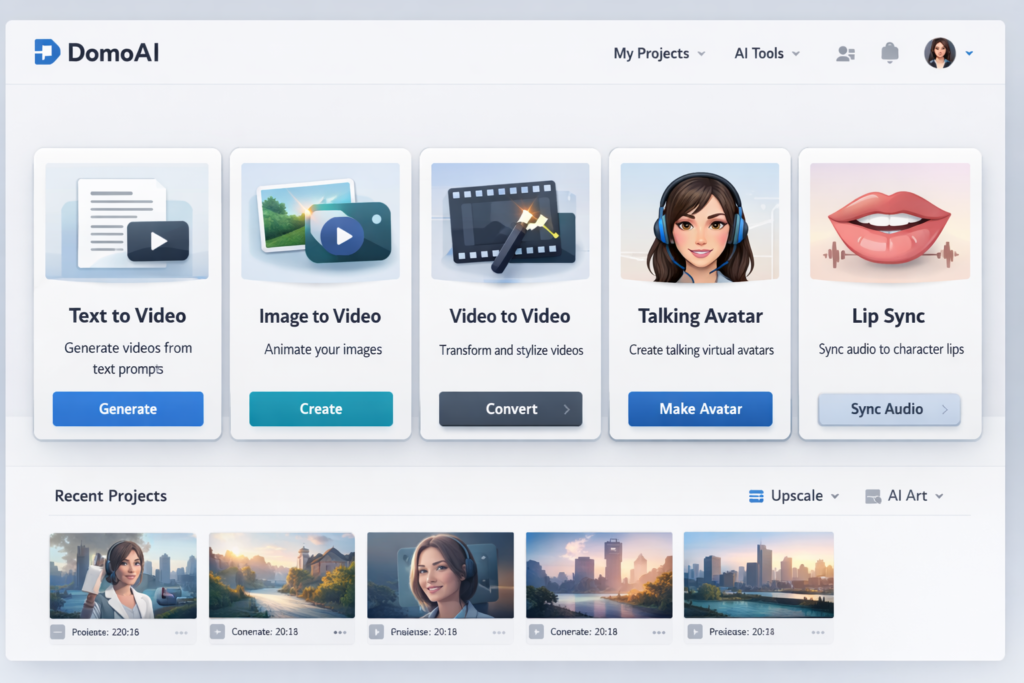
If you are searching for an honest DomoAI review, the short version is this: DomoAI is one of the more interesting AI creative platforms for people who want more than a basic text-to-video tool. Instead of focusing on just one workflow, it combines text-to-video, image-to-video, video-to-video, talking avatars, lip sync, character animation, image generation, and upscaling in one platform. That broader workflow is a big part of what makes it stand out.
That does not automatically mean DomoAI is the best choice for everyone. Some users want pure photorealistic video generation. Others want enterprise-level editing controls, long cinematic sequences, or advanced scene direction. DomoAI feels strongest when your priorities are speed, stylization, versatility, and creator-friendly workflows. If you want to turn ideas, images, or existing footage into eye-catching animated or stylized content without juggling too many separate tools, DomoAI becomes much easier to justify.
In this review, I will break down what DomoAI does well, where it falls short, how its pricing works, who it is best for, and whether it is actually worth paying for. I will also cover its core features from a practical user perspective instead of simply repeating marketing copy. The goal is to help readers decide whether DomoAI fits their real workflow, not just whether it sounds impressive on a landing page.
Affiliate disclosure: This article may contain affiliate links. I may earn a commission at no extra cost to you.
Quick Verdict
- Best for: creators, marketers, anime-style content makers, short-form video publishers, VTuber-style projects, and anyone who wants several AI media tools in one place.
- Biggest strength: DomoAI is not just a generator. It is a broader creative workflow platform built around generating, animating, stylizing, lip syncing, and enhancing content.
- Biggest weakness: if you only need one narrow feature, DomoAI can feel broader than necessary, and some users may prefer a more specialized tool.
- Overall rating: DomoAI is a strong option for stylized and creator-friendly AI video workflows, especially if you value convenience and range over ultra-technical production control.
What Is DomoAI?
DomoAI is an AI creative platform focused on animation, video generation, style transformation, and fast content production. The product is built around a simple idea: creators often do not just need one AI output. They need an entire workflow. One project may start with a prompt, move into image generation, then into animation, then into a talking avatar or lip-sync sequence, and finally into a polished export. DomoAI is trying to keep more of that process inside one environment instead of pushing users across multiple subscriptions and disconnected tools.
That positioning matters because many AI video tools still feel fragmented. Some are strong at text-to-video but weak at transforming existing footage. Some are good at talking avatars but weak at style transfer. Some can generate content but not refine or upscale it well enough for final publishing. DomoAI’s biggest strategic advantage is that it tries to cover more of the pipeline in one place. For solo creators and lean teams, that can save both time and decision fatigue.
Another important point is that DomoAI is clearly designed with stylized creation in mind. While it also supports realistic output, the product identity leans heavily into anime, artistic transformation, character-based visuals, and creator workflows. That gives DomoAI a more distinctive identity than generic AI video platforms that mostly compete on raw realism or cinematic polish.
| Category | What DomoAI Offers |
|---|---|
| Generation | Text to video, text to image, image to video |
| Transformation | Video to video, style transfer, image editing |
| Character tools | Talking avatar, lip sync, character animation |
| Enhancement | Image upscaling, video upscaling, 4K workflow support |
| Use case fit | Anime content, social video, branded content, digital storytelling, creator workflows |
Why DomoAI Feels Different From Many AI Video Tools
The easiest way to understand DomoAI is to stop thinking of it as only a video generator. It is closer to a creator toolkit. A lot of competing products are strongest when you start from nothing and ask the model to invent a clip. DomoAI supports that too, but its more interesting strength is creative transformation. You can start from a still image, a photo, a drawing, a character design, a reference video, or an existing video clip and push that asset further.
This is more practical than it sounds. Most commercial creative work does not start with an empty prompt box. It starts with assets you already have. A product image for an ad. A mascot for a brand. A talking head portrait. A video clip you want to restyle. A character illustration you want to animate. DomoAI is built around that real-world workflow, and that is one reason it can feel more useful than narrower generation tools.
That also explains why DomoAI appeals to content creators, marketers, affiliate publishers, educators, and small creative teams. They are not necessarily trying to make one perfect cinematic masterpiece. They usually need several pieces of useful content produced quickly, in different formats, for different channels. DomoAI’s all-in-one approach lines up well with that need.
Core DomoAI Features Explained
1. Text to Video
DomoAI includes a text-to-video workflow that lets users enter a prompt, choose a style, set format preferences, and generate visual content without traditional production work. This is now expected in the category, but DomoAI’s version is more useful because it is connected to the rest of the platform. Instead of creating a clip and stopping there, users can move into related tools such as video stylization, lip sync, or upscaling.
From an SEO and buying-intent perspective, this matters because many users searching for a DomoAI review are not comparing raw text-to-video power alone. They are looking for workflow efficiency. If a tool can take a prompt and then help refine the result into content that is actually usable for social media, promotions, storytelling, or branded publishing, it becomes more valuable than a one-step generator. DomoAI is strongest when judged that way.
2. Image to Video
Image to video is one of DomoAI’s most commercially useful features. Instead of forcing users to generate everything from scratch, it allows them to animate still assets such as product visuals, portraits, brand graphics, illustrations, memes, or scene concepts. This is particularly useful for creators and marketers who already have source material and want a faster way to turn static assets into motion content.
For social content, this can be a big deal. Static visuals are easier to create than full videos, but they rarely perform as well in motion-heavy feeds. DomoAI gives users a bridge between those two formats. That makes it valuable for TikTok-style content, Instagram Reels, YouTube Shorts, visual explainers, motion graphics for affiliate pages, and branded posts that need more attention-grabbing presentation.
DomoAI also pushes the idea of Frames to Video, which gives users more control by allowing several keyframes to define a visual sequence. That is a meaningful feature because it helps close the gap between pure prompt randomness and structured visual storytelling. For some users, this will be one of the platform’s most practical strengths.
3. Video to Video and Style Transfer
This is another area where DomoAI stands out. Video to video allows users to upload existing footage and apply a new aesthetic while preserving the motion and structure of the original clip. In simple terms, it is not only about generating something new. It is about transforming something you already have.
That is incredibly useful for creators who already shoot content but want it to look more distinctive. A plain video can become anime-inspired, painterly, stylized, or more visually branded. This opens up practical use cases in music visuals, creator edits, short-form ads, VTuber-style content, fan edits, and stylized promo clips. If your workflow starts with usable footage, DomoAI’s video-to-video tools may deliver more immediate value than text-to-video alone.
It is also one of the clearest signs that DomoAI is built with real creators in mind. Many AI tools talk a lot about generation but do not help enough with transformation. DomoAI clearly understands that restyling and remixing are a huge part of modern creator work.
4. Talking Avatar and Lip Sync
DomoAI also covers speaking-character workflows. Users can upload a photo or character image, add text or audio, and generate a talking avatar with synced mouth movement. This is practical for faceless channels, digital spokesperson content, explainer clips, educational content, onboarding content, and stylized brand communication.
The lip sync side is especially useful because it removes a common friction point in character-based video creation. Manually syncing speech to an image or animated figure is tedious. DomoAI aims to make that much easier. If your content strategy includes recurring characters, mascot-style presenters, or AI spokesperson workflows, this part of the platform may be more valuable than the main generation tools.
For creators who dislike appearing on camera, DomoAI’s talking avatar tools also create a middle ground between fully anonymous content and full personal video production. That makes the platform more commercially relevant than it first appears.
5. Character Animation
Character animation is another feature that pushes DomoAI beyond standard AI video generation. Users can upload a character image and use a reference video to transfer motion into the character. That is valuable for creators working with original characters, anime avatars, digital mascots, VTuber-style content, or storytelling formats where consistent character identity matters.
Not every buyer will care about this feature, but for the right niche it can be a major selling point. If your content revolves around fictional or illustrated characters, DomoAI becomes a much more specialized and interesting platform than a general-purpose AI generator.
6. Text to Image, Editing, and Upscaling
DomoAI also includes text-to-image and media enhancement features. These may sound secondary, but they improve the platform’s workflow value. In practice, many creators need to generate the source image before animating it. Others need to improve output quality for final publishing. DomoAI’s support for image generation, editing, and upscaling makes the platform more complete.
For users trying to reduce tool sprawl, this matters. You can stay inside one environment longer, which usually means fewer exports, fewer subscriptions, and less friction. That convenience is not just a nice extra. It is part of the product’s core value proposition.
DomoAI Pricing
DomoAI currently uses a free-plus-paid pricing model. The free tier is useful for testing the workflow and seeing whether the platform fits your style. For paid access, DomoAI positions its plans around Basic, Standard, and Pro. The pricing references across official pages show monthly pricing around $9.99, $27.99, and $69.99, while annual billing references reduce those effective monthly prices to about $6.99, $19.59, and $48.99.
The platform also uses a credit system in the background, and its API documentation explains credit consumption in more detail. For most regular users, though, the simpler way to understand DomoAI is that entry-level paid access is relatively affordable, while the higher tiers are designed for heavier creative output and expanded workflow features.
| Plan | Indicative Pricing | Best For |
|---|---|---|
| Free | Free starter access | Testing the platform before paying |
| Basic | $9.99 monthly or about $6.99 per month billed yearly | Casual creators, early testing, lighter workloads |
| Standard | $27.99 monthly or about $19.59 per month billed yearly | Frequent creators who need more output and better value |
| Pro | $69.99 monthly or about $48.99 per month billed yearly | Heavy users, faster lanes, larger production needs |
One thing to understand is that DomoAI becomes easier to justify when you use multiple tools inside the platform. If you only need one small feature once in a while, almost any subscription can feel expensive. But if you use image animation, stylization, talking avatars, lip sync, and upscaling in one workflow, DomoAI’s all-in-one positioning makes much more financial sense.
There is also a strategic value angle here. A creator paying for one platform that handles several steps may spend less overall than someone stacking separate tools for generation, avatar creation, editing, and enhancement. That does not mean DomoAI is always the cheapest option. It means its pricing makes the most sense when you actually use its breadth.
DomoAI Pros and Cons
| Pros | Cons |
|---|---|
| Broad all-in-one workflow across generation, animation, stylization, avatars, and enhancement | Can feel broader than necessary if you only need one narrow feature |
| Strong anime and stylized content positioning | Not the obvious first choice for users focused mainly on high-end cinematic realism |
| Useful for both creation from scratch and transformation of existing assets | Pricing details require a little attention because some site pages summarize plans differently |
| Commercial use positioning is attractive for creators and marketers | Value depends on how much of the workflow you actually use |
| Helpful for social video, faceless content, VTuber-style work, and short-form creation | Specialized teams may still prefer dedicated point solutions for certain tasks |
Who Should Use DomoAI?
DomoAI is a strong fit for creators who want stylized visual output without dealing with a fragmented tech stack. That includes anime content makers, short-form video creators, social media teams, affiliate publishers turning static assets into animated promos, educators using talking avatars, musicians creating stylized visuals, and digital artists who want to animate character or illustration-based content.
It is also a strong fit for people who value speed. If your workflow depends on moving quickly from concept to publishable content, DomoAI’s broad feature set can save time. Instead of exporting between several platforms, you can do more of the work inside one system. That matters more than many reviews acknowledge, because convenience has real commercial value.
DomoAI is probably less compelling for users who only want a simple standalone image generator or for teams whose highest priority is advanced cinematic control. Those users may prefer a more specialized platform. DomoAI can still be useful for them, but it would not necessarily be the most obvious fit.
| DomoAI is best for | DomoAI may be less ideal for |
|---|---|
| Anime and stylized content creators | Users who only want one basic AI image tool |
| Short-form video workflows | Teams obsessed with ultra-technical cinematic direction |
| Talking avatar and lip-sync use cases | Users with no interest in stylization or character-based content |
| Creators who want fewer tools in their stack | Workflows that already rely on highly specialized professional tools |
| Marketers and content teams producing fast visual variations | Buyers who will barely use the platform beyond occasional tests |
Is DomoAI Good for Marketing and Content Creation?
Yes, especially for creators and marketers who need variety. One of the biggest hidden advantages of DomoAI is that it can help one asset travel further. A single brand image can become an animated post. A product visual can become a short promo. A character can become a talking presenter. A static scene can become a stylized motion clip. That makes DomoAI more commercially practical than tools that only generate isolated outputs.
This is especially helpful for people who run content businesses. Blog publishers, affiliate marketers, educators, and social-first brands often need more than text. They need hooks, motion, explainers, and re-usable visual content. DomoAI fits that need very well, even though it is not itself an SEO writing tool.
That distinction is important. DomoAI will not do your keyword research or optimize your article structure. But it can absolutely support a broader content strategy by helping you create better visual assets for Pinterest, social promotion, branded storytelling, course content, or on-page engagement.
DomoAI for Anime and Stylized Video Work
If there is one area where DomoAI feels especially differentiated, it is stylized output. The platform clearly leans into anime, artistic styles, character-driven visuals, and expressive transformations. That gives it a more recognizable niche than many generic AI video products.
This matters because not everyone wants pure realism. Plenty of creators want content that looks more imaginative, more branded, or more visually exaggerated. Anime-inspired output remains especially popular for music visuals, fan communities, digital storytelling, VTuber content, and artistic social media posts. DomoAI appears to understand that audience well.
For the right user, this is not a side benefit. It is the main reason to choose DomoAI over a more general AI video generator. If your brand, audience, or creative identity naturally fits stylized visuals, DomoAI becomes much easier to recommend.
Commercial Use, Ownership, and Practical Business Value
Business users should care about more than flashy demos. Ownership, commercial use, privacy, and reliability matter too. DomoAI’s official positioning is appealing here because it states that created content can be used commercially and that user content remains private to the account. That makes the platform more viable for real marketing, client, and monetized publishing use cases.
For many buyers, this is more important than one extra feature. A tool that is fun but hard to trust for real business use is not worth much. DomoAI does a decent job presenting itself as practical for client work, ads, branded content, and business-facing creator workflows.
That said, serious businesses should still review the current terms and privacy materials for themselves before scaling client or sensitive work through any AI platform. Marketing pages are useful, but final operational confidence should always come from the live policy documents and your own internal standards.
DomoAI Review: Real Strengths Buyers Should Care About
Many product reviews focus too much on feature lists and not enough on what actually affects buying decisions. The strongest reasons to consider DomoAI are not just that it has text-to-video or lip sync. Plenty of tools can claim that. The real question is whether DomoAI solves enough workflow friction to become worth paying for.
In that respect, DomoAI performs well. It gives creators multiple entry points, useful transformation options, character-based tools, and media enhancement capabilities in one place. That combination can meaningfully reduce production friction. If you regularly create stylized or social-friendly visual content, that is a real benefit.
The second major strength is audience fit. DomoAI clearly knows who it wants to serve. Its strongest cases are creators, not purely enterprise film editors. That product clarity helps. Instead of trying to be everything to everyone, DomoAI leans into fast, visual, creator-friendly output.
The third strength is practical flexibility. You can start with text, an image, a photo, a character, or a video clip. That makes DomoAI easier to fit into existing workflows instead of forcing users to adopt one rigid process.
Where DomoAI Still Has Limits
No honest DomoAI review should pretend the platform is perfect. DomoAI’s biggest risk is that some buyers may assume all-in-one automatically means best-in-class at everything. That is rarely true in software. A broad platform can be very useful without being the absolute top specialist in every single sub-category.
Another limitation is that the platform makes the most sense for certain kinds of creators. If your work is strongly tied to anime, stylized content, social media visuals, talking avatars, or content transformation, DomoAI looks compelling. If your priorities are totally different, the value case becomes weaker.
There is also the usual challenge of fast-moving AI software. Features, pricing, and model capabilities can change quickly. That means readers should always check the latest live pricing and current feature availability before subscribing, especially if their workflow depends on a specific feature or output style.
DomoAI Alternatives: When You Might Want Something Else
If you mainly care about high-end photorealistic video generation, advanced scene control, or a more cinematic production feel, you may prefer a different AI video platform. If you only need static image generation and do not care about animation, avatars, or video transformation, a dedicated image tool could be more cost-effective. And if you already have a mature stack of specialized creative tools, DomoAI’s broad workflow may be less valuable to you.
But if you want a versatile creator-focused environment that combines generation, transformation, avatar work, and enhancement, DomoAI remains a strong contender. That is the context in which it should be judged.
Final Verdict: Is DomoAI Worth It?
DomoAI is worth considering if your workflow depends on stylized visuals, anime-friendly output, asset transformation, and fast multi-format content creation. Its biggest appeal is not one single flashy tool. It is the way the platform connects several creator needs into one product: text-to-video, image-to-video, video-to-video, talking avatars, lip sync, character animation, text-to-image, and upscaling.
That makes DomoAI particularly attractive for modern creator workflows where speed and versatility matter just as much as raw output quality. It is not the perfect solution for every type of buyer, and it is not the tool I would recommend for every possible visual workflow. But for creators, marketers, and stylized content publishers who want an all-in-one AI creative platform, DomoAI is one of the more compelling options available right now.
If your main goal is to create distinctive visual content faster, especially across anime, stylized, social, and character-based formats, DomoAI is easier to recommend. If your workflow is much narrower or far more technical, you may want a different kind of tool. For the right audience, though, DomoAI offers strong practical value.
Frequently Asked Questions
Is DomoAI free to use?
Yes, DomoAI offers free starter access so users can test the platform before committing to a paid plan. The free level is useful for trying the interface and seeing whether the workflow matches your needs, but regular creators will usually need a paid tier for consistent output.
What is DomoAI best for?
DomoAI is best for stylized AI video creation, image animation, talking avatar workflows, lip sync, character-based content, and creator workflows that benefit from having several tools in one platform.
Can I use DomoAI commercially?
DomoAI presents itself as commercially usable for generated content, which is one reason it appeals to marketers, creators, and people running monetized content businesses.
Is DomoAI good for anime-style content?
Yes. DomoAI is one of the more anime-friendly AI creative platforms, and its product positioning strongly emphasizes stylized, artistic, and character-based content rather than only generic realism.
Does DomoAI include talking avatars and lip sync?
Yes. DomoAI includes both talking avatar and lip-sync features, making it more useful for faceless videos, explainers, educational content, and character-based media.
Is DomoAI worth paying for?
DomoAI is worth paying for when you actually use several parts of the platform. If you only need one basic feature once in a while, the value is weaker. But if you use generation, animation, transformation, avatar creation, and enhancement together, the platform becomes much more compelling.