
If you are searching for a polished link-in-bio tool that can do more than stack a few links on a plain page, this Solo.to review is for you. A lot of bio link tools look similar at first glance, but the differences become obvious once you care about branding, custom domains, richer media embeds, lead capture, analytics, and whether your page feels like a real microsite instead of a temporary social-media shortcut.
Solo.to is one of the more interesting tools in this category because it sits between a simple bio link tool and a lightweight branded landing page builder. It is designed for creators, musicians, artists, businesses, consultants, and teams that want one mobile-friendly destination where followers, customers, and prospects can discover content, click important links, and take action quickly. That matters because the best link-in-bio pages are no longer just profile accessories. They are traffic hubs, conversion layers, and branded discovery pages.
In this article, I will cover what Solo.to does well, where it falls short, which plan makes the most sense, how Solo.to compares with Linktree, and whether it is a smart choice if your goals include branding, better conversions, and stronger long-term discoverability. This version is written to be useful for both traditional search rankings and AI-driven search visibility, so it goes beyond a surface-level overview and focuses on practical buying and setup decisions.
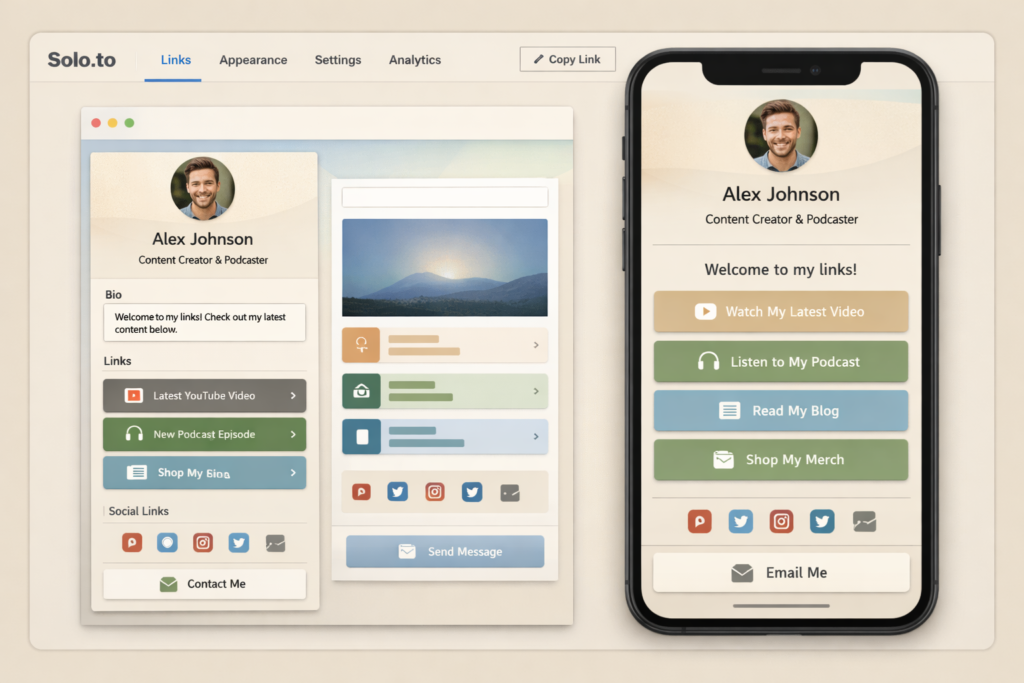
Quick Answer: Is Solo.to Worth It?
Yes, Solo.to is worth it for users who want a more branded, customizable, and conversion-friendly link-in-bio page than a basic free tool usually provides. It is especially attractive for creators, musicians, artists, consultants, agencies, and businesses that want a cleaner microsite feel, richer media embeds, custom domains, and more serious page management options without jumping straight to a full website build.
| Category | Verdict |
|---|---|
| Best for | Creators, musicians, artists, businesses, consultants, and teams that want a branded link-in-bio or microsite-style page |
| Biggest strength | Better branding and page presentation than many basic bio link tools |
| Best mid-tier value | Entrepreneur |
| Best advanced plan | Professional |
| Main drawback | The free plan is more limited than some competitors, and several advanced marketing features are locked behind higher tiers |
| Best known alternative | Linktree |
What Is Solo.to?
Solo.to is a link-in-bio tool, digital business card, landing page, and personal microsite builder. That description is important because it tells you how the company wants the product to be used. This is not just a place to paste your Instagram, YouTube, TikTok, and email links. It is designed to give you one page where your online identity, important links, content, contact methods, and brand presentation can live together in a cleaner, more intentional format.
That broader positioning makes Solo.to easier to recommend for people who are not satisfied with a plain list of buttons. For example, a musician can feature songs, playlists, videos, tour links, and social profiles. A consultant can turn it into a digital business card with contact actions. A local business can use it as a simple mobile landing page. A creator can direct visitors to multiple channels while keeping everything visually consistent. A team can manage multiple pages under one system instead of treating every profile as a one-off asset.
In other words, Solo.to works best when you want your link-in-bio page to feel like a real branded destination rather than a placeholder.
Why Solo.to Stands Out in a Crowded Link-in-Bio Market
The link-in-bio market is crowded, so any serious review needs to answer one question clearly: why choose this tool over dozens of others? In Solo.to’s case, the answer is not just “more links.” The product stands out because it combines visual branding, supported embeds, flexible page building, business-card style contact options, and team scalability in a way that feels more polished than many budget bio link tools.
1. It Feels More Like a Branded Microsite
A generic bio link page usually feels disposable. You add a profile image, a few links, maybe a background color, and you are done. Solo.to pushes further. Even lower tiers let you shape the page more intentionally, while paid tiers add text blocks, highlighted links, background images, background video, custom link images, animated profile pictures, and stronger branding controls. That makes Solo.to more appealing if your page needs to feel like a polished brand asset instead of a temporary utility page.
2. It Is Strong for Media-Rich Use Cases
One of Solo.to’s strongest selling points is how well it supports richer embeds and content presentation. This matters a lot for creators, musicians, podcasters, streamers, artists, and brands that want people to interact with content instead of just clicking away from the page as fast as possible. A better link page is often one that helps visitors understand you before they leave it.
That is especially useful if your brand depends on media discovery. Someone landing on your page can see songs, playlists, short videos, long-form videos, event links, social platforms, and other assets in one place. A plain button stack does not create the same experience.
3. It Works for Teams, Not Just Individuals
Many link-in-bio products work well for solo users but become awkward when multiple people, clients, or departments are involved. Solo.to is more flexible here. If you are an agency, brand team, music label, real-estate business, or any organization with multiple people needing consistent pages, Solo.to becomes more than a personal bio tool. It turns into a centralized page-management system that is easier to standardize and scale.
4. It Can Fit into a Real Marketing Funnel
Solo.to is not just about aesthetics. Advanced tiers give you analytics, custom domains, contact capture, collaborator access, and social pixel tracking. That means your page can become part of an actual acquisition and conversion workflow rather than acting as a dead-end profile card. For users who care about lead generation, retargeting, and branded traffic routing, that is a major upgrade over free tools that stop at link display.
Solo.to Core Features Explained
A strong Solo.to review should not just list features. It should explain why those features matter in practice. Below are the product capabilities that have the biggest effect on real use.
Customizable Page Design
Customization is one of the reasons Solo.to feels more premium than many basic bio link options. On the lower tiers you already get a custom profile picture, themes, section dividers, background color, link icons, social buttons, and contact buttons. On paid plans, you gain stronger presentation tools like section titles, text blocks, highlighted links, background images, link subtitles, animated profile pictures, custom link images, and even background video.
That sounds cosmetic, but it is more important than many people think. A link page often acts as the first branded page a new visitor sees after social media. If it looks generic, cluttered, or low effort, trust and click-through rates can suffer. A more polished page can help you look more credible before someone even chooses where to go next.
Embeds and Extensions
Solo.to supports a broad extensions ecosystem. This matters because the page can become far more useful when visitors can interact with content directly from the page. If your audience wants to hear a song, watch a clip, view tour dates, open a calendar, see a profile, or jump into a form, embedded and supported content often creates a better experience than pushing everyone through plain text links alone.
This is one of the reasons Solo.to is especially appealing for music-adjacent creators, entertainers, podcasters, streamers, and media-heavy personal brands. The product is clearly built with those audiences in mind, even though it also works well for businesses and professionals.
Multi-Page Support
For many users, a single page is enough. But once you have multiple campaigns, offers, audiences, brands, or departments, the ability to manage multiple pages under one account becomes important. Solo.to’s Entrepreneur tier includes 2 pages, Professional includes 5 pages with add-on pages available, and Teams scales much higher.
This helps in several real-world situations. You might want one page for your personal brand, one for a product, one for event links, and one for a newsletter or community. A business may want separate pages for sales reps, locations, or campaigns. Instead of fragmenting your tools, Solo.to gives you one place to control them.
Analytics
Analytics are one of the clearest differences between a casual bio link tool and a serious growth asset. Basic analytics can tell you whether your page gets traffic. Advanced analytics tell you what is actually working. Which link gets clicks? Which campaign performs best? Which page gets attention? Which audience segment responds?
Solo.to’s analytics tiers scale from simple page-view tracking into longer retention and link-click visibility. If your goal is better decision-making rather than guessing, this matters a lot. Even if you are not running paid traffic yet, analytics can help you understand what your audience cares about and which links deserve more prominent placement.
Custom Domains
Custom domains are one of the most important advanced features in Solo.to. They are especially valuable if you want your link page to look like part of your real brand instead of borrowed space on someone else’s platform. A custom domain can help with professionalism, consistency, memorability, and trust.
From a branding perspective, yourbrand.com or links.yourbrand.com looks more established than a third-party sub-URL. From a search and ownership perspective, custom domains can also be easier to connect to your broader digital ecosystem. For brands that care about long-term control and presentation, this is a major reason to step up to Professional.
Contact Capture and Lead Collection
A link page becomes much more valuable when it can help you collect leads instead of only sending traffic outward. Solo.to’s contact capture feature gives the page a stronger direct-response role. Visitors can subscribe to your list, and the collected data can be routed into your broader marketing stack.
This is especially useful for consultants, coaches, creators, agencies, and brands that want to build an owned audience rather than depending entirely on social algorithms. If your only goal is outbound traffic, any link tool might be enough. If you want owned contacts, Solo.to gets more attractive.
Pixels and Retargeting
Social pixel tracking is another feature that pushes Solo.to beyond the “simple bio link” category. If you run campaigns, care about remarketing, or want better attribution, pixels can turn your page into a measurable step in your funnel. This is one of those advanced features that many casual users never touch, but marketers and growth-focused brands will immediately appreciate.
Collaboration and Team Management
Solo.to also makes sense for situations where more than one person needs access. Collaborator access, page cloning, search, sort, and large-scale multi-page management turn the product into something much more operationally useful for teams. If multiple people need consistent branding and an efficient workflow, this is a strong differentiator.
Solo.to Pricing: Which Plan Makes the Most Sense?
Pricing is one of the most important parts of any purchase decision, so this Solo.to review needs to go deeper than simply copying the public plan names. The real question is not just how much each plan costs. It is which plan creates the best value for the kind of user you are.
| Plan | Price | Who It Is Best For | Main Value |
|---|---|---|---|
| Beginner | Free | Casual users and first-time testers | Enough to build a basic branded page and test the platform |
| Personal | $1/mo billed annually | Individuals who want better presentation on a very low budget | Text blocks, highlighted links, tip jar, better organization, stronger visual polish |
| Entrepreneur | $5/mo billed annually or $6/mo monthly | Serious creators, side businesses, and growing personal brands | Embeds, 2 pages, more links, page cloning, enhanced link SEO, scheduled links, advanced analytics |
| Professional | $10/mo billed annually or $15/mo monthly | Brands, advanced creators, marketers, and consultants | Custom domains, contact capture, collaborators, pixel tracking, 5 pages, stronger branding control |
| Teams / Enterprise | Custom | Agencies, businesses, organizations, and multi-user teams | Up to 255 pages, centralized management, collaborators, cloning, analytics, and business-scale deployment |
Best Plan for Most Solo Users
For many readers, the Entrepreneur plan is where Solo.to starts to become a genuinely strategic tool. That is the point where you move beyond a simple profile page and gain richer embeds, multiple pages, higher capacity, scheduling, cloning, and stronger analytics. If you are serious about promotion, that is often the most balanced place to start.
Best Plan for Business and Branding
If you care about owned branding, lead capture, custom domains, collaborator workflows, or retargeting, the Professional plan is usually the better long-term decision. It unlocks the features that most clearly transform Solo.to into a proper branded acquisition page instead of a nicer social profile.
Is the Free Plan Enough?
The free Beginner plan is good enough to test the product and launch a simple page, but it is not the best choice if you already know you want a more polished or business-ready setup. It works best for users who are validating the platform, not necessarily for users who already know they need richer functionality.
Solo.to vs Linktree: Which One Is Better?
No serious Solo.to review would be complete without comparing it to Linktree, because Linktree is still the most recognizable name in this category. But this is not a simple “one is better than the other” situation. These products overlap, yet their strengths are a little different.
| Category | Solo.to | Linktree |
|---|---|---|
| General positioning | Link in bio, digital business card, landing page, microsite | Large link-in-bio platform with broader creator, audience, monetization, and commerce positioning |
| Brand feel | Often feels more like a curated microsite | Often feels more ecosystem-driven and feature-broad |
| Best for | Users who care about polished presentation, embeds, custom domains, and business-card style utility | Users who want the most recognized platform and a broader creator-growth toolkit |
| Free-plan generosity | More limited | Generally more generous for simple use |
| Custom domains | Professional tier | Higher paid tiers |
| Lead capture | Professional tier | Broader audience-growth positioning |
| Teams | Dedicated teams model and large page scaling | Agency and enterprise options |
| Best reason to choose | Branded microsite feel with strong creator and business crossover | Mainstream recognition plus wider monetization and audience tools |
My practical view is this: choose Solo.to if you want a more curated, stylish, and brand-forward page that feels closer to a microsite or digital business card. Choose Linktree if you want the broadest mainstream ecosystem and place more value on a larger all-in-one creator-growth environment.
Solo.to often feels like the better fit when page presentation and brand control matter a lot. Linktree often feels like the better fit when you want the platform with the biggest name and a broader commercial feature universe.
Best Use Cases for Solo.to
One reason Solo.to is interesting is that it serves several different types of users well. It is not locked into a single niche.
| User Type | Why Solo.to Fits |
|---|---|
| Musicians | Music embeds, tour-related links, playlist promotion, release pages, and branded fan discovery pages |
| Creators | Cross-platform promotion, better page design, multiple content destinations, and clearer call-to-action structure |
| Artists | Portfolio-friendly presentation and more visually intentional page design |
| Consultants and coaches | Digital business card use, contact actions, personal-brand page control, and lead collection potential |
| Businesses | Simple branded mobile landing page with links, contact options, and custom-domain value |
| Agencies and managers | Multiple pages, cloning, standardization, collaborator access, and team workflows |
| Real-estate agents and sales teams | Share listings, contact options, booking links, bios, and social proof from one central page |
Is Solo.to Good for SEO and AI Search Visibility?
This is where a lot of reviews stay too shallow, so it is worth being precise. Solo.to can absolutely help with branded visibility, campaign discoverability, and conversion flow, especially if you use a custom domain and organize your page intelligently. But it is not a substitute for a full website or a deep content strategy if your goal is to rank for many non-branded informational keywords.
Think of Solo.to as a conversion-ready branded hub, not as a complete SEO site replacement. It can strengthen your overall search ecosystem by giving you a cleaner branded page, a custom domain option, and a more indexable, presentable destination than a low-effort social profile page. It can also support AI search visibility indirectly by making your brand, offers, and key destinations easier to understand in one place.
That said, a single bio page will never compete with a full library of useful content when it comes to broader topical authority. So the best strategy is to treat Solo.to as part of your ecosystem: a bridge between social traffic, branded discovery, and your more detailed properties like your main website, store, YouTube channel, or newsletter.
How to Make Your Solo.to Page More SEO-Friendly
- Use a custom domain if your plan allows it.
- Write clear, descriptive link titles instead of vague labels.
- Add text blocks and section titles so your page has context, not just links.
- Organize links by intent: watch, read, shop, book, subscribe, contact.
- Prioritize your most important action near the top.
- Keep your branding consistent across title, image, and link descriptions.
- Use one primary call to action for each audience segment instead of overwhelming visitors.
These decisions help both human visitors and machine-driven systems understand what your page is about. That improves clarity, which is increasingly valuable in both search and AI-assisted discovery.
Solo.to Pros and Cons
| Pros | Cons |
|---|---|
| More polished and brandable than many simple bio link tools | The free tier is more limited than some competing products |
| Strong support for rich embeds and media-heavy use cases | Several advanced features are reserved for higher tiers |
| Very affordable entry to paid plans | Personal is annual-only |
| Professional tier adds serious marketing value | Not a substitute for a full SEO content website |
| Custom domains improve trust and branding | Custom domains are not available on lower plans |
| Useful for digital business cards and microsite-style pages | If you want the broadest creator-commerce ecosystem, another platform may fit better |
| Good team scalability and page cloning | Some users may only need a simpler and freer tool |
Who Should Choose Each Solo.to Plan?
| If You Are… | Recommended Plan | Why |
|---|---|---|
| Just testing the platform | Beginner | Enough to launch a simple page without spending anything |
| A solo creator on a tiny budget | Personal | Better branding and layout flexibility for almost no cost |
| A serious creator or side-business owner | Entrepreneur | Embeds, more capacity, 2 pages, scheduling, cloning, and stronger analytics make it much more strategic |
| A consultant, brand, coach, or marketer | Professional | Custom domains, contact capture, collaborators, and pixels make it more business-ready |
| An agency or organization managing many people | Teams / Enterprise | Scale, central management, collaborators, and cloning are the main reasons to upgrade |
Where Solo.to Falls Short
Even strong tools have trade-offs, and it is better to be honest about them. The biggest limitation for some users is that Solo.to’s more powerful business and marketing features are not available on the lower tiers. If you only want a free tool with generous limits and broad utility, you may feel the platform is nudging you toward paid plans faster than some alternatives.
Another limitation is that Solo.to works best as a compact branded page, not as a full web-presence replacement. If you expect it to do the job of a full website, blog, or content hub, you may be disappointed. It can support your ecosystem well, but it should not be expected to carry your entire search strategy on its own.
Finally, some users may prefer a platform that leans more heavily into direct creator monetization, broader storefront-style features, or a larger market ecosystem. Solo.to is more about polished presentation, page quality, and flexible brand use than being the most sprawling creator-commerce platform on the market.
How I Would Set Up Solo.to for the Best Results
If I were setting up Solo.to with ranking support, stronger conversions, and better audience clarity in mind, I would use the following structure.
| Setup Element | Best Practice |
|---|---|
| Page title | Use a clean brand or personal-brand name people can immediately recognize |
| Subtitle or intro text | Explain what the visitor can do here in one sentence |
| Top link | Make your highest-priority action the first obvious choice |
| Link structure | Group by purpose: start here, featured content, offers, social, contact |
| Text blocks | Add context so the page feels intentional and not machine-generated |
| Visuals | Use on-brand imagery and avoid making the page look noisy or overly generic |
| Lead capture | If available, collect emails with a clear value proposition |
| Analytics | Check which links get clicked and improve placement regularly |
| Custom domain | Use it if possible to strengthen branding and long-term control |
| Retargeting | Add social pixels if you are running campaigns or remarketing |
This kind of setup turns Solo.to from a simple utility page into a much more effective conversion layer. It also improves readability for visitors, which tends to improve results more than simply adding more links.
Final Verdict
After looking at the product from branding, pricing, usability, creator fit, business fit, SEO utility, and team scalability, my conclusion is clear: Solo.to is one of the better choices for users who want a link-in-bio tool that feels more like a real branded microsite.
It is not the largest all-in-one creator platform, and it is not meant to replace a full content website. But if your goal is to create a more polished, more strategic, and more conversion-friendly destination for your audience, Solo.to makes a strong case for itself. The Entrepreneur plan is a smart middle ground for serious solo users, while Professional is where the platform starts to feel fully business-ready.
If you care about presentation, cleaner branding, custom domains, richer embeds, lead capture, and scalable page management, Solo.to is easy to take seriously. If all you need is a basic free page with minimal setup, you may not need its more advanced features yet. But for users who want more than “just a bio link,” Solo.to is a compelling option.
Frequently Asked Questions
Is Solo.to free?
Yes. Solo.to has a free Beginner plan that is suitable for testing the platform and building a basic branded page. It is enough for casual use, but serious creators and businesses will usually want a paid plan for better flexibility and marketing value.
Is Solo.to better than Linktree?
It depends on your priorities. Solo.to is often the better choice if you want a more curated, microsite-style page with strong branding and embed support. Linktree may be better if you want the biggest mainstream platform and a broader creator-growth and monetization ecosystem.
Which Solo.to plan is best for most users?
For most serious solo users, Entrepreneur is the best balance of cost and capability. For businesses and advanced users who want custom domains, contact capture, collaborators, and retargeting features, Professional is usually the better long-term choice.
Can Solo.to use a custom domain?
Yes. Solo.to supports custom domains on the Professional plan. This is one of the most valuable features for users who want stronger branding and a more owned web presence.
Can Solo.to collect emails or leads?
Yes. Solo.to includes contact capture on the Professional plan, which makes it more useful for businesses, consultants, and creators who want to build an owned audience instead of only sending visitors to external platforms.
Is Solo.to good for musicians and creators?
Yes. In fact, Solo.to is especially strong for media-heavy use cases like music, video, podcasts, creator promotion, and artist portfolios because richer embeds and cleaner presentation matter a lot in those niches.
Can Solo.to replace a website?
Not completely. Solo.to works best as a branded traffic hub, digital business card, or microsite-style page. It can support your broader web presence, but it is not a replacement for a full website if you need deep content, complex navigation, or broad SEO coverage.
Is Solo.to good for teams?
Yes. Solo.to has a strong team and enterprise angle, making it useful for agencies, businesses, managers, and organizations that need multiple branded pages, shared workflows, and centralized control.
About the Author
Xu Xun
Contact: xuxun1208@gmail.com
Last Updated: June 2026