
If you are looking for a cloud storage service that does more than basic file sync, this pCloud review is worth your attention. pCloud has built a strong reputation around secure file storage, flexible access, backup and recovery tools, optional zero-knowledge encryption, and one feature that immediately makes it stand out in a crowded market: lifetime cloud storage plans.
That matters because most cloud storage platforms want you to stay locked into monthly or annual payments forever. pCloud takes a different approach. It still offers subscription billing, but it also gives buyers the option to make a one-time payment for long-term storage. For users who hate subscription fatigue, that alone is enough to put pCloud on the shortlist.
But pricing alone is not enough to make a storage platform worth recommending. In a serious cloud storage review, you also need to look at privacy, encryption, recovery features, cross-device access, business usability, family sharing, file collaboration, and whether the platform is actually pleasant to use day after day. That is where pCloud becomes more interesting. It is not just selling storage space. It is selling control, flexibility, and a more ownership-friendly model than many mainstream alternatives.
In this detailed pCloud review, I will break down what pCloud does well, where it still has limitations, how its pricing works, whether pCloud Encryption is worth paying for, who should choose it, who should skip it, and whether pCloud is a smart buy for long-term use. If your goal is to find a secure cloud storage service with strong value over time, this is one of the most important products to evaluate carefully.
Quick Answer: Is pCloud Worth It?
Yes, pCloud is worth it for many users, especially if you want secure cloud storage, flexible desktop access, strong backup and recovery features, and a realistic alternative to endless subscription payments. Its biggest strengths are its lifetime plans, pCloud Drive virtual disk workflow, optional client-side zero-knowledge encryption, useful file-sharing tools, and its clear privacy-first positioning.
The biggest caveat is also important to understand upfront: pCloud’s strongest privacy layer is tied to pCloud Encryption, which is not the same as saying every file in a standard account is automatically zero-knowledge encrypted by default. That distinction matters, and serious buyers should understand it before purchasing.
| Category | Verdict |
|---|---|
| Overall value | Excellent for long-term buyers |
| Best feature | Lifetime storage plans |
| Privacy appeal | Strong, especially with pCloud Encryption |
| Best for | Individuals, freelancers, creators, families, privacy-conscious users |
| Main drawback | Zero-knowledge encryption is not universal by default across the whole account |
| Final recommendation | Strong buy for the right user profile |
What Is pCloud?
pCloud is a cloud storage platform founded in 2013 that focuses on secure file storage, access flexibility, backup, sharing, and privacy. The company positions itself as a Swiss-based cloud storage solution and emphasizes user control over data, region choice, and stronger privacy standards than many people associate with mainstream consumer cloud storage.
At a practical level, pCloud is designed to help you store documents, photos, videos, project files, and backups in the cloud while keeping them accessible on desktop and mobile devices. It supports Windows, macOS, Linux, iPhone, iPad, Android, and web access, which makes it usable in mixed-device households and mixed-device work environments. That broad platform support is especially useful for people who do not want to build their file workflow around a single hardware ecosystem.
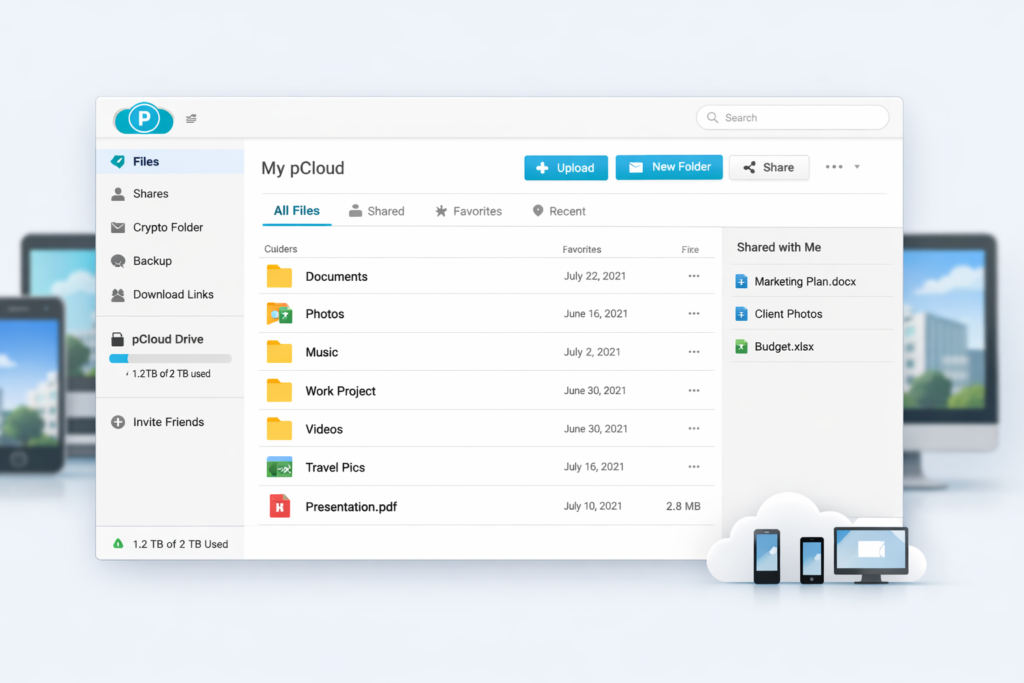
What makes pCloud more interesting than a basic online drive is that it is not built around just one storage behavior. It can work like a virtual drive that saves local disk space, it can mirror folders for sync, it can back up folders from your computer, and it can function as a file-sharing hub with link controls, password protection, and file requests. That flexibility is one of the reasons pCloud feels closer to a practical file management platform than a simple “dump files in the cloud” service.
Another reason pCloud keeps showing up in serious cloud storage discussions is its scale and maturity. It is not a brand-new service trying to buy attention with a flashy launch offer. It has been operating for years, claims more than 22 million users across 130+ countries, and continues to position itself around long-term trust. For a product people may use to store years of important personal or business data, that matters a lot.
Why pCloud Stands Out From Other Cloud Storage Services
There are many cloud storage services on the market, but pCloud has a few differentiators that make it easier to remember than most. The first is obvious: lifetime plans. The second is workflow flexibility through pCloud Drive, Sync, and Backup. The third is privacy positioning through Swiss branding, region choice, and optional client-side zero-knowledge encryption. The fourth is recovery depth, because pCloud puts more visible emphasis on revisions, rewind, and trash recovery than many casual buyers expect from a consumer-friendly storage service.
1. Lifetime Plans Make pCloud Different
Most cloud storage brands compete on free space, collaboration, or office-suite integration. pCloud also competes on those things, but its lifetime pricing is what gives it a truly different commercial angle. For users planning to keep cloud storage for years, the idea of paying once instead of paying forever is extremely appealing. That can make pCloud feel less like a rental service and more like a long-term infrastructure purchase.
This does not mean lifetime is automatically the best decision for everyone. Some users prefer lower upfront costs, and some only need temporary storage. But if you know you will continue paying for cloud storage over the long run, pCloud’s lifetime model can be one of the strongest value propositions in the category.
2. pCloud Drive Is Better Than Basic Sync for Many Users
A lot of cloud storage services train users to think in only one way: your local folder syncs to the cloud, and that is it. pCloud gives you more flexibility. pCloud Drive creates a virtual drive on your computer, which means you can access files stored in the cloud without necessarily filling up your local disk. That makes the service especially useful for laptops with limited SSD space, media-heavy workflows, and users who want fast access to large libraries without storing everything locally.
If you still want a more traditional mirrored-folder experience, pCloud also offers Sync. This makes the product easier to adapt to different working styles instead of forcing all users into one model. That is not just a technical feature. It is a quality-of-life advantage.
3. Privacy Is Part of the Product Positioning
pCloud does not market itself like a generic storage utility. Privacy is part of the brand story. The service emphasizes Swiss privacy standards, offers a choice between EU and US data regions, and promotes pCloud Encryption as its strongest privacy feature for sensitive files. For users who are tired of giving all of their digital storage to large ecosystem companies, that privacy-first messaging can be a major reason to choose pCloud.
4. Recovery Features Add Real Long-Term Value
Storage is not only about where files live. It is also about what happens when something goes wrong. pCloud is stronger than many buyers realize in this area. Between trash retention, file revisions, rewind, and the optional Extended File History add-on, pCloud gives users multiple ways to recover deleted files and restore previous versions. That makes it more attractive for people who think beyond simple storage and care about resilience.
pCloud Pricing: Plans, Tiers, and What You Actually Get
Pricing is one of the most important parts of any pCloud review because it is one of the biggest reasons buyers consider the service in the first place. The platform currently offers individual, family, business, and encryption-specific pricing paths. The structure is easy to understand, but the smartest plan depends on how long you expect to stay with the platform and whether you need advanced privacy features.
Individual Plans
| Plan | Storage | Annual Price | Lifetime Price |
|---|---|---|---|
| Premium | 500 GB | $49.99/year | $199 one-time |
| Premium Plus | 2 TB | $99.99/year | $399 one-time |
| Ultra | 10 TB | $299.99/year | $1,190 one-time |
These three individual tiers make pCloud accessible to different types of users. The 500 GB tier works for lighter personal use, document storage, and smaller photo libraries. The 2 TB plan is likely the sweet spot for most serious users, especially freelancers, creatives, and families with a lot of media. The 10 TB plan is clearly aimed at people who are storing large video libraries, project archives, raw photo collections, or large-scale personal backups.
pCloud Encryption Pricing
| Add-on | Annual Price | Lifetime Price |
|---|---|---|
| pCloud Encryption | $49.99/year | $150 one-time |
This is an important part of the buying decision. If you want pCloud mainly because of the promise of zero-knowledge privacy, you should mentally treat pCloud Encryption as part of the real purchase cost. That does not make the product bad value. It just means you should calculate the total cost based on the features you actually want, rather than judging the base storage price alone.
Family Plans
| Plan | Users | Storage | Lifetime Price |
|---|---|---|---|
| Family 2 TB | Up to 5 users | 2 TB | $595 one-time |
| Family 10 TB | Up to 5 users | 10 TB | $1,499 one-time |
The Family plan is one of pCloud’s most underrated offers. Instead of forcing a household to share one login, pCloud gives each member a private space while letting the plan owner allocate storage as needed. That is much cleaner than having everyone dump files into one account. If you are looking for family cloud storage that avoids recurring bills and still feels organized, pCloud has a very strong case.
Business Pricing
| Business Example on Official Page | Storage | Monthly Billing | Annual Billing |
|---|---|---|---|
| 3 users | 6 TB total | €14.98 per user monthly | €11.98 per user monthly billed annually |
pCloud Business is not sold as a lifetime plan. That is worth stating clearly because many people discover pCloud through its lifetime offers and assume every plan works that way. Business is built around monthly or annual billing. The service also promotes a 30-day free trial, EU data center emphasis, GDPR-oriented messaging, and a more security-focused team storage proposition.
Main Features: What You Are Actually Paying For
A good pCloud review should not stop at pricing. Storage size alone is not a good buying guide. The better question is what you can actually do with the platform once you pay for it. pCloud is strongest when you look at the combination of access flexibility, backup, sharing, recovery, and privacy tools.
| Feature | What It Does | Why It Matters |
|---|---|---|
| pCloud Drive | Creates a virtual drive on desktop | Lets you work with cloud files without filling local storage |
| Sync | Mirrors selected folders locally and in the cloud | Useful for offline-heavy workflows |
| Backup | Backs up selected computer folders automatically | Good for protecting important local files |
| Revisions | Restores previous file versions | Helps recover from accidental edits or corruption |
| Rewind | Rolls back your account or folders to an earlier point in time | Useful after major mistakes or ransomware-style events |
| Trash | Stores deleted files for a retention period | Adds a safety net for accidental deletion |
| File sharing | Lets you share files and folders via secure links | Useful for collaboration, clients, and sending deliverables |
| File requests | Lets other people upload files into your folder | Helpful for collecting files from clients or family |
| Encryption | Offers client-side zero-knowledge protection | Important for sensitive personal or business files |
pCloud Drive vs Sync
This is one of the most important product distinctions to understand. pCloud Drive and pCloud Sync are not the same thing. pCloud Drive creates a virtual drive on your computer. That means your cloud files appear like a mounted drive, but they do not have to take up local disk space by default. This is one of pCloud’s biggest advantages for users with limited storage on their laptops or workstations.
pCloud Sync, on the other hand, is for users who want mirrored folders. Changes made locally and in the cloud stay aligned. If you are often offline or prefer the familiar behavior of a locally synced work folder, Sync will feel more natural. In real life, this means pCloud does not force you to choose one storage philosophy for everything. You can use the virtual drive for large archives and Sync for active project folders.
Backup and Recovery
pCloud has stronger backup and recovery positioning than many people realize. The platform lets you back up selected computer folders automatically, and the official materials highlight that changes are backed up instantly. For users who want a safer relationship with their files, that is a major benefit. Storage is more valuable when it also helps protect against loss.
The recovery stack goes further than simple file undelete. pCloud offers trash, file revisions, rewind, and Extended File History. Free accounts get 15 days of retention for trash, rewind, and revisions. Paid accounts get 30 days. Users who want much longer recovery windows can extend that to 365 days with the Extended File History add-on. This matters for everyday mistakes, but it matters even more when large numbers of files are deleted, overwritten, or damaged.
For a lot of people, that combination of backup plus recovery is more valuable than a few extra gigabytes of storage. If you have ever lost important files, rolled a project back after a bad edit, or needed to recover from accidental deletion, you know how much difference this can make.
File Sharing, Links, and Requests
pCloud also works well as a sharing platform. You can send links to files or folders, protect them with passwords, and set expiration dates for added control. That makes pCloud useful for client work, shared project folders, family media exchange, and general cross-device file transfer. It is practical rather than flashy, which is often what users actually need.
One especially useful feature is file requests. This lets other people upload files into a folder you control without giving them visibility into its contents. That is valuable for collecting documents, media, or submissions from people who are not part of your account. It is a simple feature, but it adds a lot of real-world convenience.
Media and Photo Use
pCloud is not just for office documents. It also presents itself as a platform for photos, video, and media access. The product includes media-related tools such as built-in playback and mobile-friendly access, which makes it more suitable for personal media libraries than some purely office-oriented storage services. If your cloud storage needs include photos, archived videos, or files you want to stream or preview more naturally, pCloud is better positioned than a bare-bones storage-only platform.

Security and Privacy: Is pCloud Actually Safe?
Security is one of the biggest reasons people look up a pCloud review in the first place. The platform positions itself heavily around privacy and safe storage. It promotes Swiss privacy standards, secure data centers, TLS/SSL channel protection, and 256-bit AES encryption. For many users, that already sounds like enough. But the more important detail is what happens with sensitive files.
This is where pCloud Encryption becomes central. pCloud states that its Encryption system uses client-side encryption. In plain English, that means the files are encrypted on your device before they are uploaded, and only you hold the key to unlock them. That is the strongest privacy story pCloud offers, and it is the feature serious privacy-focused users should care about most.
However, this also means you should not casually assume every file in a normal pCloud account is automatically handled in that same zero-knowledge way. A lot of cloud storage buyers blur that distinction, and it leads to confusion. The fair summary is this: pCloud has a strong privacy profile, but the highest privacy tier is tied to its Encryption product. If you want that level of confidentiality for sensitive documents, contracts, personal archives, or financial records, you should treat pCloud Encryption as part of the plan, not an optional afterthought.
pCloud also lets users choose a data region. That is another meaningful privacy and control feature. Instead of storing everything in a region you never selected, pCloud gives users a choice between Europe and the USA. That can matter for regulatory comfort, personal preference, and organizational policy. It is also useful transparency. Many services never make this kind of choice explicit.
The only nuance to remember is that pCloud’s region model is account-wide. You cannot split one account across multiple regions, and moving data regions later involves a process, a fee, and some temporary limitations. This is not necessarily a deal-breaker, but it is something serious buyers should know before committing to one setup.
pCloud Family Plan: One of the Best Long-Term Family Storage Options
Most cloud storage conversations focus too heavily on individual plans, but pCloud’s family offering deserves more attention. The Family plan supports up to five users, gives each person their own private space, and allows the account owner to allocate storage as needed. This solves a common household problem: families want shared value, but they do not want to share one messy login and dump all files into a single mixed folder structure.
Because pCloud sells the Family plan as a lifetime deal, it becomes especially compelling for households that want long-term storage without recurring costs. Parents can keep backups, photos, documents, and media organized while still giving each family member privacy. This is much more elegant than the usual workaround of buying one individual account and informally sharing it.
It also works well for non-traditional “family” use. For example, small creator groups, close collaborators, or friend-based households could use it as a shared long-term storage pool while still preserving private areas. That flexibility adds to the plan’s appeal.
pCloud Business: Is It Good for Teams?
pCloud Business is not the main reason most people discover the brand, but it should not be ignored. The business product is designed for team storage and secure collaboration rather than lifetime-value marketing. It is billed monthly or annually, includes a 30-day free trial, and emphasizes encryption, GDPR-related positioning, and EU data-center credentials on the official business page.
For businesses that mainly need secure storage, controlled access, shared folders, and privacy-oriented positioning, pCloud Business looks attractive. It is especially interesting for smaller companies that do not necessarily want to build everything around a giant office suite ecosystem. If your team needs a file hub rather than a full productivity suite, pCloud Business may be a better conceptual fit.
That said, the strongest marketing story for pCloud is still the personal and family side. Business is solid, but the product feels most differentiated when you focus on lifetime value, flexible storage behavior, and privacy-conscious individual use.
Pros and Cons of pCloud
| Pros | Cons |
|---|---|
| Lifetime plans are a major differentiator | pCloud Encryption is a separate cost |
| Up to 10 GB free and no credit card required to start | Zero-knowledge privacy is not the default story for the whole account |
| pCloud Drive saves local disk space | Some buyers may find the Drive vs Sync distinction confusing at first |
| Strong backup, revisions, rewind, and recovery options | Business does not offer a lifetime option |
| Good file-sharing and file-request tools | Region changes later are possible but not frictionless |
| Useful family plan for up to 5 users | Collaboration across regions has some limits |
| Supports Windows, Mac, Linux, iOS, Android, and web | Not everyone needs to pay upfront for lifetime storage |
Who Should Use pCloud?
pCloud is a strong fit for several types of users.
- Individuals who want long-term value: If you know you will keep cloud storage for years, pCloud’s lifetime model can be very attractive.
- Freelancers and creators: Large project files, media libraries, and archives work well with pCloud Drive and higher-tier plans.
- Privacy-conscious users: If privacy matters more to you than default ecosystem convenience, pCloud’s positioning and Encryption add-on make sense.
- Families: The Family plan is one of the strongest use cases in the entire pCloud lineup.
- Users with limited laptop storage: The virtual-drive model is especially useful if you do not want giant local sync folders eating your disk space.
- People who care about recovery: Trash, revisions, rewind, and Extended File History make pCloud appealing for users who want a stronger safety net.
Who Should Skip pCloud?
pCloud is not the best choice for everyone.
- Users who want universal zero-knowledge encryption by default: If that is your non-negotiable requirement, you need to evaluate pCloud through the lens of the Encryption add-on, not the base account.
- People who only need cheap short-term cloud storage: If you are solving a temporary problem, a big one-time payment may not be the right value model.
- Teams that want a full office-suite ecosystem: pCloud is primarily a secure storage and sharing platform, not a complete productivity suite replacement.
- Users who do not want to think about storage behavior at all: pCloud’s flexibility is a strength, but some casual users may prefer a more simplified one-model service.
What I Like Most About pCloud
The best thing about pCloud is that it feels like it was built by people who understand long-term file ownership rather than only recurring revenue optimization. That may sound subtle, but it changes the product experience. The lifetime option, the virtual drive, the recovery features, and the region choice all point in the same direction: giving users more control.
I also like that pCloud can scale with different user types. It works for simple personal use, but it also grows into a stronger solution for media-heavy storage, privacy-oriented file handling, family accounts, and team workflows. Many storage services are either too basic or too tightly tied to one ecosystem. pCloud feels more flexible than that.
Another major strength is that pCloud’s value proposition is easy to explain in content. That matters if you are writing for SEO and reader conversions. It is much easier to persuade a reader with a clear story such as “secure cloud storage with lifetime value, optional zero-knowledge encryption, and a virtual drive that saves local space” than with vague language about generic productivity.
What Could Be Better
The biggest weakness is not that pCloud lacks privacy. It is that many readers may misunderstand how its privacy model works. Because pCloud strongly markets security, some users may assume the strongest encryption profile applies to everything by default. In reality, pCloud Encryption is a distinct purchase path. This is not deceptive if you read carefully, but it does mean buyers need to pay attention.
I also think some users may need a little time to fully understand when to use pCloud Drive, when to use Sync, and when to use Backup. The flexibility is valuable, but the platform is not as conceptually one-dimensional as a simpler consumer service. That is a fair trade-off for power, but it is still worth mentioning.
Finally, while Business looks solid, the personal and family side of pCloud still feels like the sharper, more compelling story. That is not a flaw, but it does shape who the platform is most exciting for.

Final Verdict: Should You Buy pCloud?
Yes, pCloud is one of the best secure cloud storage options for users who care about long-term value, stronger privacy, flexible storage behavior, and ownership-friendly pricing. It is especially compelling if you dislike endless subscriptions and want a storage platform that does more than basic file sync.
The service is strongest for individuals, creators, families, and privacy-conscious users. The combination of lifetime plans, pCloud Drive, backup tools, recovery features, and optional zero-knowledge encryption gives it a very distinctive place in the market. It does not try to be everything. Instead, it does a few very important things very well.
If you want a simple answer, here it is: pCloud is worth it if your priorities are secure storage, long-term savings, flexible file access, and better control over your data. If you want full client-side privacy for sensitive files, add pCloud Encryption to the equation and judge the total package accordingly. For the right buyer, that package is genuinely hard to beat.

FAQ About pCloud
Is pCloud a good cloud storage service?
Yes, pCloud is a very good cloud storage service for users who want strong long-term value, flexible desktop access, useful backup and recovery tools, and privacy-focused positioning. It is especially attractive because of its lifetime plans and optional zero-knowledge encryption.
Does pCloud offer lifetime cloud storage?
Yes, pCloud offers lifetime options for individual plans, pCloud Encryption, and Family plans. This is one of the main reasons the service stands out from most competitors.
Is pCloud secure enough for sensitive files?
Yes, but sensitive-file users should pay close attention to pCloud Encryption. That is the part of the platform that provides client-side, zero-knowledge privacy where only you hold the key.
What is the difference between pCloud Drive and Sync?
pCloud Drive creates a virtual drive so you can access cloud files without using local storage by default. Sync mirrors local folders and cloud folders so both stay updated. Drive is better for saving local space, while Sync is better for users who want traditional folder mirroring.
Does pCloud have a free plan?
Yes, pCloud offers up to 10 GB of free cloud storage and lets users start without a credit card.
Is pCloud good for families?
Yes, pCloud is one of the better family cloud storage options because it supports up to five users, gives each person a private space, and offers lifetime family plans.
Is pCloud Business lifetime?
No. pCloud Business is not sold as a lifetime plan. It is offered with monthly or annual billing.
Who should buy pCloud?
pCloud is best for individuals, freelancers, creators, families, and privacy-conscious users who want long-term cloud storage value, flexible access, and better control over their files.
