
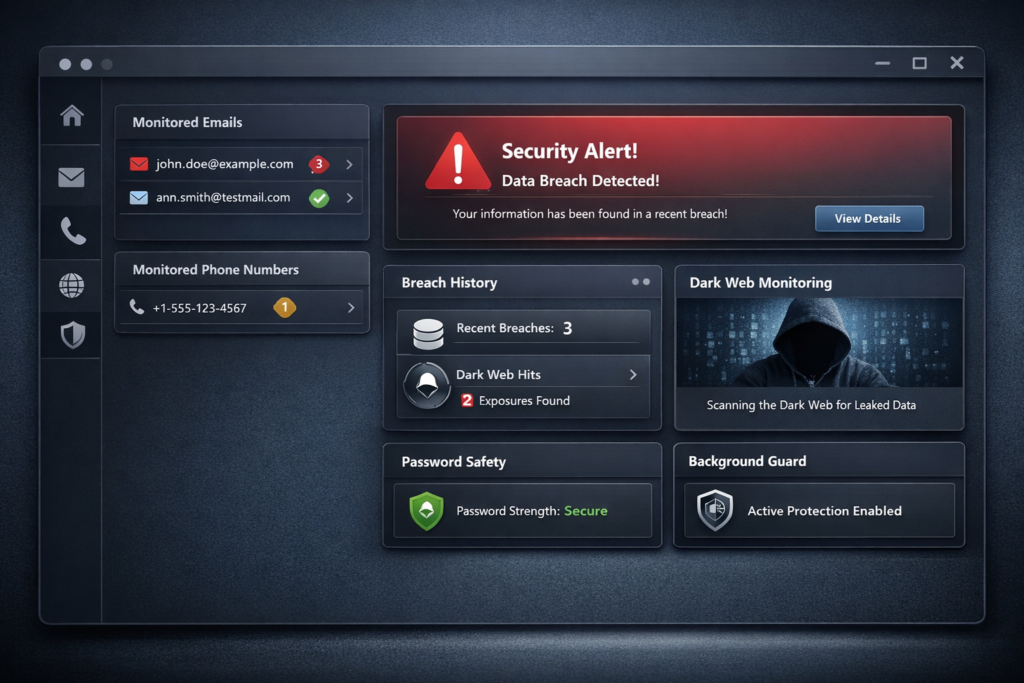
If you have ever wondered whether your email address has been exposed in a data breach, whether your phone number has been leaked online, or whether your personal data may already be circulating in the wrong places, this HackCheck review is for you. HackCheck by Abelssoft is designed to monitor email addresses and mobile numbers, detect possible exposure in hacks and leaks, and warn users before a security issue grows into a much bigger problem.
That is what makes the software interesting. Instead of trying to be a full antivirus suite or a complicated enterprise security tool, HackCheck focuses on one clear job: helping ordinary users discover account-related risks faster. For many people, that is exactly the missing layer in their digital security setup. Antivirus software may protect the device itself, but it often does not tell you that your email address, password-related information, or mobile number has appeared in a breach. HackCheck aims to fill that gap.
In simple terms, HackCheck is best for people who want a lightweight way to monitor exposed accounts, receive alerts, and react quickly. It is especially relevant for users who shop online, use the same main email address across many platforms, subscribe to lots of services, or simply want a more proactive way to keep track of online security risks.
👉 If you want a simple way to check whether your email address or phone number may already be exposed, try HackCheck here and see how it works for your accounts.
Quick Verdict
| Category | Verdict |
|---|---|
| Best for | Home users, freelancers, remote workers, and anyone who wants simple breach monitoring |
| Main use case | Monitoring email addresses and phone numbers for hacks, leaks, and possible dark web exposure |
| Biggest strength | Easy setup, clear purpose, and background monitoring |
| Main limitation | Not a full antivirus suite or complete identity restoration service |
| Trial version | Yes, 30-day trial |
| Platform | Windows |
| Overall impression | A practical tool for users who want faster awareness of account-related security issues |
If you want the short answer, HackCheck is worth considering if your goal is early warning rather than all-in-one cybersecurity. It is not trying to replace antivirus software. Instead, it helps users notice exposed data sooner, which can be extremely valuable when accounts are connected to shopping sites, email inboxes, cloud services, payment tools, work platforms, and social accounts.
What Is HackCheck?
HackCheck is a Windows security and privacy tool from Abelssoft that focuses on detecting possible exposure of personal data linked to email addresses and mobile numbers. It is marketed as a breach monitoring and alert tool rather than a traditional device-protection suite. That distinction matters, because a lot of online risk today has less to do with a virus visibly attacking your computer and more to do with account credentials being exposed, reused, sold, or abused after a leak.
When people hear the word “hack,” they often imagine a dramatic scenario: a frozen computer, stolen files, or a completely locked account. In reality, many security problems begin quietly. A password may be leaked in a breach. A reused login may be tested on other sites. An email address may be connected to several vulnerable services. A mobile number may be exposed in the wrong database. Users often do not realize anything is wrong until much later.
That is where a tool like HackCheck becomes relevant. Its value is not just in detection. Its value is in shortening the gap between exposure and response. The earlier you know something may be wrong, the earlier you can change passwords, enable two-factor authentication, secure linked services, and reduce damage.
Why Breach Monitoring Matters More Than Most Users Realize
Many people still rely on a reactive approach to security. They only take action after they lose access to an account, receive suspicious login notifications, notice unauthorized purchases, or see messages they never sent. The problem with that approach is simple: by the time obvious signs appear, the attacker may already have had time to test credentials across multiple services.
This risk gets worse when the same email address is used everywhere. One person may use the same inbox for banking alerts, shopping accounts, SaaS tools, entertainment subscriptions, social media, newsletters, cloud storage, and password resets. Even if only one service is breached, that single leak can become the starting point for a chain reaction. That is why “has my email been hacked” and “dark web monitoring software” are such common search queries. People are not just afraid of one isolated incident. They are afraid of how quickly one exposure can affect everything else.
HackCheck fits neatly into that problem space. Instead of making users manually search different breach databases and security sites, it turns the process into something more consistent and easier to manage. For non-technical users, convenience is not a small benefit. It is often the difference between staying informed and doing nothing at all.
How HackCheck Works
The software is built around a straightforward idea. You enter the email addresses and phone numbers you want to monitor, and HackCheck checks them in the background for signs of exposure, leaks, or suspicious compromise-related data. If something relevant is found, the software alerts you so you can review the issue and act quickly.
| Step | What happens |
|---|---|
| 1 | You add your email address or phone number |
| 2 | HackCheck monitors the information for breach-related exposure |
| 3 | The software continues checking in the background |
| 4 | You receive an alert if new exposure or compromise-related activity is detected |
| 5 | You take action, such as changing passwords and securing linked accounts |
This workflow is one of the strongest parts of the product. The concept is easy to understand even if you are not highly technical. You do not have to learn a complicated dashboard full of enterprise jargon. You do not have to keep returning to multiple services to check your status manually. You simply set it up and let it keep watch.
Key Features in This HackCheck Review
Email Address Monitoring
The most obvious use case is email address monitoring. For many users, the email inbox is the center of their online identity. It connects password resets, subscriptions, online orders, messages, work access, and account recovery. If that email address is exposed in a breach, the consequences can spread quickly. HackCheck is designed to keep watching for that kind of exposure so users do not need to guess.
Phone Number Monitoring
Phone number exposure is often overlooked, but it matters. Many services rely on phone verification, SMS login codes, recovery steps, and contact-based identity checks. If a mobile number is compromised or exposed in a breach-related context, it can increase the risk of phishing, scam calls, account abuse, and social engineering attempts. This makes phone number monitoring a meaningful extra layer rather than just a marketing add-on.
Dark Web Monitoring
One of the product’s strongest marketing angles is dark web monitoring. For users, this phrase has become a shorthand for a very real fear: personal data showing up in places it clearly should not be. While many people may never browse those spaces themselves, they still want to know whether their information has surfaced there. HackCheck is positioned to give users that kind of warning without making them do technical research on their own.
Background Guard
HackCheck is designed to continue monitoring in the background, which is important because security tools only help if people keep using them. Manual checks sound reasonable in theory, but most users do not remember to repeat them consistently. Background monitoring turns security awareness into an ongoing habit without requiring constant effort.
Clear Alerts and Actionable Information
An alert is only useful if the user understands what it means. One reason HackCheck is appealing for mainstream users is that it aims to provide clear warning-style feedback instead of purely technical data. That makes it easier for someone to move from “something happened” to “here is what I need to secure next.”
Password Generator
Although HackCheck is not a full password manager, the inclusion of a password generator is still useful. When users learn that their account data may be exposed, one of the first actions they should take is replacing old or reused passwords with stronger, unique ones. A built-in password-generation feature supports that workflow and makes the software more practical in real-life situations.
What HackCheck Does Well
| Strength | Why it matters |
|---|---|
| Simple setup | Good for non-technical users who want fast results |
| Focused purpose | It solves a specific, understandable problem |
| Background monitoring | Reduces the need for manual breach checking |
| Multi-account use | Useful for users with several email addresses or phone-linked accounts |
| Strong consumer appeal | Easy to explain in review, comparison, and problem-solving content |
The biggest advantage of HackCheck is clarity. A lot of cybersecurity software is difficult to market to everyday users because the value is hidden behind technical complexity. HackCheck is easier to communicate. It helps answer practical concerns: Has my data been exposed? Has my email appeared in a breach? Should I take action now? That clarity is good for readers, good for conversions, and good for search performance because the search intent is easier to match.
Another strength is content flexibility. A product like this works well in multiple content formats: a branded review, a “best dark web monitoring software” roundup, a “how to check if your email was hacked” guide, a comparison article, or a broader digital security piece. That gives you more room for internal linking later and makes the product more useful in a content-driven affiliate strategy.
Where HackCheck Has Limits
To keep this review balanced, it is important to state what HackCheck does not do. It is not a complete antivirus replacement. It is not a full identity theft recovery service. It is not a comprehensive password manager. And it is not a guarantee that you will never be hacked. No responsible security tool can promise that.
Instead, HackCheck should be viewed as an early warning and monitoring layer. Its role is awareness and faster reaction. That can still be extremely valuable, but users should understand the product properly. The best security setup usually combines several habits and tools: strong unique passwords, two-factor authentication, careful phishing awareness, device security, software updates, and account monitoring. HackCheck fits best inside that broader routine.
| What HackCheck is | What HackCheck is not |
|---|---|
| Breach monitoring tool | Full antivirus suite |
| Account exposure alert system | Complete identity restoration service |
| Consumer-friendly security utility | Enterprise security platform |
| Helpful warning layer | A guarantee against all cyber threats |
Who Should Use HackCheck?
| User type | Good fit? | Why |
|---|---|---|
| Home users | Yes | Easy to understand and relevant to daily online life |
| Freelancers and remote workers | Yes | Email security matters for client work and account access |
| People with multiple email addresses | Yes | Monitoring more than one account is useful |
| Users worried about dark web exposure | Yes | Dark web monitoring is one of the product’s main appeals |
| Enterprise IT teams | Limited | The product is clearly consumer-oriented |
| Users seeking complete device protection | Limited | They may need antivirus or broader security software too |
If your readers are everyday users rather than IT professionals, HackCheck is easier to recommend than many more advanced security products. It targets understandable fears and offers a simple response: monitor, detect, alert, and act. That makes it especially well suited for readers who are security-conscious but not deeply technical.
HackCheck vs Manual Breach Checking
| Factor | Manual checking | HackCheck |
|---|---|---|
| Time required | Higher | Lower |
| Consistency | Depends on user habit | Background monitoring helps |
| Ease of use | Moderate | Beginner-friendly |
| Alerting | Usually no automatic alerts | Designed for notifications and warnings |
| Best for | Advanced users who do not mind manual workflows | Most everyday users |
This comparison is one of the easiest ways to explain the software’s value. A motivated user can absolutely check for breach exposure manually. The problem is that most users do not do it consistently, and most do not want the extra friction. HackCheck makes the process more automatic, which in practice makes it more likely that users will actually stay informed.
HackCheck vs Traditional Antivirus Software
| Area | HackCheck | Traditional antivirus |
|---|---|---|
| Main focus | Email, phone, breach, and exposure monitoring | Malware, suspicious files, and device protection |
| Best at | Early warning about compromised account-related data | Blocking and detecting malicious software |
| Ideal role | Supplementary security layer | Core device protection layer |
| Should it replace the other? | No | No |
This is an important section because it prevents unrealistic expectations. Some readers may think a security tool should do everything. In reality, HackCheck is most useful when understood correctly. It complements broader security habits rather than replacing them.
Pricing, Trial Version, and Overall Value
At the time of checking the official product page, HackCheck was listed at €29.95, with a 30-day trial version available. The product page also highlights time-unlimited use of the full version, free email support, and six months of updates and new versions. For Windows users who want a focused breach-monitoring tool rather than a large recurring subscription bundle, that positioning can feel reasonable.
From a value perspective, the question is not whether the software replaces an entire security stack. It does not. The more relevant question is whether earlier awareness is worth paying for. For many people, the answer is yes. One exposed email address can affect shopping accounts, work access, saved passwords, cloud storage, and connected services. If a tool helps a user react before the situation gets worse, the value can be easy to justify.
Compatibility and Ease of Use
HackCheck is aimed at Windows users, which suits a large mainstream audience. It is especially appealing for people who want an uncomplicated interface and do not want to learn a complex professional security product. Ease of use matters more than many reviewers admit. A security tool can be technically impressive, but if ordinary users do not enjoy using it or forget to check it, much of its value disappears.
That is why HackCheck’s simpler positioning is actually one of its biggest strengths. It reduces the learning curve while still solving a real problem. This makes it more realistic for everyday households, side-business owners, remote workers, and people who simply want more visibility over their account safety.
Best Use Cases for HackCheck
- You use one main email address for many online services and want earlier warning if it becomes exposed.
- You shop online regularly and want to monitor data exposure linked to your email or phone number.
- You run freelance or remote work accounts and want a simple extra layer of awareness.
- You are not highly technical but still care about your online security.
- You want a more proactive alternative to occasionally checking breach databases by hand.
These are practical, high-intent scenarios that align well with how real users search. That also makes the product strong for SEO and AI-search visibility, because the use cases are easy to phrase in direct question-and-answer language. Articles that clearly answer real concerns tend to perform better in both traditional search results and AI-generated summaries.
Pros and Cons
| Pros | Cons |
|---|---|
| Simple and easy for non-technical users | Not a full antivirus replacement |
| Monitors email addresses and phone numbers | Best suited to Windows users |
| Includes dark web monitoring angle | May be too narrow for users wanting all-in-one security |
| Background monitoring improves convenience | Still needs to be combined with good password and MFA habits |
| Good fit for problem-solving review content | Not designed for enterprise-grade management needs |
What to Do If HackCheck Finds an Exposure
If HackCheck reports that your email address or phone number has been linked to a breach, the right next step is not panic. The right next step is action. Start by changing the affected password immediately. If the same password has been reused anywhere else, replace it there too. Then turn on two-factor authentication wherever possible, review account activity, check recovery options, and pay extra attention to suspicious emails or messages that may try to exploit the exposure.
In other words, monitoring is only the first half of the value. The second half is how quickly and effectively you respond. That is why tools like HackCheck can be useful even if they do not “fix” everything themselves. They create a faster decision point, and that can make a real difference.
Is HackCheck Good for SEO and AI Search Content?
Yes, because it fits several strong content formats at once. A product like HackCheck can rank through a branded review keyword such as “HackCheck review,” but it can also support surrounding informational content such as “how to know if your email was hacked,” “best dark web monitoring software,” “how to monitor exposed credentials,” or “what to do after a data breach.”
That flexibility gives you room to build topical relevance around the product instead of publishing only one isolated affiliate post. It also fits AI search behavior well, because AI systems tend to prefer content that clearly defines the tool, explains who it is for, gives practical comparisons, and provides structured answers. Tables, FAQ sections, concise summaries, and direct recommendations all help here, which is why this article is built that way.
Frequently Asked Questions
Is HackCheck an antivirus?
No. HackCheck is better understood as a breach-monitoring and exposure-alert tool. It focuses on email addresses, phone numbers, and data-leak awareness rather than full malware protection.
Can HackCheck tell me if my email has been exposed?
That is one of its main purposes. It is designed to help users monitor email addresses for leaks, hacks, and related exposure warnings.
Does HackCheck monitor the dark web?
Yes, dark web monitoring is one of the product’s central selling points and one of the reasons many users may consider it.
Can I monitor more than one account?
Yes, the product is positioned for monitoring multiple email addresses and related account information, which is useful for users who separate work, shopping, and personal accounts.
Does HackCheck offer a trial version?
Yes. The official product page promotes a 30-day trial, which makes it easier for users to test whether the software suits their needs before committing.
Who is HackCheck best for?
It is best for everyday users who want a simple, proactive way to monitor possible exposure of their email addresses and phone numbers without relying on constant manual checks.
Final Verdict: Is HackCheck Worth It?
For the right user, yes. This HackCheck review comes down to a simple conclusion: if you want a lightweight and easy-to-understand tool that helps you discover email and phone-number-related exposure faster, HackCheck is a practical option. It is not trying to be everything, and that is actually part of its appeal. It focuses on a clear security problem that many everyday users genuinely care about.
The product is especially compelling for users who want a warning layer rather than a complicated security platform. If you often use the same core email identity across many services, want better visibility into possible breaches, and prefer a simpler solution over constant manual checking, HackCheck is worth a closer look.
For many Windows users, that simple combination of monitoring, alerts, and faster reaction may be exactly the kind of extra protection they have been missing.
About the Author
Xu Xun
Contact: xuxun1208@gmail.com
Last Updated: June 2026