
Creating videos used to mean writing a script, recording audio, sourcing visuals, editing scenes, adding captions, and exporting everything manually. For many creators, marketers, educators, and affiliate publishers, that process is simply too slow. Fliki is designed to solve that problem by turning text, scripts, blog posts, URLs, and presentations into AI-generated videos with voiceovers, visuals, subtitles, and editing tools in one browser-based workflow.
In this Fliki review, I’ll break down what the platform does well, where it falls short, how its pricing works, who it is best for, and whether it is worth paying for. If you are comparing AI video tools for YouTube Shorts, blog repurposing, faceless content, training videos, or multilingual publishing, this guide will help you decide whether Fliki deserves a place in your workflow.
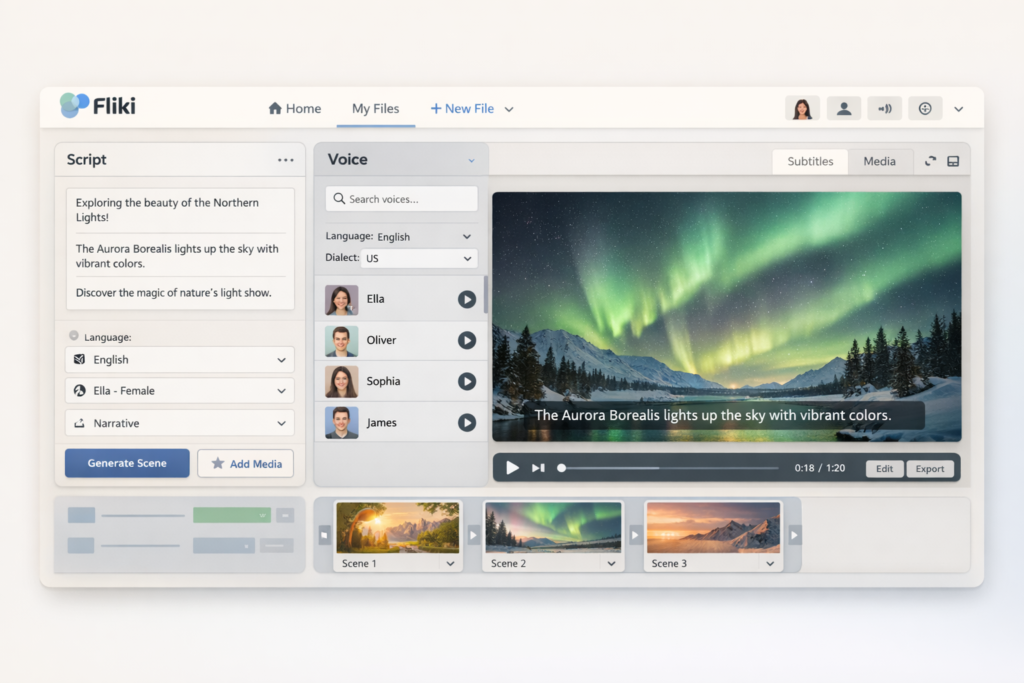
Quick Verdict
| Category | Verdict |
|---|---|
| Best for | Creators, marketers, educators, and publishers who want fast AI video production |
| Main strength | Turning written content into publishable videos quickly |
| Beginner friendly | Yes |
| Voice and language support | Strong |
| Content repurposing | Strong |
| Advanced editing control | Moderate |
| Short-form content creation | Strong |
| Value for money | Good for users who publish frequently |
Fliki is one of the more practical AI video platforms for people who want speed, convenience, and content repurposing more than deep professional editing control. It is especially appealing if you already publish blog posts, scripts, presentations, newsletters, or social media content and want to convert those assets into video without building everything manually from scratch.
What Is Fliki?
Fliki is an AI video and voice generation platform that helps users transform text into videos with AI narration, subtitles, visuals, music, avatars, and browser-based editing. Instead of focusing on only one narrow feature, Fliki combines multiple content workflows into a single platform. That includes text-to-video, script-to-video, blog-to-video, PPT-to-video, AI voiceovers, voice cloning, translation support, talking avatars, and basic editing tools.
This broader positioning is one of the main reasons the platform stands out. Many AI tools do one thing well but leave the rest of the workflow to other apps. Fliki aims to keep more of the process under one roof. That makes it particularly attractive for solo creators, small teams, affiliate bloggers, course creators, agencies, and social media publishers who want efficiency.
Key Features in Fliki
| Feature | What it helps you do | Why it matters |
|---|---|---|
| Text to video | Turn prompts, scripts, or written content into videos | Speeds up production for creators and marketers |
| Blog to video | Convert blog posts and URLs into video drafts | Useful for repurposing SEO content into visual content |
| PPT to video | Turn PowerPoint files into narrated videos | Helpful for training, demos, and business presentations |
| AI voiceovers | Use thousands of AI voices across 80+ languages | Supports multilingual and faceless content creation |
| Voice cloning | Create a custom AI version of your voice | Useful for branding and consistent narration |
| AI talking avatars | Add presenter-style videos without filming yourself | Helpful for tutorials, explainers, and internal communication |
| Translation and dubbing | Adapt content for different languages | Supports international reach and localization |
| Online video editor | Edit scenes, captions, and visuals in the browser | Reduces reliance on separate editing software |
| Thumbnail and social creative tools | Create supporting assets for publishing | Useful for YouTube and social distribution |
What makes Fliki especially practical is that you are not limited to one starting format. You can begin with a blog post, a script, a URL, a presentation deck, or a general text prompt. That flexibility matters because it allows publishers to reuse existing content instead of rebuilding every video from scratch.
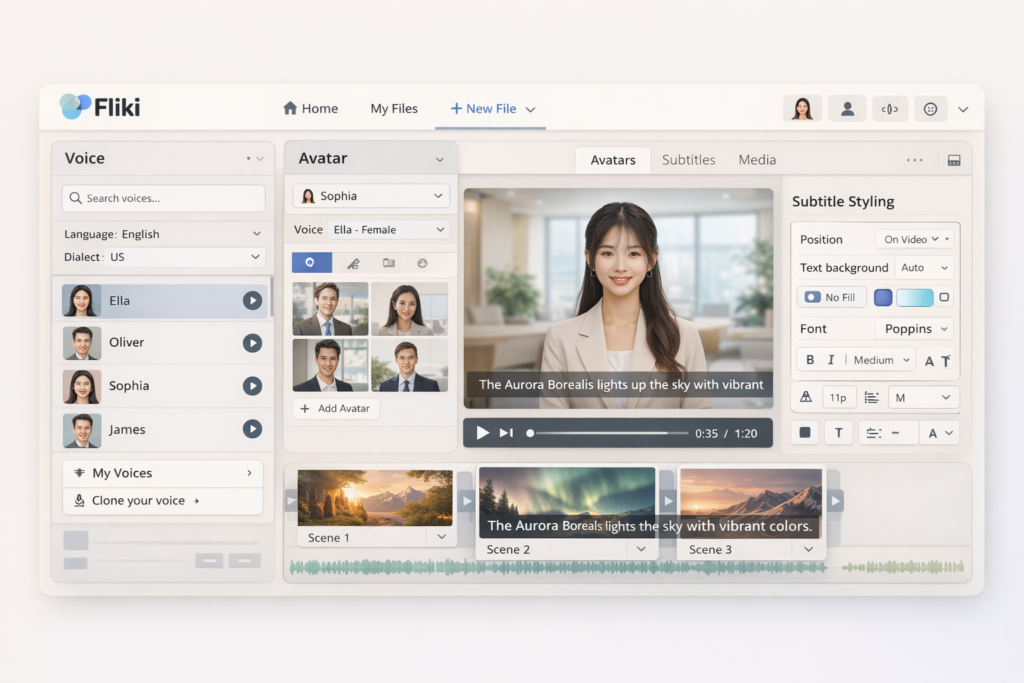
How Fliki Works
At a high level, Fliki follows a simple workflow. You start by entering text or uploading source content. Then you select a voice, language, and style options. After that, the platform helps generate visuals, captions, and structure. Finally, you preview the result, make edits, and export the finished video.
That simplicity is a big part of Fliki’s appeal. It is not designed for people who want a highly technical post-production environment. It is designed for users who want to move quickly from idea to publishable video. In many cases, that is exactly what small publishers and solo operators need.
Best Use Cases for Fliki
| Use Case | Why Fliki Fits |
|---|---|
| Blog content repurposing | Turns written articles into videos for wider reach |
| YouTube Shorts and Reels | Supports fast short-form production with voices and captions |
| Faceless YouTube channels | Useful for narration-based content without on-camera filming |
| Educational videos | Good for lesson summaries, explainers, and multilingual content |
| Business presentations | PPT-to-video workflow is useful for internal and client-facing content |
| Marketing videos | Can turn product copy and scripts into promotional videos |
| Multilingual publishing | Helpful for translating or localizing content into more languages |
If you are already producing written content, Fliki becomes more attractive. Instead of treating video as a separate production department, you can treat it as an extension of your existing content strategy. That can save time and make your content more useful across platforms like YouTube, Instagram, TikTok, training portals, and landing pages.
Fliki Pricing
Fliki offers a free plan as well as paid tiers for more serious publishing. The free version is enough to test the workflow, but most users who want regular content output will likely need at least the Standard plan.
| Plan | Price | Best For | Notable Points |
|---|---|---|---|
| Free | $0 | Testing the platform | 5 credits per month, 720p low-res video, watermark |
| Standard | $28/month or $21/month billed yearly | Solo creators and beginners publishing regularly | 1080p video, more credits, voice cloning, YouTube publishing, limited avatars |
| Premium | $88/month or $66/month billed yearly | Heavier creators, teams, and advanced users | Higher limits, longer videos, more brand control, more avatars and customization |
| Enterprise | Custom | Organizations and larger teams | API access, personalized avatars, collaboration, advanced support |
The most important thing to understand is that Fliki’s value depends on how often you publish and how often you revise. If you only need one occasional AI video, the paid tiers may feel expensive. If you regularly create content for YouTube, social media, training, or multilingual campaigns, the time savings can justify the cost much more easily.
👉 Want to turn scripts, blog posts, and presentations into videos faster?
Pros and Cons of Fliki
Pros
- Very beginner friendly
- Fast text-to-video workflow
- Strong for blog and presentation repurposing
- Useful voice cloning feature
- Supports multilingual publishing
- Browser-based, so no heavy software setup
- Helpful for faceless content creation
- Good fit for social video and training content
Cons
- Free plan is too limited for serious production
- Credit-based usage may matter if you revise a lot
- Not ideal for deep cinematic editing
- Advanced creators may still want another editor for final polish
- Paid tiers may feel expensive for low-volume users
What Fliki Does Well
1. It reduces production friction. Fliki makes video creation more approachable by letting users start from text instead of from an empty editing timeline. That is a big advantage for people who have ideas and written content but do not want to learn complex editing software.
2. It is strong for content repurposing. Blog-to-video and PPT-to-video are not just nice extra features. They are strategically useful. They let you get more value from content you have already created, which is especially helpful for SEO publishers, affiliate marketers, teachers, and small businesses.
3. It supports multilingual growth. If you want to reach multiple audiences, the combination of AI voices, translation options, and voice-related tools makes Fliki more flexible than many simpler AI video tools.
4. It is accessible to non-experts. Some AI tools advertise huge capabilities but still feel difficult to use. Fliki’s overall product positioning is much more approachable, which makes it easier for ordinary users to actually publish content instead of getting stuck in setup and technical decisions.
Where Fliki Is Less Impressive
1. It is not a full replacement for professional editing. If your workflow depends on detailed animation control, advanced transitions, manual timeline precision, or high-end post-production, Fliki may feel limiting as your only tool.
2. Pricing efficiency depends on your workflow. A high-volume creator may find strong value in the paid plans, but a low-volume user may not. The platform makes the most sense when you publish consistently and care about speed.
3. The free plan is mainly for testing. It is enough to explore the interface and basic concept, but it is not generous enough for a serious long-term content operation.
Who Should Use Fliki?
| You should consider Fliki if you… | You may want another tool if you… |
|---|---|
| Want to turn blog posts into videos | Need deep professional editing control |
| Create YouTube Shorts or faceless videos regularly | Prefer building every scene manually |
| Need multilingual voiceovers | Need advanced cinematic post-production |
| Value speed and convenience | Care more about micro-level customization than speed |
| Want an all-in-one browser-based workflow | Already have a strong traditional editing pipeline |
Is Fliki Good for SEO and AI Search Content Repurposing?
Yes, and this is one of the more overlooked reasons Fliki is interesting. If you already create blog content, review articles, tutorials, newsletters, or course materials, Fliki gives you a practical way to repurpose that content into videos. That can help you expand your reach beyond standard search results into YouTube, short-form platforms, embedded video content, and AI-friendly multimedia formats.
That does not mean Fliki automatically makes content rank better. You still need strong topics, useful information, and clear publishing strategy. But as a content multiplication tool, it can help you squeeze more value from every article or script you create.
Final Verdict: Is Fliki Worth It?
Fliki is worth considering if your main goal is to create videos faster from written content. Its strongest selling point is not cinematic perfection. Its strongest selling point is efficiency. It helps users move from idea, script, article, or presentation to finished video much faster than a traditional workflow.
For creators, affiliate publishers, educators, marketers, and businesses that publish frequently, that speed can be worth paying for. For advanced editors who want full manual control, Fliki makes more sense as a first-draft engine or repurposing tool than as a total replacement for high-end editing software.
If you care about speed, browser-based convenience, multilingual voice support, and turning existing content into videos, Fliki is one of the more practical tools in this category right now.
FAQ
Is Fliki free to use?
Yes, Fliki offers a free plan, but it is limited. It is best used for testing the platform rather than for serious ongoing production.
What is Fliki best for?
Fliki is best for turning text, scripts, blog posts, and presentations into AI-generated videos quickly. It is especially useful for creators, marketers, educators, and businesses that want speed and convenience.
Does Fliki support voice cloning?
Yes, Fliki includes voice cloning, which helps users create a more consistent branded narration style without recording everything manually each time.
Is Fliki good for YouTube Shorts?
Yes, Fliki is a good fit for YouTube Shorts and similar short-form video workflows because it is built around fast generation, captions, AI voices, and simplified editing.
Can Fliki turn blog posts into videos?
Yes, this is one of its most useful features. If you already run a content website, Fliki can help you repurpose blog content into videos for additional distribution channels.
About the Author
Xu Xun
Contact: xuxun1208@gmail.com
Last Updated: June 2026