
Drepair review is a topic worth covering for anyone who has ever faced a corrupted video, a broken photo, an unreadable document, or a damaged audio file. When important files stop opening, most people do not want a complicated technical workflow. They want a practical tool that can repair the file quickly, restore usability, and save time. That is exactly the angle that makes Drepair interesting.
Drepair is positioned as an all-in-one file repair solution for Windows users who need to fix corrupted videos, photos, documents, and audio files in one place. Instead of forcing users to install one tool for video repair, another for photo restoration, and another for damaged office documents, it tries to bring those use cases together under a single interface. That wider scope gives it a practical advantage for everyday users, content creators, students, office staff, and anyone dealing with mixed file damage.
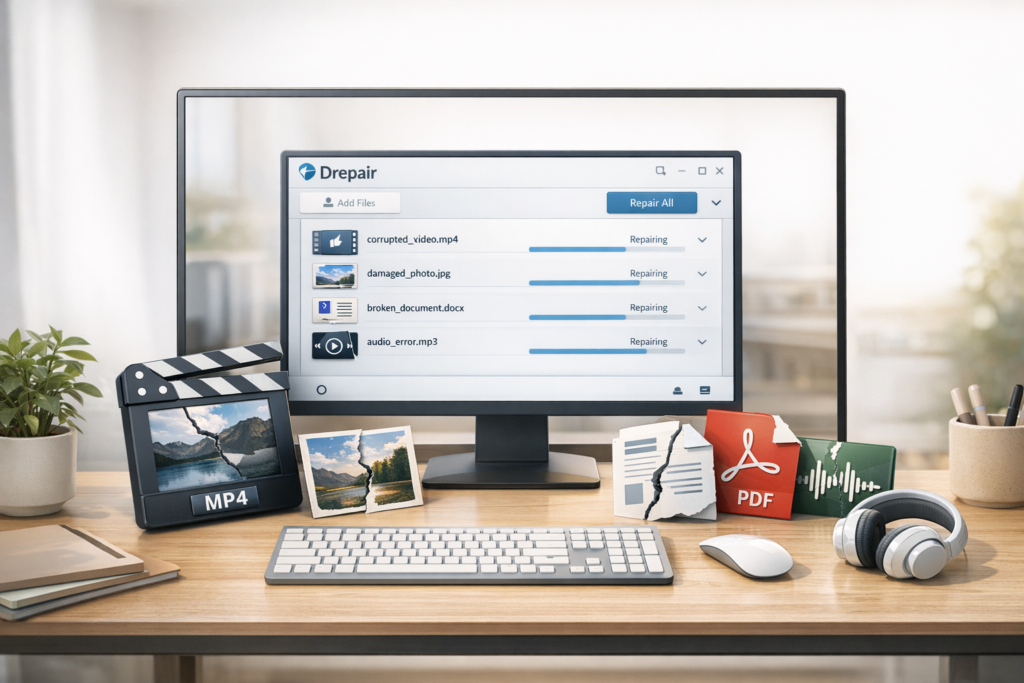
Quick Verdict: Is Drepair Worth Considering?
Yes—especially if you are looking for a multi-format file repair tool rather than a narrow one-purpose utility. Drepair makes the most sense for users who want convenience, broad compatibility, and a faster way to deal with corrupted files across both work and personal use. Its main commercial strength is not just that it attempts repairs, but that it brings several common repair categories into one workflow.
That said, it is important to keep expectations realistic. No repair tool can guarantee success in every case, especially when a file is severely damaged or its core structure is completely broken. The strongest way to position Drepair in a high-quality review is not to oversell it, but to explain clearly where it makes sense, where it may fall short, and who is most likely to get value from it.
| Category | Verdict |
|---|---|
| Best for | Users who need one repair tool for videos, photos, documents, and audio |
| Main strength | Broad use cases in a single Windows application |
| Good value for | Creators, office users, students, families, and tech support users |
| Potential limitation | Results still depend on how badly the original file is damaged |
| Overall impression | A practical file repair tool with strong commercial appeal for mixed-format recovery needs |
What Is Drepair?
Drepair is a Windows-based file repair software tool designed to help users repair damaged or corrupted files across several major categories. Instead of focusing on only one type of file, it is marketed as a broader repair solution covering video, photo, document, and audio repair. That gives it a more flexible position in the market because real-life file corruption rarely happens in only one format.
For example, one user might need to repair a corrupted MP4 video after an interrupted transfer, while another may be trying to recover a damaged PDF, a broken PowerPoint presentation, a blurry family photo, or an audio recording that no longer plays correctly. Drepair is designed to cover those mixed scenarios inside a single product rather than making the user shop around for several separate repair tools.
That broad positioning is also useful from an SEO standpoint. A good review article should not only answer whether the software works, but also explain what problems it is meant to solve, what types of users it is designed for, and why someone would pick it over a more specialized option. That is exactly where Drepair has a clear marketing angle.
What Drepair Can Repair
One of Drepair’s biggest selling points is the range of file types it aims to handle. This matters because buyers often search for repair software by problem, not by product category. They do not search for “utility suite.” They search for things like “repair corrupted video,” “fix damaged PDF,” “restore blurry photo,” or “repair broken audio file.” A strong review should reflect that behavior clearly.
| File category | Typical repair need | Why it matters |
|---|---|---|
| Video files | Corrupted, unplayable, blurry, noisy, or damaged footage | Useful for creators, editors, vloggers, and anyone with important recordings |
| Photo files | Blurred, pixelated, overexposed, old, or damaged images | Important for personal memories, archives, and visual content work |
| Document files | Unreadable office documents, presentations, spreadsheets, or PDFs | Critical for business, school, research, and workflow continuity |
| Audio files | Damaged, noisy, or inaccessible recordings | Useful for interviews, voice notes, meetings, podcasts, and music files |
From a buyer’s point of view, this multi-category coverage is one of the strongest reasons to consider Drepair. Many people do not want to research several different repair tools just to deal with separate file types. They want one interface, one purchase decision, and one repair workflow they can use across personal and professional scenarios.
Key Features That Make Drepair Stand Out
1. All-in-one repair coverage
The biggest feature is also the simplest to understand: Drepair is not limited to one narrow repair use case. It is designed to support multiple damaged file scenarios inside one application. That is valuable for users who work with mixed files every day or who simply want a more practical solution when file corruption happens unexpectedly.
2. A more convenient workflow for non-technical users
Many users searching for file repair software are not technical specialists. They may be students, office workers, parents, freelancers, or creators who do not want to learn complex manual recovery methods. Drepair’s appeal is that it presents itself as a more accessible repair tool. That ease-of-use angle is important in both SEO and conversion writing because it speaks directly to the stress users feel when a file suddenly stops working.
3. Broader value than single-purpose repair tools
A specialized repair tool can be fine if you only ever have one problem. But real users often experience several types of file damage over time. A video might fail today. A document may become unreadable next month. Old family photos might need repair later. A tool that addresses more than one category can feel more cost-effective over the long run, especially if you are paying for software you may need again in future emergencies.
4. Strong commercial relevance for high-intent buyers
Drepair is not a curiosity product. It sits in a high-intent category. People usually look for file repair software when they already have a problem that needs solving. That makes it a useful type of affiliate content because the reader is often closer to taking action than someone casually browsing informational software content.
Who Should Use Drepair?
A good review article should never treat all buyers as the same. The better approach is to explain which user groups are most likely to benefit from the software and why. Drepair makes the most sense for the following users.
| User type | Why Drepair may be a good fit |
|---|---|
| Content creators | They often deal with valuable videos, audio files, thumbnails, and project-related visuals |
| Photographers and families | Damaged or aging image files can contain irreplaceable memories |
| Students and researchers | Losing access to a paper, report, spreadsheet, or presentation can be costly and stressful |
| Office staff and freelancers | Readable business files matter for client work, communication, and operations |
| Technicians or support users | A multi-format repair tool can be more practical than managing separate utilities |
In short, Drepair is best for people who see value in having a general-purpose repair tool rather than a single-use specialist. That broader utility is what gives the product stronger long-term appeal.
Who May Not Need Drepair?
Drepair is not automatically the best fit for every buyer, and saying that openly makes the article more trustworthy. If you only need to repair one highly specific file type once in your life, you may prefer a narrower tool or even decide not to pay for software at all. Likewise, if your file is severely damaged beyond usable structure, no repair utility should be treated as a guaranteed solution.
Another case where Drepair may not be ideal is when a user wants a platform-specific Mac-first tool and does not want to work on Windows. If your audience includes both casual users and more technical buyers, it helps to be honest: Drepair is most compelling when you want convenience, broad scope, and a user-friendly approach to common file damage scenarios.
Drepair Pricing: Which Plan Makes the Most Sense?
Pricing is one of the most important parts of a commercial review because many readers skip directly to this section before deciding whether the rest of the article is worth reading. The best way to handle pricing is with a clear comparison table and a short buyer-focused interpretation.
| Plan | Best for | Value angle |
|---|---|---|
| 1 Month License | Urgent one-time repair situations | Lowest commitment for emergency use |
| 1 Year License | Most regular users | A balanced option for users who want ongoing access without paying for lifetime upfront |
| Lifetime License | Long-term users, families, creators, and tech-minded buyers | Best if you want file repair coverage available whenever future issues appear |
From a conversion perspective, the lifetime plan often becomes the easiest one to justify in content like this because file corruption is unpredictable. If a reader has already experienced a stressful file loss once, they are more likely to appreciate the idea of having a repair tool available permanently instead of buying again later. At the same time, the shorter license option still matters because it gives cost-sensitive buyers a lower-risk entry point.
Drepair Pros and Cons
| Pros | Cons |
|---|---|
| Handles multiple file categories in one tool | Not every damaged file can be repaired successfully |
| Good fit for mixed personal and work file problems | Some users may only need a narrower one-purpose solution |
| Easy commercial angle for high-intent readers | Results depend on how serious the corruption is |
| Convenient for non-technical users | May be less relevant for users who only need one repair once |
| Stronger long-term value if you choose a broader-use license | Windows-focused positioning may not suit every platform preference |
This kind of balanced section helps the article rank better and convert better at the same time. Google generally rewards content that demonstrates real evaluation rather than blind praise, and readers are more likely to trust a recommendation when they can see both strengths and trade-offs.
How Drepair Works in Real-Life Use
Even when users already believe a product may be useful, they still want to know whether the workflow is straightforward. That is why this section matters. A review should reduce uncertainty, and one of the easiest ways to do that is by showing what the normal user journey looks like from installation to repair.
Step 1: Install the software
Start by installing Drepair on a Windows PC. For most users, this is the easiest part of the process and should only take a few moments.
Step 2: Add the damaged file
Import the corrupted video, photo, document, or audio file you want to repair. This is the point where the software begins to feel useful because the user moves from stress and uncertainty into an actionable repair workflow.
Step 3: Start the repair process
Once the file is loaded, the software analyzes the damage and attempts to restore file usability. Depending on the category, that may mean fixing structural issues, improving clarity, or restoring playability and readability.
Step 4: Preview or review the result
This is where users judge value quickly. A repair tool does not need to be perfect to be worth it. It needs to recover enough of the file to make the result useful again, whether that means reopening a document, restoring a family photo, or making a video playable.
Step 5: Save the repaired file safely
After a successful repair, save the restored file in a secure location and keep the original copy until you are sure the repaired version is usable. This simple habit helps prevent further loss and gives the user a fallback point if needed.
What Kinds of Problems Can Drepair Help Solve?
Readers often search with problem-based queries rather than brand-based ones, so this section improves both SEO reach and AI search relevance. Instead of only asking “What is Drepair?” many users search for situations like:
- How do I repair a corrupted video that will not play?
- Can I fix a blurry or damaged photo file?
- What software can repair an unreadable Word, Excel, PowerPoint, or PDF file?
- How do I restore a broken audio recording?
- Is there one repair tool for multiple damaged file types?
By answering those scenario-based questions naturally inside the article, you improve the content’s usefulness for both traditional search engines and AI systems that prefer direct, well-structured answers. Drepair fits that kind of article well because the product itself aligns with several problem categories instead of just one.
Drepair Review: The Real Strength Is Convenience
If I had to summarize Drepair’s strongest appeal in one line, it would be this: Drepair reduces the need to hunt for different repair tools when different file types break. That convenience matters more than many reviews acknowledge. Users do not only pay for repair attempts. They also pay to reduce stress, save time, simplify decisions, and avoid tool overload.
That is why this product has a solid affiliate angle. The reader is not only buying software. They are buying a more manageable response to file damage. When framed like that, Drepair becomes easier to position as a practical solution rather than just another generic utility.
Is Drepair Safe and Legit?
This is one of the most important questions in any software review because readers want reassurance before installing a repair tool on their computer. The strongest way to answer it is with a measured response. Drepair appears to be positioned as a commercial software product with a normal purchase flow, support structure, and formal product pages. That is a much better sign than the kind of random repair tools that appear on low-trust download sites.
Still, the right tone here is confidence without exaggeration. The goal is not to say that every user will get a perfect result. The goal is to explain that Drepair appears to be a legitimate software product built around a clear problem-solving use case, which is exactly what most readers need to hear before deciding whether to test it.
Is Drepair Worth It for the Average User?
For many users, yes. Drepair is worth considering when the cost of losing the file is higher than the cost of the software. That is especially true when the file contains personal memories, important client work, academic work, business material, or content that would be difficult or impossible to recreate. In those cases, even partial repair success may be worthwhile.
It is also easier to justify when you value ongoing preparedness. A lifetime or longer-term license often appeals to users who have already experienced one painful file damage incident and do not want to face the same stress again without a repair option ready to go.
Final Verdict
Drepair stands out because it aims to solve a stressful, high-intent problem with a broader and more practical approach than many single-purpose repair tools. Its value is not just about repairing one kind of file. Its value is that it gives users one place to try restoring corrupted videos, photos, documents, and audio files without turning file recovery into a complicated research project.
For readers who want a straightforward answer, this is the simplest conclusion: Drepair is worth considering if you want an all-in-one file repair solution for Windows and you care more about convenience, scope, and practical recovery options than about using separate specialist tools for each file type.
That makes it a strong product to cover in an affiliate review, especially if your site already targets software, utilities, productivity tools, creator tools, or digital problem-solving products. A well-structured article like this can rank not only for the brand term Drepair review, but also for related intent-based searches around corrupted file repair, damaged media repair, and unreadable document repair.
FAQ
What is Drepair used for?
Drepair is used to repair corrupted or damaged videos, photos, documents, and audio files in a single Windows-based workflow.
Is Drepair only for video repair?
No. One of its main selling points is that it is positioned as a broader file repair tool rather than a video-only solution.
Who should buy Drepair?
Drepair is best for users who want one tool for repairing multiple file types, including creators, students, office users, families, and anyone dealing with mixed file damage.
Is Drepair worth it for one-time use?
It can be, especially if the damaged file is important enough that even partial recovery would save time, effort, or emotional value. For long-term use, broader licenses usually make more sense.
Can Drepair guarantee file repair success?
No repair tool should be treated as a guaranteed fix in every case. Results depend on how badly the original file is damaged, but tools like Drepair can still be worthwhile when the alternative is losing the file completely.
About the Author
Xu Xun
Contact: xuxun1208@gmail.com
Last Updated: June 2026