
If you are looking for a serious Creatify review before paying for another AI tool, the short version is this: Creatify is much more useful when you treat it as an AI ad generator rather than a generic “make any video” platform.
That distinction matters. A lot of AI video tools are designed for creators who want talking-head videos, short explainers, or polished social clips. Creatify is more focused on a very specific business problem: turning product pages, product assets, scripts, and marketing angles into ad creatives that can be tested quickly across paid channels.
In other words, Creatify is not trying to be everything for everyone. It is trying to help ecommerce brands, DTC teams, app marketers, agencies, affiliate marketers, and performance advertisers produce more ad variations without dragging every idea through a slow production process.
That is exactly why Creatify has become interesting. When media buying gets more competitive, audience targeting alone is rarely enough. Fresh creative matters. Testing matters. Speed matters. A platform that helps you go from product URL to ad-ready videos in minutes can be much more valuable than a tool that only makes one decent-looking clip.
This article breaks down what Creatify does, how it works, what its pricing means in practice, where it is strong, where it still falls short, and whether it is a smart buy for your business. I will also cover the best use cases, the most important limitations, and the type of buyer who is most likely to get a strong return from it.
Quick Verdict
| Category | Verdict |
|---|---|
| Best for | Ecommerce brands, DTC marketers, app advertisers, agencies, and anyone who needs high creative volume for paid ads |
| Main strength | Fast URL-to-video workflows, AI avatars, batch variation creation, and ad-focused production |
| Main weakness | Credit-based usage, reliance on source assets, and less relevance for non-ad video use cases |
| Free plan | Good for testing the interface, not enough for serious campaign production |
| Best-value tier | Usually Pro for teams that actually need meaningful testing volume |
| Overall rating | Strong option for ad-focused teams that need faster testing and more creative throughput |
If your main goal is to produce YouTube documentaries, cinematic storytelling, or broad-purpose social content, Creatify may feel too specialized. If your real problem is “I need more ad creatives fast,” the platform makes a lot more sense.
What Is Creatify?
Creatify is an AI advertising video platform built to help businesses generate image and video ads more quickly. Its official positioning emphasizes turning product pages into winning video ads, generating creatives from URLs, using AI avatars, creating product videos, and producing multiple variations for testing.
That positioning is important because it tells you how the product should be judged. Creatify should not be evaluated as if it were a general editing suite competing on timeline control, manual editing depth, or long-form storytelling features. It should be judged on speed, creative volume, ad usability, and how well it fits real-world paid acquisition workflows.
For that reason, Creatify is easier to understand when you compare it to three categories at once. First, it competes with traditional video production, where speed is slow and cost can be high. Second, it competes with user-generated content sourcing workflows, where you wait on creators, approvals, and edits. Third, it competes with AI video tools that make videos, but are not tightly built around performance marketing.
Creatify’s pitch is that it can reduce friction across all three areas. Instead of starting from a blank canvas, you can start from a product URL or asset. Instead of waiting for a creator, you can test AI avatars. Instead of building one ad at a time, you can generate multiple variations to compare hooks, scripts, visuals, and presenters faster.
Who Creatify Is Best For
| User Type | Why Creatify Fits |
|---|---|
| Ecommerce brands | Can turn product pages and images into ad-ready creatives faster than traditional production |
| DTC marketers | Useful for testing hooks, UGC angles, product benefits, and multiple creative directions |
| App marketers | Helpful when ad volume and iteration speed matter across paid acquisition channels |
| Agencies | Good for producing more client ad variations without scaling production cost at the same pace |
| Affiliate marketers | Useful for quickly building product-led ad content when the offer is already clear |
| In-house growth teams | Helps when creative production is the bottleneck holding back campaign testing |
The best fit is usually a buyer who already understands advertising. Creatify is easy to appreciate when you already think in terms of hooks, angles, CTR, testing, creative fatigue, landing pages, and paid media iteration. If you do not work in that mindset, the tool can still be useful, but you may not unlock its full value.
Who Should Probably Skip Creatify
| User Type | Why It Is Less Ideal |
|---|---|
| Long-form YouTubers | Creatify is much more ad-focused than long-form content-focused |
| Pure video editors | It is not a full replacement for advanced editing software |
| Brands needing highly custom brand films | AI speed is not the same thing as handcrafted premium production |
| Users who only need one polished video occasionally | The strongest value appears when you need testing volume, not one-off output |
| Teams with weak product pages or poor assets | Input quality still affects the output quality in a major way |
How Creatify Works
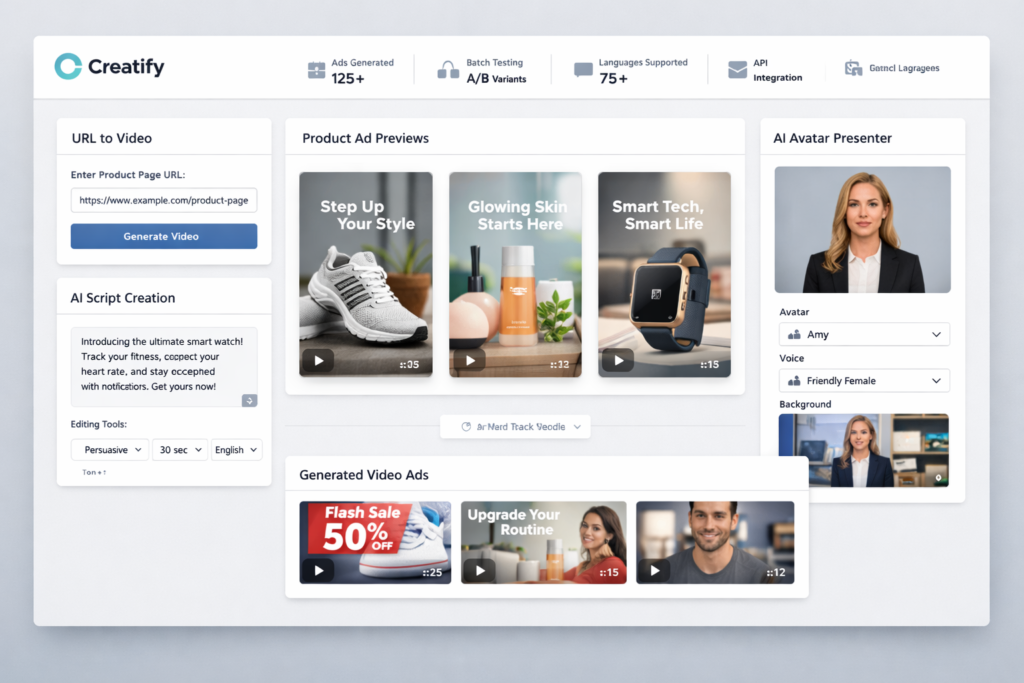
One of the biggest reasons Creatify stands out is that it does not force every user to begin from zero. Its most compelling workflow starts with a product page or asset. You can paste in a URL, let the system scrape the page, generate scripts, build previews, choose styles and avatars, then render the ad you want to use.
That sounds simple, but it solves a major workflow problem. Most businesses already have a product page, product images, feature bullets, and sales messaging. The bottleneck is not having “nothing.” The bottleneck is turning what they already have into ad-ready creative fast enough to test in market.
Creatify is built around that exact use case. You can start from a URL, from an image, or from scratch. Once inside the platform, you can generate scripts, choose avatars, create product videos, and build multiple variations for testing. Higher-level workflows also extend into product video creation, ad inspiration, competitive creative research, and API-driven or embedded use cases.
That makes the product feel less like a blank creative suite and more like a system for producing ad assets from existing business inputs.
Creatify’s Core Features
| Feature | What It Does | Why It Matters |
|---|---|---|
| URL to Video | Turns product or landing page URLs into ad-ready video workflows | Reduces blank-page friction and speeds up ad creation |
| AI Avatars | Lets you create spokesperson-style and UGC-style video ads | Helps test creator-like formats without relying on live creators |
| Batch Mode | Creates multiple ad variations at once | Useful for creative testing and performance marketing |
| Product Video | Transforms static product images into motion-driven marketing videos | Strong fit for ecommerce catalogs and visual products |
| Ad Templates / Inspiration | Provides structure and creative starting points | Helps teams move faster when they do not want to build every concept manually |
| Asset Generator | Uses premium AI models for asset creation | Adds more creative flexibility inside the same workflow |
| Ad Clone / Ad Insights / Ad Launcher | Supports higher-level ad workflow and launch-related tasks on paid tiers | Makes the platform more performance-marketing-oriented |
| API | Enables programmatic video generation and embedded use cases | Useful for platforms, internal systems, or scaled automation |
Creatify Review: The Features That Actually Matter
1. URL-to-Video Is the Most Practical Feature
The most practical feature for many buyers is URL-to-video. This is the part of the product that makes Creatify feel distinct from a generic AI video tool.
If you already have a product page or landing page, you do not want to rebuild your offer from scratch just to test an ad angle. You want the platform to pull the relevant product information, images, and messaging, then help you turn that into a usable creative faster. That is exactly the promise Creatify makes, and it is one of the clearest reasons performance-focused buyers pay attention to it.
This is also why Creatify can be especially appealing for ecommerce, affiliate, and app marketing workflows. Those categories often already have a strong product page, a clear value proposition, and a need to convert existing assets into ad creatives quickly. A URL-based flow is much more efficient than starting every ad with a blank script box.
Of course, this does not mean the platform will turn a weak page into a winning campaign automatically. A weak offer, weak page structure, or low-quality product imagery will still limit results. But for strong inputs, URL-to-video can save a significant amount of time.
2. AI Avatars Make UGC-Style Testing Easier
Creatify’s avatar system is a major reason many people notice the platform in the first place. If you need spokesperson-style ads, user-generated-content-style hooks, or talking-head product pitches, the avatar library expands what you can test without sending products to creators or waiting for revisions.
That does not mean AI avatars replace real creators in every context. Human nuance, true product usage footage, and credible creator relationships still matter. But as a testing layer, AI avatars are useful because they let you explore multiple angles with less coordination overhead.
This matters most when your team wants to test different presenters, emotional tones, hooks, or scripts before committing to more expensive production. In that setting, avatar-based workflows are not just convenient. They can be strategically valuable.
Creatify’s pitch here is not merely “look, we have avatars.” The real value is that avatars are connected to an ad production system. That makes them more relevant for marketers than avatar tools that are mainly designed for generic presenter videos.
3. Batch Mode Matches How Good Ad Teams Actually Work
Batch Mode is one of the strongest reasons a performance marketer would choose Creatify over a more general AI video generator.
In real paid acquisition environments, one creative is rarely enough. Good teams test multiple hooks, presenters, scripts, angles, aspect ratios, and value propositions. Creative fatigue sets in quickly, especially on paid social. The ability to generate multiple ad variations at the same time is therefore not a nice extra. It is a core part of performance marketing reality.
This is where Creatify’s product design feels more mature than tools that mainly focus on generating one talking-head clip. Batch creation makes the platform useful for experimentation. That is a much bigger business advantage than simply helping users make something that “looks AI-generated but acceptable.”
If your business wins by testing more concepts and reaching valid conclusions faster, Batch Mode is one of Creatify’s most important features.
4. Product Video Is Useful for Static Asset Brands
Not every brand has fresh live-action footage ready to use. Many ecommerce businesses have mostly static product photography, catalog images, or listing visuals. Product Video is valuable because it helps bridge the gap between static assets and motion-based ads.
For brands with visually clear products, this can be enough to create scroll-stopping creative faster than arranging a full shoot. It is especially useful when you need rapid output for catalog testing, product launches, new angles, or seasonal variations.
The most realistic expectation is not “AI product video replaces premium brand cinematography.” The better expectation is that it helps you create viable ad assets more quickly from the assets you already have.
5. The Platform Is More Than Just a Video Generator
Many first-time buyers see Creatify and assume the entire product revolves around avatar videos. That is too narrow. The real advantage is that Creatify combines multiple parts of the ad creation workflow inside one platform: source inputs, scripting, avatars, product video, templates, testing variations, creative research signals, and higher-tier launch-oriented features.
This matters because separate tools create separate friction. One tool for scripting, one for avatars, one for editing, one for ad inspiration, one for competitor research, and another for launch support may sound flexible, but it also adds more switching cost and more workflow drag. Creatify becomes more compelling when you value workflow compression, not just isolated features.
Creatify Pricing: What You Actually Get
Pricing is one of the most important parts of any Creatify review because the platform uses a credit-based model and the real value depends heavily on how much creative volume you need.
At the time of writing, Creatify offers a Free plan, a Starter plan, a Pro tier with a wide credit range, and an Enterprise option. The Free plan is enough to explore the product, but not enough to judge whether it can support a serious testing workflow. That is because heavy advertisers usually care less about whether the platform can generate one ad and more about whether it can support repeatable output at scale.
| Plan | Best For | What Stands Out |
|---|---|---|
| Free | Testing the interface | Good entry point, but limited credits and watermark restrictions make it more of a trial than a true working plan |
| Starter | Solo creators and small operators | Much better than Free, but still limited if you need aggressive ad testing |
| Pro | Advertisers and teams | Usually the most relevant plan for people who need creative scale, more actors, more models, more templates, and stronger workflow features |
| Enterprise | Larger brands and platforms | Relevant when API, integration, or very high creative volume matters |
Free Plan
The Free plan is useful for trying the interface and seeing whether the workflow matches your thinking. That alone is valuable because some AI tools look attractive on paper but feel clumsy once you actually use them.
Still, you should treat the Free plan as a testing layer, not a serious production setup. If your business model depends on launching multiple creatives, comparing variants, and refreshing ads often, you will outgrow it quickly.
Starter Plan
The Starter plan makes more sense for individuals, solopreneurs, or early-stage operators who want to move beyond basic experimentation. It gives you a more realistic taste of the workflow, but it is still better thought of as an entry-level working plan than a true scale plan.
If you only need a moderate amount of ad content each month, Starter can be enough. But if you are serious about creative testing, it can become tight faster than the price suggests. That is the main trap with low-tier AI pricing. The subscription looks small, but your actual usage ambition may not be.
Pro Plan
The Pro plan is where Creatify starts to look like a serious performance-marketing tool. This is the tier where more actors, more premium models, more templates, longer durations, and extra workflow capabilities make the platform much more compelling for advertisers.
If you are running paid campaigns and want Creatify to become part of your real workflow, Pro is usually the most important tier to evaluate. The upgrade is not just about “more of the same.” It changes the practical range of what you can test.
Enterprise Plan
Enterprise matters less to most solo readers, but it is relevant if you are a platform, large team, or brand that wants integration, larger-scale automation, or custom operational support. Creatify’s API and case-study positioning make it clear that the company is not only selling to individual marketers. It also wants to serve scaled business workflows.
Creatify Pricing Table
| Pricing Point | Current Snapshot |
|---|---|
| Free | 10 monthly credits, up to 2 video ads or 20 image ads, 300 AI actors, 10 premium AI models, 40 templates, watermark on exports |
| Starter | $33/month, 100 credits, up to 20 videos per month, 300 AI actors, 10+ premium AI models, 40 templates, videos up to 2 minutes |
| Pro | 200–5000 credits, 40–1000 videos, 1500 AI actors, 30+ premium AI models, 200+ templates, videos up to 10 minutes, more advanced ad workflow features |
| Enterprise | Custom pricing and custom scale |
The most important takeaway is not just the sticker price. It is the relationship between credits and creative ambition. If you only need occasional output, Creatify may feel affordable quickly. If your strategy is based on aggressive testing, the real question becomes whether the workflow saves enough time and production cost to justify the credit burn.
What Creatify Gets Right
It Is Built for Ad Output, Not Generic Output
This is probably the biggest reason Creatify is worth paying attention to. Many AI tools can generate content. Fewer are designed around the operational needs of ad buyers. Creatify is more focused on the kind of output that matters when you are trying to launch, test, and scale campaigns.
It Reduces Blank-Canvas Friction
URL-based workflows and product-led generation reduce one of the biggest hidden costs in content production: the effort required just to get started. When tools can work from assets you already have, they create business value faster.
It Supports Testing Behavior
Batch variation creation is not a flashy marketing extra. It aligns with how winning ad teams actually operate. That makes the product more useful in practice than a tool that only helps you create one beautiful video with no easy testing workflow.
It Can Lower Coordination Overhead
For teams that normally rely on creators, editors, or agency pipelines, Creatify can reduce back-and-forth work. That saves time, but it also changes the speed of decision-making. You can test more before escalating to more expensive production paths.
It Has a Real Scale Story
The API and official case studies make it clear that Creatify is not only targeting individual content creators. It also has a scaled business narrative, which matters if you care about platform maturity, automation possibilities, or long-term operational relevance.
Where Creatify Is Weaker
It Still Depends on Input Quality
This is a key limitation that buyers should not ignore. Creatify can accelerate production, but it does not eliminate the importance of strong inputs. Weak product pages, weak imagery, vague offers, and unclear messaging will still produce weaker results than solid inputs.
Credit-Based Pricing Needs Monitoring
Credit systems are not inherently bad, but they require a little more strategic thinking. Businesses that render many versions can move through usage faster than they expect. The right way to evaluate the cost is not to ask, “Is this subscription cheap?” The better question is, “Does this help us create enough useful ad output to justify the cost versus our current workflow?”
It Is Not a Full Creative Studio Replacement
If you need intricate editing, custom motion graphics, nuanced storytelling, or premium brand film production, Creatify will not replace your entire production stack. Its strength is speed and scale, not handcrafted perfection.
Some Buyers Will Be Better Served by Simpler Tools
If you only need occasional social clips or do not run paid campaigns at all, Creatify may be more platform than you need. The strongest case for buying it appears when ad iteration is central to your business.
Creatify vs Traditional Ad Production
| Category | Creatify | Traditional Production |
|---|---|---|
| Speed | Fast workflow from URL or asset to ad-ready output | Usually slower, with scripting, coordination, shooting, and editing delays |
| Creative volume | Easier to generate many variations | More expensive and slower to scale |
| Talent dependency | Reduced with AI avatars and automation | Higher dependence on creators, editors, or agencies |
| Cost structure | Subscription and credit-based usage | Often project-based, retainer-based, or creator-based |
| Best use case | Testing many ad concepts quickly | Custom premium creative campaigns |
| Main trade-off | Less bespoke, more system-driven | More bespoke, but slower and costlier |
This comparison helps explain why Creatify can be such a strong operational tool. Even when a business still wants premium human-made campaigns later, there is often a huge gap between “we have an idea” and “we have enough creative assets to test.” That gap is where Creatify fits best.
Creatify vs Generic AI Video Tools
Compared with more general AI video tools, Creatify’s advantage is focus. It is not simply trying to help users make a nice-looking AI clip. It is trying to support ad creation from source inputs, make UGC-style testing easier, help teams produce multiple variants, and keep more of the workflow inside one platform.
The trade-off is that some generic tools may feel more flexible for broad content creation. So the better question is not which tool is universally better. The better question is which tool is better for your workload. If your workload is mainly ad iteration, Creatify’s narrower focus can be a strength rather than a limitation.
What Official Case Studies Suggest About Creatify
Official case studies should never be treated like independent neutral audits, but they are still useful for understanding what a company is trying to prove with its platform.
Creatify’s published case studies push a clear story: faster ad production, lower creative cost, and more scalable testing. That is consistent across the brand stories shown on the site.
1MORE Case Study
In Creatify’s 1MORE case study, the company presents the platform as a lower-cost, faster alternative to traditional influencer-style and image-only ad workflows. The story emphasizes faster creation time, lower cost per video, and better performance against several key marketing metrics.
For buyers, the bigger point is not the exact percentage lift in one campaign. The bigger point is the type of outcome Creatify wants to enable: more control over messaging, lower production cost, and faster creative output that can still compete at a useful level.
Alibaba Case Study
The Alibaba case study is especially interesting because it shows Creatify thinking beyond solo marketers. It frames the product as an embedded ad-generation capability that can live inside a larger commerce platform and help sellers produce creatives directly where they manage products.
That suggests Creatify is not only a creator-facing tool. It also wants to be infrastructure for businesses and platforms that need scalable AI ad creation. That is a different level of ambition, and it strengthens the argument that the product is built around operational use cases rather than novelty.
How to Get Better Results With Creatify
Buying the tool is only part of the equation. To get more value from Creatify, you need to use it in a way that fits how ad testing actually works.
- Start with strong product pages and stronger offers, because source quality still matters.
- Test multiple hooks, not just multiple presenters.
- Use different creative angles for different audience states, such as problem-aware, solution-aware, and product-aware buyers.
- Compare avatar-led creatives against product-led creatives instead of assuming one format always wins.
- Refresh winning concepts with new openings and slight visual changes before creative fatigue fully sets in.
- Use Creatify as a testing engine first, then double down on proven directions with more polished production if needed.
This is the most practical mindset for using the platform well. Treat it as a speed and testing tool, not a magic replacement for strategy.
Creatify Pros and Cons
| Pros | Cons |
|---|---|
| Strong URL-to-video workflow for product-led ad creation | Credit-based usage requires planning if you test heavily |
| Useful AI avatars for UGC-style and spokesperson-style testing | Output quality still depends heavily on source page and source assets |
| Batch Mode supports real-world creative testing behavior | Not a full replacement for premium custom production |
| Product Video helps convert static product assets into motion-based ads | Less compelling for users who do not actually run ads |
| More business-focused than many generic AI video tools | Free tier is too limited to evaluate serious long-term fit |
| API and scale story add credibility for larger operational use cases | Some buyers may prefer simpler tools if they only need occasional content |
Is Creatify Worth It?
For the right buyer, yes.
If your business depends on making more ad creatives, testing more creative angles, and moving faster from product page to campaign-ready asset, Creatify has a real value proposition. It is one of the more purpose-built platforms for this kind of work, and that focus gives it an advantage over broader AI video tools that are not truly designed around advertising workflows.
However, “worth it” depends on whether your team can actually benefit from speed and creative volume. If you will only use it once in a while, the value case is weaker. If creative production is a genuine bottleneck and you regularly need fresh variants, the value case becomes much stronger.
So my conclusion in this Creatify review is straightforward: Creatify is most worth it for advertisers, not casual creators. It becomes increasingly attractive as your need for testing, speed, and operational efficiency grows.
Final Verdict
Creatify is not just another AI video tool with a trendy interface. It is an AI ad creation platform built around a very specific outcome: helping businesses create more ad creatives more quickly from the assets they already have.
That makes it especially attractive for ecommerce brands, DTC teams, app marketers, agencies, and affiliate marketers who care about campaign testing, not just video generation in the abstract.
Its strongest advantages are practical rather than flashy. URL-to-video reduces setup friction. AI avatars help teams test creator-style concepts without live creator dependencies. Batch Mode supports faster experimentation. Product Video expands what static-asset brands can do. And the broader workflow makes the platform feel more purpose-built for performance marketing than many generic competitors.
The downsides are also practical. Inputs still matter. Credits matter. And the platform is narrower than a broad-purpose content suite. But if your real constraint is ad production speed and creative throughput, those trade-offs are easy to understand.
Overall, Creatify is one of the more compelling AI ad generators for businesses that need scalable creative testing. It is not the ideal tool for every type of content creator, but for ad-driven teams, it is a serious platform worth evaluating.
FAQ
What is Creatify used for?
Creatify is mainly used to create AI-powered ad creatives from product pages, product images, scripts, and other marketing inputs. It is especially useful for ecommerce and performance marketing workflows.
Is Creatify good for ecommerce brands?
Yes, Creatify is a strong fit for ecommerce because it can turn product pages and product assets into ad-ready creatives faster than traditional production processes.
Does Creatify support AI avatars?
Yes. AI avatars are one of the platform’s core selling points, especially for UGC-style, spokesperson-style, and performance marketing creatives.
Can Creatify generate multiple ad variations?
Yes. Batch Mode is specifically designed to create multiple variations, which is one of the platform’s biggest advantages for ad testing.
Is Creatify free?
Creatify has a free plan, but it is best treated as a trial layer. Businesses that want serious creative volume will probably need a paid plan.
Is Creatify worth it for agencies?
For agencies that need to create more client ad variations and reduce production friction, Creatify can be a strong operational tool.
Is Creatify better than hiring creators?
Not in every scenario. For premium creator partnerships and highly custom live-action campaigns, human creators can still be stronger. But for fast testing, iteration, and lower-cost volume, Creatify can be much more efficient.
What is the biggest limitation of Creatify?
The biggest limitation is that AI speed does not replace strategic clarity. You still need a strong offer, strong messaging, and strong inputs for the output to perform well.
About the Author
Xu Xun
Contact: xuxun1208@gmail.com
Last Updated: June 2026