
Creating faceless short-form videos sounds easy until you try to do it consistently. You need content ideas, scripts, visuals, voiceovers, editing, scheduling, and enough output to test what actually works. That is why tools like AutoShorts.ai are attracting attention. Instead of making creators piece together multiple apps, AutoShorts.ai aims to handle a larger part of the workflow inside one platform.
AutoShorts.ai is designed for people who want to create faceless videos faster and publish them more consistently. The platform is built around a simple promise: help users automatically create, schedule, and post faceless short-form videos with less manual work. That positioning makes it especially relevant for TikTok-style and YouTube Shorts-style workflows, where output consistency often matters just as much as production quality.
In this AutoShorts.ai review, I will break down what the tool does, how it works, what kind of creator it is best for, where it saves time, where it still needs human oversight, how the pricing is structured, and whether it is worth using if your goal is to build a faceless short-form content system.
What Is AutoShorts.ai?
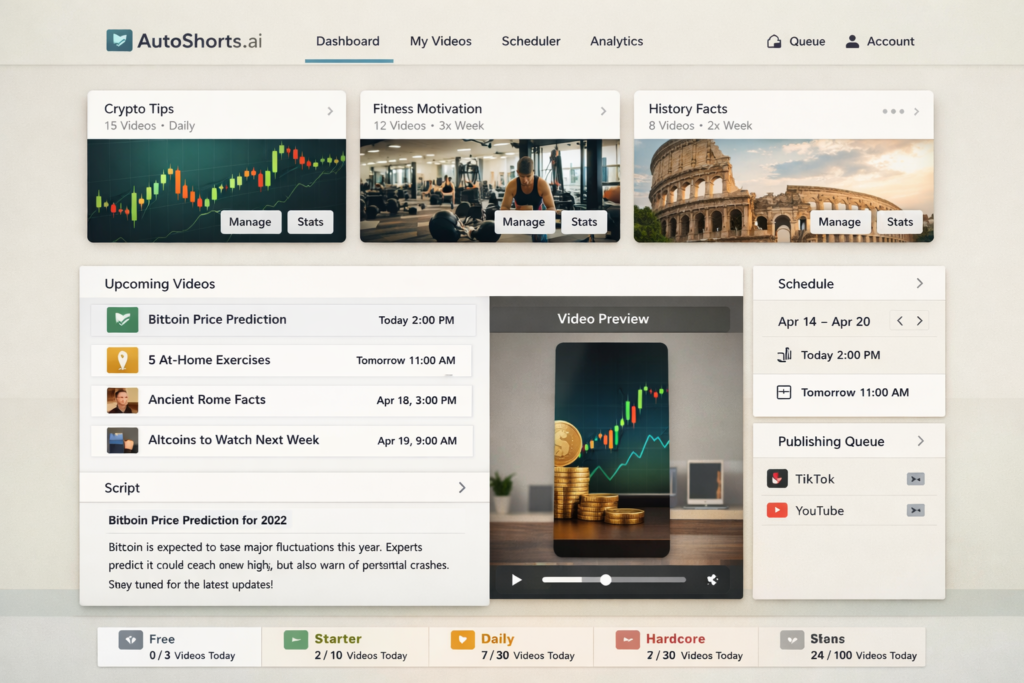
AutoShorts.ai is an AI faceless video generator focused on helping users create recurring short-form content with less manual effort. Rather than functioning as a simple one-off video maker, it is positioned more like a workflow tool. You choose a topic or create a custom prompt, let the system generate a video, review the result, and then publish or schedule it.
That sounds simple, but it matters for one key reason: many creators do not struggle because they lack ideas. They struggle because they cannot sustain the workload. Writing scripts, gathering visuals, choosing audio, editing clips, formatting for vertical video, and posting consistently takes time. A tool like AutoShorts.ai becomes valuable if it reduces that production friction enough to let creators test more ideas and stay more consistent.
If you are looking for a fully custom cinematic editor, AutoShorts.ai is probably not the right type of product. But if your goal is to streamline faceless content production and reduce repetitive tasks, it is much more relevant.
AutoShorts.ai Review: Quick Verdict
| Category | Verdict |
|---|---|
| Best for | Creators who want to automate faceless short-form publishing |
| Main strength | Topic-to-video workflow with scheduling support |
| Main weakness | Output quality still depends on niche choice and prompt quality |
| Learning curve | Low to moderate |
| Best use case | Testing faceless content ideas with a repeatable publishing system |
| Not ideal for | Creators who want deep cinematic editing or highly custom branding |
How AutoShorts.ai Works
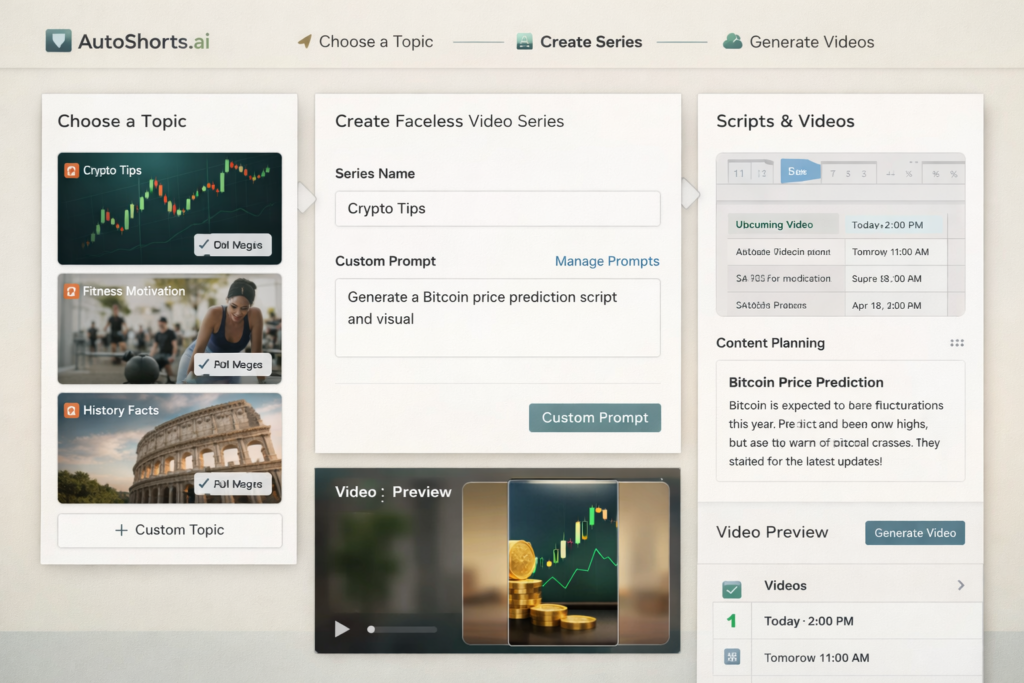
The workflow is one of the strongest parts of AutoShorts.ai. Instead of asking you to build every video manually from scratch, the platform guides you through a series-based system. You choose a topic, optionally use a custom prompt, let the AI generate a video, review the result, and then either publish or schedule it. That makes it easier to think in terms of content systems instead of isolated video files.
| Step | What You Do | Why It Matters |
|---|---|---|
| 1 | Choose a topic or series idea | Builds a repeatable content direction instead of random uploads |
| 2 | Use a built-in topic or write a custom prompt | Gives you more control over script direction |
| 3 | Let the AI generate a faceless video | Reduces manual production time |
| 4 | Preview the result | Helps catch weak hooks, awkward wording, or niche mismatch |
| 5 | Edit script, title, visuals, or music if needed | Adds a human quality-control layer |
| 6 | Schedule or publish | Supports consistency instead of last-minute posting |
For creators who struggle with consistency, this kind of workflow is often more important than having dozens of advanced editing features. The biggest advantage is not that AI can generate a video. It is that AI can reduce the number of repeated tasks between idea and upload.
Key Features That Make AutoShorts.ai Interesting
1. Series-Based Faceless Video Creation
One of the most practical parts of AutoShorts.ai is that it is built around recurring video series, not just one-off content generation. This matters because successful faceless channels usually grow through repetition. A creator does not need one random video. They need a format they can repeat, test, improve, and scale.
That structure makes the platform more useful for niche testing. Instead of constantly reinventing your workflow, you can use a system that keeps producing content around a central topic or content angle.
2. Custom Prompts for Better Content Control
AutoShorts.ai also supports custom prompts, which is important if you want more than generic AI output. The difference between bland content and useful niche content often comes down to prompt specificity. If you can guide the tool with better instructions, you have a much better chance of producing videos that feel more aligned with your audience.
For example, instead of using a broad topic like “AI videos,” a stronger prompt direction would be something like beginner AI mistakes, underrated AI tools for small businesses, daily productivity tips for remote workers, or faceless finance facts for beginners. The more specific your content direction is, the easier it becomes to produce videos that feel intentional instead of repetitive.
3. Preview and Edit Before Publishing
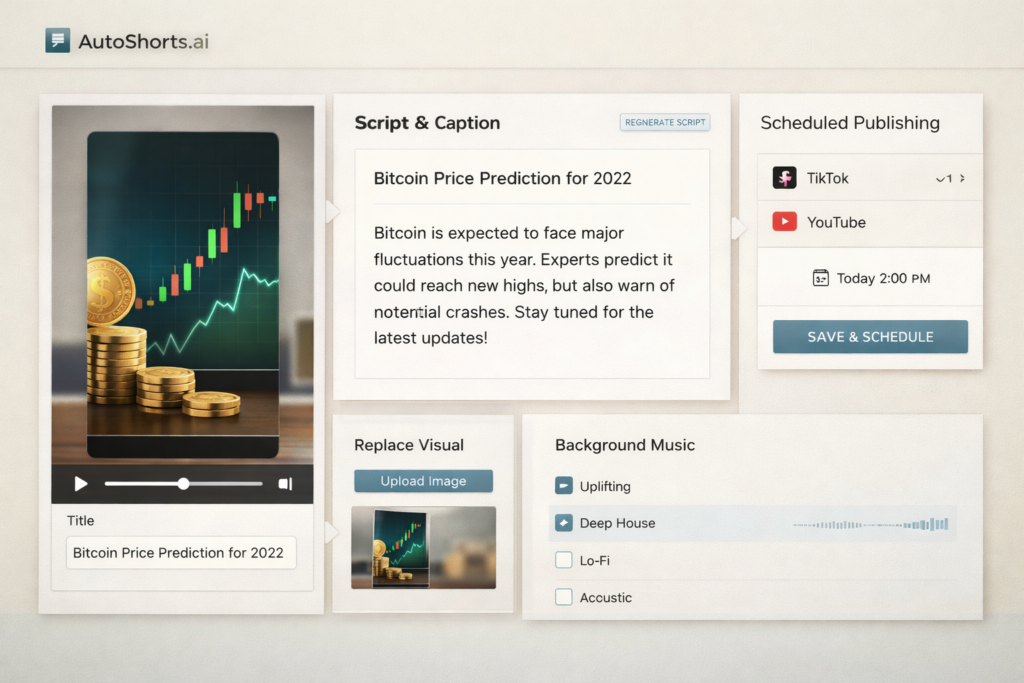
This is one of the most practical benefits of the platform. AutoShorts.ai is not just about blind automation. It also gives users a review layer before posting. That matters because AI-generated content can save time, but it still needs human judgment. A hook may be too weak, a title may be too generic, or the tone may not fit your niche. Even small edits can make the final result more usable.
For creators who want speed without giving up total control, this review step is a strong feature. It makes the tool more realistic for day-to-day content production.
4. Automated Scheduling and Posting
Scheduling is often underestimated, but it is a major part of consistency. A creator may have enough ideas and even enough content, but if posting is irregular, results are harder to measure. AutoShorts.ai tries to solve that by combining video generation with scheduling and posting support. That makes it more of a faceless content engine than just a content toy.
If your main weakness is execution discipline rather than content strategy, this could be one of the most useful parts of the platform.
5. Beginner-Friendly Positioning
AutoShorts.ai is easier to understand than many AI tools that depend on confusing credits, scattered modules, or overly technical workflows. Its value proposition is simple: help users create faceless short-form videos more quickly and publish them on a repeatable schedule. For beginners, that clarity is important. A tool that is easier to understand is easier to use consistently.
AutoShorts.ai Pricing
One of the good things about AutoShorts.ai is that the plan structure is relatively easy to understand. The public pricing structure is based around output frequency rather than abstract credits, which makes it more practical for creators who think in terms of publishing volume.
| Plan | Price | Best for | What Stands Out |
|---|---|---|---|
| Free | $0 | Testing the platform | Lets you create 1 video before paying |
| Starter | $19 | Beginners and light users | Designed for posting 3 times a week |
| Daily | $39 | Creators focused on consistency | Built around posting once a day |
| Hardcore | $69 | Higher-volume faceless publishers | Built around posting twice a day |
This pricing model is useful because it connects cost to publishing behavior. If you are serious about testing short-form content, a plan tied to cadence can be easier to evaluate than a tool that hides everything behind usage math.
Still, pricing should always be judged in context. If AutoShorts.ai helps you replace hours of scripting, editing, and scheduling work every week, even a paid plan may feel reasonable. But if you want deeply customized videos with unique branding and heavy creative control, you may still need extra manual tools, which changes the value equation.
Who Should Use AutoShorts.ai?
AutoShorts.ai is best for creators who care more about system efficiency than handcrafted editing. It makes the most sense for people who want to publish faceless short-form content consistently and do not want to manage every production step manually.
| User Type | Why AutoShorts.ai Can Be a Good Fit |
|---|---|
| Beginner faceless creators | Helps reduce the overwhelm of starting from zero |
| Busy solo creators | Saves time on repetitive production tasks |
| Niche testers | Makes it easier to try multiple content angles faster |
| Shorts-focused publishers | Supports a more consistent posting cadence |
| Content site owners expanding into video | Useful for turning article topics into short-form video ideas |
It may be less suitable for advanced editors, agencies that need highly customized branded content, or creators in sensitive factual niches where every line needs extra validation. AI can speed up production, but it does not eliminate the need for oversight.
If you want a faster way to test faceless short-form content ideas and turn them into a more consistent publishing system, AutoShorts.ai is worth trying.
👉 If you want a faster way to test faceless short-form content ideas and build a more consistent publishing workflow, try AutoShorts.ai here.
AutoShorts.ai Pros and Cons
| Pros | Cons |
|---|---|
| Reduces the workload between idea and published video | AI output still depends heavily on prompt quality |
| Series-based workflow supports repeatable publishing | Not ideal for creators who want deep cinematic control |
| Custom prompts give users more flexibility | Faceless automation can still feel generic in crowded niches |
| Preview and edit step adds useful quality control | Human review is still necessary for best results |
| Pricing structure is easy to understand | May not replace a full manual workflow for advanced creators |
Where AutoShorts.ai Saves the Most Time
The biggest strength of AutoShorts.ai is not that it can generate a single video. Plenty of AI tools can do that. Its real strength is that it reduces production friction across multiple stages of the workflow. That makes it more useful for creators who want content output, not just content experiments.
| Task | Manual Workflow | AutoShorts.ai-Style Workflow |
|---|---|---|
| Topic setup | Research and plan everything manually | Choose a series topic or custom prompt |
| Script development | Write each script from scratch | Use AI-assisted generation |
| Visual assembly | Source and arrange assets manually | Built into the platform workflow |
| Scheduling | Handle with separate tools or manually | Part of the publishing system |
| Consistency | Depends on discipline and available time | Easier to maintain through automation |
This is why AutoShorts.ai can be appealing for creators who keep stopping and restarting. It reduces the workload required to stay active. That alone can make a real difference when testing short-form content strategies.
Potential Drawbacks and Limitations
No honest AutoShorts.ai review should pretend that automation solves everything. AI can accelerate production, but it does not automatically create strong content. Hook quality, audience fit, topic selection, and content differentiation still matter.
The first limitation is that generic prompts usually lead to generic output. If your niche is crowded, bland content will disappear fast. AutoShorts.ai gives you tools to improve control, but you still need to steer the strategy.
The second limitation is that human review still matters. Even when automation works well, creators should still review titles, scripts, tone, and positioning. A video may be technically complete but strategically weak.
The third limitation is that this type of tool is more about speed and consistency than deep originality. If your content style depends on strong personal brand identity, complex storytelling, or very custom visuals, AutoShorts.ai may feel more like a productivity layer than a complete creative solution.
Is AutoShorts.ai Good for Beginners?
Yes, for many beginners, AutoShorts.ai is a practical starting point. The platform is easier to understand than a manual workflow built from separate script, video, voiceover, and scheduling tools. If you are new to faceless content, that simplicity can reduce friction and help you start faster.
However, beginners should still keep expectations realistic. A tool can shorten the path to publishing, but it cannot replace learning what viewers actually care about. Even if AutoShorts.ai saves time, you still need to understand what makes a good hook, what kinds of topics get ignored, and how to tell when a content series is worth continuing.
For that reason, beginners should treat AutoShorts.ai as a workflow accelerator, not a guaranteed shortcut to views.
Best Practices for Getting Better Results With AutoShorts.ai
If you decide to use AutoShorts.ai, the smartest approach is to use the platform as a testing engine. Do not rely on automation alone. Pair it with a clear strategy so you can improve results over time.
- Choose one clear niche first instead of trying to cover everything at once.
- Write more specific prompts so your videos feel less generic.
- Review every video early on to understand where the AI needs correction.
- Track hooks, retention patterns, and repeatable formats.
- Keep what works, and improve winning topics manually if needed.
- Use automation to increase testing speed, not to avoid thinking.
This mindset is especially important if you want long-term results. Volume helps, but smart volume works better than random volume.
Is AutoShorts.ai Worth It?
AutoShorts.ai is worth considering if your biggest problem is not lack of ideas, but the burden of production. If you know you should be publishing more often but keep getting stuck on scripting, editing, and scheduling, this kind of tool can create real value.
It is especially worth trying if you want to build a faceless short-form system, test multiple ideas faster, and maintain a more regular upload schedule. On the other hand, if you want highly original, heavily branded, visually complex videos, the platform may not replace your manual workflow.
For most creators, the best conclusion is this: AutoShorts.ai is not magic, but it can be useful. Its value comes from helping you reduce repetitive work and increase publishing consistency. That makes it a good fit for creators who want a workflow advantage rather than a fully custom studio.
Ready to test whether a more automated faceless video workflow can help you publish more consistently? Try AutoShorts.ai and see if it fits your content system.
👉 For creators who want a simpler way to generate, schedule, and publish faceless short-form videos, AutoShorts.ai is worth testing.
Final Verdict
AutoShorts.ai stands out most as a practical faceless short-form workflow tool. Its biggest strengths are not flashy promises. They are structural advantages: a series-based approach, custom prompts, a review layer before publishing, and a pricing model tied to posting cadence. Those are useful features for creators who care about execution and consistency.
If your goal is to test faceless content ideas quickly and publish on a repeatable schedule, AutoShorts.ai is a relevant tool to look at. If your goal is cinematic originality and total creative control, it may feel too automated. In other words, AutoShorts.ai is strongest when used as a scalable content workflow tool, not as a complete replacement for judgment or strategy.
FAQ
What is AutoShorts.ai used for?
AutoShorts.ai is used to create, schedule, and publish faceless short-form videos with less manual work. It is designed for creators who want a more streamlined workflow from topic selection to posting.
Is AutoShorts.ai good for TikTok and YouTube Shorts?
Yes, it is clearly aimed at creators working in short-form vertical video formats. It is especially relevant for users building faceless channels that depend on consistent posting.
Does AutoShorts.ai have a free plan?
Yes. The platform publicly shows a free plan that allows users to create 1 video before moving to paid plans.
Can you edit videos before AutoShorts.ai posts them?
Yes. One of the practical parts of the workflow is that users can review and edit generated content before publishing, which helps reduce the risk of low-quality automation.
Who is AutoShorts.ai best for?
It is best for creators who want to publish faceless short-form content more consistently without building every video manually from scratch.
About the Author
Xu Xun
Contact: xuxun1208@gmail.com
Last Updated: June 2026