
AnyTrans Review: A Smarter Way to Transfer, Back Up, and Manage iPhone Data

If you have ever felt limited by iTunes, frustrated by rigid iCloud restore options, or simply wanted a better way to move files between your iPhone and computer, this AnyTrans review will help you decide whether the software is worth your money.

AnyTrans is designed as an all-in-one iPhone manager for people who want more control over how they transfer, back up, restore, and organize data. Instead of locking you into one narrow workflow, it gives you multiple ways to move content between iPhone, iPad, iPod, computer, iTunes, and iCloud. That flexibility is the biggest reason this software stands out.

For users who upgrade to a new iPhone, archive photos, export messages, move music, protect WhatsApp chats, or keep several Apple devices in sync, AnyTrans can solve several problems in one desktop app. That makes it much more appealing than a tool that only handles one task.
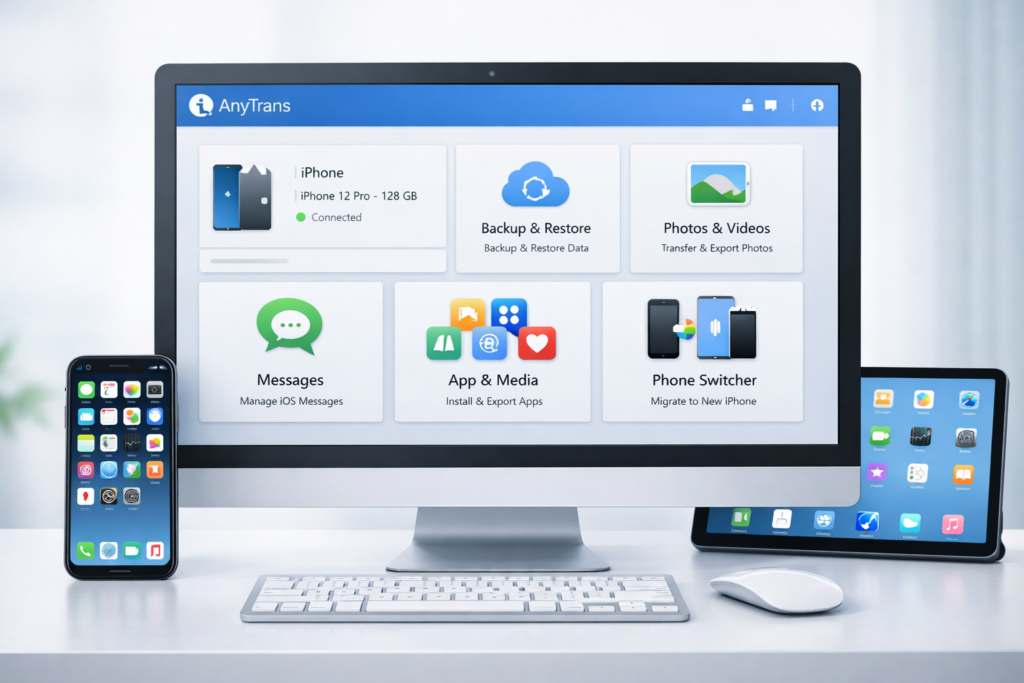
AnyTrans desktop dashboard for iPhone transfer backup and device management

👉 Try AnyTrans if you want a simpler way to transfer, back up, and manage iPhone data without relying on iTunes alone.

What Is AnyTrans?

AnyTrans is desktop software for Windows and Mac that helps users manage iPhone, iPad, and iPod content more freely. It is built for people who want to move beyond the limitations of Apple’s default tools and handle data in a more selective and practical way.

Instead of treating your device like a closed box, AnyTrans gives you ways to browse, export, import, migrate, and restore data with much more control. That includes media files, personal files, messages, apps, backups, and certain types of chat data. For many users, that means less dependence on one full-device backup or one rigid syncing method.

In simple terms, AnyTrans is best for people who want their iPhone data to feel accessible instead of trapped.

Quick Verdict

CategoryVerdict
Best foriPhone users who want more flexible transfer and backup control
Main strengthSelective transfer, selective restore, and device migration convenience
Biggest advantageMore practical control than iTunes or standard iCloud workflows
Main drawbackSome users may not need this much functionality if they only use basic backups
Worth buying?Yes, especially for migration, backup management, media export, and message archiving

Why AnyTrans Stands Out

The biggest difference between AnyTrans and Apple’s default tools is flexibility. Apple’s built-in workflows are fine if you only want standard syncing or complete device restoration. But many people do not want an all-or-nothing workflow. They want to transfer selected files, restore only what matters, keep current content intact, or move data from one place to another without extra complications.

That is where AnyTrans becomes attractive. It is not just trying to be a backup app. It is trying to be a complete iPhone management hub.

TaskTypical Apple WorkflowAnyTrans Advantage
Export specific photosOften more manual and time-consumingCategory-based export and easier browsing
Move music to iPhoneCan feel restrictiveMore flexible transfer between devices and computers
Restore backup dataOften focused on full restoreMore selective recovery options
Switch to a new iPhonePossible but not always flexibleMultiple migration paths and easier content transfer
Archive messagesLimited for ordinary usersExport and print conversations and attachments

Key Features Explained

1. Photo and Video Management

One of the easiest reasons to consider AnyTrans is photo management. Most iPhone users accumulate huge libraries of photos and videos, but exporting and organizing them is often more annoying than it should be. AnyTrans helps by sorting content into categories and making it easier to locate what you want.

That matters for anyone who wants to back up family memories, free up space, transfer media to a computer, or keep a clean archive outside the phone itself. If you often move photos to your desktop for editing, long-term storage, or content creation, this alone can make the software feel useful.

2. Music Transfer Without Old iTunes Friction

Many users still have music libraries spread across computers, old iPhones, iPods, and iTunes libraries. AnyTrans is built to make those transfers easier. Instead of forcing you into the old sync mindset, it gives you a more flexible way to move music where you want it.

This is especially useful if you have an older personal music collection, download audio outside streaming apps, or want to move songs to a new iPhone without wiping your current library.

3. Message Backup, Export, and Printing

Messages can be more valuable than people expect. They are often a mix of personal memories, work conversations, confirmation details, and useful records. AnyTrans gives users a way to export or print those conversations more conveniently, including attachments.

This is a strong selling point because message management is not just about convenience. For some users, it is about preserving meaningful content or keeping records available outside the phone.

4. App and App Data Management

AnyTrans also includes app management tools that make it easier to handle apps across devices. If you manage several family devices or move to a new iPhone, being able to handle apps more efficiently can save time and reduce frustration.

For users with multiple Apple devices in the same household, this makes the software feel more like a practical household utility instead of a one-time migration tool.

5. WhatsApp Transfer and Backup

Chat history is one of the most sensitive parts of switching devices. People do not just want their photos and contacts. They also want their conversations. AnyTrans includes WhatsApp-focused tools that make backup and migration much more attractive for users who rely heavily on chat history.

This can be a major decision factor for buyers because chat migration is often stressful, especially when moving to a new phone.

AnyTrans WhatsApp transfer and iPhone message export interface

6. iPhone-to-iPhone and Android-to-iPhone Migration

This is one of the strongest buying angles for AnyTrans. When people upgrade phones, they want the process to be quick, low-risk, and complete. AnyTrans is built for exactly that use case, helping users move important content from an old iPhone or even an Android phone to a new iPhone.

That makes the software easy to recommend to people who are buying a new device right now, because the need is immediate and easy to understand.

7. Flexible Backup and Restore

Backup control is where AnyTrans becomes especially appealing. Many users do not want to blindly restore an entire device just to recover a few files. They want to preview what is in a backup, restore selected data, and avoid overwriting content unnecessarily.

AnyTrans is built around that more flexible approach. It also supports different backup styles, which is important for users who want something more efficient than repeating the same full backup every time.

If backup management is one of your main pain points, this is the section where AnyTrans starts to justify its price.

AnyTrans backup and selective restore options on desktop

AnyTrans Features at a Glance

Feature AreaWhat It Helps WithWhy It Matters
Photo managementExport and organize photos and videos more easilyUseful for backup, storage, and cleanup
Music transferMove music between devices and computersBetter for users with personal libraries
MessagesExport, print, and archive conversationsHelpful for records and personal history
AppsHandle apps more efficiently across devicesSaves time for families and multi-device users
WhatsApp toolsBack up and transfer chat dataImportant during device switching
Device migrationMove from old iPhone or Android to a new iPhoneStrong value during upgrades
BackupsCreate and manage flexible backupsBetter control than a rigid full-restore workflow
Restore optionsRecover only what you needReduces risk and saves time

Who Should Buy AnyTrans?

AnyTrans is not for every iPhone user. If you only use iCloud backups, never export anything, and rarely switch devices, you may not need it. But for the right type of user, it can be very useful.

  • People upgrading to a new iPhone who want a smoother migration process
  • Users with large photo or video libraries who need better export and organization tools
  • People who care about backup control and want more than a blind full restore
  • Families with multiple Apple devices who benefit from centralized management
  • Users who want to preserve messages or WhatsApp history outside the phone itself
  • Anyone tired of iTunes limitations and looking for a more flexible desktop manager

Compatibility and System Support

AnyTrans supports both Windows and Mac, which is important because many iPhone utility tools lean too heavily toward one platform. It is also designed to work across a wide range of iOS versions and supports Android in migration-related scenarios, which expands its usefulness for switchers.

CategorySupport
WindowsWindows 11, 10, 8, 7, Vista
MacmacOS 10.13 and above
iPhone/iPad/iPodiOS 5 to iOS 26
AndroidAndroid 5.0 and above for supported workflows

That broad compatibility makes AnyTrans more practical than a niche transfer utility that only works in limited situations.

AnyTrans Pricing

AnyTrans offers several plan types, which gives users flexibility based on whether they prefer a lower upfront cost or a lifetime license. For many buyers, the one-time plan is the most appealing because it avoids recurring payments and feels easier to justify over the long term.

PlanListed PriceBest For
Family Plan$79.99Multiple computers and long-term family use
One-Time Purchase$59.99Single-computer lifetime access
1-Year Subscription$39.99Lower upfront cost

As with most software pricing, it is smart to check the latest offer before buying because discounts can change. Still, the pricing structure makes sense: subscription for lower entry cost, or lifetime purchase for users who expect long-term use.

👉 Check the latest AnyTrans price and choose the plan that fits your backup, transfer, and migration needs best.

Pros and Cons

ProsCons
Flexible data transfer between iPhone, computer, iTunes, and iCloudSome users may not need a paid tool for basic backup habits
Helpful migration options for new iPhone setupDesktop software is less appealing to users who want mobile-only solutions
Useful backup and restore controlApple ecosystem restrictions still affect what third-party tools can do
Good value for users with lots of media or messagesCan feel like more software than casual users need
Broad feature set in one appBest value appears when you use multiple features, not just one

How AnyTrans Compares to iTunes and iCloud

It is important to be clear here: AnyTrans does not need to replace Apple completely to be useful. Its value comes from giving users more choice and more control.

If you only want Apple’s basic syncing and automatic cloud backup, built-in tools may be enough. But if you want to transfer selected files, export media, archive messages, move data from Android to iPhone, or restore only part of a backup, AnyTrans is much easier to justify.

That is why this software appeals most to people who already feel some friction in Apple’s default workflows. It fills the gaps where convenience and selectivity matter most.

Real-World Use Cases Where AnyTrans Makes Sense

Software reviews rank better when they answer practical questions, so here are the most realistic situations where AnyTrans is worth considering:

  • You bought a new iPhone and want to move data quickly without hassle.
  • You need to export photos and videos to your computer regularly.
  • You want a better way to back up or preserve messages.
  • You need more control over restoring data from backups.
  • You want to keep WhatsApp conversations safe before switching devices.
  • You manage several Apple devices in one family or work environment.
  • You are tired of depending entirely on iTunes for music or data movement.

These are the scenarios where AnyTrans feels most valuable, because the software saves time, reduces friction, and gives users more confidence during important data tasks.

AnyTrans iPhone to iPhone and Android to iPhone migration interface

Is AnyTrans Worth It?

For casual users who only rely on standard iCloud backups and never move files manually, AnyTrans may be more than they need. But for people who regularly manage photos, transfer music, archive messages, migrate devices, or want more backup control, it is much easier to recommend.

The software’s biggest strength is not just one feature. It is the combination of transfer flexibility, migration convenience, and better control over backup and restore. That combination makes AnyTrans much more compelling than a narrow single-purpose tool.

Overall, AnyTrans is worth considering if you want an iPhone manager that gives you more freedom than Apple’s default tools and makes common data tasks less frustrating.

👉 Get AnyTrans if you want a more flexible way to transfer, back up, and manage your iPhone data from your computer.

Frequently Asked Questions

Is AnyTrans free?

AnyTrans offers a free download, but the full version requires a paid license to unlock the full feature set.

Is AnyTrans safe to use?

AnyTrans is sold as a commercial product by iMobie and is presented as clean and secure software. As with any utility tool, it is best to download it from the official website.

Can AnyTrans transfer WhatsApp data?

Yes. One of its notable selling points is helping users back up and transfer WhatsApp content more conveniently when managing or switching devices.

Can AnyTrans move data from Android to iPhone?

Yes. It is designed to support migration workflows for users moving from Android to iPhone as well as from one iPhone to another.

Who should buy AnyTrans?

AnyTrans is best for users who want more control over iPhone data, especially people migrating to a new device, exporting media, backing up messages, or managing several Apple devices more efficiently.

Final Thoughts

If your goal is to find a better way to manage iPhone data, this AnyTrans review shows why the software stands out. It is not trying to be just another backup tool. It is trying to make file transfer, device migration, message archiving, media export, and restore workflows much easier to handle in one place.

That broader utility is exactly what makes it easier to recommend. For the right user, AnyTrans can save time, reduce migration stress, and provide more practical control over important iPhone data.

Leave a Reply