
If you are looking for a practical way to improve browser privacy on Windows without manually tweaking every hidden browser setting, this AntiBrowserSpy review will help you decide whether it is worth your money. Online privacy is no longer just about deleting history. Advertisers, trackers, and large platforms can learn a surprising amount from your browser behavior, your device setup, and the small technical signals your browser gives away every time you go online.
That is exactly where AntiBrowserSpy tries to position itself. Instead of expecting ordinary users to harden Chrome, Edge, Firefox, or Opera one setting at a time, it offers a central privacy-focused dashboard that aims to reduce tracking, erase traces, and give users more control over how much information their browsers leak. For many Windows users, that convenience is the real selling point.
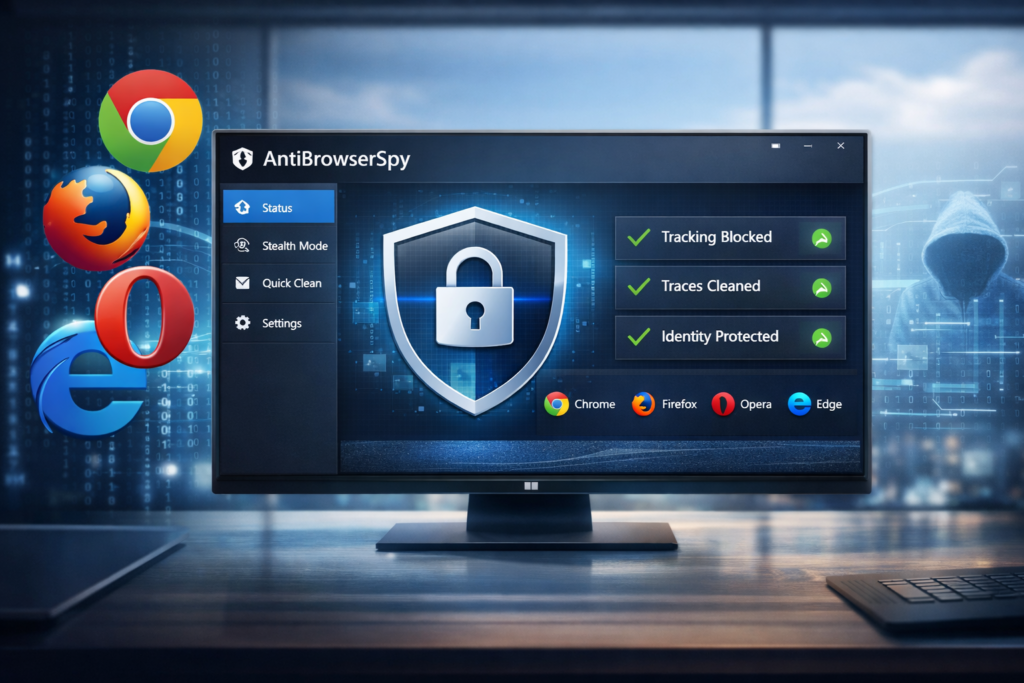
👉 See the latest AntiBrowserSpy price and check the current offer here.
Quick Verdict
AntiBrowserSpy is best for Windows users who want an easier way to improve browser privacy without becoming privacy experts. It is not a magic invisibility tool, and it does not replace a VPN, but it can still be useful if your goal is to reduce tracking, clean browsing traces, and manage browser privacy settings from one place. The strongest angle is not “perfect anonymity.” The strongest angle is convenient privacy hardening for everyday Windows users.
AntiBrowserSpy at a Glance
| Category | Details |
|---|---|
| Product name | AntiBrowserSpy |
| Developer | Abelssoft |
| Main purpose | Reduce browser tracking, erase internet traces, and improve privacy controls |
| Platform | Windows |
| Supported browsers | Chrome, Firefox, Opera, Edge |
| Trial availability | Yes |
| Best for | Windows users who want easier browser privacy management |
| Ideal use case | Reducing tracking, cleaning traces, and centralizing privacy settings |
Why Browser Privacy Still Matters
Many people still think private browsing is enough. It is not. Private browsing can help reduce what is stored locally on your own device, but it does not stop websites, networks, and other parties from observing activity in broader ways. That is why browser privacy tools, anti-tracking settings, privacy-focused extensions, and fingerprint-reduction methods continue to matter.
The real privacy issue today is not only your browsing history. It is the combination of cookies, trackers, browser settings, ad scripts, profiling systems, and browser fingerprinting. Even users who clear history regularly may still leave behind useful signals. That is why tools like AntiBrowserSpy are marketed as more than just cleaners. They are sold as privacy-management tools that try to reduce the amount of usable data your browser reveals.
What Is AntiBrowserSpy?
AntiBrowserSpy is a Windows privacy utility designed to help users regain control over browser privacy. In practical terms, that means it focuses on cleaning browsing traces, adjusting privacy-related settings, reducing tracking exposure, and giving users a simpler way to monitor the privacy status of their browsers.
The product is aimed primarily at normal desktop users, not advanced privacy hobbyists. That matters, because it shapes how you should evaluate it. This is not software built for people who already live inside custom browser configurations and manually tweak every advanced setting. It is built for users who want a faster, easier, and more visual approach.
Main Features
| Feature | What It Means for Users | Why It Matters |
|---|---|---|
| Stealth Browser | Designed to change or obscure digital fingerprint signals | Helps reduce how consistently your browser can be identified |
| Privacy by Click | One-click cleanup of browsing traces | Good for users who want speed and simplicity |
| Identity Concealment | Combines multiple privacy mechanisms | Supports the product’s privacy-protection positioning |
| Browser-Specific Protection | Lets you configure protection per browser | Useful if you use multiple browsers for different tasks |
| Background Guard | Alerts you when software tries to change privacy settings | Adds visibility and ongoing monitoring |
| Tracker Visibility | Shows which companies may be profiling you | Makes privacy more understandable for non-technical users |
| Security Score Dashboard | Provides a quick overview of privacy status | Useful for beginners who want a simple summary |
The feature mix is what makes AntiBrowserSpy easier to market than a generic browser cleaner. It gives you several talking points beyond “delete history.” You can discuss fingerprinting, browser-specific hardening, privacy dashboards, and background monitoring, which makes the article more useful for both readers and search engines.
What AntiBrowserSpy Does Well
1. It Makes Privacy Easier for Normal Users
The biggest strength of AntiBrowserSpy is convenience. Most users do not want to spend an hour comparing browser privacy menus, reading technical explanations, or testing multiple extensions just to reduce tracking. AntiBrowserSpy turns privacy improvement into a simpler workflow. That alone makes it more appealing to mainstream buyers.
2. It Goes Beyond Basic History Cleaning
There are many tools that can delete temporary files or erase traces, but AntiBrowserSpy is positioned as more than that. It also focuses on digital fingerprinting, hidden privacy settings, and ongoing privacy awareness. That broader angle makes it easier to justify as a paid tool rather than a simple one-click cleaner.
3. It Supports Multiple Browsers
Many Windows users do not rely on only one browser. They may use Chrome for work, Firefox for personal browsing, Edge because it is preinstalled, and Opera for specific use cases. AntiBrowserSpy becomes more useful in that kind of environment because it gives users one privacy-focused interface for several browsers instead of making them manage everything separately.
4. It Has a Beginner-Friendly Selling Point
The dashboard-style presentation matters more than some people think. Privacy tools often fail not because they lack features, but because ordinary users find them too technical. AntiBrowserSpy has a more approachable pitch: see your privacy status, adjust settings, clean traces, and reduce exposure without deep technical knowledge.
Where AntiBrowserSpy Is Less Convincing
1. It Does Not Make You Fully Anonymous
This is the most important point to state clearly in any honest review. AntiBrowserSpy may help reduce tracking and improve browser privacy, but that is not the same as becoming invisible online. No serious review should oversell it as perfect anonymity software.
2. It Is Not a VPN Replacement
AntiBrowserSpy and a VPN solve different problems. A VPN mainly changes your IP location and encrypts traffic between you and the VPN server. AntiBrowserSpy focuses on browser privacy, traces, and identity-related browser signals. The two can complement each other, but one is not a full substitute for the other.
3. Advanced Users May Already Handle Some of This Manually
If you already use strict browser settings, privacy-focused extensions, hardened browser profiles, and strong browsing habits, the software may feel more like a convenience product than an essential one. That does not make it bad. It simply means its value depends heavily on the user’s skill level and tolerance for manual setup.
4. It Is Windows-Only
This article is useful for Windows search intent, but less useful for readers on macOS, Linux, or mobile. That does narrow its potential audience. However, from an SEO perspective, that can also help you stay focused on a clearer keyword target: Windows browser privacy.
Pros and Cons
| Pros | Cons |
|---|---|
| Easy to understand for non-technical users | Windows-only |
| Supports multiple mainstream browsers | Does not replace a VPN |
| More than just a history-cleaning tool | Does not guarantee full anonymity |
| Useful dashboard and privacy overview | Advanced users may prefer manual privacy hardening |
| One-click cleanup is convenient | Less relevant for users outside Windows |
| Can be attractive for multi-browser users | Value depends on how much convenience you need |
AntiBrowserSpy vs Incognito Mode vs VPN
| Feature | Incognito Mode | VPN | AntiBrowserSpy |
|---|---|---|---|
| Prevents local history from being saved | Yes, partly | No | Helps by cleaning traces |
| Changes IP address | No | Yes | No |
| Focuses on browser privacy settings | Very limited | No | Yes |
| Helps reduce fingerprint consistency | No real focus | Not by itself | Yes, that is part of its positioning |
| Monitors browser privacy setting changes | No | No | Yes |
| Good for users who want one central privacy dashboard | No | No | Yes |
| Provides total anonymity | No | No | No |
This comparison is one of the most valuable sections in the article because it aligns well with buyer intent. Many users search from confusion, not certainty. They are not always asking, “Should I buy AntiBrowserSpy?” Sometimes they are really asking, “Do I already have enough privacy protection?” This section answers that better than a pure feature list.
Real-World Use Cases
For Shared or Family PCs
If more than one person uses the same Windows computer, privacy becomes more practical and personal. A browser privacy tool can help reduce leftover traces, saved data exposure, and accidental privacy leaks. This use case is easy for readers to understand and often converts better than abstract privacy arguments.
For Multi-Browser Users
If you switch between Chrome, Firefox, Edge, and Opera, managing privacy separately in each browser can become annoying. AntiBrowserSpy offers more value in that situation because it aims to centralize control.
For Users Who Dislike Technical Setup
Many people care about privacy, but they do not care enough to study dozens of browser settings and advanced guides. They want a product that gives them a simpler path. AntiBrowserSpy is easier to justify for that audience than for power users.
For People Concerned About Tracking and Profiling
If you frequently see ads that feel uncomfortably specific, or if you are becoming more aware of how browsers and websites build profiles over time, the software’s core pitch becomes easier to appreciate.
Who Should Buy AntiBrowserSpy?
- Windows users who want easier browser privacy protection
- People who use more than one browser regularly
- Users who know Incognito mode is not enough
- People who want a more visual, guided privacy tool
- Buyers who value convenience over manual tweaking
Who Should Skip It?
- Users who already harden their browsers manually and enjoy doing so
- People who expect absolute anonymity online
- Users on Mac or mobile who need a cross-platform solution
- Buyers who only want a free privacy approach and do not mind extra setup time
Pricing and Overall Value
For a Windows utility in this category, AntiBrowserSpy sits in the kind of price range where the buying decision usually comes down to convenience. Most buyers are not asking whether the software does something completely impossible to do any other way. They are asking whether it saves them enough time, confusion, and privacy-management effort to be worth paying for.
That is why the value proposition depends on the user. If you are highly technical, you may feel that built-in browser tools, privacy extensions, and stricter browsing habits already cover much of what you need. If you are a normal Windows user who wants a simpler and more centralized privacy tool, AntiBrowserSpy can look much more attractive.
Ease of Use and User Experience
Ease of use is one of the strongest reasons someone would choose AntiBrowserSpy over a free manual setup. A tool like this does not win because it sounds technical. It wins because it lowers friction. The dashboard approach, one-click privacy actions, browser-specific protection, and privacy-status style presentation all point in the same direction: a simpler user experience for mainstream buyers.
That also makes it easier to recommend in a review article. Many privacy products are difficult to explain without becoming too technical. AntiBrowserSpy is easier to present in a buyer-friendly way because the benefits are more visual and more concrete: cleaner traces, clearer privacy status, easier settings control, and less guesswork.
How to Use AntiBrowserSpy More Effectively
Even if you buy the software, you should not treat it as a complete privacy solution by itself. A more realistic privacy setup often includes several layers:
- Use AntiBrowserSpy to improve browser privacy settings and reduce trace exposure
- Use a reputable VPN if you also want IP-level privacy protection
- Review browser extensions regularly and remove ones you do not trust
- Use stronger account security, including password managers and two-factor authentication
- Stay careful with social logins, ad-heavy websites, and permissions you grant to browser add-ons
This layered explanation is helpful for conversion because it sounds credible. It shows readers you are not overselling the product, which usually builds more trust than exaggerated promises do.
Is AntiBrowserSpy Worth It?
Yes, for the right user.
If you want a simple way to improve browser privacy on Windows, reduce tracking exposure, and manage privacy settings without going deep into technical details, AntiBrowserSpy is a reasonable option. Its value is strongest when you care about convenience, use multiple browsers, and want a more guided privacy experience.
If you are advanced, already privacy-focused, and comfortable doing everything manually, you may still like the software, but you are less likely to see it as essential. In that case, its biggest benefit is convenience rather than necessity.
Final Verdict
AntiBrowserSpy is not best understood as a miracle anonymity button. It is better understood as a browser privacy management tool for Windows users who want less tracking, fewer leftover traces, and more control without extra hassle. That is a much more honest and much more useful way to evaluate it.
For the right audience, that is enough to make it worth considering. It gives you a practical angle for the review, a realistic buyer profile, and a clear reason to exist in a market where many users still underestimate how much their browsers reveal.
FAQ
Does AntiBrowserSpy work with Chrome and Edge?
Yes. It is designed for major Windows browsers, including Chrome and Edge, which makes it useful for users who do not rely on only one browser.
Is AntiBrowserSpy better than Incognito mode?
They serve different purposes. Incognito mainly limits what is stored locally on your device. AntiBrowserSpy is meant to go further by focusing on privacy settings, tracking reduction, and browser-level privacy controls.
Do I still need a VPN if I use AntiBrowserSpy?
Possibly, yes. A VPN and AntiBrowserSpy address different privacy layers. If you also want IP-level privacy and encrypted traffic routing, a VPN can still be useful.
Is AntiBrowserSpy for Mac?
No. This product is positioned for Windows users, so it is most relevant if your website targets Windows software search traffic.
Who is AntiBrowserSpy best for?
It is best for ordinary Windows users who want better browser privacy without spending a lot of time on manual setup and technical tweaking.
About the Author
Xu Xun
Contact: xuxun1208@gmail.com
Last Updated: June 2026