
If you are researching OpenArt and wondering whether it is worth paying for, this review is built to answer that clearly.
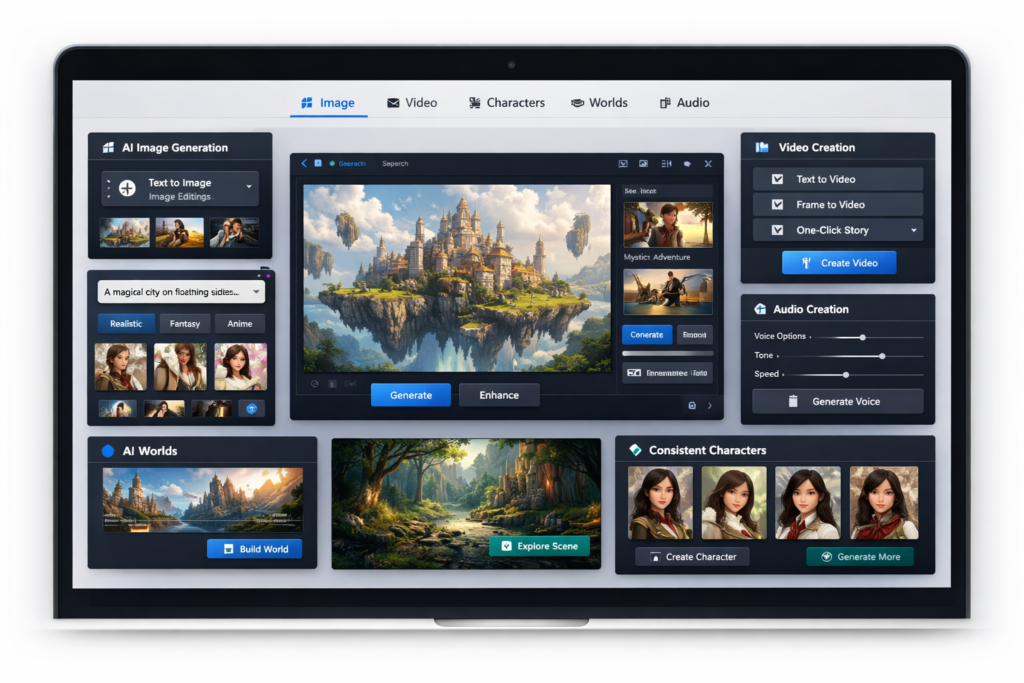
OpenArt is no longer just another AI image generator. It is now positioned more like an all-in-one AI creator studio that combines image generation, image editing, consistent characters, short-form video tools, reusable 3D worlds, audio creation, and custom model training inside one platform.
That broader positioning is exactly why OpenArt is attracting attention. Instead of juggling one tool for AI art, another for character consistency, another for lightweight video generation, and another for voiceovers, creators can potentially keep much more of the workflow in one place.
But wider feature coverage does not automatically mean better value for everyone. Some people only need a simple image generator. Some want a true professional video editor. Others need the cheapest possible option, not a broader creative ecosystem.
So this OpenArt review takes the practical angle. I am not just listing features. I am looking at what OpenArt actually does well, where it still has limits, how the pricing works, who should use it, who should skip it, and whether it makes sense for creators, marketers, agencies, and content businesses.
If your goal is to choose a platform that can support recurring visual content instead of one-off generations, OpenArt is one of the more interesting tools in this category right now.
Quick Verdict
| Category | Verdict |
| Best for | Creators, marketers, and storytellers who want images, characters, video, and creative asset reuse in one platform |
| Not ideal for | Users who only need a cheap image generator or a full traditional video editor |
| Biggest strength | Broad all-in-one workflow with strong character and world-building potential |
| Biggest weakness | Credit-based usage can become expensive for heavy production |
| Standout feature | Consistent characters combined with reusable OpenArt Worlds |
| Overall rating | 8.8/10 |
What Is OpenArt?
At a basic level, OpenArt is an AI creative platform for generating and editing visual content. But if you stop there, you miss the real story.
OpenArt has expanded beyond simple text-to-image generation into a broader creator workflow. It now covers AI images, AI video, character creation, creative worlds, audio, and custom model training. That makes it closer to a lightweight creative production environment than a narrow art generator.
This matters because the value of the tool changes depending on how you work. If you are only generating occasional images, OpenArt may feel broader than you need. If you regularly create campaigns, stories, recurring characters, branded scenes, or content series, the extra feature depth starts to make a lot more sense.
In other words, OpenArt is strongest when you use it as a system, not just as a button for making one nice picture.
What Makes OpenArt Different?
The easiest way to understand OpenArt is to compare it with the two common extremes in this market.
On one side, you have simple AI image tools that are easy to use but narrow in scope. They can generate visuals, but they do not help much with reusable characters, visual continuity, world-building, model training, or connected multi-format output.
On the other side, you have specialized tools for video, voice, design, or production. These can go deeper in one area, but they usually require users to stitch together multiple subscriptions and workflows.
OpenArt sits in the middle. It tries to give users one platform where a creative idea can move from prompt to image, then from image to character, then from character to video, and eventually into a reusable environment or ongoing content system.
That workflow continuity is its biggest strategic advantage.
For creators building repeatable visual brands, recurring social content, short-form stories, faceless media assets, AI characters, or campaign variations, that continuity can be more valuable than having the absolute best single feature in one category.
OpenArt Review: Core Features
1. AI Image Generation
OpenArt still begins with its image generation layer, and for many users that will be the main entry point.
The platform supports text-based image creation, model selection, and a wide range of visual directions. That alone is not unique anymore, but OpenArt becomes more useful because image generation is not isolated from the rest of the ecosystem.
You can create images, refine them, reuse them as references, build characters from them, and carry those assets into video or world-based workflows. That is a smarter long-term setup than platforms that treat each generation as a disposable result.
If your content strategy depends on consistent visual identity, that difference matters a lot.
2. AI Image Editing
One reason many AI image tools fall apart in real workflows is that they are good at generation but weak at revision. OpenArt tries to solve that with a stronger editing layer.
Instead of forcing users to regenerate from scratch every time an output is close but not right, OpenArt offers image editing capabilities that help refine results. That makes the platform more practical for marketers, bloggers, ecommerce teams, and creators who care about usable outputs rather than endless experimentation.
This is especially useful for things like changing scene details, improving compositions, adapting style, cleaning up backgrounds, or creating variations from a stronger base image.
For day-to-day content production, editing is not a bonus feature. It is one of the reasons a platform becomes usable at scale.
3. Consistent Characters
This is one of the most compelling parts of OpenArt.
Many AI tools can generate attractive people or fictional figures, but they struggle to keep the same character visually stable across multiple outputs. That creates a huge problem for anyone building a story series, virtual influencer, brand mascot, educational character, comic identity, or recurring visual brand.
OpenArt puts much more emphasis on reusable characters than many competing platforms. You can build characters from prompts, reference images, or presets, then use them again across multiple images and even video-oriented workflows.
That is a major productivity advantage because it reduces the need to fight the model every time you want consistency. Instead of creating a fresh face from zero each time, you are building a reusable creative asset.
If your content plan includes recurring personalities, this feature alone can be enough to justify serious attention.
4. AI Video and Story Creation
OpenArt is also much more serious about video than many users first assume.
The platform now supports several video directions, including text-to-video, image-to-video, motion-based video creation, lip-sync workflows, and story-oriented generation. That makes OpenArt more than a still-image platform with a token animation effect added on top.
What is attractive here is speed and creative convenience. If you want lightweight social clips, explainer-style outputs, visual story experiments, character-driven shorts, or quick concept videos, OpenArt can cover much more of that workflow than a basic image generator can.
Still, this is where readers need to be realistic. OpenArt is useful for AI video creation, but it should not be confused with a full traditional video editor. If your workflow depends on detailed manual cutting, timeline-heavy editing, advanced transitions, or professional finishing inside the same app, you will still want separate editing software.
That does not make OpenArt weak. It just means the product is strongest at AI-assisted creation, not full post-production replacement.
5. OpenArt Worlds
OpenArt Worlds is one of the most interesting features in the platform because it addresses a problem that frustrates almost everyone working with generative visuals: inconsistency.
Normally, you generate a strong scene once, then struggle to recreate it from new angles or with new compositions. OpenArt Worlds takes a different approach by turning a prompt or image into a reusable 3D environment that you can explore, frame, and build on later.
That is powerful because it changes AI visuals from one-off outputs into something closer to a repeatable creative environment. If you are building serialized content, scene continuity, product storytelling, short-form episodes, or branded visual systems, reusable worlds can save a lot of wasted time.
It also gives OpenArt a more distinctive identity. Plenty of tools can generate pretty images. Far fewer help creators turn those images into reusable spaces with stronger compositional control.
For advanced users, this is one of the most exciting reasons to watch OpenArt.
6. Audio Creation
OpenArt also includes audio generation, which makes the platform more useful for creators working across multiple content formats.
Instead of treating visuals as the only output, OpenArt gives users a way to add voice-driven content into the workflow. That is helpful for short video narration, explainers, simple storytelling, content repurposing, and creator experiments that need more than silent visuals.
This feature will not replace every dedicated audio tool, but it reinforces the same core strength we keep seeing throughout the product: OpenArt is trying to reduce tool fragmentation.
If you are a solo creator or small team, fewer disconnected subscriptions can be a real advantage.
7. Custom Model Training
OpenArt also supports custom model training, which moves the platform beyond casual use.
This matters for users who want to train a model around a particular style, face, character, object, or visual identity. For businesses and power users, that can mean more predictable outputs, stronger brand alignment, and less dependence on long prompt trial-and-error sessions.
In practical terms, model training makes OpenArt more scalable. Instead of reinventing your visual direction over and over, you can build assets and systems that improve repeatability.
If you only create casually, this may be more than you need. But if you think in terms of ongoing campaigns or reusable IP, it is a serious feature.
👉 CTA 1: Try OpenArt if you want one platform for AI images, consistent characters, and short-form story content. [Insert OpenArt affiliate link]
OpenArt Pricing
Pricing is one of the most important parts of this OpenArt review because the value of the product depends heavily on how much of the ecosystem you actually use.
OpenArt uses a credit-based structure. That is common in AI tools, but it creates a clear dividing line between light users and heavy users. If you create occasionally, you may not need much. If you are generating many images, videos, consistent characters, or trained models, your usage can scale quickly.
| Plan | Displayed Price | Monthly Credits | Good for |
| Free | Free | Limited | Testing the platform and learning the basics |
| Essential | $7/seat/mo on displayed annual pricing | 4,000 | Frequent beginners who want real access but moderate usage |
| Advanced | $14.5/seat/mo on displayed annual pricing | 12,000 | Serious creators, marketers, and small businesses |
| Infinite | $28/seat/mo on displayed annual pricing | 24,000 | Heavy creators who need more speed and output |
| Wonder | $120/seat/mo on displayed annual pricing | 106,000 | High-volume production teams and advanced use cases |
The sweet spot for many serious users will probably be the Advanced plan rather than the cheapest tier. That is where the platform begins to make more business sense, especially if you want stronger usage allowances and commercial confidence.
At the same time, OpenArt is not the best-value option for everyone. If your usage is narrow and occasional, you may feel like you are paying for features you do not need. The platform becomes more cost-effective when you actively use multiple parts of the ecosystem together.
Is OpenArt Good Value?
Here is the blunt answer: OpenArt is good value if you treat it like a multi-tool.
If you only want text-to-image, it may not be the most efficient spend. If you want image generation, character consistency, creative reuse, lightweight video, voice, and custom model options inside one environment, then the pricing starts to look more reasonable.
In other words, OpenArt rewards users with broader creative workflows.
OpenArt Review: Ease of Use and Workflow
OpenArt is relatively approachable for a platform with this much breadth, but new users should still expect a learning curve.
The interface is much easier to understand if you start with one use case first. Most beginners should begin with image generation, then move into editing, then characters, and only after that explore story video, worlds, or model training.
If you try to learn everything on day one, the product can feel larger than it really is. But if you adopt it step by step, the platform becomes much easier to navigate.
This is important for conversions too. OpenArt is not only for expert prompt users. The platform is trying to lower creative friction for users who want practical results, not endless interface complexity.
That said, the platform is still more suitable for users who are willing to experiment. If you want a completely rigid, template-first workflow, OpenArt may feel more open-ended than you prefer.
Output Quality: Is OpenArt Actually Good?
In most real-world cases, OpenArt’s value is less about a single “best” output and more about usable creative range.
That distinction matters. Some tools are impressive in demos but frustrating in production because they only shine under narrow conditions. OpenArt is more useful when you need flexibility: multiple models, different workflows, reusable characters, variations, training options, and connected asset building.
For many content businesses, that is more important than chasing one perfect output style. What you really want is repeatable quality, not occasional luck.
OpenArt is well-positioned for that kind of repeatable creative work. It is especially attractive for visual systems that need continuity rather than random novelty.
OpenArt Pros and Cons
| Pros | Cons |
| Broad creator ecosystem instead of a narrow one-feature tool | Credit-based usage can become costly for heavy creators |
| Strong character consistency potential | Can be overkill if you only need simple AI images |
| Useful combination of image, video, audio, and model training | Not a full traditional video editor |
| OpenArt Worlds adds reusable scene continuity | No public API at the time of writing |
| Better suited for recurring content systems than one-off generation tools | Commercial-use details should be checked carefully by business users |
Who Should Use OpenArt?
OpenArt is a strong fit for users who want to build an ongoing content workflow rather than make isolated experiments.
- Content creators building recurring visual series
- Marketers producing ad creatives or campaign variations
- Social media teams creating character-led or story-led content
- Agencies that need multiple creative directions quickly
- Storytellers and educators who need consistent characters
- Small businesses that want one platform covering more than just AI images
The strongest use cases are the ones where continuity matters.
If your workflow includes recurring characters, repeatable scenes, short story-based content, multiple creative formats, or brand-aligned assets, OpenArt becomes much more compelling.
Who Should Skip OpenArt?
Not everyone needs a platform this broad.
- Skip OpenArt if you only want the cheapest possible text-to-image tool
- Skip it if you need a full professional video editing suite inside the same platform
- Skip it if you dislike credit-based ecosystems and want flat, simple usage
- Skip it if you will never use characters, worlds, audio, or training
There is no point paying for workflow breadth if your use case is narrow.
OpenArt for Marketers, Bloggers, and Affiliate Content Creators
This is an important angle because a lot of readers are not filmmakers or digital artists. They are marketers, bloggers, ecommerce sellers, niche site builders, educators, or business owners who need visuals that are useful, repeatable, and fast.
OpenArt works well for that kind of user because the platform is not limited to “art for art’s sake.” It can support practical production needs such as blog visuals, social content, brand characters, creative variations, ad experiments, narrated clips, and reusable scene concepts.
For affiliate marketers and content publishers in particular, that can be valuable. Instead of relying on one-off stock-style outputs, you can work toward a more recognizable content system with visual continuity.
That is one of the strongest strategic reasons to look at OpenArt seriously: it helps move visual content from isolated generation toward scalable brand assets.
Important Limitations You Should Know Before Buying
1. Monthly Credits Do Not Roll Over
If you do not use your monthly base credits, they do not carry over. That makes plan choice important. Overbuying can waste budget.
2. Add-On Credits Are Different
Purchased add-on credits can roll over, which is useful for users with uneven production cycles. That is a good distinction to understand before you assume all credits work the same way.
3. Commercial Use Needs Careful Reading
If you are publishing client work, ads, product visuals, or monetized content, do not rely on vague assumptions. Always confirm the current terms around commercial use and plan level before scaling up.
4. No Public API
If you want to plug OpenArt directly into a custom automated production stack, the lack of a public API is a real limitation right now.
5. Not a Full Manual Video Editor
OpenArt is strong for AI video creation and experimentation, but it is not the same thing as a full editing suite for detailed timeline work. That difference matters for professional production workflows.
OpenArt Alternatives: When Another Type of Tool Might Be Better
There are situations where another category of tool may fit better.
- If you only need still-image generation, a simpler image-first platform may be cheaper.
- If you mainly need advanced video finishing, a dedicated video editor will be better.
- If you care most about one narrow specialty, a specialist tool may go deeper in that lane.
- If you want an integrated creator workflow, OpenArt becomes more attractive than juggling separate tools.
This is why OpenArt is easiest to recommend to people with multi-step creative workflows, not one-feature needs.
Final Verdict: Is OpenArt Worth It?
Yes, OpenArt is worth it for the right user.
It is not the cheapest AI creative tool, and it is not the most specialized in every single category. But that is not really the point. The reason to choose OpenArt is that it connects multiple creative tasks inside one platform: images, editing, characters, video, worlds, audio, and model training.
If you are building recurring creative assets, visual continuity, short-form content systems, or brand-driven storytelling, that connected workflow can be far more valuable than a narrower point solution.
If you only need occasional images, OpenArt may be more than you need. But if you want a broader AI creator studio with room to grow into more advanced workflows, it is one of the stronger options in this space right now.
My recommendation is simple: choose OpenArt if you want one platform for consistent characters, reusable visual workflows, and multi-format AI creation. Skip it if you only want the cheapest image generator or a traditional editing suite.
👉 CTA 2: Start with OpenArt if you want to turn ideas into AI images, characters, stories, and creator-ready assets in one place. [Insert OpenArt affiliate link]
Frequently Asked Questions
Is OpenArt free?
OpenArt does offer a free starting point, which is useful for testing the interface and basic capabilities. But serious use usually means moving to a paid plan, especially if you want consistent production volume.
Is OpenArt good for beginners?
Yes, especially if beginners start with image generation first and then expand gradually into editing, characters, and video. It is broad, but it is still approachable when used step by step.
Does OpenArt support commercial use?
Commercial use should be checked carefully against the current plan and terms. Business users should confirm the latest rules directly before using outputs in monetized or client-facing work.
Does OpenArt do video?
Yes. OpenArt supports AI video creation, including prompt-driven and image-based workflows, along with story-oriented features. But it should not be treated as a full replacement for professional manual video editing software.
What is the best OpenArt feature?
For many users, the best OpenArt feature is not one single tool. It is the combination of image creation, character consistency, and reusable workflow depth. If I had to pick one standout area, it would be the character-plus-world-building direction.
Who is OpenArt best for?
OpenArt is best for creators, marketers, agencies, educators, and content businesses that want more than a one-off AI image generator. It is especially useful when continuity, reuse, and creative scale matter.
About the Author
Xu Xun
Contact: xuxun1208@gmail.com
Last Updated: June 2026