
If you are looking for an AI content platform that can handle video, images, and audio in one place, this Media.io review is worth a close look.
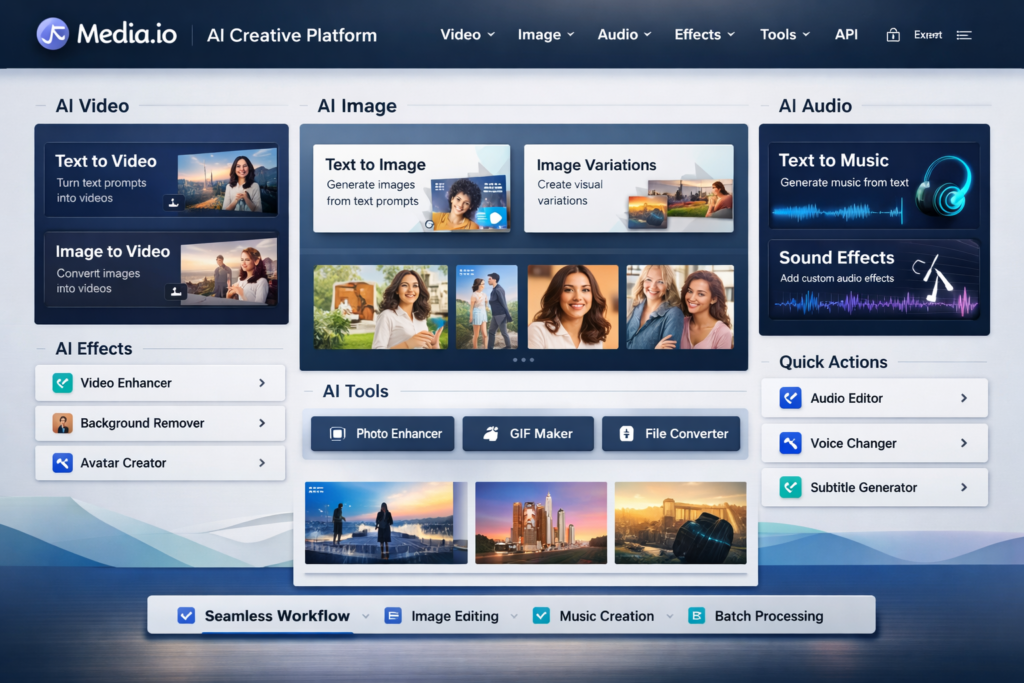
Media.io is not just another single-purpose AI tool. It positions itself as an all-in-one AI creative platform that brings together AI video generation, AI image generation, AI music creation, media enhancement tools, trend-style effects, and creator-friendly editing utilities inside one browser-based workflow.
That all-in-one angle is the main reason Media.io stands out. Many AI tools are good at one thing but weak everywhere else. One tool handles text to video, another helps with image generation, another deals with music, and then you still need separate utilities for enhancement, cleanup, and editing. Media.io tries to reduce that friction by keeping more of the workflow under one roof.
For bloggers, affiliate marketers, ecommerce sellers, social media creators, and small marketing teams, that matters. A platform that helps you generate assets across several formats can save time, reduce tool-switching, and simplify production. In many cases, that is more valuable than having the deepest specialist tool in only one category.
In this Media.io review, I will break down what the platform does well, where it falls short, how its pricing works, who should use it, and whether it is actually worth paying for.
Quick Answer: Is Media.io Worth It?
Yes, Media.io is worth considering if you want one platform for AI video, image, and audio creation instead of paying for several separate tools.
Its biggest strength is convenience. You can move from idea to asset faster because the platform combines generation, enhancement, effects, and utility tools in one place. Its biggest weakness is that free usage is limited and some commercial-use details deserve a closer check if you plan to use generated content heavily in client work, advertising, or large-scale monetized publishing.
| Category | Verdict |
|---|---|
| Best for | Creators, bloggers, marketers, ecommerce sellers, and users who want video, image, and audio tools in one platform |
| Main strength | All-in-one workflow with broad creative coverage |
| Main weakness | Free plan limits and the need to review usage terms carefully for some commercial scenarios |
| Pricing style | Free tier, subscription plans, and credit-based options |
| Overall rating | A strong option for convenience-focused users who value speed and breadth |
What Is Media.io?
Media.io is an AI creative platform built around three main content pillars: video, image, and audio.
Instead of focusing only on one narrow function, Media.io brings together a wider set of tools that support creation, editing, enhancement, and trend-driven content production. That is why it can appeal to several different audiences at once. A content creator may use it for short-form video and music. A marketer may use it for ad creatives and landing-page visuals. A blogger may use it for article graphics and supporting media. An ecommerce seller may use it for product visuals, promo clips, and fast creative testing.
| Core Area | What Media.io Offers |
|---|---|
| AI Video | Text to video, image to video, video to video, video extender, AI video editor, enhancer, and watermark-related tools |
| AI Image | Text to image, image to image, AI character creation, upscaling, object removal, and image editing utilities |
| AI Audio | Text to music, lyrics to song, AI sound effects, noise reduction, vocal tools, lip sync, and translation-oriented tools |
| AI Effects | Template-driven and trend-style effects for creators and social content |
| Extra Layer | Pricing plans, credits, storage, exports, community content, and a separate API offering |
That broad structure is one of the main reasons Media.io can rank well as a review topic. Searchers are not always looking for a single narrow function. Many are comparing full creative ecosystems, and Media.io gives you enough breadth to target several overlapping buying intents within one article.
Who Media.io Is Best For
Media.io is best for people who care more about getting results quickly than about mastering a complicated production suite.
| User Type | Why Media.io Makes Sense |
|---|---|
| Bloggers and affiliate marketers | Can create blog visuals, supporting clips, thumbnails, and simple audio assets in one place |
| Social media creators | Helpful for short-form content, fast generation, and trend-style effects |
| Ecommerce sellers | Useful for promo content, product visuals, and quick creative testing |
| Small marketing teams | Reduces tool-switching and simplifies lightweight creative workflows |
| Beginners | Browser-based workflow is easier to approach than heavyweight editing software |
It is especially attractive for people who regularly work across multiple content formats. If your workflow often jumps between video, images, and audio, then the value of an all-in-one platform becomes easier to justify.
Who Should Probably Skip Media.io
Media.io is not the perfect fit for everyone.
- If you only need one highly specialized tool, a dedicated best-in-class product may serve you better.
- If you want deep manual editing first and AI generation second, Media.io may feel too convenience-focused.
- If you need airtight certainty around commercial rights for every possible output type, you should review the current official terms before building a large client or advertising workflow around it.
That does not mean Media.io is a bad platform. It just means its strongest value comes from breadth, speed, and workflow convenience rather than from being the deepest specialist in every single feature category.
Media.io Features Review
1. AI Video Generation
AI video is one of the strongest entry points into Media.io.
The platform supports text to video, image to video, and video-to-video style workflows. That means users are not limited to one generation path. You can start from a written prompt, use an image as the base for motion, or transform existing video material. This flexibility makes the tool more useful for a wider audience.
For example, a marketer can turn ad concepts into fast visual drafts. A blogger can generate supporting clips for social distribution. A creator can test prompt ideas without opening a complex editing app. That lower friction is part of Media.io’s appeal.
Another advantage is that the platform does not present generation as the final step. It also includes editing and enhancement utilities around the video workflow. In other words, Media.io is trying to be more than a novelty generator. It is trying to become a lightweight creative environment for moving from raw idea to usable asset.
That matters for commercial users because the real problem is not usually “Can AI generate something?” The real problem is “Can I get usable output quickly enough to fit a real content workflow?” Media.io is clearly built with that second question in mind.
2. AI Image Generation and Editing
Media.io’s image stack is broader than many readers expect.
It includes text to image, image to image, AI character generation, object removal, image enhancement, and other related tools. That makes it useful not just for people making “AI art,” but also for users who need practical visual assets for publishing, ads, social media, or lightweight design support.
One of the more commercially relevant angles is image variation. If you want to test different visual directions for a campaign, a product mockup, a blog cover image, or a landing page concept, Media.io’s image tools can help generate multiple styles faster than building everything manually.
This also makes the platform more interesting for affiliate marketing and content SEO use cases. Many publishers need visuals that are good enough, fast enough, and flexible enough for supporting content. They are not always trying to produce gallery-grade artwork. They are trying to publish faster without making the page look weak.
Because of that, Media.io’s image tools are not just a nice add-on. They are part of the real value proposition.
3. AI Music and Audio Tools
Audio is where Media.io separates itself from many simpler AI creative platforms.
Instead of stopping at video and images, Media.io also includes text to music, lyrics to song, AI sound effects, noise reduction, vocal-related tools, lip sync support, and other audio-friendly features. This gives the platform more real workflow value because media creation often depends on audio just as much as visuals.
That matters for short-form creators, podcasters, ad makers, YouTube publishers, and social teams. Even if the visuals are solid, weak audio often drags down the final result. A platform that can help with soundtrack generation, background audio, or cleanup has a practical advantage.
If your content workflow includes explainers, promos, reels, or lightweight branded media, Media.io’s audio layer makes the platform more complete than a video-only or image-only competitor.
4. Trend Effects and Template-Driven Content
Media.io also puts a lot of emphasis on trend-style effects, creator templates, and visual experimentation. This helps it appeal to a broader creator audience rather than only serious business users.
If you create social content, experiment with viral-style formats, or need eye-catching visuals quickly, that part of the platform can be useful. Not every user will care about effects, but for short-form distribution they can add practical value.
For marketers, the more important point is that Media.io is not trying to be a flat utility site. It is actively trying to support creative ideation, fast variation, and trend-aware production. That may matter more for some audiences than pure editing depth.
Media.io Pricing
Pricing is one of the most important parts of any Media.io review because this is where readers decide whether the platform fits their budget and workflow.
Media.io uses a mix of free access, subscription tiers, and credit-based purchasing. That gives users more than one entry point, which is useful because not everyone wants a full subscription immediately.
| Plan | Pricing Direction | Best For | Notes |
|---|---|---|---|
| Free | No-cost starting point | Testing the platform | Good for exploration, but not ideal for serious production |
| Standard | Lower paid tier | Beginners and lighter users | Better for watermark-free exports and basic regular use |
| Premium | Higher paid tier | Heavier users and broader AI usage | More suitable if you want stronger access and a fuller workflow |
| Credit options | Flexible usage-based spend | Irregular users | Useful if you do not want to commit to full-time subscription spending |
In practical terms, the free tier is mainly a trial layer. It is good for getting familiar with the interface and testing whether the outputs align with your workflow. But if you expect regular use, you will probably end up looking at the paid tiers or credits fairly quickly.
The Standard plan is likely the most realistic entry point for many readers. It tends to make the platform usable for real content work without immediately forcing the highest tier. Premium makes more sense for users who rely on the AI tools more heavily or want broader access across the platform.
Is Media.io Expensive?
That depends on how you compare it.
If you compare Media.io to one single-purpose AI tool, it may not always look like the cheapest option. But if you compare it to paying separately for a video generator, an image generator, a music generator, an image enhancer, a video enhancer, and additional creative utilities, the bundled value becomes more attractive.
That is why Media.io should not be judged only as a narrow software purchase. It should be judged as a convenience stack. The more of its tools you actually use, the stronger the value proposition becomes.
Media.io Pros and Cons
| Pros | Cons |
|---|---|
| Combines video, image, and audio in one platform | Free access is limited for serious use |
| Useful for creators, bloggers, marketers, and ecommerce sellers | May feel broad rather than deeply specialized in every category |
| Browser-based workflow lowers friction | Some users will still prefer dedicated specialist tools |
| Includes enhancement and utility tools beyond generation | Commercial-use details should be reviewed carefully for business-heavy deployment |
| Flexible entry through subscriptions and credits | Feature breadth can feel overwhelming if you only need one simple function |
What Makes Media.io Good for SEO Publishers and Affiliate Marketers?
This is the part that matters most for many readers building monetized websites.
Media.io is a useful affiliate-style product because it solves a broad and practical problem. It is not selling one tiny feature. It is selling convenience across multiple parts of the content creation workflow. That wider value proposition usually makes a product easier to write about, easier to compare, and easier to position against alternatives.
Here is why that matters from an SEO and affiliate angle.
| Affiliate / SEO Advantage | Why It Helps |
|---|---|
| Broad keyword reach | You can target review, pricing, alternatives, video, image, and music-related search intent |
| High practical value | Users can understand the benefit quickly because the workflow problem is obvious |
| Strong comparison angle | Easy to position against specialized tools and other all-in-one AI platforms |
| Visual content support | Helps you produce article visuals, supporting media, and social assets more efficiently |
| Beginner-friendly positioning | Can convert users who feel overwhelmed by pro-level creative software |
In plain terms, Media.io is easier to market than a tool that only does one narrow thing. You can write review articles, alternatives articles, comparison posts, use-case pages, and even informational guides around it. That gives it more content leverage.
Where Media.io Still Falls Short
No honest Media.io review should ignore the weaker side of the product.
The first limitation is obvious: an all-in-one platform often trades some depth for breadth. That does not automatically make it worse, but it does mean power users in one very specific category may still prefer a dedicated specialist tool.
The second limitation is that usage rights and plan details deserve attention. If you are a casual creator, this may not matter much. But if you are producing commercial assets at scale, running paid campaigns, or creating client deliverables, then you should verify the current terms and plan coverage carefully before treating Media.io as the foundation of a business workflow.
The third limitation is that breadth can be mentally messy for some users. If you only want a simple tool for one repeated task, then a platform with many tabs, tools, and creative directions may feel less focused than a pure specialist app.
Media.io vs Specialized Tools
Media.io is strongest when you evaluate it as a convenience-first ecosystem rather than as a niche-only specialist.
| Comparison Angle | Media.io | Specialized Tool |
|---|---|---|
| Breadth | High | Usually narrower |
| Workflow convenience | Strong | Can require more tool-switching |
| Single-category depth | Moderate to strong, depending on feature | Often stronger in one category |
| Best for beginners | Often yes | Depends on the product |
| Best for all-in-one value | Yes | Usually no |
If your goal is to build a fast creative workflow, Media.io looks more attractive. If your goal is to push one narrow discipline to the limit, a specialist platform may win.
Best Use Cases for Media.io
Media.io makes the most sense in situations where speed and range matter more than deep manual control.
- Creating short-form marketing clips from prompts
- Building supporting visuals for blog content or social media
- Testing creative variants for campaigns
- Generating quick audio or music for content production
- Enhancing visuals or audio without opening separate software
- Running lightweight multi-format creative workflows in one browser-based environment
That range is exactly why the platform works well as an affiliate review topic. It is not limited to a single user story.
Is Media.io Safe for Commercial Use?
This deserves a careful answer.
Some Media.io feature pages present generated assets as commercially usable under the platform’s terms. At the same time, the general terms indicate that the service is generally provided for private, non-commercial use except where commercial-use services are expressly provided. Because of that, the safest conclusion is not a lazy yes or no.
The practical answer is this: Media.io may be suitable for commercial use in some cases, but serious users should check the current official terms, the specific tool involved, and the exact plan they are using before relying on it for paid ads, client content, or high-volume monetized publishing.
That is not unique to Media.io. It is common across AI tools. But it is still important enough to mention clearly in a review.
Media.io API: An Extra Angle Most Reviews Miss
One useful angle that many review articles overlook is Media.io’s API layer.
Media.io is not only trying to be a browser-based creation tool for end users. It also presents itself as an API platform for integrating AI-powered media generation into products and services. That gives the platform a stronger ecosystem story than a simple consumer-only tool.
You do not need to make the API the center of your article, but mentioning it strengthens the positioning. It shows that Media.io is trying to serve both creators and more advanced product-driven users. That broader ecosystem angle can make the product more attractive in a crowded market.
Media.io Alternatives
If Media.io does not look like the perfect fit, the next step is usually to compare it with more specialized or differently positioned tools.
| If You Want… | You May Prefer… |
|---|---|
| A more video-focused AI workflow | A dedicated AI video platform |
| Deeper image-first generation | A specialist AI image tool |
| Audio-first composition or music depth | A dedicated AI music generator |
| Manual editing power | A pro editing suite with AI features added on |
| All-in-one convenience | Media.io remains one of the more attractive options |
This is exactly why Media.io works best when the user values range, convenience, and speed. If that is your priority, the platform makes more sense. If not, you may want a more specialized alternative.
Final Verdict: Should You Use Media.io?
Media.io is a strong all-in-one AI creative platform for people who want speed, convenience, and multi-format creative support in one place.
Its biggest advantage is not that it dominates every single subcategory on the market. Its biggest advantage is that it reduces friction across the broader creative workflow. That is why it can be useful for bloggers, creators, affiliate marketers, ecommerce sellers, and small teams who need practical output fast.
If you only need one ultra-specialized function, a dedicated tool may still be better. But if you want a flexible browser-based platform that supports AI video, image, and audio creation with extra utility tools around them, Media.io is worth trying.
For most readers, the best move is simple: test the platform first, then decide whether the convenience of the full workflow justifies the paid upgrade.
FAQ
Is Media.io free to use?
Media.io does offer a free starting point, but free usage is mainly good for testing. If you want smoother production use, you will likely look at the paid plans or credit options.
Is Media.io good for beginners?
Yes. Media.io is more beginner-friendly than many heavyweight creative suites because it is browser-based and organized around prompt-driven workflows.
What can you do with Media.io?
You can create AI videos, AI images, and AI audio, while also using supporting tools for enhancement, cleanup, effects, and related editing tasks.
Is Media.io good for marketing content?
Yes, especially for fast-turnaround content, testing creative directions, and producing supporting assets across multiple formats.
Is Media.io worth paying for?
It can be, especially if you will actually use the video, image, and audio layers together. The more parts of the platform you use, the more value the all-in-one model provides.
If you want one AI platform that can help with video, images, and audio without making your workflow messy, Media.io is worth testing.
Try Media.io now and see whether its all-in-one workflow can save you time on content creation.
Check the latest plans, explore the tools, and decide whether Media.io fits your publishing or marketing workflow.
About the Author
Xu Xun
Contact: xuxun1208@gmail.com
Last Updated: June 2026