
If you are looking for a video editor that feels easier to learn than many traditional professional editing suites, but still offers enough depth for YouTube videos, tutorials, marketing content, short-form clips, demos, and client work, this Wondershare Filmora review is for you.
Filmora has built its reputation around one core promise: helping everyday creators make polished videos faster. Instead of overwhelming users with a steep learning curve from day one, Filmora focuses on usability, AI-assisted editing, templates, effects, captions, screen recording, and a workflow that gets you from raw footage to finished content without wasting hours.
That positioning matters. Most buyers are not choosing between Filmora and a Hollywood post-production pipeline. They are choosing between frustration and momentum. They want software that helps them publish consistently, improve video quality, and save time. Filmora is one of the few editors that tries to meet all of those needs at once.
In this Wondershare Filmora review, I will break down the pricing, best features, strengths, weaknesses, commercial-use considerations, and the types of creators who will get the most value from it. The goal is simple: help you decide whether Filmora is actually worth paying for, not just whether it looks good on a sales page.
Quick Verdict
Wondershare Filmora is one of the strongest video editing options for beginners, solo creators, educators, marketers, freelancers, and small business users who want an editor that is easy to learn but still capable enough for serious content production.
Its biggest advantage is speed. Filmora reduces the friction between recording, editing, captioning, enhancing, and exporting. That makes it especially attractive for creators who publish often and cannot afford to spend forever inside complicated software.
It is not the best tool for every possible user. If you need the deepest professional color workflow, the most advanced VFX environment, or a heavy-duty studio collaboration setup, Filmora is not really trying to be that kind of editor. But for most creators who care about getting good-looking videos out the door quickly, Filmora is a very competitive option.
| Category | Verdict |
|---|---|
| Ease of use | Excellent for beginners and non-technical creators |
| Feature depth | Strong for everyday content creation, marketing, tutorials, and social media |
| AI tools | One of Filmora’s biggest modern advantages |
| Value for money | Good value for most individual creators, especially on Advanced |
| Best for | YouTubers, educators, marketers, freelancers, and small teams |
| Main drawback | Licensing and plan differences need careful attention before buying |
What Is Wondershare Filmora?
Wondershare Filmora is an all-in-one video editing platform built for creators who want a smoother path from idea to finished video. Instead of focusing only on high-end technical editing, Filmora combines practical timeline editing with AI tools, subtitles, effects, templates, recording tools, stock assets, and cross-device flexibility.
That matters because modern content creation usually involves more than just cutting clips. A typical creator might need to record a tutorial, clean up audio, generate captions, add text, include transitions, build short clips for social media, and export in multiple formats. Filmora tries to bring all of that into one ecosystem.
It is best understood as a creator-focused editor rather than a pure high-end post-production tool. That is exactly why it appeals to a wide audience. It gives beginners something they can actually learn, while still giving intermediate users enough features to grow into.
| Filmora Is Especially Good For | Why It Fits |
|---|---|
| YouTube creators | Fast editing, captions, titles, effects, and easy exports |
| Educators and course creators | Screen recording, subtitle generation, webcam capture, and lesson editing |
| Marketers | Product demos, promos, ad creatives, explainers, and social video workflows |
| Freelancers | Quicker turnaround for client videos without a huge learning curve |
| Small businesses | Useful for internal communication, tutorials, branded content, and presentations |
| Beginners | Less intimidating than many advanced editors |
Wondershare Filmora Pricing and Plans
Pricing is one of the most important parts of any Wondershare Filmora review because buyers often assume Filmora is just a simple one-time purchase. It is not that simple anymore. Filmora now has multiple individual plans, plus separate business licensing considerations if you are using it for a company or brand.
At the time of writing, the individual options are Basic, Advanced, and Perpetual. The main difference is not only the payment model. It is also about AI access, cloud storage, update rights, and how future versions are handled.
| Plan | Price | Best For | Main Notes |
|---|---|---|---|
| Free | $0 | Testing the editor | Good for trying Filmora, but exported videos include a watermark |
| Basic | US$49.99/year | Light creators and beginners | No watermark, 4K export, creative assets, 1GB cloud storage, ongoing upgrades |
| Advanced | US$59.99/year | Most serious individual creators | Includes everything in Basic plus 1,000 AI credits per month and 10GB cloud storage |
| Perpetual | US$79.99 one-time | Users who dislike subscriptions | One-time payment, device-specific, tied to the current major version rather than future major upgrades |
The best plan for most readers is usually Advanced. It is only a small jump from Basic, but it fits the way Filmora is evolving. Filmora is no longer just a traditional video editor with a few extras. More and more of its value now comes from AI-assisted workflows, and Advanced is the plan that supports that direction better.
The Basic plan makes sense if you mainly want the core editor without a heavy focus on newer AI workflows. The Perpetual plan makes sense if you strongly prefer a one-time payment and are comfortable with the trade-off that future major versions are not included.
You should also pay attention to the licensing details. Basic and Advanced are the safer options for people who want more flexibility over time. Perpetual can still be a good deal, but only if you understand exactly what you are buying.
Important Licensing Details Most Buyers Miss
This is where a lot of weak review articles fail readers. They talk about features and pricing, but skip the licensing details that can actually affect whether a buyer is using the software correctly.
For individual users, the biggest details are straightforward. The free version is mainly for testing because exports are watermarked. Basic and Advanced are stronger long-term plans for personal use. Perpetual is tied to the current major version, which means it does not function like “buy once and receive all future versions forever.”
For business users, things matter even more. If you are creating videos for a company, brand, marketing team, or paying clients, you should not casually assume an individual plan is enough. Filmora’s official business guidance makes this a distinct category, and that can affect compliance as well as how confidently you can use the software for commercial work.
| Licensing Point | What It Means in Practice |
|---|---|
| Free version | Useful for testing, not ideal for serious publishing because of watermarking |
| Basic / Advanced | Better for most individual users who want updates and smoother long-term use |
| Perpetual | Good for one-time-payment buyers, but future major versions are not included |
| Company use | Business use should be handled with the Business Plan rather than assuming an individual plan covers everything |
| Built-in music and sound effects | Commercial-use assumptions should be checked carefully, especially for company usage |
Best Filmora Features That Actually Matter
A good Wondershare Filmora review should focus on the features that change real workflows, not just list whatever is on a sales page. Below are the Filmora features that matter most for most buyers.
1. Beginner-Friendly Timeline Editing
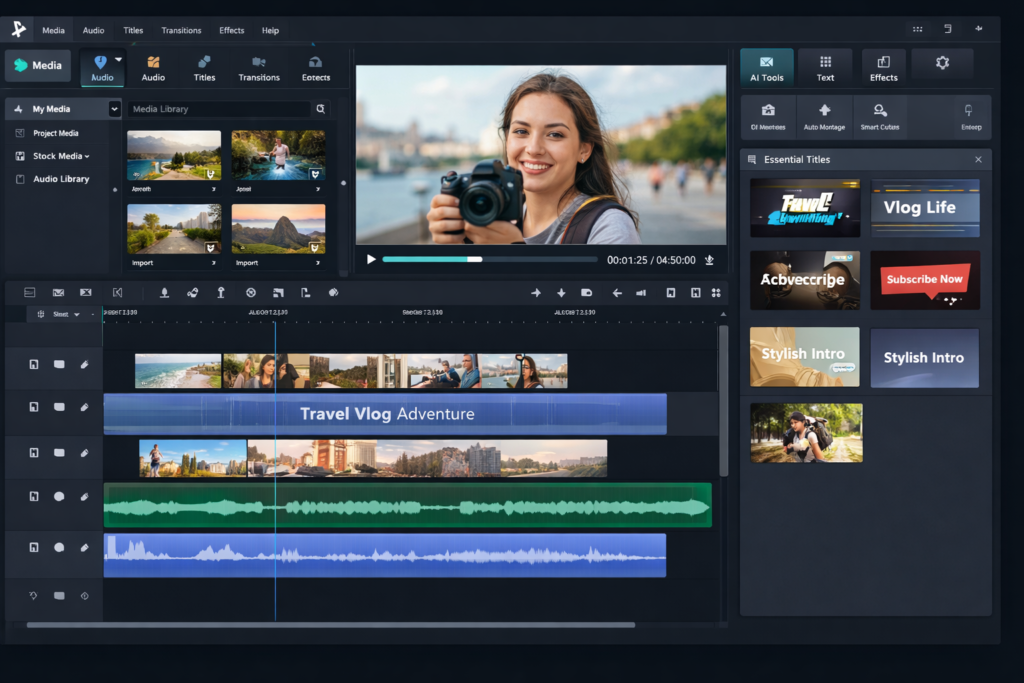
Filmora’s foundation is still its timeline editor, and that remains one of its best selling points. The interface is easier to understand than many more advanced editors, which means you can import clips, trim footage, arrange scenes, add titles, use transitions, drop in music, and get to a finished export without feeling overwhelmed.
This is more important than it sounds. A lot of creators quit or delay video work because the software itself feels like a barrier. Filmora reduces that friction. That makes it easier to stay consistent with YouTube uploads, product demos, tutorials, or short-form content.
2. AI Mate Editing
Filmora is leaning hard into AI-assisted editing, and AI Mate Editing is one of the clearest examples. Instead of forcing you to do every repetitive step manually, Filmora increasingly tries to help with suggestions, workflow shortcuts, and smarter automation.
For beginners, that can reduce confusion. For working creators, it can reduce editing fatigue. The biggest benefit is not just novelty. It is time saved across repeated tasks.
3. AI Text-Based Editing
This is one of Filmora’s most useful modern features. AI Text-Based Editing lets you work from transcribed speech, almost like editing a document. That is incredibly practical for talking-head videos, tutorials, interviews, podcasts, webinars, lessons, and repurposed long-form content.
Instead of scrubbing through a timeline endlessly, you can identify phrases, cut filler, tighten sections, and improve pacing in a more efficient way. For creators who publish spoken-content videos regularly, this feature alone can save a meaningful amount of time.
4. Auto Caption and Subtitle Tools
Filmora’s subtitle workflow is one of its strongest practical advantages. Captions are no longer optional for many creators. They help with accessibility, retention, discoverability, and muted viewing on social platforms.
That matters for YouTube Shorts, Instagram Reels, TikTok-style clips, educational content, presentations, and any video that depends on spoken clarity. A smoother caption workflow is not a “nice extra” anymore. It is core functionality.
5. Screen Recording and Webcam Capture
Filmora is not just an editor. It also works well for recording. That gives it an edge for educators, trainers, software demo creators, online teachers, gaming creators, remote teams, and marketers who frequently need to show screens, walkthroughs, and presentations.
The value here is workflow simplicity. Record, open the footage in the same ecosystem, clean it up, add captions, edit the audio, and export. That is much better than juggling separate tools for recording and editing.
6. Creative Assets, Templates, and Effects
Filmora’s large asset ecosystem makes it easier for non-designers to create polished-looking videos. Templates, title styles, transitions, effects, stock-style resources, and creative elements help users improve presentation quality without having to build everything from scratch.
This is one reason Filmora feels productive for everyday content work. You do not always need more technical editing features. Sometimes you need a faster way to make a video look complete and professional.
7. Mobile and Cross-Device Flexibility
Filmora also makes sense for users who create across desktop and mobile environments. That does not mean the mobile experience replaces the desktop editor for every project. It means the platform is trying to serve modern creators who may start, review, or publish content from different devices.
That flexibility is useful for social creators, small teams, and busy solo operators who do not always want to be locked into one production environment.
How Easy Is Filmora to Use?
Ease of use is one of Filmora’s biggest competitive advantages. That is not marketing fluff. It is the main reason a lot of people choose it instead of more intimidating alternatives.
When software is easier to use, you publish more often. You spend less time being stuck and more time building actual assets: YouTube videos, product tutorials, ad creatives, educational lessons, testimonials, explainers, or branded content. Over time, that consistency matters more than having the most technically advanced editor on the market.
Filmora’s interface is one of its strongest arguments. It is structured in a way that feels familiar quickly. Media goes in. Clips go on the timeline. Text, effects, music, subtitles, and enhancements are easy to access. That flow makes the tool feel less like software you have to “study” and more like software you can actually use.
This is also why Filmora is especially strong for creators who are moving from no editor at all, from mobile-only editing, or from very basic tools that they have outgrown. It offers a much more capable environment without becoming punishingly complex.
Filmora Performance, Exports, and Everyday Workflow
Most buyers do not just care about features. They care about whether the software actually fits their weekly workflow. Filmora does a good job here because it is built around practical content creation rather than cinematic perfectionism.
For example, a typical workflow might look like this: record your screen and webcam, import a face-cam clip, remove filler using text-based editing, generate captions, add text overlays, clean up timing, apply transitions, enhance the look, and export for YouTube or social media. Filmora is designed to make that kind of sequence feel natural.
That is why Filmora works so well for people who need volume and consistency. It supports publish-first creators. If you are producing regular content for audience growth, lead generation, education, or client delivery, a smooth workflow can matter more than rare advanced tools you barely touch.
Paid plans also improve the experience meaningfully because you remove watermark limitations and gain better access to the full working environment. That is why serious users should view the free version mainly as a test drive.
Filmora Pros and Cons
| Pros | Cons |
|---|---|
| Easy to learn for beginners and non-technical users | Not built for the deepest studio-grade post-production workflows |
| Strong mix of editing, captions, AI tools, templates, and recording features | Plan and licensing differences can confuse first-time buyers |
| Works well for YouTube, tutorials, marketing videos, and social content | Free version is mainly for testing because exports are watermarked |
| Text-based editing can save serious time for spoken-content workflows | Some buyers may prefer a simpler one-price model |
| Large asset ecosystem helps videos look polished faster | Perpetual buyers need to understand upgrade limitations before purchasing |
| Good value for solo creators and small teams | Commercial and company use should be reviewed carefully before publishing branded content |
Who Should Buy Filmora?
Filmora is not for everyone, but it is a very strong fit for a large part of the creator market.
| User Type | Should You Buy Filmora? | Reason |
|---|---|---|
| Beginners | Yes | One of the easiest serious editors to start with |
| YouTubers | Yes | Great for talking-head content, tutorials, captions, and frequent uploads |
| Educators | Yes | Screen recording, subtitles, and lesson editing are strong use cases |
| Marketers | Yes | Useful for promos, demos, ads, explainers, and branded social content |
| Freelancers | Usually yes | Fast turnaround and accessible workflow make client delivery easier |
| Small businesses | Yes, with correct licensing | Very practical for internal and external business content |
| High-end studio editors | Not usually | You may outgrow Filmora if your workflow demands deeper specialist tools |
Who Should Skip Filmora?
You should probably skip Filmora if your main priority is the deepest professional editing environment possible and you already know you need a heavier, more specialized pipeline. Filmora’s strength is speed, accessibility, and practical creator workflows. Its strength is not trying to become the most intimidating editing suite in the market.
You might also skip it if you strongly dislike plan complexity. Some users want a totally simple pricing model with no questions about AI credits, business usage, or future version rights. Filmora can still be worth buying, but it rewards buyers who read the details before choosing a plan.
Commercial Use and Business Plan Notes
This section matters a lot for ranking because many buyers search for licensing questions before they pay. If you make videos for a company, a brand, a marketing team, or paying clients, you should take Filmora’s business-use guidance seriously rather than assuming an individual plan covers everything by default.
That is especially important for agencies, freelancers working under brand contracts, in-house marketers, and businesses using Filmora for presentations, internal training, sales content, or promotions. This is not the kind of detail you want to discover after you have already built a workflow around the wrong plan.
Another point people often ignore is audio licensing. If your workflow depends on music and sound effects for commercial projects, it is smart to verify that part before publishing client or business content. That step is boring, but it prevents unnecessary risk later.
Is Wondershare Filmora Worth It?
For the right buyer, yes. Filmora is worth it because it solves a very real problem: too many creators need better video content, but they do not have the time or patience for overly complicated software.
Filmora gives those users a way to produce stronger videos without carrying the full burden of a heavy pro-editing learning curve. That makes it valuable not only because of its features, but because of the momentum it can create. A tool that helps you actually publish is often more profitable than a tool that looks more advanced on paper but slows you down every week.
It is especially worth it for creators whose work depends on speed and repeatability. If you publish tutorials, create social content, make product videos, edit webinars, build video ads, or run an educational or marketing content engine, Filmora can absolutely justify its price.
The strongest choice for most individual buyers is still the Advanced plan because it lines up better with the way Filmora is evolving. But even if you choose Basic or Perpetual, the core value of Filmora remains the same: it helps normal creators make better videos faster.
Final Verdict
Wondershare Filmora earns its place as one of the most practical video editing tools for modern creators. It does not try to win by being the most intimidating editor on the market. It wins by helping real users move faster.
That makes Filmora a strong recommendation for beginners, solo creators, educators, marketers, freelancers, and many small businesses. The interface is approachable, the feature set is broad, the AI direction is meaningful, and the overall workflow is built around actually getting content published.
If your goal is to create more video content with less friction, Filmora is well worth considering. Just choose the plan carefully, especially if your usage crosses into commercial or company territory.
Bottom line: Filmora is one of the best video editors for creators who want strong results without a brutal learning curve.
Frequently Asked Questions
Is Wondershare Filmora good for beginners?
Yes. That is one of Filmora’s biggest strengths. It is much easier to learn than many advanced editors, but still capable enough for serious content creation. If you are new to editing and want to start producing polished videos quickly, Filmora is one of the safer choices.
Does Filmora have a free version?
Yes, but it works best as a trial. The free version is useful for testing the interface and basic workflow, but serious users usually move to a paid plan because exported videos from the free version include a watermark.
Which Filmora plan is best for most people?
For most individual creators, the Advanced plan is the best choice because it aligns better with Filmora’s AI-heavy direction and gives you more room to grow. Basic is fine for lighter use. Perpetual is better for buyers who strongly prefer a one-time purchase and accept the trade-offs.
Can I use Filmora for YouTube videos?
Yes. Filmora is a very good fit for YouTube videos, especially tutorials, talking-head content, reaction-style content, explainers, product demos, and educational videos. Its captioning, text tools, templates, and easy editing flow make it practical for regular uploads.
Is Filmora good for short-form content?
Yes. Filmora is well suited for short-form content because it supports fast editing, captions, effects, social-friendly workflows, and a general creator-first approach. That makes it useful for reels, short clips, and promotional videos.
Can Filmora record screen and webcam?
Yes. This is one of the reasons Filmora is so attractive for educators, tutorial creators, remote teams, and software demo marketers. Recording and editing inside one ecosystem makes the overall workflow much smoother.
Can I use Filmora for business or client work?
Yes, but you should pay close attention to Filmora’s business-use guidance and licensing rules. If you are producing videos for a company, brand, or paying clients, review the Business Plan details rather than assuming an individual plan automatically covers every commercial scenario.
Is Filmora worth paying for?
For many creators, yes. Filmora is worth paying for when your main goal is to make better videos faster. Its value comes from workflow efficiency, ease of use, modern AI assistance, and the fact that it helps normal users create polished content without getting trapped in unnecessary complexity.
About the Author
Xu Xun
Contact: xuxun1208@gmail.com
Last Updated: June 2026