
If you run a growing small business, there is a good chance you have already felt the pain of disconnected tools. One platform handles email. Another handles forms. A third manages appointments. A fourth helps with invoices. Then your CRM ends up being little more than a contact database that never fully reflects what is actually happening in your business.
That is the problem Keap is trying to solve. Instead of focusing on just one stage of the customer journey, Keap is built to connect lead capture, contact management, follow-up, automation, scheduling, quoting, invoicing, payments, and reporting in one place. For small businesses that rely on consultations, service delivery, repeat clients, or high-touch follow-up, that all-in-one setup can be much more valuable than having a stack of separate tools that only partly talk to each other.
In this Keap review, I will break down what the platform does well, where it feels expensive, who it fits best, what its pricing really means for small businesses, and whether it is actually worth the investment. The goal is not to give you a shallow product summary. The goal is to help you decide whether Keap is the right growth system for your business.
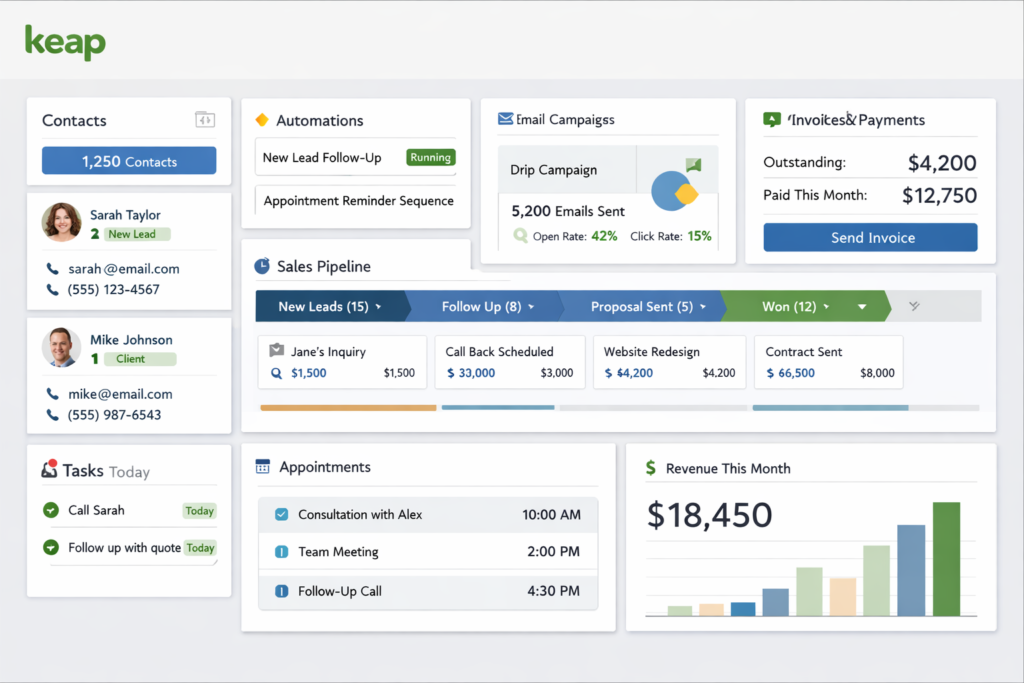
Quick Verdict: Is Keap Worth It?
Keap is worth serious consideration if your business needs more than just email marketing or a basic CRM. It is especially strong for small businesses that want to manage leads, automate follow-up, book appointments, send quotes, collect payments, and keep customer communication organized without stitching together a complicated software stack.
However, Keap is not the cheapest or lightest option in its category. It makes the most sense for businesses that are already getting leads and sales, but need better systems to convert more consistently and operate more efficiently. If you only want a simple newsletter tool or a low-cost contact manager, Keap may feel like more software than you need. If you want an operational platform that can reduce manual work across sales, marketing, and client management, it becomes much more compelling.
| Category | Verdict |
|---|---|
| Best for | Growing small businesses, service businesses, consultants, coaches, agencies, and teams with active lead follow-up |
| Biggest strength | Combines CRM, automation, appointments, invoicing, payments, and communication in one system |
| Biggest weakness | Higher starting cost and required implementation make it less attractive for very small or budget-sensitive businesses |
| Ease of use | More approachable than many enterprise CRMs, but still requires setup and process thinking |
| Overall takeaway | A strong all-in-one platform for serious small businesses that want better systems, not just another app |
What Is Keap?
Keap is a small business CRM and automation platform designed to help businesses get organized, automate routine work, and convert more leads into customers. It is not positioned as a giant enterprise sales platform. Instead, it is aimed at growing businesses that need structure, consistency, and better follow-up without building an overly complex tech stack.
What makes Keap different from many traditional CRMs is that it is not trying to stop at contact management. It goes further into the actual operating workflows that drive growth. That includes landing pages, forms, email marketing, appointment scheduling, sales pipeline management, invoices, recurring payments, task automation, text messaging, reporting, and integration support.
This matters because most small businesses do not lose opportunities because they lack a place to store names and emails. They lose opportunities because follow-up is inconsistent, lead routing is messy, billing is delayed, and too many tasks still depend on someone remembering to do them manually. Keap is designed around fixing those operational gaps.
| Keap at a glance | What it means for buyers |
|---|---|
| CRM | Centralized contact records, notes, tasks, tags, saved searches, company records, custom fields, and lead scoring |
| Marketing | Landing pages, forms, email broadcasts, newsletters, and campaign automation |
| Sales | Appointments, pipeline stages, quotes, invoices, checkout pages, and payment collection |
| Automation | Preset and advanced workflows for lead nurture, reminders, follow-up, invoicing, and more |
| Communication | 1:1 email visibility, texting, business line tools, and mobile access in supported regions |
| Operations | Billing automation, recurring payments, internal tasks, and customer journey management |
| Support | Customer Success Manager, chat, phone support, academy, and implementation guidance |
Why Keap Appeals to Small Businesses
Small businesses often reach a stage where growth creates complexity faster than systems improve. More leads arrive, but follow-up becomes inconsistent. More clients sign up, but invoicing takes longer. More appointments get booked, but reminders and scheduling become messy. More revenue is possible, but day-to-day operations feel increasingly fragile.
Keap’s value proposition is built around that exact moment. Rather than telling a business owner to buy five separate tools and build everything themselves, Keap tries to provide one environment where core customer workflows can be managed end to end. That includes what happens before a sale, during a sale, and after a sale.
For the right business, this can create three meaningful advantages. First, it reduces app sprawl. Second, it makes customer history easier to understand because important actions happen around the same contact record. Third, it improves consistency, because automation can replace manual follow-up that would otherwise be forgotten, delayed, or handled differently every time.
That is why Keap tends to make more sense for businesses with real customer journeys rather than one-off transactions. If you close business through consultations, lead nurturing, quotes, onboarding, or recurring billing, Keap’s structure becomes much more useful.
Keap CRM Features: More Than a Contact Database
At its foundation, Keap is a CRM. But it is not limited to storing names and email addresses. The platform includes contact management, contact segmentation with tags, lists and filters, company records, custom fields, notes, tasks, automation history, and lead scoring. These are the kinds of features that help a small business move from “we have contacts” to “we actually know how to act on them.”
The tagging and segmentation side is especially important. A good CRM should not just collect leads. It should help you prioritize them, personalize communication, and route them into the right next step. Keap’s use of tags, filters, and lead scoring supports that goal. For businesses that handle warm leads, reactivation campaigns, seasonal offers, or different service lines, this makes the platform more useful than a flat contact list.
I also like that Keap keeps operational context close to the contact record. If notes, invoices, payments, tasks, emails, and communication history are visible in one place, a business owner or team member can make better decisions faster. That is a huge advantage over fragmented setups where half the story lives in email, another part lives in a calendar app, and another part lives in billing software.
For B2B or team-based environments, company records and user roles add more structure. That means Keap is not only useful for solo operators. It can also support small teams that need shared visibility and clearer account management.
Automation Is the Real Reason Many Businesses Choose Keap
If CRM is the foundation, automation is the main reason many businesses seriously consider Keap. The platform is built to automate repetitive sales and marketing work such as lead follow-up, appointment reminders, invoice reminders, nurture sequences, thank-you messages, and pipeline progression. This is where Keap becomes more than a record-keeping tool.
Keap offers both easier preset automation options and more advanced workflow building. That matters because businesses are rarely at the same maturity level. Some need a fast starting point. Others want more customization. Having both paths makes the software more accessible while still allowing room to build more sophisticated customer journeys later.
From a practical point of view, automation helps small businesses in three ways. It saves time. It reduces the number of leads that fall through the cracks. And it makes the customer experience feel more consistent, because follow-up happens when it should instead of whenever someone remembers. Those gains are not glamorous, but they are exactly the type of improvements that move revenue and reduce operational stress.
Keap’s automation focus also aligns well with service businesses. A local or online service provider often needs to move someone from inquiry to appointment, from appointment to quote, from quote to payment, and from payment to repeat business. Keap’s automation is designed around those repeatable, high-value flows.
👉 Alt Text 2: Keap automation workflow builder with email, lead follow-up, and appointment automation.
Email Marketing, Landing Pages, and Lead Capture
Keap is not trying to replace specialist enterprise marketing clouds, but it does give small businesses the tools they usually need to capture and nurture leads. That includes landing pages, forms, email marketing, broadcasts, newsletters, and triggered emails based on contact behavior.
This is important because lead generation does not start after the contact enters your CRM. It starts with how you capture interest. If your landing pages, forms, and follow-up are all tied into the same platform, you reduce friction and make your campaigns easier to measure. That is especially useful for small teams that do not want to piece together separate systems for page building, form collection, and email workflows.
Another advantage is that Keap supports one-to-one email visibility through Gmail and Outlook sync. For businesses that close deals through direct conversations, this is a valuable detail. It keeps important communication connected to the customer record instead of buried in individual inboxes where teammates cannot see the full context.
Keap also has AI-related tools for generating campaign copy. These are not the reason to buy the platform, but they can reduce friction for busy owners and teams who want help drafting emails, follow-up messages, sales copy, or landing page content faster. In other words, Keap is using AI to improve execution speed inside existing workflows rather than turning itself into a novelty AI product.
Appointments, Scheduling, and Moving Leads Toward Revenue
Appointments are one of the areas where Keap becomes much more practical than a generic CRM. Many small businesses do not sell purely through checkout pages. They sell through consultations, calls, discovery sessions, service appointments, or booked meetings. Keap’s scheduling tools help connect that step with the rest of the customer journey.
That means a lead can come in through a form, move into follow-up, receive scheduling prompts, book a time, receive reminders, and continue through a defined sales or service flow. Instead of treating booking as a separate step managed in a separate tool, Keap makes it part of the broader operational process.
This is especially helpful for consultants, coaches, agencies, accountants, photographers, and professional services. In those businesses, the appointment is not just an administrative detail. It is often the bridge between interest and revenue. Software that helps remove friction at that point can improve both conversion rates and customer experience.
It also reduces the cost of forgetfulness. Missed reminders, no-shows, and inconsistent follow-up can be expensive for small businesses. When appointment scheduling is supported by automation, those risks start to come down.
Quotes, Invoices, Checkout Forms, and Payments
This is one of Keap’s strongest selling points. A lot of CRMs help you manage leads but stop before money actually changes hands. Keap goes further by supporting quotes, invoices, checkout forms, payment collection, recurring payments, billing automation, and sales reporting. That makes it much more useful for businesses that want their CRM connected directly to revenue operations.
If your business sends proposals, takes deposits, bills on schedules, or manages repeat customer payments, Keap has a more operationally complete feel than many simpler CRM tools. It is not just about storing opportunities in a pipeline. It is about moving customers from interest to payment with fewer handoffs and fewer disconnected tools.
Recurring payments are another meaningful advantage. Businesses with memberships, retainers, payment plans, or ongoing service packages often struggle when billing is separate from the rest of the customer system. Keap’s ability to connect recurring payments and reminders to the contact record can simplify both administration and visibility.
Keap Pay adds an embedded payment option, while the platform also supports third-party processors. This gives buyers some flexibility. The key value is not that Keap magically removes payment fees. It is that it centralizes the payment workflow and improves reporting and operational control.
👉 Alt Text 3: Keap sales pipeline with quotes, invoices, payment collection, and billing automation.
Texting, Keap Business Line, and Mobile Access
Keap also stands out by including communication tools beyond email. Its messaging and business line features support 1:1 texting, text broadcasts, automated text messages, and business-call handling in supported regions. For service-oriented businesses, this can be a big plus because customers often respond faster to text than to email.
There is also value in separating business communication from personal communication. A dedicated business line can make a small business look more organized while keeping customer interactions easier to track. Keap also allows desktop access to calls and messages, which can be useful for teams that do not want communication trapped on one phone.
That said, these features are not equally relevant for every buyer. Keap’s own materials make it clear that some business line, texting, and mobile capabilities depend on region. So if messaging is a major part of your buying decision, you should evaluate those details carefully rather than assuming global availability.
For businesses in supported markets, though, the communication layer adds to the platform’s all-in-one value. It is easier to keep customer conversations organized when messaging, appointments, and CRM history work together rather than in separate apps.
👉 Alt Text 4: Keap mobile app and business line features for texting, calls, and appointment reminders.
Reporting, Integrations, and Support
Keap includes reporting tools designed to help small businesses see what is working and where performance can improve. That includes comparative reporting, pinned reports, email deliverability visibility, and sales-related insights. For a small business owner, this matters because software is only as useful as the decisions it improves.
Integrations matter too. Even though Keap tries to reduce app sprawl, most growing businesses still need certain outside tools. Keap’s support for API connections, webhooks, and Zapier expands flexibility without forcing the platform to do absolutely everything itself. This is a practical middle ground. You can use Keap as a central system while still connecting specialized apps when needed.
Support is one of the platform’s more distinctive advantages. Keap includes customer success support, chat, phone help, educational resources, and a community. This ties directly into its broader positioning: Keap is not just selling software access. It is selling a guided path to implementation and usage. For some buyers that will feel reassuring. For others it may feel like part of the cost structure they would rather avoid.
In general, I see support as a positive differentiator here. Small businesses often do not fail because the software lacked features. They fail because the system never got implemented well enough to produce results. Keap’s support model is clearly designed to reduce that risk.
Keap Pricing: What You Are Really Paying For
Pricing is one of the most important parts of any Keap review because this is not bargain software. Keap’s current positioning is aimed at serious small businesses that want more than entry-level tools. That means the value conversation should not stop at the monthly subscription alone. You also need to think about what the platform replaces, how much manual work it removes, and how much better your follow-up and customer management become after implementation.
Keap’s pricing structure is notable because it does not emphasize a maze of feature-restricted plans in the same way many tools do. Instead, the platform is presented as an all-in-one software offering with required implementation support. This reinforces the idea that Keap is selling outcomes and setup guidance, not just access to features.
The result is simple to understand conceptually but more substantial financially. If you are a business owner comparing Keap against lightweight tools, the starting cost will look high. If you are comparing Keap against the combined cost of a CRM, scheduler, invoicing tool, email platform, basic automation software, and communication add-ons, the picture becomes more nuanced.
| Keap pricing snapshot | What to know |
|---|---|
| Starting price | $299/month shown on the pricing page |
| Annual figure shown on page | $2,988/year |
| Users included | 2 user licenses |
| Additional users | $39/month per user |
| Contacts | Additional contacts priced in tiers |
| Implementation | Required |
| Free trial | 14 days, no credit card required |
| Free trial limitations | 25-email limit, no payments, no texting |
| Annual cancellation note | $299 early termination fee is listed for early cancellation on annual term |
One of the most important pricing realities is that implementation is required. This will be a downside for some buyers, but it also explains how Keap wants to differentiate itself. The company is clearly trying to reduce the risk that customers sign up, never finish setup, and fail to get results.
That means the real question is not “Is Keap cheap?” It is “Will Keap save enough time, reduce enough friction, and improve enough revenue-generating processes to justify the investment?” For a business with active leads, service delivery complexity, and repeatable workflows, the answer may absolutely be yes. For a tiny operation that only needs occasional email campaigns, the answer is much less likely to be yes.
Keap Pay and Payment Fees
If payments are important to your workflow, Keap becomes more interesting. The platform supports invoices, checkout forms, quotes with payment functionality, and recurring billing. That can create a smoother handoff from sales activity to actual revenue collection.
Keap Pay also adds native payment processing. From a buyer’s perspective, the key advantage is less about lower fees and more about convenience, centralization, and reporting visibility. You are keeping more of the payment process inside the same business system instead of bouncing between disconnected tools.
| Keap Pay fee snapshot | Current published detail |
|---|---|
| Monthly fee | $0 |
| Credit card fee | 2.99% + $0.30 USD |
| ACH fee | 1% capped at $10.00 |
| Refund fee | $0.30 USD each |
| Availability noted | United States, with Canada noted as coming soon on the page |
For many service businesses, those details matter less than the workflow benefit. Being able to invoice, collect payment, automate reminders, and keep that history visible inside the CRM can reduce administrative overhead and improve cash flow discipline.
Who Keap Is Best For
Keap is best for growing small businesses that need a structured system for managing leads, clients, communication, and revenue-related workflows. It is especially appealing when customer journeys involve more than a quick checkout. If your sales process includes nurturing, booking, quoting, invoicing, or repeat business, Keap becomes more valuable.
| Keap is a strong fit if you… | Why it fits |
|---|---|
| Run a service business | You likely need consultation flows, follow-up, appointments, invoices, and repeat client communication |
| Sell through conversations | Keap works well when lead nurturing and direct outreach affect conversion |
| Need better follow-up systems | Automation helps reduce missed leads and inconsistent communication |
| Want fewer disconnected tools | Keap combines multiple operational functions in one platform |
| Value support during setup | Implementation and customer success resources are part of the product story |
| Are experiencing growth pains | Keap is more useful when business complexity is starting to outgrow simple tools |
In practical terms, that often includes coaches, consultants, accountants, agencies, photographers, real estate professionals, professional service firms, and other businesses where the client journey has multiple steps and follow-up quality strongly affects revenue.
Who Should Probably Skip Keap
Keap is not ideal for everyone. If your business is still extremely early, has minimal lead flow, or only needs one narrow function, the platform may feel too expensive or too broad. It is also less appealing for businesses that strongly prefer pure self-serve software with no required implementation process.
| You may want another option if you… | Why Keap may not be ideal |
|---|---|
| Only need a simple email tool | Keap’s broader system may be unnecessary |
| Need the lowest possible monthly cost | Its pricing is aimed at serious small businesses, not bargain shoppers |
| Do not want implementation support | Keap requires implementation services |
| Have a very simple sales process | You may not benefit enough from the automation and workflow depth |
| Already love your current stack | The value of consolidation may be lower for you |
| Need messaging features in unsupported regions | Some business line and text features are region-limited |
Pros and Cons
| Pros | Cons |
|---|---|
| All-in-one system for CRM, automation, appointments, invoices, and payments | Higher entry price than lightweight tools |
| Strong fit for service and consultation-based businesses | Required implementation increases commitment |
| Good operational visibility across the customer journey | Can feel like more software than very small businesses need |
| Useful combination of lead management and revenue workflows | Some texting and communication features have regional limits |
| Support, education, and customer success resources add real value | Free trial does not fully reflect the complete paid experience |
| Flexible enough to reduce tool sprawl | Best value depends on actually using the system well after setup |
Is Keap Easy to Use?
Keap is easier to understand than many enterprise-focused CRMs, but it is not a trivial tool. The platform covers too many important parts of business operations to feel completely plug-and-play. That is exactly why the implementation side exists.
In my view, the better way to think about ease of use is this: Keap is approachable for the amount of work it can do, but you still need clear processes. If your business has no defined sales flow, no consistent follow-up logic, and no real idea how leads should move from inquiry to payment, Keap will not magically fix that by itself. What it can do is help you systemize those processes once you decide how they should work.
That means Keap rewards businesses that are ready to get more intentional. If you are willing to build better systems, it can be a strong fit. If you want software that requires almost no thinking at all, it may feel like more commitment than you want.
Final Verdict: Should You Buy Keap?
Keap is a strong choice for small businesses that are serious about operational improvement, not just software collection. Its biggest advantage is the way it connects CRM, automation, appointments, communication, invoicing, and payments into one workflow-oriented system. That makes it especially useful for businesses that sell through relationships, process, and follow-up rather than simple one-click transactions.
The downside is clear too. Keap is not cheap, and it is not aimed at casual users. The platform expects you to care about setup, implementation, and better business systems. But for the right buyer, that is exactly the point. If your business has already outgrown scattered tools and inconsistent follow-up, Keap can be a meaningful upgrade.
Overall, I would place Keap in the category of “worth it for the right small business, overkill for the wrong one.” If better customer management, more reliable automation, and smoother revenue workflows would directly improve your business, Keap is absolutely worth a close look.
Frequently Asked Questions
Is Keap a CRM or a marketing automation platform?
Keap is both. It combines CRM features like contact management, notes, tasks, tags, and lead scoring with automation tools such as follow-up workflows, appointment reminders, email campaigns, invoicing workflows, and payment-related actions.
Is Keap good for small businesses?
Yes, but mainly for growing small businesses that need better systems. Keap is most useful when your business has active leads, repeatable sales or service workflows, and enough complexity that disconnected tools are slowing you down.
Does Keap include invoicing and payments?
Yes. Keap supports quotes, invoices, checkout forms, recurring payments, billing automation, and payment processing options. That makes it more operationally complete than many CRMs that stop before the billing stage.
Does Keap offer a free trial?
Yes. Keap offers a 14-day free trial. However, the trial is limited, so it does not fully represent the full production experience. The published limitations include restricted email sending and no payment or texting functionality during the trial.
Is Keap expensive?
Keap is more expensive than many entry-level tools, but it is also broader. Whether it feels expensive depends on what it replaces in your stack and how much value you get from improved follow-up, fewer missed leads, better organization, and more integrated revenue workflows.
Who should avoid Keap?
Businesses that only need a simple newsletter tool, very basic contact management, or the lowest possible monthly cost should probably look elsewhere. Keap is best when you actually need its wider business automation capabilities.
About the Author
Xu Xun
Contact: xuxun1208@gmail.com
Last Updated: June 2026