
If you are searching for a practical way to create whiteboard-style explainer videos without learning complicated animation software, this Doodly review is built for you. Doodly has been around long enough to become one of the more recognizable names in whiteboard animation, but brand familiarity alone is not enough to justify a purchase. What matters is whether it still makes sense today for marketers, educators, creators, agencies, and small businesses that need videos which look clear, engaging, and professional without taking forever to produce.
The good news is that Doodly still has a clear place in the market. It is designed to help users make whiteboard, chalkboard, glassboard, and custom-background doodle videos through a more approachable drag-and-drop workflow than traditional animation tools. The bigger question is not whether Doodly works. The bigger question is whether Doodly is the right fit for your workflow, your budget, your content style, and your long-term content goals.
In this in-depth Doodly review, I will break down Doodly’s features, pricing, pros, cons, ease of use, best use cases, limitations, and overall value. I will also cover who should buy Doodly, who should skip it, and where it makes more sense than a generic video editor. If you want a simple answer before reading the full review, Doodly is best for people who specifically want whiteboard animation and care more about speed and simplicity than advanced cinematic editing.
Quick Verdict
| Category | Verdict |
| Best for | Beginners, educators, marketers, coaches, small businesses, and agencies creating whiteboard-style explainer videos |
| Not ideal for | Advanced motion graphics, mobile-first creators, or users who want full modern cinematic editing |
| Core strength | Easy-to-use doodle video creation with multiple board styles, hand styles, custom uploads, and voiceover support |
| Main weakness | Desktop-only workflow, some manual steps, and limited value if you do not specifically need whiteboard animation |
| Pricing model | Monthly and annual plans, with Standard and Enterprise tiers |
| Overall takeaway | Doodly is worth considering if whiteboard animation is your main content style and you want a simpler tool than traditional animation software |
What Is Doodly?
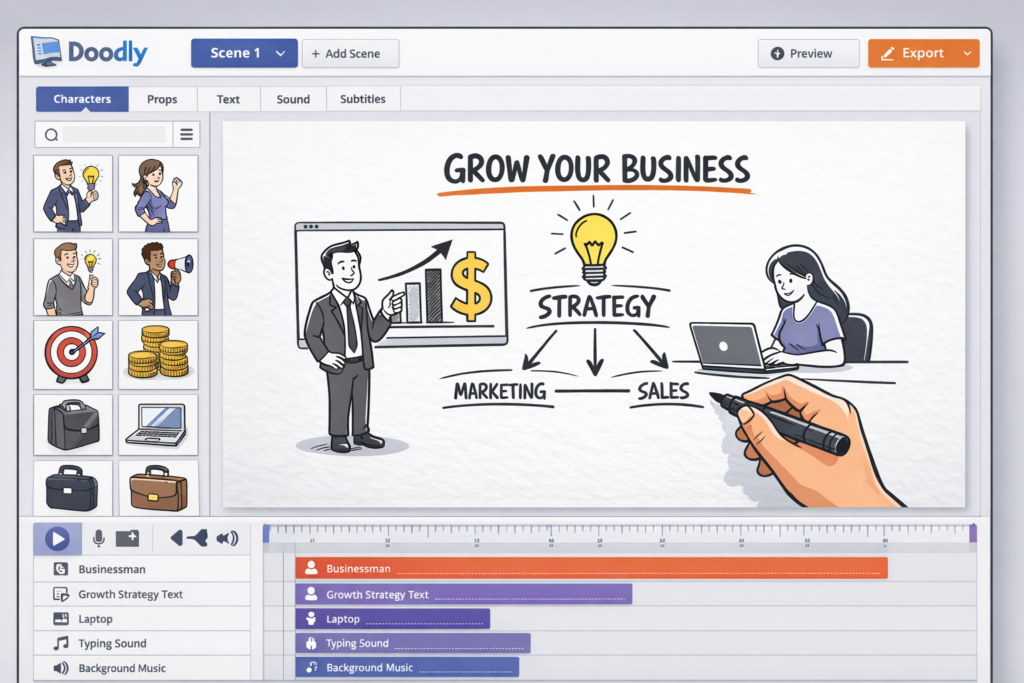
Doodly is whiteboard animation software built for users who want to create hand-drawn explainer videos without hiring an animator or learning a complex design stack. Instead of forcing you into a high-skill animation environment, it gives you a more guided workflow for building scenes, adding text, placing images, choosing hand styles, syncing audio, and exporting your final video.
That positioning matters because Doodly is not trying to be everything. It is not a full replacement for advanced motion design software, and it is not meant to compete directly with high-end cinematic editors. Its real appeal is that it helps ordinary users produce a specific type of video that still performs well in education, training, sales, onboarding, storytelling, and social content where visual explanation matters more than flashy editing.
If your content strategy depends on explaining ideas clearly, simplifying a process, presenting an offer, teaching a lesson, or making information more memorable, the whiteboard format still has value. That is why Doodly remains relevant. It serves a focused need instead of trying to become a bloated all-in-one video suite.
Who Doodly Is Best For
- Educators and trainers who want lesson videos, concept breakdowns, and tutorial visuals
- Marketers who need explainers, ad creatives, lead magnet videos, or simple sales videos
- Course creators and coaches who want presentation-style visuals without hiring a designer
- Agencies and freelancers who need repeatable client deliverables in a whiteboard style
- Small businesses that want onboarding, service explainers, or promotional content
- Beginners who want something easier than traditional animation tools
Doodly makes the most sense when your goal is not “make any kind of video.” It makes the most sense when your goal is “make this specific kind of explainer video faster, more consistently, and with less frustration.” That distinction is important because it is what decides whether Doodly feels like a smart purchase or an unnecessary extra subscription.
Who Should Probably Skip Doodly
- Creators who mostly make fast-moving Reels, cinematic edits, or highly stylized brand videos
- Users who want a strong mobile or tablet editing workflow
- People who only need one or two whiteboard videos and may be better off outsourcing
- Buyers who expect automatic AI-heavy editing, instant subtitles, or deep animation control
- Teams that do not really use whiteboard or doodle-style visuals in their content strategy
This matters for SEO and buyer intent because a good review should not only tell readers why a product is useful. It should also help them avoid a bad-fit purchase. Doodly is not weak because it has a niche. Its niche is actually its strength. But that same niche also limits who should spend money on it.
Doodly’s Biggest Selling Points
1. Multiple board styles make the software more versatile than the name suggests
One of Doodly’s biggest practical strengths is that it is not limited to a plain whiteboard look. You can create videos using whiteboard, dark chalkboard, green chalkboard, glassboard, and custom backgrounds. This gives you more flexibility than many people expect when they first hear about “whiteboard animation software.”
That flexibility matters because visual style changes the entire tone of a video. A classic whiteboard can feel educational and clean. A chalkboard can feel more classroom-like or creative. A glassboard can feel more modern and presentation-driven. A custom background can help you align the video with a brand or campaign. Instead of forcing one aesthetic, Doodly gives you several ways to present the same message.
2. Hand-style options help videos feel less generic
Doodly also supports multiple hand styles, including right-handed, left-handed, sleeved, sleeveless, male, female, different skin tones, cartoon-style hands, and no hand at all. This is a small detail on paper, but in practice it helps your videos feel less repetitive and gives you more control over presentation style.
For example, some brands want the classic hand-drawing effect because it feels familiar and engaging. Others prefer to remove the hand for a cleaner modern look. Some educators may prefer chalkboard visuals, while a marketing team may want a glassboard-style presentation. Doodly gives you enough control here to keep content from feeling too templated.
3. Custom asset support is one of the features that gives Doodly real long-term value
Doodly is not limited to built-in assets. You can upload your own PNG, JPG, SVG, and animated GIF files, and you can also upload custom fonts. This matters because it moves Doodly from being a closed template system to being something you can adapt to real business use.
If you are building videos for a brand, a course, a product demo, or a niche audience, custom uploads are essential. You may want to use your own logo, your own icons, your own screenshots, your own illustrations, or your own typography. Without custom uploads, Doodly would be much easier to outgrow. With them, it becomes much more usable for repeat content production.
SVG support is especially important because it can produce better results for drawn effects. Transparent PNG files are also useful if you want cleaner asset integration. For creators who care about visual consistency, this is one of the strongest reasons to take Doodly seriously instead of seeing it as a toy.
4. Built-in voiceover and audio support make the workflow more practical
Doodly lets you record a voiceover directly inside the software, upload MP3 audio, place sound on the timeline, clip it, fade it, and align it with scenes. That may not sound revolutionary, but it is extremely useful for the actual users Doodly targets. Most buyers want to explain something, and explanation usually works best with narration.
Instead of forcing you to do every audio task outside the app, Doodly keeps enough audio functionality inside the workflow to make production smoother. This is particularly useful for course creators, YouTube explainers, onboarding videos, and simple sales presentations where narration does a lot of the persuasive work.
5. Export control is good enough for most practical use cases
Doodly supports export to your computer or to Voomly Cloud, with output formats including MP4, OGG, MKV, and WebM. It also gives control over resolution, FPS, and quality. For most users, this is more than enough. You are not locked into one low-quality export option, and you have enough flexibility to create files suitable for websites, presentations, social distribution, or educational delivery.
The software also benefits from the fact that Doodly exports do not force branded watermarks onto your final videos. That matters for professionals who want client-safe output and for businesses that do not want a software watermark distracting from the message.
Doodly Features Breakdown
| Feature | Why it matters |
| Whiteboard, chalkboard, glassboard, and custom backgrounds | Lets you match the video style to the audience, topic, or brand |
| Multiple hand styles and no-hand option | Gives more presentation flexibility and helps reduce repetitive-looking videos |
| Custom image uploads | Useful for logos, brand assets, screenshots, product visuals, and niche illustrations |
| Custom font uploads | Improves brand consistency and language flexibility |
| Voiceover recording inside the app | Speeds up production for explainers, tutorials, and training videos |
| Audio upload and timeline editing | Helps sync narration and music without leaving the workflow |
| Templates and scene templates | Improves speed for repeat video creation |
| Multiple export formats | Makes the software more practical for different publishing needs |
| Unlimited video creation | Better value for people producing content regularly |
| Use on multiple computers | Helpful for multi-device workflows and flexible work setups |
How Easy Is Doodly to Use?
Ease of use is where Doodly wins most clearly. The software is built around a simpler editing logic than advanced animation tools. You choose a board style, add scenes, place objects, edit text, add narration or music, and export the result. That is much easier to learn than building animated sequences from scratch in a high-end design environment.
For beginners, that is the main attraction. You do not need to be a motion designer. You do not need to be a visual effects editor. You do not need to understand advanced compositing. Doodly lowers the barrier enough that people who are strong in marketing, teaching, or storytelling can still turn ideas into video.
That said, “easy” does not mean “automatic.” If you upload custom assets, refine timing, adjust draw paths, or fine-tune audio, you still need to spend time making decisions. Doodly removes a lot of technical pain, but it does not completely remove production work. That is actually a good thing, because total automation often leads to low-quality or generic output.
The best way to think about Doodly is this: it is easier than traditional animation software, but it still rewards users who care about scripting, pacing, visuals, and scene structure. In other words, the software reduces skill barriers, but it cannot replace creative judgment.
Doodly Pricing
Doodly currently offers both monthly and annual pricing, with Standard and Enterprise plan options. Standard is the lower entry tier, while Enterprise expands the asset library, template count, font count, music tracks, support level, and storage. For buyers comparing value, the key question is not just the price difference. The key question is whether you actually need the extra asset volume and support tier.
| Plan | Price | Best for |
| Standard Monthly | $49/month | Individuals and smaller creators testing or using Doodly regularly without committing annually |
| Enterprise Monthly | $79/month | Users who want a larger built-in library, more templates, more fonts, and premium support |
| Standard Annual | $490/year | Users who know they will use Doodly throughout the year and want a lower long-term cost |
| Enterprise Annual | $790/year | Teams, agencies, or frequent creators who want the strongest included package |
Here is what really matters from a buyer perspective. Doodly can feel expensive if you compare it to generic one-off video tools or if you barely use whiteboard animation. On the other hand, it can feel very reasonable if you create explainers, lessons, or sales videos regularly and want a tool built specifically for that purpose. Price only makes sense when matched against workflow frequency.
Another consideration is that Doodly’s pricing page also positions the offer as part of a broader Voomly Cloud ecosystem. That can improve value for some users, but it should not be the main reason you buy. The main reason to buy Doodly should still be Doodly itself and whether it solves your whiteboard-video needs.
Is Doodly Worth the Price?
Doodly is worth the price for people who make the kind of content it was built for. If you publish educational videos, service explainers, sales videos, onboarding videos, simple social explainers, or training assets on a recurring basis, the software can save time and make whiteboard production more repeatable. In that situation, the cost is easier to justify.
Doodly is less convincing for casual buyers who only need one or two videos or for creators whose audience expects a more modern motion-graphics style. In those cases, the best value might come from a freelancer, a different type of video editor, or even another content format entirely.
Value also depends on whether you use custom assets well. Buyers who simply drag a few default doodles into the editor may not unlock much strategic value. Buyers who build branded explainers, combine their own assets with narration, and treat Doodly as a repeatable communication tool will get much more out of it.
Which Doodly Plan Should You Choose?
If you are deciding between Standard and Enterprise, do not overcomplicate it. The lower tier is usually enough for solo creators, educators, coaches, and smaller businesses that mainly want access to the core workflow. If your main goal is to create whiteboard videos consistently and you are comfortable supplementing with your own assets when needed, Standard can be enough to get started.
Enterprise makes more sense when you want more built-in assets, more templates, more fonts, more included music, and stronger support. Agencies, client-service businesses, and heavier users are more likely to appreciate those upgrades because the extra library depth can reduce production friction over time.
| Choose this if… | Recommended plan |
| You are a solo creator testing Doodly for your own videos | Standard |
| You mainly need the core whiteboard workflow, not the largest built-in library | Standard |
| You create videos frequently for clients or multiple brands | Enterprise |
| You want more included templates, fonts, music, and support | Enterprise |
| You already know whiteboard videos will be part of your long-term workflow | Annual plan |
| You only want to test the software before committing | Monthly plan |
What Makes Doodly Different From Cheaper Alternatives?
When buyers compare Doodly with cheaper alternatives, the discussion often becomes too shallow. People focus only on headline price instead of workflow quality. A cheaper tool is not always cheaper in practice if it creates more friction, forces more compromises, or produces results that you do not actually want to publish.
Doodly’s advantage is not that it is the cheapest way to put moving visuals on a screen. Its advantage is that it offers a recognizable whiteboard-animation workflow with board-style flexibility, hand-style control, custom uploads, voiceover support, and a repeatable content-production structure. That is more valuable than a rock-bottom price if you plan to use the software regularly.
Another difference is output confidence. Specialized tools often create better results faster inside their niche than broader tools that technically can do the job but are not designed around that job. Doodly benefits from being specialized. If your scripts, offers, lessons, or explanations naturally fit the doodle format, the software can help you move from idea to finished video with less decision fatigue.
Buying Doodly Makes the Most Sense in These Scenarios
- You publish explainers regularly. If explanation is part of your weekly or monthly content workflow, Doodly becomes more valuable.
- You sell information or services. Coaches, educators, consultants, agencies, and software-related businesses often benefit from visual explanation.
- You want a tool that non-designers can actually use. This is one of Doodly’s biggest advantages.
- You want repeatable production. Templates, reusable assets, and a familiar workflow help you produce more consistently.
- You prefer clarity over visual flash. Whiteboard videos work well when understanding is more important than cinematic polish.
When Doodly Is More Likely to Feel Like a Bad Purchase
- You like the idea of whiteboard videos more than you actually use them. If this content style is not central to your strategy, the software may sit unused.
- You expect AI automation to do most of the creative work. Doodly still benefits from human planning and editing.
- You want all your editing done on mobile devices. Doodly is not built for that.
- You only need a single launch video. One project may not justify ongoing software costs.
- Your brand identity depends on modern short-form editing aesthetics. In that case, a different kind of editor may fit better.
Doodly Pros and Cons
| Pros | Cons |
| Beginner-friendly workflow | Desktop-only, no mobile or tablet app |
| Multiple board styles beyond basic whiteboard | Still limited compared with full animation suites |
| Good hand-style variety, including no-hand mode | Some tasks remain manual, especially with custom asset refinement |
| Custom image and font uploads | Best value only if you specifically need whiteboard-style video content |
| Built-in voiceover recording and audio support | Not the strongest option for modern short-form social editing |
| Multiple export settings and formats | Can feel costly for one-time or occasional users |
| Unlimited video creation | Not ideal if you want highly automated AI-first video production |
| No forced watermark on exports | Some users may outgrow the style if they move into broader video production |
Where Doodly Performs Best in Real-World Use
Teaching and training
Doodly works especially well for educational content because the whiteboard format naturally supports concept explanation. If you are teaching a process, showing a sequence, introducing a framework, or breaking down a difficult concept, hand-drawn visual progression can keep attention better than plain slides alone.
Sales videos and explainers
Whiteboard videos can also work well for sales messaging when the product or service needs explanation. This is especially true for digital products, services, consultancies, and offers that benefit from step-by-step persuasion. Doodly helps here because it is easier to turn a script into a guided visual sequence.
Course content and lead magnets
For creators building educational products, Doodly can be useful not only for public content but also for internal lesson material, bonus content, onboarding, and downloadable resource videos. If you sell knowledge, clarity is part of the product, and Doodly can support that clarity well.
Agency repeatability
Agencies and freelancers can get strong value from Doodly when they offer explainer-style deliverables to multiple clients. Once the workflow is set up, the combination of templates, custom uploads, and reusable production patterns can make Doodly more efficient over time than starting from scratch for every client project.
Important Limitations You Should Know Before Buying
A strong review should not hide limitations, so here are the most important ones. First, Doodly does not currently offer a mobile or tablet app. If you want to edit from your phone or tablet, this is not the right tool. It is a desktop-centered workflow.
Second, Doodly still depends on an internet connection for important parts of its workflow, including project access and cloud-linked functionality. Users who want a more offline-first experience may find that frustrating.
Third, although Doodly is beginner-friendly, some higher-quality results still require manual effort. Custom image handling, scene timing, narration pacing, and visual polish do not magically solve themselves. The software makes production easier, but it does not replace thoughtful execution.
Fourth, subtitle support exists, but scene subtitles are not automatically generated. If auto-caption intelligence is central to your workflow, you should factor that into your buying decision.
Finally, Doodly’s style itself can become a limitation if your brand evolves beyond whiteboard-style communication. This does not make the software bad. It simply means the software is specialized. Specialized tools are powerful when they match the job and less compelling when they do not.
Doodly vs a Generic Video Editor
| If you need… | Doodly is a better fit | A generic editor may be better |
| Whiteboard-style explainer videos | Yes | No |
| Fast scene-based educational videos | Yes | Maybe |
| Custom doodle-style business explainers | Yes | Maybe |
| Modern social editing with trendy transitions | No | Yes |
| Cinematic brand storytelling | No | Yes |
| Mobile-first editing | No | Yes |
| Easy learning curve for non-designers | Yes | Depends on the editor |
This comparison matters because many buyers ask the wrong question. They ask, “Is Doodly the best video software?” That is too broad. The better question is, “Is Doodly one of the better choices for whiteboard and doodle-style communication when I want something easier to use?” In that narrower and more accurate comparison, Doodly becomes much more competitive.
Does Doodly Work for SEO, Content Marketing, and Business Communication?
Yes, but not in the way some people assume. Doodly does not improve SEO by itself. What it can do is improve how you communicate information that supports SEO, content marketing, conversions, or audience retention. For example, an embedded explainer video can make a landing page easier to understand. A visual tutorial can increase time on content. A sales explainer can clarify an offer. An onboarding video can reduce support friction.
In other words, Doodly is not an SEO tool. It is a communication tool that can strengthen content experiences when used well. This makes it more useful for marketers than buyers sometimes realize, especially when a business sells something that benefits from visual explanation rather than pure entertainment.
Do You Own the Videos You Create?
This is an important buying question. The practical answer is that the work product you create is yours, but the built-in software assets are licensed for use within the software rather than transferred to you as standalone stock assets. For most buyers, that is a reasonable setup. You can create and use your finished videos, but you should not treat the built-in library as a separate downloadable asset pack for unrelated external use.
If you are producing client work or branded business content, this ownership structure is generally workable. The main thing is to understand that your finished output is yours while the software’s included creative elements remain part of the licensed Doodly ecosystem.
Is Doodly Still Worth It in 2026?
Yes, Doodly is still worth considering in 2026, but only if you evaluate it correctly. If you expect it to function like a modern all-purpose video studio, you may feel disappointed. If you evaluate it as approachable whiteboard animation software for explainers, lessons, marketing videos, and business communication, it remains a relevant and useful option.
Its continued value comes from a few things: it still solves a real communication need, it is accessible to non-designers, it supports custom assets, and it gives enough production control to produce polished results in its category. That combination is what keeps Doodly useful even as the broader video market becomes more crowded.
The most honest verdict is this: Doodly is not the best tool for every creator, but it can be exactly the right tool for people whose message works best in a drawn explainer format. That kind of product fit is more important than hype.
Final Verdict
Doodly is a strong niche tool. It is not trying to win every category of video creation, and it does not need to. Its job is to help people create whiteboard and doodle-style videos more easily, and it still does that well. For beginners, educators, marketers, and businesses that depend on explainer-style communication, that alone can make it worth the investment.
The strongest reasons to buy Doodly are its approachable workflow, multiple board styles, hand-style control, custom asset support, voiceover capability, export flexibility, and repeat-use potential. The strongest reasons to skip it are desktop-only usage, limited relevance if you rarely need whiteboard animation, and the fact that some higher-quality output still requires manual work.
If your content strategy genuinely benefits from whiteboard explainers, Doodly is one of the more sensible tools to consider. If your strategy does not, then a broader editor or a different content format may be the smarter investment. The best purchase decision comes from matching the tool to the job, not from chasing software just because it sounds useful.
FAQ
Is Doodly good for beginners?
Yes. Doodly is one of the more beginner-friendly options in the whiteboard animation category because it focuses on a simpler drag-and-drop workflow rather than advanced animation complexity.
Does Doodly work on Mac and Windows?
Yes. Doodly is designed for both Mac and Windows desktop users.
Can I upload my own images to Doodly?
Yes. Doodly supports custom image uploads, which is one of its most useful features for branded or niche content creation.
Can I add my own voiceover in Doodly?
Yes. You can record voiceover directly inside the software and also upload compatible audio files.
Does Doodly have a mobile app?
No. Doodly is currently a desktop application rather than a mobile or tablet editing tool.
Is Doodly worth it for businesses?
Doodly can be worth it for businesses that use explainer videos, onboarding videos, training content, or service walkthroughs regularly. It is less compelling for businesses that rarely use this style of content.
Can Doodly replace a full video editor?
Not usually. Doodly is better understood as a specialized whiteboard animation tool rather than a full replacement for every type of video editor.
About the Author
Xu Xun
Contact: xuxun1208@gmail.com
Last Updated: June 2026