
If you are searching for an honest Uncanny Automator review, you are probably trying to solve a very specific WordPress problem: your forms, store, CRM, email platform, SEO plugin, course platform, and content workflow all do useful things, but they do not naturally work together in a smooth, scalable way. You end up moving data manually, copying details from one plugin to another, checking if an email fired, checking if a user was enrolled, checking if a webhook ran, and wasting time on small repetitive tasks that should have been automated from the beginning.
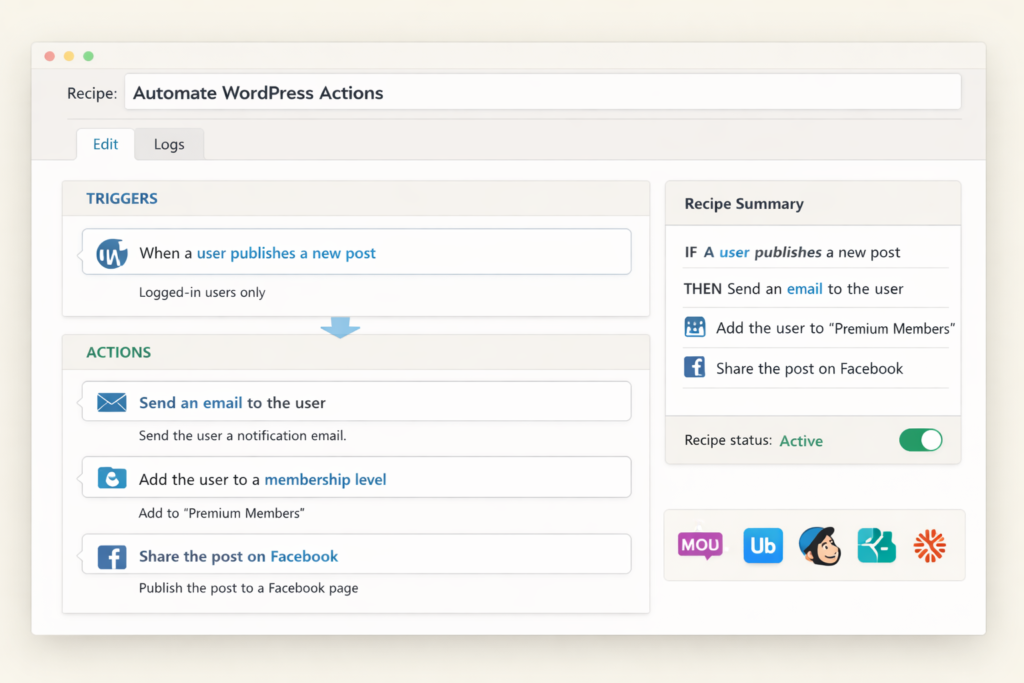
That is exactly where Uncanny Automator stands out. Instead of acting like just another add-on plugin, it works more like a WordPress automation layer. You create recipes. A trigger happens. Then one or more actions run automatically. In simple terms, it lets your WordPress site respond intelligently to what users, admins, customers, or editors do, and it can connect those actions not only across WordPress plugins, but also across external apps, webhooks, and content workflows.
For site owners who care about growth, efficiency, and SEO, that matters. The more your site grows, the more operational drag you create. Orders need tagging. Leads need routing. content needs sharing. SEO-related changes need follow-up actions. Access needs to be granted or removed. Teams need notifications. Reports need to be updated. If you keep doing all of this manually, your WordPress stack becomes heavier every month. If you automate it well, your site becomes more scalable without requiring custom development for every little workflow.
In this detailed review, I am going to look at what Uncanny Automator actually does well, where it falls short, which sites benefit most, whether the free version is enough, how the pricing compares to the value, and whether it is genuinely worth using if your goal is to build a more efficient WordPress business. This article is written for ranking value and real buyer intent, so instead of giving you a vague overview, I will break the plugin down from a practical, decision-making angle.
Uncanny Automator Review: The Short Answer
Yes, Uncanny Automator is one of the best WordPress automation plugins available right now, especially for websites that already rely on multiple plugins and need those plugins to work together without custom code. It is especially strong for WooCommerce sites, membership sites, LMS businesses, agencies, content publishers, and WordPress operators who want more control over workflows inside WordPress itself.
| Category | Verdict |
|---|---|
| Best for | WordPress site owners who want no-code automation across plugins, users, content, and external apps |
| Biggest strength | Native WordPress automation with deep plugin support, webhook flexibility, and advanced workflow control |
| Best use cases | WooCommerce workflows, lead routing, LMS automation, membership access, content operations, SEO-related maintenance flows |
| Main drawback | The most powerful features live in the paid plans, and serious users will probably outgrow the free version quickly |
| Free version | Good for testing and real plugin-to-plugin automation, but app-based workflows and advanced logic are limited compared with Pro |
| Overall verdict | Excellent choice if your business runs heavily on WordPress and you want to reduce admin work without building custom integrations |
If your website is simple and mostly static, you may not need a plugin like this. But if your site has real operational complexity, Uncanny Automator can save time, reduce mistakes, and make your plugin stack feel much more connected.
What Is Uncanny Automator?
Uncanny Automator is a no-code WordPress automation plugin that lets you create automated workflows called recipes. A recipe is built from triggers and actions. A trigger is the event that starts the automation, and an action is what the plugin does next. For example, when a user submits a form, you can tag them in your CRM, add them to a Google Sheet, send a Slack alert, create a WordPress user, enroll them in a course, or perform several follow-up actions at once.
That sounds simple, but the power comes from the range of things you can connect. Uncanny Automator is not limited to one plugin category. It touches eCommerce, memberships, forms, LMS platforms, SEO plugins, webhooks, content publishing, cache management, social posting, and AI-related workflows. That makes it more useful than many narrow automation plugins that only solve one slice of the WordPress workflow problem.
Another reason it gets attention is the way it is positioned. Instead of forcing WordPress users to move every automation into a separate external platform, Uncanny Automator allows a lot of logic to happen directly on the WordPress site itself. That does not mean external automation platforms are useless, but for WordPress-heavy businesses, keeping more workflow logic inside the site can be simpler, faster, and easier to manage.
In practice, that means you can build workflows such as:
- When a customer buys a product, create an account, grant access, and notify support.
- When an editor updates a post, adjust SEO-related settings and clear the relevant cache.
- When a lead submits a form, qualify it, segment it, and push it into the right downstream tools.
- When a student completes a course, unlock a new path and send a targeted follow-up.
- When a business event happens on one site, trigger actions on another site or in another app.
That is why the plugin is best understood as a workflow engine for WordPress rather than just a basic integration helper.
Why Uncanny Automator Matters More in 2026
There are two reasons this plugin matters more now than it did a few years ago.
The first is feature depth. Uncanny Automator has moved well beyond simple trigger-action behavior. It now supports more advanced workflow controls such as conditions, delays, schedules, loops, user creation, multi-step app interactions, and more flexible data handling. That means it is no longer only useful for beginners who want a simple “if this, then that” recipe. It is increasingly useful for serious site operators who need automation to work more like a business system.
The second is relevance to publishing and SEO operations. Many site owners still think of automation only in terms of forms, ecommerce, or email. But modern websites need much more than that. They need publishing systems, editorial checks, cache clearing, metadata management, content distribution, reporting, and increasingly, AI-assisted workflows. Uncanny Automator has clearly been expanding into that direction. That makes it especially interesting for affiliate sites, content businesses, course businesses, and publishers who need repeatable processes instead of ad hoc admin work.
If your WordPress site is becoming more like an operating system for your business than just a website, tools like this become more valuable over time, not less.
Who Should Use Uncanny Automator?
Uncanny Automator is not equally useful for every site. Its real value shows up when your site has workflow complexity.
| User type | Why Uncanny Automator makes sense |
|---|---|
| WooCommerce store owners | Automate post-purchase actions, tagging, staff alerts, reporting, access, and follow-up workflows |
| Membership site owners | Control access levels, move users between restricted areas, and automate subscriber journeys |
| LMS and course creators | Trigger enrollment, course progression, achievement actions, reminders, and learner segmentation |
| Agencies | Build reusable automation systems across multiple client sites and reduce repetitive admin work |
| Publishers and affiliate sites | Automate content operations, reporting, SEO-related steps, sharing, and site maintenance workflows |
| Operations-heavy WordPress businesses | Connect forms, users, posts, CRM actions, notifications, and app integrations without custom coding |
On the other hand, if your site is mostly a brochure site, portfolio, or very simple blog with almost no operational logic, the plugin may be more than you need. It is powerful, but that power only pays off when there is enough workflow complexity to justify it.
Core Features That Make Uncanny Automator Stand Out
1. Recipe builder
The recipe builder is the heart of the plugin. It uses sentence-based logic that is much easier to understand than many technical automation interfaces. Instead of feeling like a developer tool, it feels like a structured workflow builder for normal WordPress users. That matters because many automation tools fail not because they lack power, but because they make the power too hard to use.
2. Native WordPress automation
One of Uncanny Automator’s biggest strengths is that many workflows can run directly on your WordPress site. If your site is the center of your business, this is a major advantage. You keep your workflow logic closer to the content, users, and events that actually matter, instead of pushing every task through a separate external system.
3. Broad integrations
Integration breadth is one of the product’s biggest selling points. It connects with many of the plugins and apps WordPress businesses already use, including forms, ecommerce tools, memberships, LMS systems, CRMs, spreadsheets, messaging tools, AI tools, social platforms, and webhooks. For buyers, this matters because the best automation plugin is usually not the one with the prettiest interface. It is the one that actually connects the tools already in your stack.
4. Conditions
Conditions let you decide whether a specific action should run based on rules. This is where automation starts to become much more precise. Instead of building blunt workflows that run the same way every time, you can filter users, emails, roles, field values, and other criteria. That makes recipes far more useful for real businesses because not every user or event should be treated the same way.
5. Delays and schedules
Delays and schedules let you separate the trigger from the action in time. This is essential for trial periods, reminder flows, onboarding sequences, delayed email follow-ups, expiration logic, and event-driven timing. Without delays and scheduling, many automations remain too basic to support serious business workflows.
6. Loops and bulk actions
Loops are one of the features that push Uncanny Automator into more advanced territory. Instead of only reacting to a single user action, loops let you run actions on sets of users that match certain criteria. This is powerful for reporting, re-engagement campaigns, access corrections, bulk emails, and operational cleanup tasks. It is also one of the features that requires more care, because bulk actions are where mistakes can scale quickly if you do not test carefully.
7. Webhooks and app connections
Webhook support is a major advantage because it expands what the plugin can do beyond listed plugins. Even if a service is not covered by a polished native integration, webhooks often make it possible to connect the site to external systems anyway. That increases flexibility and future-proofs the plugin to some extent.
8. Add-ons for access, user data, and personalization
Higher plans also include add-ons that make the plugin more interesting for membership sites, personalized experiences, and structured user management. This is where the plugin begins to feel less like a simple automation tool and more like part of your site architecture.
Uncanny Automator Free vs Pro: Which One Is Actually Enough?
The free version of Uncanny Automator is better than many WordPress users expect. It is not just a teaser that becomes useless after five minutes. You can build real plugin-to-plugin workflows, create unlimited recipes for included WordPress integrations, and test app-based workflows with credits. That makes it a legitimate starting point if you want to validate whether the plugin fits your site.
However, the free version and Pro version serve different kinds of users.
| Plan level | Best for | What you should know |
|---|---|---|
| Free | Testing, lightweight automation, basic plugin-to-plugin workflows | Good starting point, but advanced logic and unlimited app usage are not the focus |
| Basic | Single-site businesses that need real automation depth | Best for one serious site that already depends on WordPress workflows |
| Plus | Agencies, multisite users, membership and data-heavy businesses | Adds more strategic value if you manage several sites or need access/data add-ons |
| Elite | Larger operations, advanced agencies, more demanding workflow stacks | Best choice when you need scale, more sites, and higher-end integrations |
My practical advice is simple. Start with the free version if you want to test whether the workflow builder fits your style and your plugin stack. Upgrade when you hit a real operational bottleneck such as delayed sequences, advanced conditions, user creation, multi-site workflows, richer logging, or heavy app usage. That keeps the decision grounded in value rather than buying features you may never use.
Uncanny Automator Pricing: Is It Worth the Cost?
Pricing matters because workflow plugins can look cheap or expensive depending on what they replace. If you only want one tiny automation, almost any paid plan can feel expensive. But if the plugin replaces manual admin work, avoids extra niche plugins, and reduces the need for custom code or heavier external workflow tooling, the math changes very quickly.
At the time of writing, Uncanny Automator’s paid plans are structured across Basic, Plus, and Elite. The current official pricing makes the biggest difference in site limits and included higher-tier functionality, not just in cosmetic feature packaging.
| Plan | Price | Site limit | Who it fits best |
|---|---|---|---|
| Basic | $149/year | 1 site | Solo site owners and single-site businesses that need serious automation |
| Plus | $249/year | 10 sites | Agencies, growing businesses, multisite users, and operators managing several WordPress properties |
| Elite | $399/year | 50 sites | Advanced agencies and larger businesses that need more scale and richer capabilities |
There are two important things to understand about pricing here.
First, the plugin is much easier to justify when you compare it to time saved, not just to other plugins. Saving even a few hours per month in admin time can easily cover the annual cost for a commercial site. That is especially true when workflows affect revenue, onboarding, lead handling, memberships, or content operations.
Second, plan selection should be based on business structure, not only on budget. Many people instinctively choose the cheapest plan, but if you run multiple sites, manage clients, or need richer user-data and access logic, the higher tiers may actually be better value because they eliminate the need for additional tools and make your workflow architecture cleaner.
The bottom line: Basic is easy to justify for one serious site, Plus is strong value for site portfolios or agencies, and Elite makes sense when automation is part of a larger operational system.
What Can You Actually Build With Uncanny Automator?
Features matter, but use cases matter more. The real test of any automation plugin is whether it solves practical problems you already have.
WooCommerce automation
Uncanny Automator is especially useful for WooCommerce sites because buying behavior creates many downstream actions. Purchases can trigger tagging, access, notifications, reporting, coupon workflows, follow-up sequences, user creation, or enrollment into other experiences. If you sell digital products, memberships, training, subscriptions, or event access, this becomes much more powerful than a simple order notification system.
Membership and access workflows
Membership businesses usually struggle with access logic. A user buys access, changes plan, stops paying, finishes onboarding, submits a form, or reaches a milestone. Then something about their access should change. This is exactly the kind of workflow automation that becomes messy when handled manually. With the right add-ons and connected plugins, Uncanny Automator becomes a much cleaner way to coordinate user movement between different levels or protected content experiences.
LMS and course logic
Course businesses are a natural fit for automation because student behavior creates a stream of useful triggers. Enrollment, course completion, quiz results, inactivity, milestones, and group membership can all become workflow signals. That makes it easier to personalize learning paths, send interventions, reward progress, or move students into different stages of the customer journey.
Lead capture and form routing
Forms are one of the easiest places to create value quickly. Instead of letting form data sit inside the form plugin, you can route it outward. Send it to your CRM, send it to a spreadsheet, send it to a messaging channel, create a user, apply segmentation rules, or trigger a follow-up chain. This is often the first automation that convinces people a plugin like Uncanny Automator is worth keeping.
Content publishing and SEO operations
This is one of the most interesting angles for publishers and affiliate sites. A modern content workflow does not end when an author clicks publish. You may need to update metadata, check SEO scores, push reporting data to a spreadsheet, notify editors, clear the relevant caches, share the post, or trigger AI-assisted support content. That kind of operational chain is where automation can save more time than most people expect.
Reporting and admin reduction
Many businesses underestimate how much time gets lost to tiny administrative tasks. Exporting users. Checking lists. Sending repetitive alerts. Updating spreadsheets. Segmenting by behavior. Creating access changes after specific events. Uncanny Automator is valuable because it removes that slow operational friction from the system.
Why Uncanny Automator Is Especially Interesting for SEO and Content Sites
Because your goal is rankings, this section matters more than it would in a generic plugin review.
Most people think of automation as a marketing convenience. For content and SEO-focused sites, it is more than that. Automation can improve consistency. Consistency improves operational quality. Operational quality often improves publishing speed, editorial discipline, metadata handling, and technical follow-through. Those things do not magically create rankings, but they absolutely help serious websites operate more reliably.
Uncanny Automator is becoming more relevant in this area because it can connect publishing activity with SEO plugin actions, cache clearing, notifications, spreadsheets, AI assistance, and content distribution. That means you can build workflows such as:
- When a post is updated, review or update specific metadata fields.
- When content reaches a certain stage, notify the editor or SEO reviewer.
- When a post is changed, clear the relevant cache so updates appear faster.
- When new content is published, push reporting information into a tracking sheet.
- When user behavior or support data suggests a content gap, trigger a content ideation or draft-support workflow.
That matters for affiliate sites and digital product sites because content publishing is often not the bottleneck. The bottleneck is the messy work around publishing. If you can automate parts of that system, you free up more time for strategy, research, and content quality.
It is also worth noting that AI search visibility increasingly rewards clarity, structure, consistency, and operational maturity. A plugin like Uncanny Automator does not directly make AI systems cite you, but it can help you maintain the workflows that support better content hygiene and better publishing discipline over time.
What I Like Most About Uncanny Automator
The biggest thing I like is that it feels built for real WordPress businesses, not just for demos. That may sound like a small compliment, but it matters. Plenty of plugins have impressive landing pages and shallow real-world usefulness. Uncanny Automator feels different because the underlying problem it solves is genuine, recurring, and operationally important.
I also like that the free version is not fake value. You can actually learn how the plugin works and build something real before paying. That lowers risk and makes the upgrade decision easier.
Another strength is flexibility. The plugin does not force you into one business model or one type of site. It works across stores, memberships, education sites, lead funnels, content sites, and operational workflows. That breadth is useful because many WordPress businesses are hybrids. A site may be part publisher, part product business, part membership system, and part lead-generation machine all at once.
Finally, I like the strategic direction. The plugin is not stuck in old-school automation logic. It is clearly moving into SEO, maintenance, AI-assisted workflows, and broader site operations. That makes it more future-relevant than tools that still focus only on a narrow plugin integration niche.
Where Uncanny Automator Falls Short
No honest Uncanny Automator review should pretend the plugin is perfect.
The main weakness is that the most exciting functionality lives in the paid tiers. If you are a serious user, you will probably want conditions, schedules, user creation, richer app usage, advanced integrations, or multi-site capability. In other words, the free version is genuinely useful, but it is also likely to prove the case for upgrading rather than eliminate the need for it.
A second weakness is complexity growth. The plugin is approachable, but workflow logic becomes more demanding as your recipes become more advanced. Multi-step business logic always requires thinking, testing, and operational discipline. The plugin makes that much easier, but it cannot remove the complexity of the business process itself.
A third limitation is that very small sites may not get enough value from it. If your site is simple, the plugin may feel powerful in theory but underused in practice. The value depends heavily on whether your WordPress site is operationally active.
And finally, as with any automation system, you need to test carefully. Bulk actions, user changes, and access workflows can have wide effects if configured incorrectly. That is not a flaw unique to Uncanny Automator, but it is a real operational consideration.
Uncanny Automator Pros and Cons
| Pros | Cons |
|---|---|
| Powerful no-code automation inside WordPress | Best features are mostly in paid plans |
| Strong free version for plugin-based automation | Advanced workflows still require careful setup and testing |
| Broad integrations across plugins, apps, webhooks, and operational workflows | May be overkill for very small or mostly static sites |
| Useful features like conditions, schedules, loops, and multi-step workflow logic | Serious users can outgrow the free tier quickly |
| Strong fit for WooCommerce, memberships, LMS, and content operations | Bulk or access-related automations require caution to avoid mistakes |
| Increasing relevance for SEO, caching, and site maintenance workflows | Value depends on whether your site has enough workflow complexity |
How Easy Is Uncanny Automator to Use?
For a plugin this capable, it is surprisingly approachable. The builder is readable, the concept is intuitive, and the idea of recipes is easy to understand even for non-developers. That gives it a big advantage over more technical automation systems that immediately overwhelm normal WordPress users.
That said, ease of use depends on what you are trying to do.
If you want a simple form-to-spreadsheet or purchase-to-email workflow, it should feel straightforward. If you want a multi-condition sequence that creates users, branches logic, updates metadata, clears caches, and pushes data to several systems, the thinking becomes more advanced. That is normal. The plugin is user-friendly, but workflow design is still workflow design.
The practical takeaway is this: the plugin is easy enough to start, and powerful enough to grow into, which is exactly what most serious WordPress buyers want.
Best First Workflows to Build
If you install Uncanny Automator for the first time, do not begin with your most complicated automation idea. Start with one workflow that is easy to verify and clearly valuable.
- Lead capture workflow: form submission → add to sheet → notify team → segment contact.
- Content workflow: post published or updated → notify editor or marketing channel → clear cache → log details to sheet.
- WooCommerce workflow: purchase completed → tag customer → grant access → send follow-up email.
- LMS workflow: lesson or course completed → unlock next stage → issue a reward or follow-up.
- Membership workflow: payment or user event → move access level → notify admin → update status tracking.
Starting with a workflow you can verify quickly is the easiest way to judge whether the plugin deserves a permanent place in your stack.
Is Uncanny Automator Better Than Using Separate Small Plugins?
In many cases, yes.
One of the hidden costs of WordPress growth is fragmentation. You add a plugin for one thing, then another plugin to connect it, then another plugin to notify someone, then a snippet to fix a missing behavior, then a sheet for manual tracking. Eventually, the system works, but only because you are constantly babysitting it.
Uncanny Automator can reduce that fragmentation because it provides a shared automation framework. Instead of solving every little need with a separate plugin or custom tweak, you solve more of those needs inside one workflow system. That does not mean it should replace every specialized plugin, but it can often reduce how many glue-like tools you need around the edges.
This is one of the biggest reasons the plugin becomes more valuable as a site matures. Mature sites do not only need features. They need coordination.
Is Uncanny Automator Worth It for Affiliate Sites and Digital Product Sites?
Yes, especially if your site is evolving from “a blog with links” into a real digital property with workflows.
Affiliate and digital product sites usually accumulate complexity slowly. At first, they are mostly content. Then they add forms, lead magnets, downloads, newsletters, AI-assisted workflows, editorial review, product tables, monetization tracking, or gated resources. Suddenly, the site is not just publishing content anymore. It is operating a small digital business.
That is the stage where automation becomes much more valuable. A content site with no operations may not need a plugin like this. A content site with lead capture, tracking, editorial systems, and product-related workflows often does.
If your site strategy depends on publishing at scale while keeping quality and operations under control, Uncanny Automator is worth serious consideration.
Is Uncanny Automator Worth It for Agencies?
Agencies are one of the clearest target users for the higher plans.
If you manage multiple WordPress sites, repeated admin tasks become expensive fast. Even tiny actions multiplied across many sites create drag. An automation plugin that can standardize key workflows across sites is valuable because it reduces human repetition, makes handoff easier, and creates more operational consistency across client work.
For agencies, the value is not only about automation itself. It is also about having a reusable workflow layer that can be adapted for different client setups without reinventing the process from scratch each time.
My Final Verdict on Uncanny Automator
Uncanny Automator is one of the strongest WordPress automation plugins available in 2026, and it deserves that reputation. It is not just a niche convenience tool. It is a serious workflow platform for site owners whose businesses actually run through WordPress.
Its biggest strengths are clear: a solid free version, deep WordPress-centered automation, broad integration coverage, practical workflow logic, and growing relevance for SEO, maintenance, and content operations. Its biggest weakness is also clear: if you want the most strategic value, you will probably need a paid plan.
That said, for the right kind of website, the value proposition is strong. If your site depends on forms, memberships, ecommerce, learners, content workflows, operational reporting, or plugin coordination, Uncanny Automator can save time, reduce mistakes, and make your WordPress stack much more efficient.
So, is Uncanny Automator worth it? For serious WordPress site owners, yes. Especially if your website is already doing enough business activity that manual processes are starting to slow you down.
Frequently Asked Questions About Uncanny Automator
Is Uncanny Automator free?
Yes. There is a real free version, and it is good enough to build actual WordPress plugin-to-plugin automations. It is a useful way to test whether the plugin fits your workflow before paying for Pro.
What is the main difference between Uncanny Automator free and Pro?
The main difference is depth. Pro is where you get more advanced workflow control, broader app usage, richer actions, user creation, schedules, conditions, and more operational flexibility. The free version proves the concept. Pro unlocks the larger business value.
Is Uncanny Automator good for WooCommerce?
Yes. WooCommerce is one of the strongest use cases because purchases naturally trigger follow-up actions. This is where automation can quickly save time and improve the customer journey.
Is Uncanny Automator good for membership sites?
Yes. It is especially useful when you need access changes, onboarding workflows, user movement between levels, or automation tied to payment and behavior events.
Can Uncanny Automator help with SEO workflows?
Yes. It is increasingly relevant for SEO-related operations because it can now connect publishing, metadata changes, cache clearing, notifications, and content-related processes in more structured ways.
Is Uncanny Automator hard to use?
It is easier to use than many powerful automation tools, but the difficulty depends on the complexity of the workflows you build. Simple recipes are approachable. Advanced business logic still requires careful thinking and testing.
Who should probably skip Uncanny Automator?
If your site is tiny, mostly static, or has almost no real workflow complexity, you may not get enough value from it. The plugin shines when your WordPress site is doing meaningful operational work.
Conclusion
If you want a lightweight answer, this is it: Uncanny Automator is one of the best automation plugins for WordPress users who are serious about reducing manual work and building smarter systems.
If you want the longer answer, it comes down to fit. The plugin is not powerful because it looks technical. It is powerful because it solves a real operational problem that most growing WordPress websites eventually face. When plugins, users, content, and business events stop living in isolation and start working together, your site becomes easier to scale.
That is what Uncanny Automator is really selling: not just automation, but operational leverage for WordPress.
About the Author
Xu Xun
Contact: xuxun1208@gmail.com
Last Updated: June 2026