
If you are searching for an honest CloudCone review, the short answer is this: CloudCone is one of the more interesting low-cost infrastructure platforms for developers, technical website owners, and budget-conscious users who want more control than shared hosting without jumping straight to a much more expensive cloud provider.
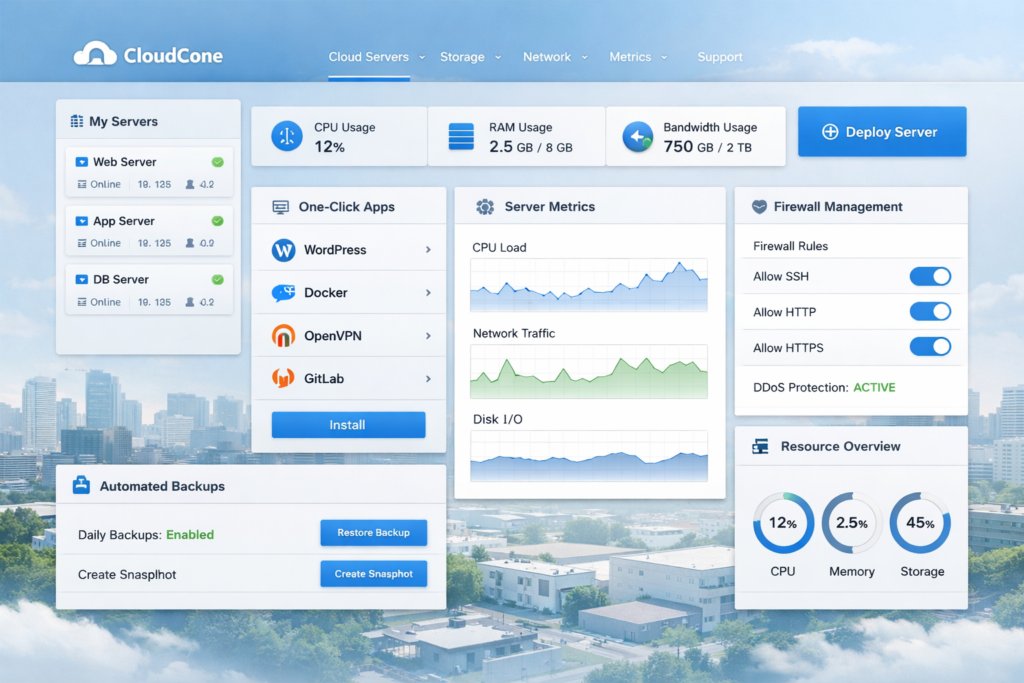
CloudCone stands out because it combines low entry pricing with cloud-style flexibility. On its public SC2 cloud server page, the entry plan starts at $5.20 per month, hourly billing is available, and the listed plans include features such as a managed firewall, advanced server metrics, one-click applications, snapshots, and the option to enable automated daily backups. That combination gives CloudCone a different value proposition from a generic bargain VPS.
At the same time, this is not the kind of host that makes everything invisible for beginners. CloudCone’s SC2 product is much closer to a real root server environment. You get flexibility and control, but you are also expected to be more comfortable with server management, Linux, SSH, or at least a control panel setup.
That makes this platform a strong fit for some buyers and a weak fit for others. In this review, I’ll break down CloudCone pricing, features, use cases, pros and cons, WordPress suitability, limitations, and whether it is actually worth using in 2026.
CloudCone Review Summary
| Best for | Developers, technical site owners, staging servers, lightweight apps, self-managed WordPress, VPNs, and budget-conscious cloud buyers |
| Not ideal for | Total beginners, users who want fully managed WordPress, and buyers who want heavy hand-holding |
| Main strength | Affordable entry pricing with hourly billing, flexible scaling, and useful infrastructure tools |
| Main weakness | More technical than beginner-oriented hosting |
| Public SC2 entry price | $5.20/month |
| Data center emphasis on public SC2 page | Los Angeles, US |
| My verdict | CloudCone is worth considering if you want affordable cloud servers with real control and can handle a more self-managed setup |
If your priority is flexibility, root access, and better cost control than many traditional hosts offer, CloudCone is easy to take seriously. If your priority is convenience and fully managed website hosting, it is much less compelling.
What Is CloudCone?
CloudCone is a cloud infrastructure provider that offers scalable cloud servers, VPS hosting, dedicated servers, hosted email, one-click applications, backups, snapshots, DDoS protection options, and API access under one account ecosystem. For most readers comparing it with other hosting brands, the most important product is SC2, which stands for Scalable Cloud Compute.
SC2 is the product that makes CloudCone more than just another cheap VPS provider. Instead of selling only fixed long-term plans, CloudCone positions SC2 as a more flexible cloud server environment. You can choose preset plans or custom-build around resources, pay hourly for many workloads, deploy one-click apps, manage backups and snapshots, and work with firewall rules and monitoring from the platform.
That difference matters. Buyers often assume all “cheap servers” are basically the same, but CloudCone’s SC2 product is built for users who want more direct infrastructure control. It is a better comparison against low-cost cloud compute or flexible VPS-style infrastructure than against beginner shared hosting.
CloudCone also sells separate VPS offers, often through promotional or yearly pricing pages. Those can be cheaper, but they are not the same product as SC2. If flexibility and scaling matter, SC2 is the more relevant product to evaluate.
CloudCone Pricing and Plans
Pricing is one of the biggest reasons CloudCone gets attention. The public SC2 lineup starts low enough for testing, staging, utility servers, or small production workloads, but still includes meaningful platform features. For users trying to avoid overpaying for cloud infrastructure, that matters more than marketing language.
CloudCone SC2 Pricing Table
| Plan | Monthly Price | Hourly Price | vCPU | RAM | Storage | Bandwidth | Best for |
|---|---|---|---|---|---|---|---|
| SC2 Starter | $5.20 | $0.00699/hr | 1 | 1 GB | 20 GB RAID-10 SSD | 3 TB | Testing, small sites, dev boxes |
| SC2 Basic | $10.34 | $0.01390/hr | 2 | 2 GB | 40 GB RAID-10 SSD | 3 TB | Small apps, light production sites |
| SC2 Standard | $14.51 | $0.01950/hr | 3 | 3 GB | 60 GB RAID-10 SSD | 3 TB | Moderate workloads |
| SC2 Business | $17.56 | $0.02360/hr | 3 | 4 GB | 80 GB RAID-10 SSD | 3 TB | Growing sites and business apps |
| SC2 Professional | $31.99 | $0.04300/hr | 5 | 8 GB | 160 GB RAID-10 SSD | 3 TB | Heavier websites and larger projects |
| SC2 Premium | $63.09 | $0.08480/hr | 11 | 16 GB | 320 GB RAID-10 SSD | 3 TB | More demanding workloads |
On the public SC2 plan page, each listed plan includes 1 IPv4 address, 3 IPv6 addresses, Los Angeles deployment, a managed firewall, advanced server metrics, one-click apps, snapshots, and the option to enable automated backups. That is why CloudCone feels more complete than many entry-level server offers that advertise a low price but strip away everything useful.
Custom Resource Pricing
CloudCone also publishes resource-based hourly pricing for custom builds, which is useful if none of the preset plans fits your exact workload.
| Resource | Listed Price |
|---|---|
| CPU | $0.0015/hr |
| RAM | $0.00238/hr |
| Disk | $0.0032/hr |
| IPv4 | $0.0027/hr |
This matters because custom resource pricing gives you more control over cost efficiency. Instead of paying for a bigger preset just because you need one more piece of the stack, you can shape the server closer to your real needs.
Backup, Snapshot, and DDoS Add-On Pricing
| Add-on | Current Listed Pricing | Why it matters |
|---|---|---|
| Automated daily backups | 30% of the server’s monthly fee | Useful for safer production workloads and routine recovery |
| Snapshots | $0.07 per GB per month | Helpful before upgrades, migrations, and risky changes |
| Always-on DDoS protected IP | $3.50 per IP per month | Important for projects that need stronger, always-on mitigation |
This add-on structure is important for honest budgeting. CloudCone’s entry pricing is attractive, but production workloads usually need more than the cheapest starting plan. Backups, snapshots, and stronger DDoS protection can still keep the total affordable, but you should calculate the full monthly cost instead of focusing only on the headline price.
What You Actually Get With CloudCone
A cheap server is not automatically a good server. What makes CloudCone interesting is that the platform adds enough surrounding tools to make the infrastructure usable for real projects, not just throwaway experiments.
1. Hourly billing and flexible scaling
Hourly billing is one of CloudCone’s clearest advantages. It gives you room to test, deploy, rebuild, or run temporary workloads without locking into a larger long-term commitment than you need. That is useful for staging servers, internal tools, MVPs, development environments, campaign workloads, and projects that are still validating demand.
For many buyers, this is the real appeal of CloudCone. You are not just getting a low sticker price. You are getting better financial flexibility around how you deploy infrastructure.
2. Root access and real server control
CloudCone SC2 instances are positioned as pure root servers with a Linux shell. That means this is not a heavily abstracted, beginner-first hosting product. You get the type of control developers and advanced users want: reinstallation, rebooting, direct environment control, and the freedom to shape the stack yourself.
That is excellent if you are comfortable with Linux, SSH, or panels. It is much less attractive if you want the platform to hide complexity from you.
3. Managed firewall, metrics, backups, and snapshots
CloudCone’s SC2 page explicitly includes managed firewall and advanced server metrics on listed plans. It also gives you the option to enable automated daily backups and on-demand snapshots. This is one of the platform’s strongest points because many low-cost hosts appear cheap until you realize essential operational tools are missing or awkward to add.
In practical terms, this makes CloudCone more realistic for production use. The platform gives you a better operational base for recovery, monitoring, and risk control than the usual bargain-bin server offer.
4. One-click applications
CloudCone’s one-click application library is another major benefit. The official one-click app pages highlight options such as WordPress, Docker, OpenVPN, Nextcloud, Bitwarden, Jitsi, and more. That helps users deploy faster without manually building every environment from scratch.
This feature makes CloudCone more approachable than a fully blank server while still keeping the product infrastructure-focused. You do not lose flexibility, but you reduce setup friction.
5. API access for automation
CloudCone also offers a REST API that covers much of the functionality available in the client area. For developers, agencies, and repeatable deployment workflows, that is a meaningful advantage. You can think beyond one-off manual setup and move toward scripted operations, provisioning, and infrastructure automation.
6. Optional always-on DDoS protection
CloudCone’s DDoS offering gives users an upgrade path when their projects need stronger protection. The public DDoS page advertises always-on protection up to layer 7 and up to 1 Tb/s, sold as a protected IP add-on. That makes CloudCone more relevant for exposed services, gaming-related use cases, business-critical apps, or projects that want more resilience than a basic low-cost server usually provides.
Is CloudCone Easy to Use?
CloudCone is reasonably usable, but it is best described as accessible infrastructure, not beginner magic. The platform appears designed to expose meaningful server controls instead of hiding them behind simplified marketing language. That is a strength for technical users because it gives you direct access to the tools that actually matter.
CloudCone is easier to recommend if you fit one of these profiles:
- You are comfortable with Linux, SSH, or basic system administration.
- You want to install a control panel and manage websites that way.
- You are running development, staging, or self-managed production workloads.
- You care more about control and pricing flexibility than about beginner guidance.
It is harder to recommend if you expect a polished, fully managed experience like premium managed WordPress hosting. CloudCone does support WordPress deployment, and it also points users toward cPanel/WHM or free panels, but the platform is still fundamentally a server product.
That does not make it bad. It just means you should judge it against the right category. If you compare CloudCone against a beginner website builder or a hands-off managed host, it will feel too technical. If you compare it against self-managed VPS and low-cost cloud infrastructure, it becomes much more attractive.
👉 [Suggested Alt Text 2: CloudCone cloud server controls with backups snapshots firewall and monitoring tools]
Best Use Cases for CloudCone
CloudCone is not the best hosting platform for everybody, but it fits several real-world use cases very well.
| Use case | Why CloudCone makes sense |
|---|---|
| Developer test environments | Hourly billing and flexible provisioning reduce waste |
| Small SaaS or internal tools | More control than shared hosting without enterprise cloud pricing |
| Self-managed WordPress | WordPress one-click deployment is available, but you still control the stack |
| Staging servers | Easy to spin up, test, snapshot, and rebuild |
| VPN or privacy tools | One-click apps such as OpenVPN and WireGuard are relevant |
| Agencies and technical freelancers | API access, snapshots, and infrastructure controls support repeatable workflows |
| Budget production workloads | Low starting cost with room to grow when traffic or complexity increases |
CloudCone is much less suitable for users who want managed WordPress optimization, hand-holding support at every step, or a highly simplified “build my site for me” experience.
If you want to check CloudCone’s latest SC2 plans and see which configuration best fits your site or app, you can explore the current options here.
CloudCone Pros and Cons
| Pros | Cons |
|---|---|
| Low entry pricing for SC2 | More technical than beginner hosting |
| Hourly billing for flexible workloads | Not a fully managed WordPress product |
| Managed firewall and advanced metrics on listed plans | Public SC2 plans currently center on Los Angeles, US |
| Automated daily backups and snapshots available | Add-ons can raise total monthly cost |
| One-click applications, including WordPress and Docker | Best experience goes to users comfortable with Linux or panels |
| REST API for automation | Not the best fit for users who want the platform to do everything for them |
| Support for control panels such as cPanel/WHM and free panels | Some buyers may confuse SC2 with separate CloudCone VPS offers |
CloudCone vs Traditional VPS vs Managed WordPress Hosting
This comparison helps explain where CloudCone really belongs in the market.
| Category | CloudCone SC2 | Traditional Budget VPS | Managed WordPress Hosting |
|---|---|---|---|
| Cost flexibility | Strong | Usually moderate | Usually lower |
| Hourly billing | Yes | Often no | Rare |
| Root access | Yes | Usually yes | Usually no |
| Ease of use | Moderate | Moderate to low | High |
| WordPress convenience | Moderate | Low to moderate | High |
| Infrastructure control | High | High | Low |
| Best buyer | Technical users who want value and flexibility | Users chasing the lowest fixed price | Users who value convenience over control |
If you want maximum convenience, CloudCone is not the clear winner. If you want a better balance of price, control, and useful infrastructure features, it becomes much more compelling.
Where CloudCone Falls Short
It is still a self-managed server product
CloudCone gives you strong tools, but it does not remove the responsibilities that come with running your own server. Security practices, updates, software stack choices, performance tuning, and troubleshooting are still largely your job unless you add your own management layer.
Cheap entry pricing can be misleading if you ignore add-ons
The base entry plan is attractive, but real production usage often needs backups, maybe stronger DDoS protection, and possibly a control panel. That does not destroy CloudCone’s value, but it changes the real cost from the number you first notice on the pricing page.
It is not the best platform for non-technical site owners
If you do not want to think about server maintenance at all, you will probably be happier with managed hosting. CloudCone works best when the buyer sees control as a feature, not a burden.
Public location emphasis is currently narrow
On the current public SC2 plan page and status information, Los Angeles is the clearly emphasized location. That will be fine for many projects, but it is still worth noting if regional diversity or geographic targeting is a major part of your infrastructure plan.
CloudCone FAQ
Is CloudCone good for WordPress?
CloudCone can be a good option for self-managed WordPress. WordPress is available as a one-click application, and CloudCone also supports control panel options such as cPanel/WHM. But it is not a managed WordPress host, so you are still responsible for the environment, updates, performance tuning, and security workflow.
Is CloudCone beginner-friendly?
Not especially. It is more approachable than a totally bare server because of one-click apps and panel options, but it is still aimed more at technical users than complete beginners.
Does CloudCone offer daily backups?
Yes. CloudCone’s official backup materials describe automated daily backups, and the current listed pricing is 30% of the server’s monthly fee on standard SC2 plans.
Does CloudCone offer DDoS protection?
Yes. CloudCone markets a paid always-on DDoS protected IP add-on. Its public DDoS page advertises protection up to layer 7 and up to 1 Tb/s.
Where are CloudCone’s public SC2 plans currently deployed?
The public SC2 plan listings currently emphasize Los Angeles, US. That is an important detail for latency-sensitive projects or buyers who need broader regional options.
Final Verdict: Is CloudCone Worth It?
CloudCone is worth considering if you want an affordable cloud server platform that gives you real control, hourly billing, useful operational tools, and room to scale without paying premium-cloud prices too early. It fills a valuable middle ground between ultra-cheap barebones VPS offers and much more expensive cloud ecosystems.
The platform is especially attractive for developers, advanced WordPress users, agencies, indie founders, and technical site owners who are comfortable managing infrastructure more directly. For those buyers, CloudCone can deliver a very strong price-to-control ratio.
It becomes less attractive if your main goal is simplicity. If you want a host to manage the stack for you, optimize everything for WordPress automatically, and minimize technical decisions, you should look at managed hosting instead.
Still, for the right buyer, CloudCone is not just “cheap hosting.” It is a practical, flexible cloud infrastructure option with enough surrounding tools to support real projects. That is what makes it worth a serious look.
If you want to compare CloudCone’s current plans and start with a smaller configuration before scaling up, you can check the latest options here.
About the Author
Xu Xun
Contact: xuxun1208@gmail.com
Last Updated: June 2026