
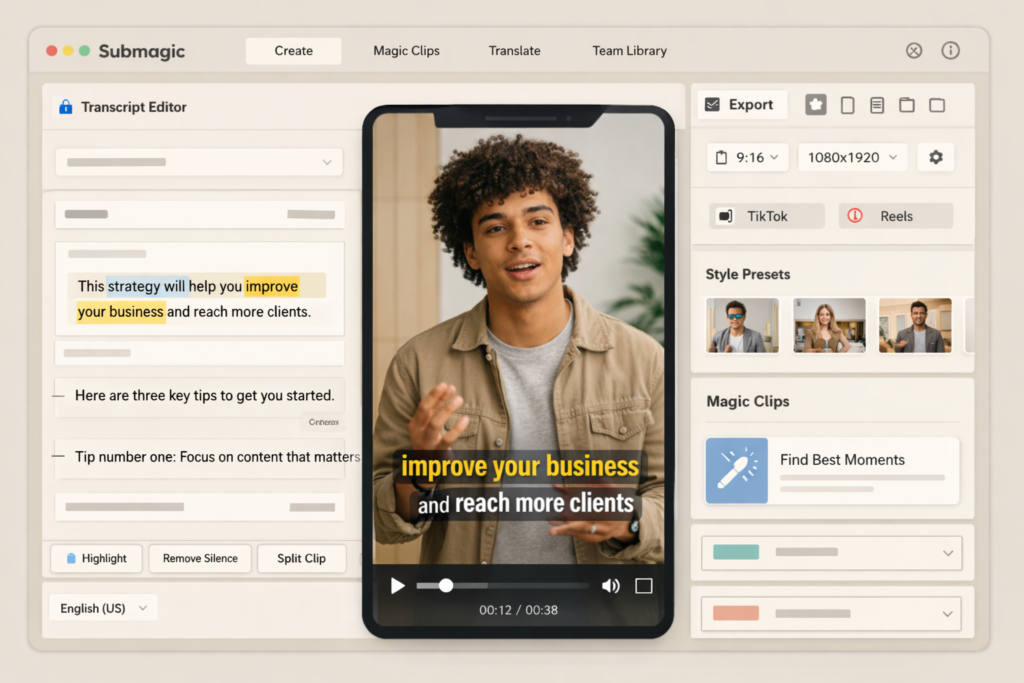
If you are looking for an AI video editor that can turn raw footage into polished Shorts, Reels, and TikTok-style content faster, this Submagic review will help you decide whether it is actually worth paying for. Submagic is built for creators, marketers, agencies, and media teams that want to move from recording to publishing with less manual editing and less time spent inside a traditional timeline.
Instead of positioning itself as a full Hollywood-style editing suite, Submagic focuses on the workflow that matters most for short-form content: automatic captions, text-based editing, highlight extraction, AI clip generation, subtitle translation, eye contact correction, cleanup tools, team collaboration, and automation. That narrow focus is exactly why it stands out. It is trying to help users publish faster, not overwhelm them with advanced editing controls they may never need.
If your content strategy depends on repurposing podcasts, interviews, tutorials, webinars, talking-head videos, or marketing footage into short vertical videos, Submagic is one of the most relevant tools in this category right now.
Quick Answer: Is Submagic Worth It?
Yes, Submagic is worth it for creators and teams who publish short-form videos regularly and want to save time on captions, clipping, and social-first editing. It is especially strong for turning long videos into short clips, adding stylish captions quickly, translating subtitles, and improving output speed across a repeatable workflow. If you only make occasional videos or need advanced long-form timeline editing, it may be more tool than you need or the wrong type of editor for your workflow.
What Is Submagic?
Submagic is a web-based AI video editing platform designed mainly for short-form content. It helps users generate animated captions, trim footage through transcript-based editing, create highlight clips from long videos, translate subtitles, add visual polish, and prepare content for platforms like TikTok, Instagram Reels, and YouTube Shorts.
The product is clearly built around speed. Instead of asking users to manually build every cut from scratch, it automates repetitive tasks that slow creators down, such as subtitle generation, silence removal, clip extraction, and basic enhancement work. That makes it attractive for solo creators, content teams, agencies, coaches, podcasters, and brands that need more output without multiplying editing hours.
Submagic Review: At a Glance
| Category | Summary |
| Best for | Creators, marketers, agencies, and teams producing short-form videos regularly |
| Main strength | Fast AI-powered short-form editing with captions, clips, and workflow automation |
| Core features | AI captions, Magic Clips, subtitle translation, eye contact correction, cleanup tools, text-based editing |
| Team support | Useful for shared workflows, presets, brand consistency, and scaling output |
| Free plan | Available, but limited |
| Best paid fit | Starter for beginners, Pro for active creators, Business for teams and higher-volume workflows |
| Main downside | Less suitable for users who want deep traditional timeline editing for complex long-form projects |
Who Submagic Is Best For
Submagic is best for people who already know that short-form video is part of their growth strategy. If you are recording long-form content and then trying to extract multiple clips for different platforms, Submagic makes a lot of sense. If you are a solo creator trying to post more consistently without hiring an editor, it also makes sense. And if you are part of a team that needs faster content operations, shared templates, and smoother handoff between roles, Submagic becomes even more compelling.
- Content creators posting Reels, Shorts, or TikToks several times a week
- Podcasters repurposing long interviews into multiple clips
- Coaches and educators publishing talking-head content
- Agencies editing short-form videos for multiple clients
- Marketing teams that need speed, branding consistency, and repeatable workflows
- Businesses exploring API or automated video production pipelines
It is less ideal for editors who need a fully traditional multi-track editing environment for documentaries, cinematic work, or advanced manual timeline control. That does not mean it is weak. It means it is specialized.
Best Submagic Features
1. AI Captions That Actually Fit Short-Form Content
Captions are one of Submagic’s biggest selling points. But what matters is not just that it adds subtitles. A lot of tools can do that. The value here is that Submagic makes captions part of the editing workflow itself. Instead of treating subtitles as an afterthought, it treats them as one of the core visual elements of short-form content.
That matters because modern short-form videos are often consumed silently, skimmed quickly, and judged in seconds. Readable captions, strong pacing, and text emphasis can have a major effect on retention. Submagic is built for that reality. If you create talking-head videos, tutorials, explainers, interviews, or social commentary content, this feature alone can remove a lot of manual work.
2. Magic Clips for Turning Long Videos Into Shorts
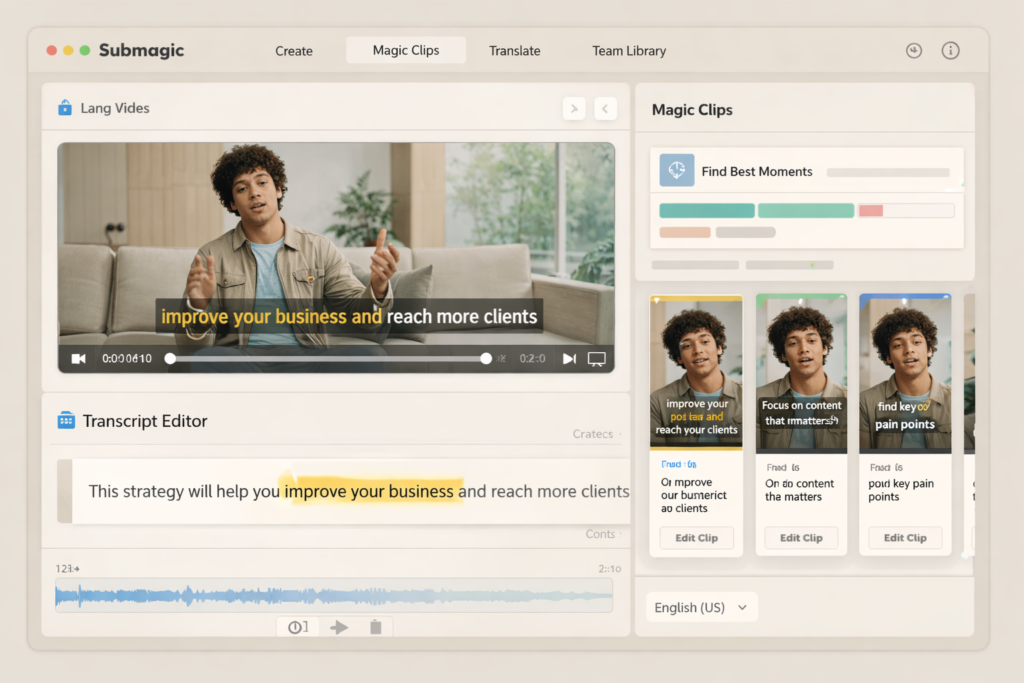
Magic Clips is one of the most useful reasons to consider Submagic. If you upload a longer video, the tool can identify strong moments and generate multiple shorter clips from it. That is especially valuable for podcasters, YouTubers, educators, agency teams, webinar hosts, and brands trying to stretch one recording session into many pieces of content.
Instead of manually scanning through an hour-long recording to find the best moments, Submagic gives you a faster starting point. That does not remove the need for review or judgment, but it can dramatically reduce the time needed to get from raw footage to publishable short clips.
3. Text-Based Editing for Faster Turnaround
One of the reasons many non-editors struggle with video software is that timelines can feel slow and technical. Submagic reduces that friction by allowing transcript-based editing. For many creators, especially those producing spoken content, editing through text feels more intuitive than constantly scrubbing through footage frame by frame.
This is not a small convenience. It changes who can use the tool efficiently. Team members who are not traditional editors can still help produce clips, clean up pacing, and prepare social content faster.
4. AI Subtitle Translation for Global Reach
Submagic also stands out because it is not limited to basic English captioning. If you want to expand your content reach across different languages, subtitle translation is a practical advantage. This is helpful for creators targeting multilingual audiences, digital product businesses, international marketers, and agencies serving clients in more than one region.
For AI search visibility and organic discovery, multilingual content can also widen the number of searchable surfaces your videos appear in. Even when you are not creating separate dubbed versions, translated subtitles can help your content travel further.
5. AI Eye Contact, Cleanup, and Visual Polish
Submagic is not just a clip and caption tool. It also includes features that make videos feel more polished with less manual effort. These include eye contact correction, audio cleanup, silence removal, visual enhancement, and other editing touches designed for short-form delivery.
This is especially useful for creators who read from notes or scripts, record in imperfect conditions, or simply want a cleaner final result without sending every video through a full professional post-production workflow.
6. Team Collaboration, Brand Consistency, and Automation
Submagic becomes more interesting when you view it as a workflow tool rather than just an editing tool. Shared folders, presets, templates, brand kits, publishing-oriented workflows, integrations, and API access all point toward a platform that is trying to support scale. If a team needs multiple people to work inside the same content system, that matters a lot.
For agencies, media teams, or fast-growing brands, the real bottleneck is often not just editing. It is content throughput. A tool that helps standardize styles, reduce repetitive manual work, and automate part of the pipeline can be much more valuable than a tool that only offers isolated editing features.
Submagic Pricing
Pricing is one of the biggest decision points in any Submagic review because the tool makes more sense when you publish consistently. If you only edit once in a while, even a good tool can feel expensive. But if you are producing short-form content every week, the time savings become easier to justify.
| Plan | Best for | What to expect |
| Free | Testing the product | Good for trying Submagic before paying, but limited for serious publishing |
| Starter | Beginners and new creators | Good entry point if you mainly want captions and basic short-form editing |
| Pro | Active creators and freelancers | Better for users who publish more often and need more advanced workflow value |
| Business + API | Agencies, teams, and higher-volume operations | Best fit when collaboration, automation, and scale matter more than just editing one video at a time |
| Custom | Larger organizations | For teams with custom workflow, support, or implementation needs |
In practical terms, the right plan depends less on whether you can afford it and more on how often you create content. If one video session can become five, ten, or more publishable clips, the platform can pay for itself much more easily than a standard caption-only tool.
Submagic Pros and Cons
| Pros | Why it matters |
| Built specifically for short-form content | Better fit for TikTok, Reels, and Shorts than general-purpose editors |
| Strong caption workflow | Saves time and improves readability for social-first videos |
| Magic Clips helps repurpose long content | Useful for multiplying output from one recording session |
| Text-based editing is approachable | Easier for non-editors and faster for spoken-content workflows |
| Translation and polish features add extra value | Reduces the need for multiple separate tools |
| Useful for teams and scalable workflows | Shared systems matter when content volume grows |
| Cons | Why it matters |
| Free plan is limited | Not enough for serious publishing needs |
| Best value appears when you publish regularly | Occasional users may not get full value from paid plans |
| Not designed as a deep traditional editor | May not suit users who want highly manual long-form editing control |
| Some of the strongest workflow benefits matter more to teams than casual users | Solo beginners may not use every advanced feature immediately |
What Makes Submagic Different From Basic Caption Tools?
The main difference is that Submagic is not only trying to add subtitles. It is trying to shorten the entire process of making short-form videos. That includes identifying clips, editing through text, improving pace, adding visual polish, translating subtitles, and helping teams move faster. A basic caption tool may help with one task. Submagic is trying to help with the whole short-form production loop.
This is why comparing it only on subtitle accuracy misses the bigger point. The real question is not whether it can caption a video. The real question is whether it helps you publish better short-form content with less time, less friction, and more consistency. For many users, the answer is yes.
Submagic Review for Different Types of Users
For Beginners
Submagic is beginner-friendly compared with many editing platforms because it reduces technical complexity. If you mainly want to upload footage, generate captions, make quick cuts, and publish faster, it is much more approachable than traditional editing software. That said, beginners who only make occasional videos may want to test the free plan first before committing.
For Serious Creators
If short-form content is already part of your growth strategy, Submagic is much easier to justify. Serious creators get the most value when they produce consistently, reuse long-form content, and care about speed, output volume, and repeatable style. In that context, it can become a workflow advantage rather than just a convenience tool.
For Agencies and Teams
Agencies and teams are some of the strongest matches for Submagic because workflow matters more at scale. Shared assets, collaborative editing, standardized branding, and automation features can reduce delivery time and help multiple people work more efficiently. If you are serving several clients or publishing content across multiple brands, those benefits add up quickly.
If you want to test whether Submagic fits your workflow before upgrading, start with the free plan and run one real project through the full process from upload to export. That will tell you much more than reading feature lists ever could.
How Submagic Helps With SEO and AI Search Visibility
Video tools do not improve Google rankings by magic, but they can help you create assets that support discoverability across search and AI-driven surfaces. Short-form videos with clear captions, stronger retention, translated subtitles, and faster publishing can support broader distribution. If your workflow allows you to produce more useful, searchable, and platform-ready content consistently, that can support growth over time.
There is also an AI search angle. Search systems increasingly value content that is structured, direct, easy to parse, and distributed across multiple formats. When your videos are captioned clearly, clipped around specific topics, and translated where useful, you create more opportunities for your ideas to be discovered, referenced, and repurposed across platforms.
Where Submagic Still Has Limits
No review would be complete without discussing the limits. Submagic is not the right tool for every kind of creator. If your work depends on advanced cinematic editing, deep manual effects work, or complex long-form post-production, you may still need a more traditional editing environment. In that case, Submagic works better as a speed layer for short-form content than as your only editing system.
There is also the normal AI-tool reality: automation gives you a fast starting point, not perfect taste. You still need judgment. You still need to choose which clips are strongest, which captions read best, and what should actually be published. The tool saves time, but it does not replace editorial thinking.

Final Verdict: Is Submagic Worth It?
Submagic is worth it if your priority is creating better short-form videos in less time. It is especially useful for creators and teams who want strong captions, fast clip generation, transcript-based editing, multilingual subtitle support, and a workflow that moves from raw footage to publish-ready content with less friction.
It is not trying to be the best choice for every editing scenario. It is trying to be one of the most useful AI editors for modern short-form publishing. For that job, it does a lot right. If you are posting Shorts, Reels, or TikToks consistently, or repurposing long videos into multiple short assets, Submagic is one of the more practical tools to test.
If your goal is to publish more short-form content without spending hours editing every clip manually, Submagic is absolutely worth trying on a real project. The easiest way to judge it is to upload one long video, turn it into multiple short clips, and see whether the time savings feel meaningful for your workflow.
FAQ
Is Submagic free?
Submagic does offer a free plan, but it is mainly for testing the platform rather than running a serious content operation. If you want regular publishing and more workflow flexibility, you will likely outgrow it quickly.
Is Submagic good for beginners?
Yes. It is easier for beginners than many traditional editors because it focuses on speed, captions, and text-based workflows instead of advanced manual timeline work.
Can Submagic turn long videos into short clips?
Yes. That is one of its strongest use cases. Magic Clips is specifically designed to help users extract multiple short videos from longer content.
Does Submagic support subtitle translation?
Yes. Submagic includes subtitle translation features, which can help creators and brands reach multilingual audiences more efficiently.
Is Submagic better than a basic caption generator?
For most serious short-form creators, yes. It does more than add subtitles. It helps with clipping, editing, cleanup, workflow speed, and scaling content production.
Who should not use Submagic?
If you rarely edit videos, only need occasional captions, or want a deep traditional long-form editing suite, Submagic may not be the best primary tool for you.
About the Author
Xu Xun
Contact: xuxun1208@gmail.com
Last Updated: June 2026