
If you are searching for an honest Quso AI review, you are probably trying to answer a practical question: can one platform really help you turn long-form content into clips, captions, posts, and scheduled social media content without forcing you to juggle multiple tools?
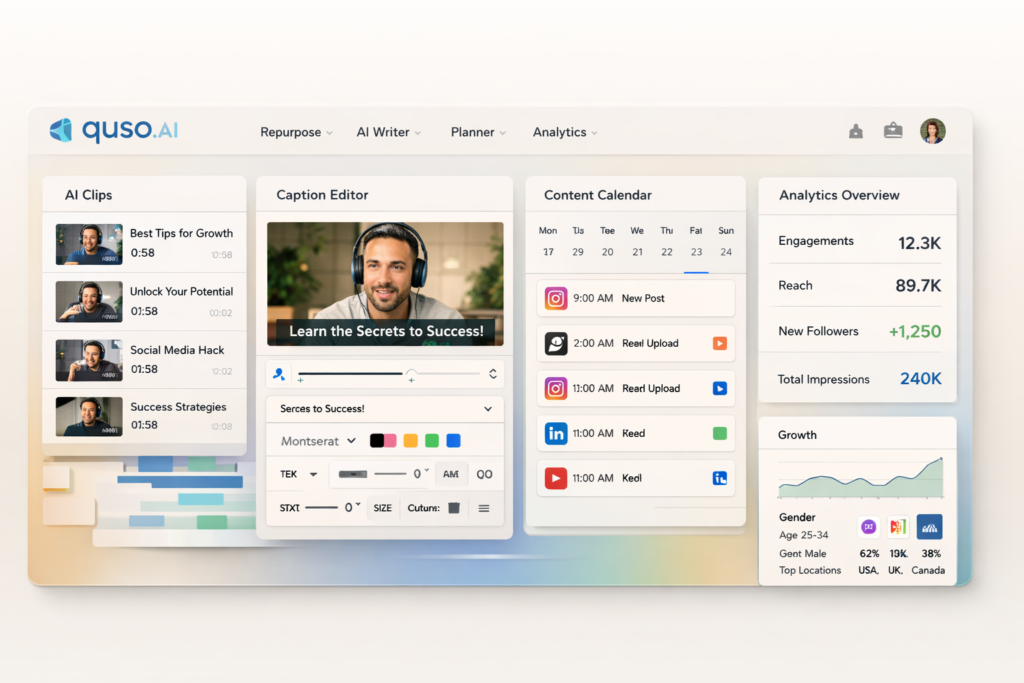
That is the core promise behind Quso AI. The platform positions itself as an all-in-one social media AI tool for creators, coaches, podcasters, educators, business owners, and video-first teams that want to create once and publish everywhere. Instead of only clipping videos, Quso AI aims to connect repurposing, captioning, writing, scheduling, and analytics in one workflow.
In this review, I will break down what Quso AI does well, where it feels strongest, who it is best for, how its pricing works, and whether it is actually worth paying for if your goal is to grow through search, social media, and reusable content assets.
Quick Verdict
| Category | Verdict |
| Best for | Creators, coaches, podcasters, educators, and brands that start with long-form video and want to turn it into multiple content assets. |
| Main strength | Combines AI video repurposing, captions, writing, scheduling, and analytics in one connected workflow. |
| Main weakness | May be more platform than you need if you only want a simple clipping tool or a basic scheduler. |
| Free plan | Yes, so you can test the workflow before committing. |
| Worth trying? | Yes, especially if your current process is fragmented across multiple content tools. |
What Is Quso AI?
Quso AI is best understood as a content repurposing and social media workflow platform. It is designed to take a single source asset, usually a long-form video, podcast recording, webinar, interview, lesson, or talking-head video, and turn it into multiple pieces of content you can publish across different channels.
That matters because modern content marketing is rarely about publishing one piece once. One good source recording often needs to become short clips for discovery, captions for retention, social posts for engagement, blog content for search visibility, and scheduled publishing for consistency. Quso AI is built around that exact content stack.
In other words, Quso AI is not only trying to help you edit faster. It is trying to help you build a more repeatable publishing system. That is a far more useful promise for businesses and creators who need output every week, not just one polished clip every now and then.
| Quso AI at a glance | Details |
| Former name | vidyo.ai |
| Main positioning | All-in-one Social Media AI platform |
| Core workflow | Repurpose, caption, write, schedule, and analyze |
| Typical source content | Long-form videos, podcasts, webinars, interviews, lessons, and creator content |
| Main output types | Short clips, captions, blog drafts, posts, and scheduled content |
| Free plan available | Yes |
Why Quso AI Stands Out
The biggest reason Quso AI stands out is simple: it tries to cover the entire path from source content to published content. A lot of tools are good at one small job. Some are good at clipping. Some are good at captions. Some are good at scheduling. Some are good at analytics. Quso AI is more ambitious because it wants to connect all of those jobs.
That all-in-one approach matters most when your current workflow feels messy. If you are currently moving between a video editor, a subtitle tool, a document for post ideas, a scheduler, and a reporting dashboard, the time cost adds up fast. Quso AI is clearly designed to reduce that friction.
For content-heavy businesses, that can make the platform more valuable than a tool that is only slightly better at one isolated task. Workflow efficiency often matters more than having the absolute best standalone feature in a single category.
Key Quso AI Features That Matter Most
1. AI Content Repurposing
The strongest part of Quso AI is its repurposing engine. This is the feature that will matter most to creators and marketers who already produce long videos and want more output without multiplying their workload. Instead of manually finding highlights, trimming clips, rewriting social copy, and resizing for different platforms, Quso AI is built to turn one source video into many smaller publishable assets.
This is where Quso AI makes the clearest business case. If one webinar, one coaching session, one YouTube upload, or one podcast episode can be transformed into a week of content, then the platform does not just save editing time. It also increases the yield of every recording session you create.
That makes Quso AI especially attractive for people who already have content but are underusing it. Many creators do not have a content creation problem. They have a repurposing bottleneck. Quso AI is designed to solve that specific bottleneck.
2. AI Captions and Subtitle Workflow
Captions are no longer optional for social video. They improve accessibility, help with silent autoplay, make content easier to follow, and often increase retention. Quso AI treats captions as a core workflow instead of a minor extra.
For creators, this matters because caption production is one of the most repetitive parts of video publishing. A tool that can auto-generate, style, and export captions inside the same workflow is automatically more useful than one that forces you to export the video and handle subtitles somewhere else.
Quso AI is also appealing here because branded captions matter. If you publish frequently, consistency in fonts, layout, and subtitle style can help your content feel more recognizable across platforms.
3. AI Writer for Blogs, Posts, and Content Expansion
One of the more interesting parts of Quso AI is that it goes beyond video. The platform also pushes an AI Writer workflow that can help turn video source material into written content such as blogs, post drafts, and related marketing copy.
That makes Quso AI more attractive for SEO-focused creators and businesses. If you want each video to feed both social discovery and search traffic, a writing layer adds real value. A single recording can potentially support short-form content, website content, email content, and supporting post copy instead of being limited to one format.
For brands trying to build authority, this matters a lot. Search content and social content work best when they reinforce each other. A video-first workflow that can also support blog production gives Quso AI a stronger long-term content marketing angle than a pure clip generator.
4. Content Planner and Scheduling
Quso AI is not just about creation. It also tries to help you plan and publish. That is important because content operations break down when users can create assets but still need another platform to organize and schedule them.
If your goal is consistency, a built-in planner matters. You can think more strategically about what gets published, when it goes live, and how your content mix looks across the week or month. That is far more sustainable than exporting a pile of clips and hoping you post them later.
For solo creators, this can help reduce chaos. For small teams, it can also make handoff and planning easier because the workflow becomes more centralized.
5. Analytics and Performance Feedback
Creation is only half the job. The other half is knowing what works. Quso AI also includes analytics-oriented features, which is important because a serious content workflow should not stop at publishing. It should also help you understand what is gaining reach, what is driving engagement, and which content patterns deserve more investment.
That makes Quso AI more useful for growth-focused users than tools that only help you produce content. If your goal is not just to publish more, but to publish better over time, analytics becomes part of the product’s real value.
For teams, this also supports reporting and refinement. Instead of guessing which formats are working, you can use performance feedback to shape the next batch of clips, posts, or campaigns.
6. AI Influencer and Expanded Creative Tools
Another reason Quso AI feels broader than many competitors is that it does not stop at repurposing and scheduling. It also pushes additional AI creation features such as AI Influencer and related video-generation workflows.
Not every user will care about these extras, but they do expand the platform’s use cases. If you want one subscription that covers both social publishing operations and more experimental AI content creation, Quso AI becomes more compelling than a narrow repurposing-only tool.
Quso AI Pricing
Quso AI offers a free plan and multiple paid tiers. The pricing page currently shows overlapping newer and older plan cards, so the safest way to present pricing in a blog post is to summarize the main publicly visible plan structure while advising readers to confirm the latest live checkout price before buying.
| Plan | Who it is for | What stands out |
| Free | Users who want to test the workflow before paying | Free access, limited credits, entry-level export quality, watermark, and core clip/caption testing. |
| Lite | Solo creators who mainly want repurposing and export tools | Core clips and captions, video generation, resizing, and higher-quality exports. |
| Essential | Users who want a fuller content workflow | Broader AI tool access, scheduling support, AI Writer, and more advanced workflow features. |
| Growth | Higher-volume creators and small teams | Unlimited scheduling, bulk publishing, stronger analytics, templates, and priority-oriented support. |
My practical view is that the free plan is useful for testing, but the real value of Quso AI starts when you use it as a system rather than a sampler. That usually means stepping into a plan that gives you both content creation and publishing workflow features together.
Who Should Use Quso AI?
Quso AI is best for people and teams that already create long-form content or want to build around it. That includes podcasters, coaches, consultants, educators, YouTubers, interview-based creators, webinar marketers, course businesses, and service brands that need more content output from every recording session.
- Use Quso AI if you regularly record long videos and want to turn them into clips, captions, blogs, and scheduled posts.
- Use Quso AI if your current workflow feels scattered across too many tools.
- Use Quso AI if you care about publishing consistency and want creation plus scheduling in one place.
- Skip Quso AI if you only need a basic manual editor and do not care about repurposing or content operations.
- Skip Quso AI if you are primarily text-first and do not plan to build around video-led content.
Quso AI Pros and Cons
| Pros | Cons |
| All-in-one workflow is more efficient than using disconnected tools. | Can feel like more platform than you need if you only want one simple feature. |
| Strong fit for long-form video repurposing. | Pricing presentation on the public page is currently a bit messy. |
| Useful for both creators and small teams. | Some users may still prefer specialist tools for deep manual editing. |
| Supports both creation and publishing operations. | Full value depends on using multiple features together, not just one. |
| Free plan lowers the risk of testing it. | Not every buyer will need extras like broader AI content tools. |
Quso AI vs Using Separate Tools
This is the easiest way to judge whether Quso AI is worth your money. Ask yourself what your current content workflow looks like.
- Do you edit clips in one tool?
- Do captions in another?
- Write posts in a document or AI writer?
- Schedule content in a separate platform?
- Check performance in yet another dashboard?
If that sounds familiar, then Quso AI has a clear value proposition. It may not replace every specialist tool for every power user, but it can simplify the day-to-day publishing chain enough to save meaningful time and reduce operational drag.
That is why Quso AI is easier to justify for workflow efficiency than for one isolated feature. Its real advantage is integration.
How to Use Quso AI as a Real Content Engine
One reason many people underuse content tools is that they think in terms of single outputs instead of systems. Quso AI works best when you use it as a repeatable engine.
- Record one useful long-form video each week.
- Use Quso AI to pull out multiple short clips.
- Add captions and polish the best assets.
- Turn the source material into supporting written content.
- Schedule your clips and posts across the week.
- Review analytics and double down on what performs best.
That kind of system is where the platform becomes more than a convenience tool. It becomes a way to create momentum. For businesses that rely on visibility, that is exactly the kind of compounding workflow that matters over time.
Is Quso AI Worth It?
Yes, for the right type of user.
If your strategy depends on video-led content, and especially if you want that content to support both social media growth and search visibility, Quso AI has a strong case. It is broader than a simple clipper and more workflow-oriented than a basic scheduler. That combination is what makes it interesting.
It is not the perfect choice for every buyer. If you only need one highly specific editing feature, a specialist tool may be enough. But if you want one platform that helps you move from source video to distributed content with less friction, Quso AI is easy to recommend as a tool worth testing.
My bottom line is this: Quso AI is worth trying if you want to create once, publish everywhere, and reduce the time you lose moving between disconnected content tools.
Frequently Asked Questions
Is Quso AI the same as vidyo.ai?
Quso AI is the expanded platform brand that now includes and goes beyond what vidyo.ai originally focused on. If you knew the earlier product mainly as a clipping and video repurposing tool, Quso AI represents a broader social media AI suite.
Does Quso AI have a free plan?
Yes. That is one of the most useful things about it because you can test the workflow before deciding whether the paid plans make sense for your content volume and publishing needs.
Can Quso AI help with SEO content too?
Yes. One of the appealing angles of Quso AI is that it goes beyond short clips and also supports written-content workflows, which makes it more useful for brands that want to connect social distribution and search traffic.
Who gets the most value from Quso AI?
The biggest winners are people who start with long-form content. Podcasters, coaches, educators, consultants, YouTubers, and video-first businesses can usually get the most leverage from the platform.
Is Quso AI beginner-friendly?
It appears to be designed with accessibility in mind, and the platform markets itself as beginner-friendly. That makes it easier for newer creators who want more output without mastering a complicated editing stack.
Should you pay for Quso AI?
You should pay for Quso AI if the time you save and the extra content you publish will clearly outweigh the subscription cost. For creators who publish often, that answer can be yes very quickly.
Final Verdict
Quso AI is one of the more interesting all-in-one platforms for video-first content marketing because it is not limited to clipping. It aims to help you repurpose, caption, write, schedule, and analyze from one system. That makes it a strong fit for creators and businesses that care about efficiency, consistency, and getting more mileage from every source video they produce.
If you want a simple answer, here it is: Quso AI is worth a look if your current process is fragmented and your content strategy depends on turning long-form material into multiple assets.
About the Author
Xu Xun
Contact: xuxun1208@gmail.com
Last Updated: June 2026