
If you are looking for a music licensing platform for YouTube, TikTok, podcasts, or client content, this Epidemic Sound review will help you decide whether it is the right choice. Epidemic Sound has become one of the most recognized names in creator music licensing because it combines a large music and sound effects catalog with a simpler licensing model, channel safelisting, and a growing set of workflow tools for modern content creators.
For many creators, the biggest challenge is not just finding good music. It is understanding what you are actually allowed to do with it. Can you monetize your videos? Can you use the track on TikTok? Can you create content for a client? Can you keep old videos live after canceling? These are the questions that matter, and they are exactly why Epidemic Sound stands out.
In this review, I will break down Epidemic Sound pricing, licensing, features, pros and cons, best use cases, and whether it is worth paying for in 2026. I will also explain which plan makes sense for personal creators, freelancers, brands, and agencies so you do not end up paying for the wrong subscription.
If you want an easier way to find high-quality music and sound effects without overcomplicating licensing, Epidemic Sound is worth trying.
👉 Try Epidemic Sound here
What Is Epidemic Sound?
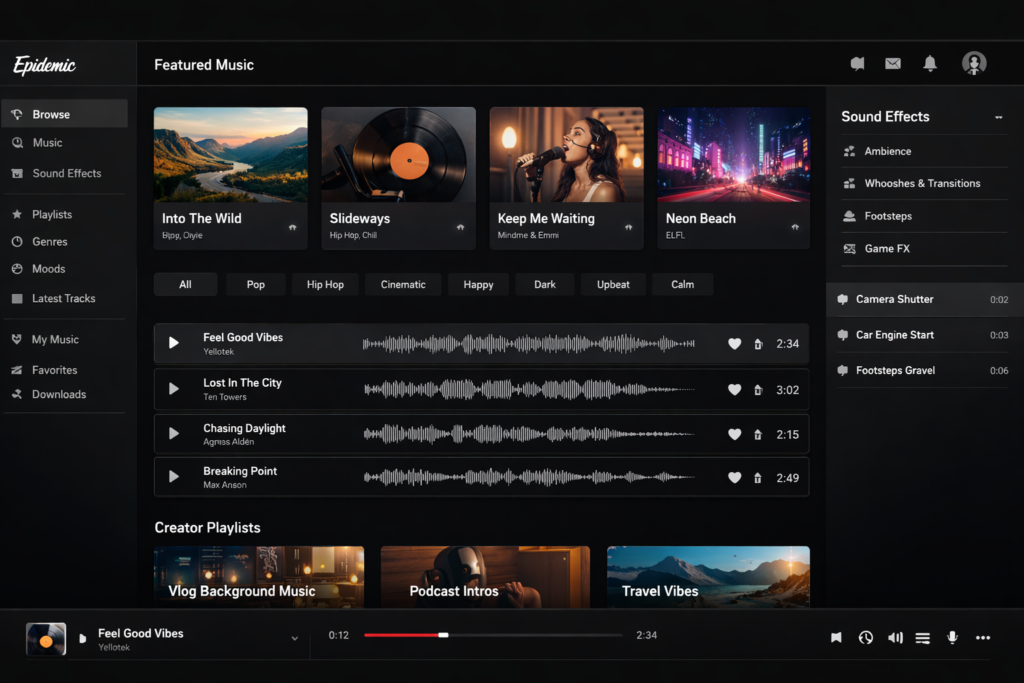
Epidemic Sound is a subscription-based music and sound effects platform designed for creators, freelancers, businesses, and brands that need licensed audio for online content. Instead of buying individual tracks one by one, you pay for access to a library of music and sound effects plus the licensing rights attached to your plan.
That matters because music licensing can quickly get messy. Many libraries talk about being royalty-free, but the details still vary depending on monetization, client work, advertising, or platform usage. Epidemic Sound built its reputation by making this simpler. The company positions its catalog as worldwide royalty-free licensing with all rights included, which makes it easier for creators to understand what they can publish and monetize when they are on the right plan.
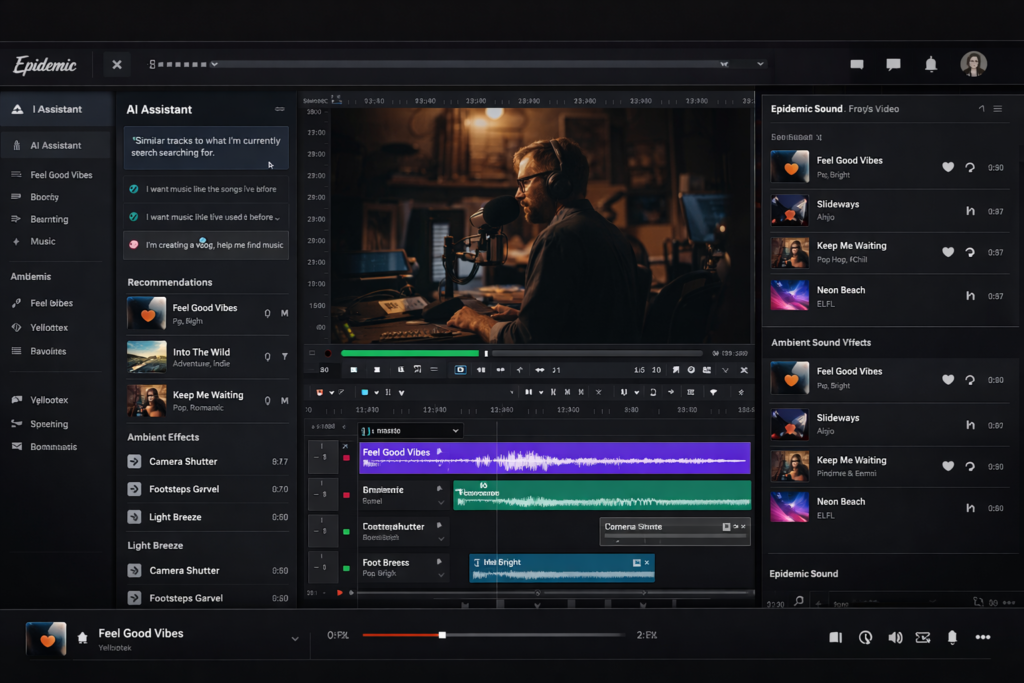
Today, Epidemic Sound is more than just a stock music site. In addition to its music catalog, it also includes a large sound effects library, AI-assisted soundtrack discovery, a desktop app, editing plugins, voice tools, and video-to-audio workflow features that help creators find and apply music faster.
Why Epidemic Sound Is So Popular with Creators
Epidemic Sound is popular because it solves multiple problems at once. First, it gives creators access to a large catalog of music and sound effects. Second, it makes licensing easier to understand than many older music marketplaces. Third, it fits modern creator workflows by supporting YouTube, TikTok, podcasts, websites, and commercial online content under the right plan.
It is especially appealing for creators who publish consistently. If you are uploading videos every week, creating short-form content daily, editing podcast episodes, or working on client deliverables, you usually need more than just a few tracks. You need a reliable system that saves time, reduces licensing anxiety, and keeps your workflow moving.
That is where Epidemic Sound performs well. It is built for repeat usage, not occasional one-off downloads. The value gets stronger the more content you produce.
Epidemic Sound Features at a Glance
| Feature | What It Does | Why It Matters |
|---|---|---|
| 55,000+ tracks | Large music catalog across multiple moods and genres | Useful for creators who publish regularly and need variety |
| 250,000+ sound effects and variations | Access to SFX for videos, shorts, ads, and podcasts | Reduces the need for separate sound effects subscriptions |
| Safelisting | Connects your channels or accounts to your subscription | Helps avoid copyright issues on supported platforms |
| Unlimited downloads | Download as much music and as many sound effects as your plan allows | Great for creators producing content at scale |
| AI Assistant | Suggests tracks and directions based on your prompt or project | Saves time when searching manually feels slow |
| Studio | Creates a synced soundtrack draft from your uploaded video | Helpful for faster sound design workflows |
| Desktop app | Lets you work with music, SFX, and voice tools on Mac and Windows | Improves workflow for heavy editors |
| Plugins | Works inside Adobe apps and DaVinci Resolve Studio | Useful if you want to soundtrack without leaving your editor |
| Voice tools | Includes instant voiceovers and voice replica allowances depending on plan | Adds more production flexibility beyond music |
Epidemic Sound Pricing in 2026
Epidemic Sound currently offers four main plan tiers: Creator, Pro, Business, and Enterprise. The most important thing to understand is that these plans are not just priced differently. They are licensed differently. That means the cheapest plan is not always the best value if your content use case is commercial.
| Plan | Official Price | Best For | Main Licensing Use Case |
|---|---|---|---|
| Creator | $9.99/month billed yearly | Individual creators | Personal content for social, podcasts, and web |
| Pro | $16.99/month billed yearly | Freelancers and commercial creators | Client work, digital ads, and broader online commercial use |
| Business | $29.99/month billed yearly | Small and medium businesses | Higher-volume business use, collaborators, apps, games, events |
| Enterprise | Custom pricing | Larger organizations | Tailored licensing for broader distribution needs |
One important advantage is that Epidemic Sound also offers a free trial, which makes it easier to test the catalog, the workflow, and the overall value before committing long term.
Creator vs Pro vs Business: Which Epidemic Sound Plan Should You Choose?
Choosing the right plan is one of the most important parts of this Epidemic Sound review. A lot of people only compare prices, but the real difference is what kind of content you are allowed to produce and publish.
Creator Plan
The Creator plan is designed for individuals making personal content. It includes unlimited music and sound effects downloads, licensing for social media, podcasts, and web content, plus monetization for one channel per platform. For many YouTubers, solo podcasters, and social media creators, this will be the entry point.
However, this is not the right plan for client work. If you create videos for other people or businesses, the Creator plan is too limited.
Pro Plan
The Pro plan is where Epidemic Sound becomes much more attractive for freelancers and commercial creators. This plan covers client work, digital ads, and broader content creation for third parties. If you edit videos for brands, run commercial social content, or need more flexibility than a personal creator subscription offers, this is the plan that usually makes the most sense.
It is also the smarter option if your content is directly tied to products, promotions, or revenue-generating campaigns. Even if you started as a solo creator, once your work becomes commercial, Pro is usually the safer choice.
Business Plan
The Business plan is intended for teams and businesses that need broader operational use. It adds more robust business-focused coverage, including collaborator access and certain higher-volume use cases like apps, games, events, and wider organizational workflows.
If you are running a content-heavy brand or a business with multiple people involved in production, this plan is easier to justify than trying to stretch a lower-tier subscription beyond its intended use case.
Enterprise Plan
Enterprise is for organizations that need customized licensing. If your use case goes beyond standard online creator or brand publishing, this is where Epidemic Sound wants you to talk to their team directly.
How Epidemic Sound Licensing Works
Licensing is the biggest reason many people choose Epidemic Sound over cheaper alternatives. Instead of forcing users to piece together confusing rights information, the platform gives you a clearer framework based on plan type and connected channels.
In plain English, here is how it works. You subscribe to a plan, safelist your relevant channels or accounts, and publish content while your subscription is active. The content you publish during your active subscription remains cleared, even if you later cancel. But content published after your subscription ends is not covered. That distinction matters a lot if you plan to pause your subscription in the future.
| Situation | What It Means |
|---|---|
| You publish content during an active subscription | That content stays cleared |
| You cancel later | Previously published content remains covered |
| You publish new content after cancellation | That new content is not covered |
| You create content for clients | You need Pro or above |
| You run commercial campaigns or digital ads | You need the correct commercial plan |
This is why understanding your use case is more important than just picking the cheapest plan. If your content is commercial, sponsored, client-based, or ad-driven, using the wrong plan is simply not worth the risk.
Is Epidemic Sound Good for YouTube?
Yes, Epidemic Sound is one of the strongest options for YouTube creators. It is particularly well suited for channels that publish consistently and need both music and sound effects rather than just occasional background tracks.
The reasons are straightforward. First, the licensing is much easier to manage than traditional music sourcing. Second, the catalog is large enough to support long-term content production without your videos all sounding the same. Third, the workflow tools save time when you are editing often.
If your channel relies heavily on storytelling, pacing, mood shifts, intros, transitions, and cinematic sound design, having both music and a deep sound effects library in one place can be a major advantage.
Is Epidemic Sound Good for TikTok?
Yes, but TikTok users need to pay close attention to commercial usage. Epidemic Sound is a strong fit for TikTok creators because short-form content depends heavily on mood, pacing, and fast turnaround. The platform’s library, safelisting flow, and commercial options make it more practical than generic stock music for creators who post frequently.
If your TikTok content includes product promotion, sponsorships, or direct commercial activity, you need the right plan. That is one of the most important details to get right before publishing at scale.
Is Epidemic Sound Good for Podcasts?
Epidemic Sound is also a strong option for podcasters, especially those who want consistent intro music, transitions, background atmosphere, and sound effects without dealing with per-track licensing. It is more useful for podcast creators who publish regularly than for those who only release a few episodes per year.
If your podcast is part of a personal brand, the Creator plan may be enough. If the podcast is tied to clients, a business, or commercial campaigns, then Pro or above is the safer path.
Is Epidemic Sound Worth It for Freelancers and Agencies?
Yes, and this is one of the areas where Epidemic Sound becomes especially compelling. Freelancers and agencies often need a music subscription that works across multiple client deliverables, ad campaigns, and ongoing content contracts. The Pro plan is built for this type of work.
Instead of buying separate licenses or worrying whether a personal creator plan is enough, you get a clearer commercial framework for client work. That alone can save time, reduce mistakes, and make your service more scalable.
For small agencies, it is often easier to justify a stronger licensing subscription than to risk re-editing or replacing music later because the original rights did not match the job.
Epidemic Sound Tools and Workflow Features
One reason Epidemic Sound feels more premium than a basic music library is that it has expanded into workflow tools. These features matter if you want faster soundtrack creation rather than just a place to download audio files.
AI Assistant
AI Assistant helps you find music and sound effects faster by suggesting options based on prompts, scenes, or creative direction. This is useful if you do not want to scroll endlessly through filters trying to guess what might fit your video.
Studio
Studio is one of the more interesting features because it moves Epidemic Sound beyond simple catalog browsing. You can upload a video and generate a soundtrack draft synced to the action. For editors who want a faster starting point for music and sound design, this can be a major time saver.
Desktop App
The desktop app is useful for creators who want a smoother drag-and-drop workflow across projects. Instead of constantly switching browser tabs, you can manage music, sound effects, and other tools more directly while editing.
Plugins
Epidemic Sound also offers plugins for Adobe apps and DaVinci Resolve Studio. This is a meaningful benefit for editors because it keeps soundtrack work closer to the editing timeline. The less friction there is between discovery and application, the faster your production pipeline becomes.
Pros and Cons of Epidemic Sound
| Pros | Cons |
|---|---|
| Clearer licensing than many music marketplaces | You must choose the correct plan for your use case |
| Large catalog of both music and sound effects | Can feel expensive for casual creators |
| Good fit for YouTube, TikTok, podcasts, and client work | Not every user needs the extra workflow tools |
| Unlimited downloads | Commercial and advanced distribution use cases may require higher plans |
| Useful AI and plugin workflow features | Cheaper options may be enough for low-volume creators |
| Content published while subscribed remains covered | New content after cancellation is not covered |
Who Should Use Epidemic Sound?
| User Type | Good Fit? | Recommended Plan |
|---|---|---|
| Personal YouTuber | Yes | Creator |
| TikTok creator | Yes | Creator or Pro depending on commercial use |
| Podcaster | Yes | Creator for personal use, Pro for commercial use |
| Freelancer making client videos | Yes | Pro |
| Small agency | Yes | Pro or Business |
| Content-heavy brand | Yes | Business |
| Large enterprise or specialized licensing needs | Yes | Enterprise |
| Occasional low-volume hobby creator | Maybe | Depends on budget and publishing frequency |
Who Might Not Need Epidemic Sound?
Epidemic Sound is not necessarily the best value for everyone. If you only publish occasionally, need just a few background tracks per year, or do not care about a deep sound effects library, AI tools, or workflow plugins, then a cheaper music solution might be enough.
The platform makes the most sense when you create content regularly and want both licensing clarity and production efficiency. The more often you publish, the easier it is to justify the subscription.
My Final Verdict: Is Epidemic Sound Worth It?
Yes, Epidemic Sound is worth it for many creators, especially those who publish frequently and need more than just occasional music downloads. Its biggest strengths are licensing clarity, a strong music and sound effects catalog, creator-friendly plan structure, and workflow tools that go beyond simple search and download.
If you are a YouTuber, TikTok creator, podcaster, freelancer, or small business producing content on a regular basis, Epidemic Sound is one of the strongest all-in-one music licensing platforms available right now. It is particularly good if you care about reducing copyright stress, improving production speed, and having both music and sound effects under one subscription.
On the other hand, if you publish rarely and only need basic background audio, it may be more than you need. The platform is best viewed as a serious content production tool, not just a casual music library.
If Epidemic Sound looks like the right fit for your videos, podcasts, or client work, the best next step is to test the platform yourself.
👉 Try Epidemic Sound today
FAQ: Epidemic Sound Review
Is Epidemic Sound royalty-free?
Yes. Epidemic Sound offers royalty-free music and sound effects under its subscription model, but what really matters is choosing the correct plan for your intended use.
Can I monetize YouTube videos with Epidemic Sound?
Yes. Epidemic Sound supports monetized content, but you need to safelist your channels and make sure your subscription matches your usage type.
Can I use Epidemic Sound for client work?
Yes, but not on the Creator plan. Client work requires Pro or above.
What happens if I cancel my subscription?
Content published during your active subscription remains covered, but new content published after cancellation is not covered.
Is Epidemic Sound good for TikTok?
Yes. It is a strong fit for TikTok creators, especially if you publish often and need commercial-safe music under the correct plan.
Does Epidemic Sound include sound effects?
Yes. In addition to music, Epidemic Sound includes a large sound effects library, which makes it more useful for video creators than music-only platforms.
Is Epidemic Sound worth it for beginners?
Yes, especially if you want a simpler licensing experience and plan to publish regularly. For very casual use, a cheaper option may be enough.
About the Author
Xu Xun
Contact: xuxun1208@gmail.com
Last Updated: June 2026