
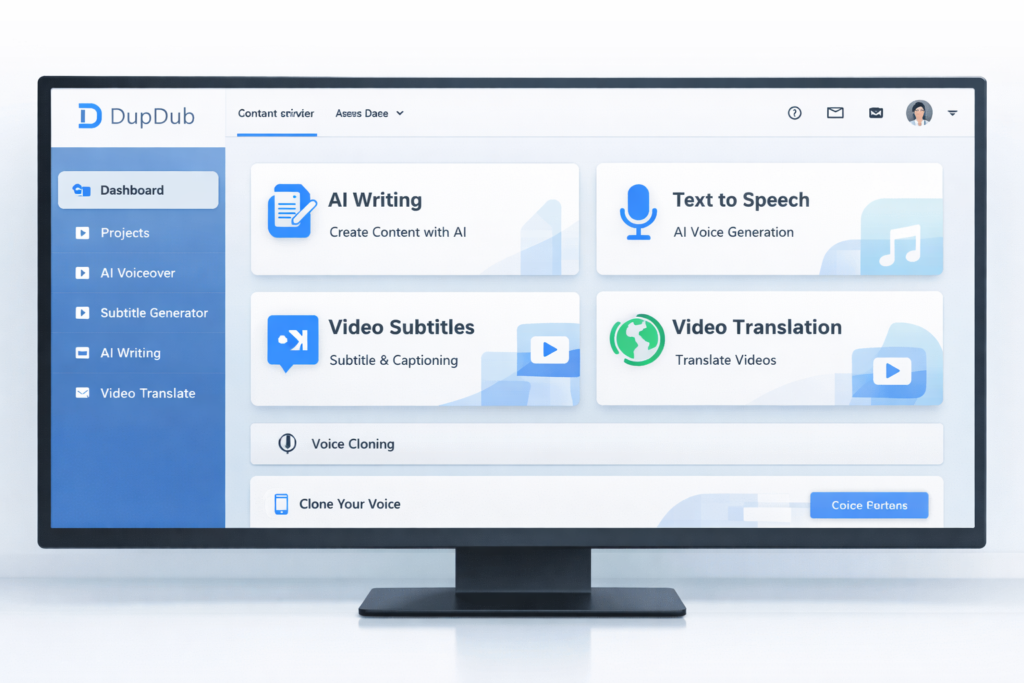
If you are looking for an all-in-one AI content creation tool that can help you write scripts, generate voiceovers, clone voices, translate videos, create subtitles, and speed up publishing, DupDub is one of the more interesting platforms to consider right now. Instead of forcing creators to jump between separate writing tools, text-to-speech apps, subtitle generators, and localization software, DupDub tries to bring those steps into one workflow.
That is exactly why DupDub stands out. Many AI tools do one thing well. DupDub aims to help you move from idea to script, from script to voice, from voice to translated video, and from there to publish-ready content without as much tool switching. For creators, marketers, educators, and multilingual content teams, that workflow-first positioning is often more valuable than having one isolated feature.
👉 If you want to test the platform before committing, try DupDub’s free trial here.
Quick Verdict: Is DupDub Worth It?
| Category | Verdict |
|---|---|
| Best for | Creators, marketers, educators, trainers, faceless YouTube channels, and multilingual content teams |
| Main strength | It combines writing, voice, subtitles, translation, and light editing in one workflow |
| Main weakness | Users who only need one highly specialized function may prefer a dedicated niche tool |
| Free trial | Yes, which makes it easy to test before paying |
| Overall verdict | Strong choice if you want speed, convenience, and fewer tools in your stack |
The short answer is yes: DupDub is worth considering if you want more than just a basic text-to-speech generator. Its real value is not only in producing AI voices. Its value is in reducing workflow friction. If your normal process involves brainstorming, scripting, voice generation, subtitle creation, transcription, and multilingual repurposing, DupDub can potentially save both time and software costs by keeping more of those tasks under one roof.
That said, the best tool always depends on your use case. If you only need audio editing at a highly advanced professional level, or if you only want a single-purpose specialist app, DupDub may be broader than necessary. But if you want one platform that helps you create faster and repurpose content more efficiently, it becomes much more compelling.
What Is DupDub?
DupDub is an AI-powered content creation platform built for modern digital publishing workflows. In practical terms, it combines several categories of tools that creators often buy separately: AI writing, text-to-speech voice generation, voice cloning, transcription, subtitle generation, subtitle alignment, video translation, online recording, and light video editing.
That broader positioning matters for SEO readers because people searching for a “DupDub review” are often not just comparing voices. They are usually trying to figure out whether DupDub can replace part of their current workflow and whether it can help them create faster, publish more consistently, or localize content for wider reach.
From a buyer-intent perspective, DupDub fits into the “commercial investigation” category very well. People who land on this type of article usually want clear answers to practical questions such as: What can DupDub actually do? Who is it best for? Is the pricing reasonable? Can it save me time? Does it work for YouTube, social media, online courses, or content localization? That is why this review focuses on real use cases rather than just feature listing.
DupDub Features at a Glance
| Feature | What It Does | Why It Matters |
|---|---|---|
| AI Writing | Helps generate, rewrite, expand, and polish scripts or content | Useful for speeding up ideation and first drafts |
| Text to Speech | Converts text into natural-sounding voiceovers | Ideal for videos, narration, promos, explainers, and faceless channels |
| Voice Cloning | Creates a reusable AI version of a voice | Useful for creator branding and multilingual consistency |
| Video Translation | Translates and dubs video content into other languages | Helps expand into international audiences faster |
| AI Subtitles | Automatically generates subtitles for video or audio | Improves accessibility, watch time, and content reuse |
| Transcription | Turns audio and video into text | Helpful for repurposing, note-taking, SEO, and editing |
| Online Recording | Records screen, webcam, or microphone in-browser | Convenient for quick content creation without extra software |
| Video Editing | Handles light edits, subtitles, and voiceover workflows | Reduces the need to jump between multiple tools |
Why DupDub Is Different from a Basic AI Voice Tool
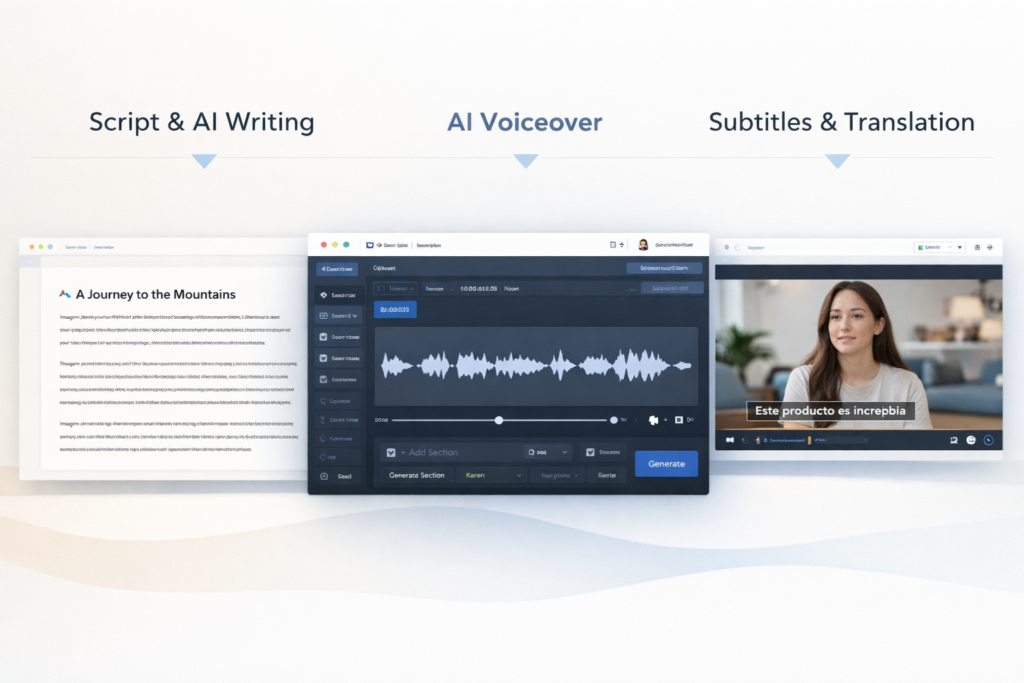
The easiest mistake when reviewing DupDub is to treat it as if it were only a voice generator. That would undersell it. DupDub is better understood as a workflow platform for content creation and localization. The voice tools may attract users first, but the surrounding features are what make the platform strategically useful.
For example, a content creator might start with a rough topic idea, use AI writing to shape it into a script, turn that script into a voiceover, add subtitles, translate the finished video into another language, and then export the assets for publishing. In many tool stacks, each of those steps happens in a different product. DupDub’s real appeal is that it tries to collapse those steps into a single environment.
This matters even more if your content business depends on volume, speed, or multilingual reach. The more often you repeat a process, the more expensive tool switching becomes. In that context, convenience is not a small feature. It becomes part of the ROI.
Deep Dive: DupDub’s Most Important Features
1. AI Writing for Faster Scripting
For many users, the content creation process does not start with voice. It starts with the blank page. That is why DupDub’s AI writing layer matters. It helps users move from rough ideas to more structured content such as scripts, social copy, product descriptions, lesson outlines, promotional messages, or talking points.
This is especially valuable for creators who do not want to spend too much time writing from scratch. It can also be useful for teams that need repeatable content formats, such as short videos, ad hooks, training snippets, landing-page videos, and educational explainers.
2. Text to Speech for Voiceovers at Scale
Text to speech is still one of DupDub’s strongest hooks. For many buyers, this is the entry point into the platform. The reason it converts well is simple: TTS solves a clear and common pain point. Not everyone has the time, setup, confidence, or audio quality needed to record voiceovers manually.
With DupDub, the appeal is not only that you can generate a voiceover. It is that you can do so quickly, revise easily, and use the output across multiple content types. That makes it useful for YouTube narration, explainer videos, e-learning content, social videos, podcast-style content, promotional creatives, and internal presentations.
Another advantage is flexibility. Different projects require different tones. Some need an instructional voice. Others need a softer storytelling delivery. Others need something energetic and promotional. When a tool offers broad voice coverage, it becomes easier to match the output to the format rather than forcing every project into the same tone.
3. Voice Cloning for Brand Consistency
Voice cloning is one of the most commercially interesting parts of DupDub. If you are a creator, coach, educator, or brand with a recognizable speaking style, cloning can help you keep consistency across your content without recording every line manually. It is also useful for updating old scripts, republishing existing ideas, or extending content into other languages while maintaining a familiar vocal identity.
Used responsibly, this can be a major productivity feature. It can help a solo creator sound more scalable and help a business produce more content without forcing the same person to repeatedly record minor updates. However, voice cloning should always be approached with permission, ownership, and ethical use in mind.
4. Video Translation for International Reach
This is where DupDub becomes more than a creator convenience tool. Video translation gives the platform strategic value. Instead of creating entirely separate videos for every market, users can take one core asset and adapt it for different languages. That can dramatically improve the usefulness of each original piece of content.
For educators, it means lessons can reach more learners. For brands, it means one campaign can be localized more efficiently. For YouTubers and social creators, it means one good piece of content can potentially be repurposed across multiple language audiences instead of being locked to one market.
If your long-term goal is reach, localization is no longer optional. AI tools that help reduce the cost and time of localization are becoming increasingly valuable, and DupDub’s translation plus dubbing workflow is one of the strongest reasons to look at the platform seriously.
5. AI Subtitles and Transcription for Repurposing
Subtitles and transcription may sound less exciting than voice cloning, but they are often more practical in everyday publishing. Subtitles improve accessibility, help viewers follow along, and support social video performance. Transcription helps turn spoken content into blog posts, captions, notes, training assets, and searchable documentation.
If you create content consistently, these text-based features become a major part of your production system. They help you repurpose one asset into many forms, which is exactly the kind of multiplier that makes content marketing more efficient over time.
6. In-Browser Recording and Light Editing
DupDub also includes browser-based recording and editing tools. That may not replace a fully professional editing suite for everyone, but it does remove friction for users who need to record quickly, trim content, add voiceovers, layer subtitles, and export without relying on a large software stack.
This is another example of DupDub’s broader philosophy: remove steps, reduce switching, and help users move faster. For busy creators and small teams, that convenience can be more important than having the deepest possible editing feature set.
Who Should Use DupDub?
| User Type | Why DupDub Makes Sense |
|---|---|
| Faceless YouTube creators | Useful for script writing, AI narration, subtitles, and scaling content faster |
| Social media marketers | Helpful for quick promotional videos, repurposing, and multilingual campaigns |
| Educators and trainers | Supports narrated lessons, translated training, and accessible content |
| Agencies and content teams | Can reduce workflow fragmentation and simplify asset production |
| Small businesses | Useful for product explainers, onboarding videos, and branded voice content |
DupDub is especially attractive for users who produce content repeatedly. The more often you create scripts, videos, voiceovers, or localized assets, the more value you can potentially get from having those tasks connected in one system.
Who May Not Need DupDub?
DupDub may be less compelling if you only need one narrow function and already have a strong workflow for everything else. For example, if you already love your writing system, your editing suite, your subtitle tool, and your voice provider, then DupDub has to compete more on convenience than on necessity.
It may also be more than some users need if their content output is extremely light. If you only create occasional projects and do not care about speed or repeatability, a broader platform may feel less essential. But for active creators and teams, the combined workflow is where DupDub starts to make much more sense.
DupDub Pros and Cons
| Pros | Cons |
|---|---|
| Broad all-in-one workflow | Some advanced users may still want specialist tools |
| Good fit for content repurposing | Feature breadth can mean a learning curve for beginners |
| Useful for multilingual publishing | Final translated outputs may still benefit from human review |
| Reduces tool switching | Not every user needs every feature included |
| Supports creators, marketers, and educators | Pricing value depends on how actively you use the platform |
DupDub Pricing and Value
Pricing always matters in software reviews, but the right question is not simply whether a tool is cheap. The better question is whether the tool saves enough time or replaces enough other tools to justify its cost. DupDub’s value is easier to understand when you evaluate it as a workflow platform instead of as a single-purpose subscription.
If you would otherwise need separate tools for AI writing, voice generation, subtitles, transcription, translation, and light editing, DupDub may compare favorably on convenience alone. If you only care about one feature, then pricing becomes a more direct comparison and the value depends on how strongly you need that specific function.
DupDub Pricing and Value
Instead of relying on a pricing image that can quickly go out of date, here is a cleaner table showing DupDub’s current entry-level creator plan structure. This makes the article easier to scan on both desktop and mobile, and it is also better for SEO and AI search readability.
| Plan | Price | Billing | Best For |
|---|---|---|---|
| Free | $0 | Free | Testing the platform before paying |
| Personal | $11/month | Billed annually | Individuals and solo creators |
| Professional | $30/month | Billed annually | Pro creators and heavier content workflows |
| Ultimate | $110/month | Billed annually | Startups, teams, and high-volume use |
DupDub also offers a 3-day free trial, which makes it easy to test the workflow before committing to a paid plan.
👉 If you want to see whether DupDub fits your workflow before paying for a full plan, start the free trial here.
Best Use Cases for DupDub
- YouTube narration: Great for faceless videos, explainers, list videos, and storytelling channels.
- Short-form social content: Useful for subtitles, voiceovers, quick edits, and multilingual snippets.
- Online courses: Helpful for lesson narration, training localization, and accessibility improvements.
- Marketing videos: Useful for product demos, ad creatives, landing-page explainers, and campaign localization.
- Content repurposing: Turn one script or video into audio, subtitles, transcripts, and translated assets.
How DupDub Fits an SEO and AI Search Content Strategy
From a strategy perspective, DupDub is interesting because it supports content multiplication. One original idea can become a script, a voiceover, a video, subtitles, a transcript, and a translated asset. That means one content investment can potentially generate several distribution formats.
For marketers and site owners, this matters because modern visibility is no longer only about one blog post ranking in one search engine. Content now needs to work across organic search, social media, video platforms, international audiences, and AI-driven discovery systems. Tools that help you convert one core asset into multiple formats are becoming more valuable for that reason alone.
If your business model depends on content output, speed, and repurposing, DupDub is easier to justify than if you judge it as a simple voice toy. Its strongest argument is operational leverage.
Final Verdict: Should You Try DupDub?
DupDub is not just for people who want AI voices. It is for people who want a smoother content workflow. That distinction is what makes it worth paying attention to. If your process includes writing, narration, subtitles, repurposing, and multilingual expansion, DupDub can potentially remove friction at several stages instead of solving only one small problem.
For creators, marketers, educators, and small teams, that makes DupDub a practical and commercially relevant tool. It is especially attractive if you are trying to scale output without building an overly complicated tool stack. If that sounds like your situation, testing the platform through the trial is the smartest next step.
👉 If you are ready to create voiceovers, subtitles, and multilingual content in one place, try DupDub here.

Frequently Asked Questions
Is DupDub good for beginners?
Yes, especially for beginners who want one platform instead of learning several separate tools. The bigger benefit for beginners is simplicity of workflow rather than having to piece together a stack on their own.
Is DupDub only for text to speech?
No. Text to speech is one of its most visible features, but DupDub also covers writing, voice cloning, subtitles, transcription, translation, recording, and light editing.
Is DupDub useful for YouTube creators?
Yes. It is especially useful for faceless channels, explainer content, multilingual publishing, and creators who want to repurpose one script or video into multiple formats.
Can DupDub help with multilingual content?
Yes. That is one of its strongest use cases. The platform’s translation, dubbing, subtitle, and voice features make it relevant for creators and teams trying to reach audiences in more than one language.
Who is DupDub best for?
DupDub is best for creators, marketers, educators, agencies, and businesses that want faster production and fewer moving parts in their content workflow.
Disclosure: This article contains affiliate links. If you choose to buy through one of these links, I may earn a commission at no extra cost to you.
About the Author
Xu Xun
Contact: xuxun1208@gmail.com
Last Updated: June 2026