
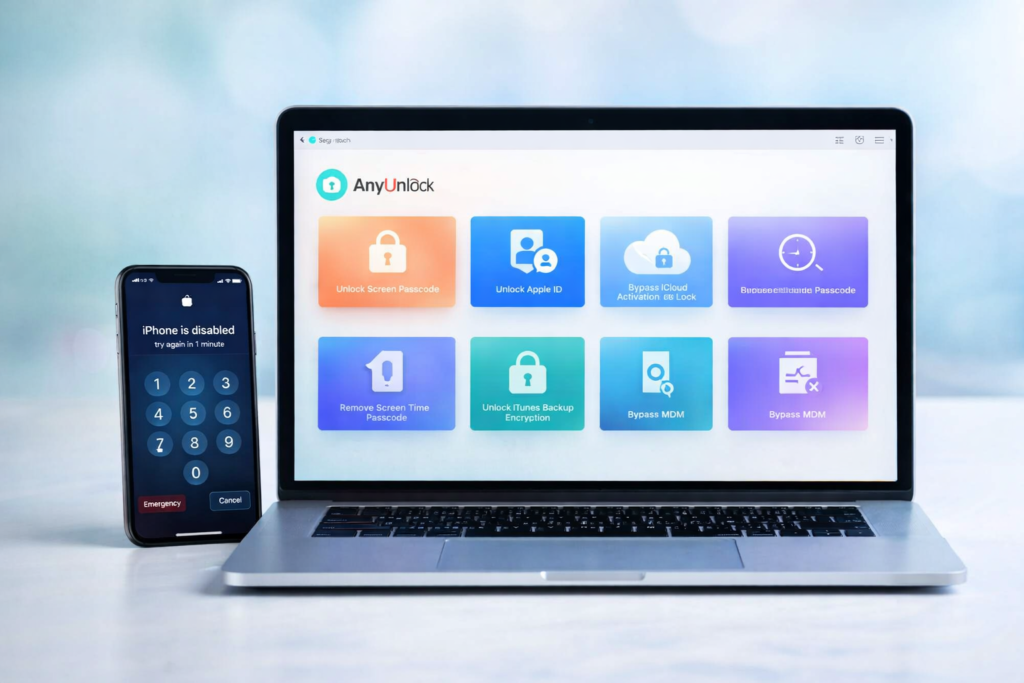
If you are locked out of your iPhone or iPad, AnyUnlock is one of the tools you will probably see mentioned again and again. It is marketed as an all-in-one iPhone and iPad unlocker that can help with forgotten screen passcodes, Apple ID removal, Screen Time passcodes, iTunes backup encryption passwords, MDM restrictions, and several other access-related problems.
But does that actually make it worth buying?
The honest answer is that AnyUnlock can be useful for the right user, but it is not a magic solution for every Apple lock situation. That matters because many buyers do not just want a list of features. They want to know whether the software is safe, whether it really works, what it can and cannot do, how much it costs, and whether Apple’s own recovery options are still the better first choice.
This review takes a practical, buyer-focused look at AnyUnlock, including its main features, pricing, strengths, drawbacks, real-world limitations, and the types of users who may actually benefit from it. If you are trying to decide whether this software is worth paying for, this guide will help you make a more informed choice.
Quick Verdict
| Category | Verdict |
|---|---|
| Best for | Users who forgot an iPhone or iPad passcode, need Screen Time removal, want Apple ID removal on a device they own, or prefer one toolkit for several unlock-related tasks |
| Less ideal for | Users who still have easy access to Apple’s official recovery options, or buyers expecting guaranteed support for every device and every lock scenario |
| Free trial | Yes, but full unlocking requires a paid plan |
| Platforms | Windows and Mac |
| Refund policy | 60-day money-back guarantee according to the official policy |
| Overall takeaway | A useful toolkit for specific, legitimate ownership-recovery situations, but not a universal answer to every Apple lock problem |
What Is AnyUnlock?
AnyUnlock is an iPhone and iPad unlocking toolkit developed by iMobie. Instead of focusing on only one problem, it tries to cover several common access and device-management issues in one product. On its official pages, iMobie presents AnyUnlock as software that can remove screen passcodes, unlock Apple ID, bypass certain MDM restrictions, remove Screen Time passcodes, handle iTunes backup encryption passwords, and offer a number of extra utilities such as Apple ID lookup, password export, device verification, and SIM lock handling.
That broad feature set is one of the main reasons the product stands out. Many buyers do not want to pay for several separate tools just to solve different iPhone or iPad access problems. A bundled toolkit can look more attractive, especially if a user is dealing with multiple issues at once or wants one familiar interface instead of several unrelated apps.
At the same time, the broader a tool is, the easier it becomes for buyers to misunderstand what it can really do. Some features are much simpler and more practical than others. Some can preserve data, while others may erase the device during the process. And some of the most heavily advertised capabilities are also the ones with the most caveats. That is why an honest review matters much more than a basic sales pitch.
What Can AnyUnlock Do?
| Feature | What it is designed to help with | Typical user intent |
|---|---|---|
| Unlock Screen Passcode | Remove a forgotten lock screen passcode from an iPhone or iPad | “I forgot my iPhone passcode” |
| Unlock Apple ID | Remove an old Apple ID from a device you own or are authorized to manage | “Remove Apple ID from my iPhone” |
| Bypass MDM | Remove or bypass certain mobile device management restrictions | “Remove MDM from iPhone or iPad” |
| Unlock Screen Time Passcode | Remove a forgotten Screen Time restrictions passcode | “Forgot Screen Time password” |
| Unlock iTunes Backup Encryption | Remove or recover an iTunes backup encryption password | “Forgot iTunes backup password” |
| Apple ID Lookup and Device Verification | Identify account details and check device information on supported workflows | “Check iPhone before buying or using” |
| SIM Lock Handling | Assist with supported SIM-related lock scenarios | “Use my phone with another carrier” |
On paper, that is a strong feature list. It gives AnyUnlock more commercial appeal than a single-purpose unlock utility, because it can attract buyers from several different search intents instead of just one. For affiliate content, that also makes the product easier to position. A user searching for an Apple ID removal tool is not necessarily the same user searching for Screen Time removal, but both may still be candidates for the same software.
The key point, however, is that not all features have the same level of flexibility, simplicity, or compatibility. A buyer should never assume that support for one function automatically means full support for every other function in the toolkit. That is one of the most important things to understand before paying.
How AnyUnlock Works
AnyUnlock is designed around a simple workflow. In most cases, you choose the unlock mode you need, connect your device to a Windows PC or Mac, follow the on-screen prompts, and let the software attempt the selected process. This simplified structure is part of the product’s appeal because many users do not want to navigate complicated manual recovery steps if they can avoid it.
That said, “simple to start” does not mean “identical in every case.” Different modules have different requirements and outcomes. Some workflows are relatively straightforward. Others involve more conditions, more restrictions, or more risk. Buyers who skip this distinction are usually the ones who end up disappointed.
For example, data handling is not the same across all features. Some functions are presented as being able to preserve user data, while others may erase the device during the unlocking process. That difference is extremely important, especially for buyers who care more about recovering access than they do about keeping existing local data.
This is why the best approach is not to think of AnyUnlock as one single “unlock button.” It is better understood as a collection of different tools inside one software suite, each with its own strengths, limits, and ideal use case.
AnyUnlock vs Apple’s Official Recovery Options
Before paying for third-party software, it is always smart to ask one simple question: Can Apple’s official recovery route already solve this problem?
In many cases, the answer may be yes. If you forgot your iPhone passcode, Apple’s official guidance typically involves putting the device into recovery mode and restoring it with a computer. Apple also explains that Activation Lock is a built-in anti-theft feature linked to the Apple Account used to activate the device. In other words, Apple’s own path should still be the first option whenever it is available to you.
| Situation | Best first step | Should you consider AnyUnlock? |
|---|---|---|
| You still know your Apple Account password | Use Apple’s official recovery path first | Usually not necessary as a first move |
| You forgot your lock screen passcode | Compare Apple restore options with AnyUnlock’s passcode module | Possibly, especially if you prefer a guided software workflow |
| You forgot a Screen Time passcode | Check whether AnyUnlock’s dedicated tool is a better fit | Yes, this is one of the more practical use cases |
| You need help with encrypted iTunes backups | Look at AnyUnlock’s backup encryption options | Yes, this can be a strong use case |
| You have an Activation Lock issue | Use Apple Account recovery or proof-of-purchase support first | Only after fully understanding the limitations |
This comparison matters because it makes the buying decision more realistic. Good affiliate content should not pretend that third-party software always replaces the manufacturer’s own recovery system. In many situations, Apple’s official methods remain the safest and cleanest first option. AnyUnlock becomes more attractive when Apple’s route is unavailable, inconvenient, too limited for the exact problem, or when the buyer needs a more specialized workflow.
Pricing: What Does AnyUnlock Cost?
One of the reasons AnyUnlock is easier to promote than some competing tools is that it does not force every buyer into one giant plan. iMobie sells both single-feature licenses and a Full Toolkit. That pricing structure is useful because some users only need one function once, while others may prefer access to multiple modules in the same software.
Official pricing can change with promotions, regional offers, and time-limited discounts, so it is always wise to verify the latest price before publishing. Still, the official pricing pages make the general structure clear enough for buyers to understand what to expect.
| Plan or Module | Official pricing snapshot | Who it may suit best |
|---|---|---|
| Unlock Screen Passcode | 3-Month Plan: $39.99 | Users locked out of their own iPhone or iPad |
| Remove Apple ID | 3-Month Plan: $35.99 | Users needing Apple ID removal on an owned device |
| Bypass MDM | 3-Month Plan: $39.99 | Users dealing with supported MDM restrictions |
| Bypass iCloud Activation Lock | 3-Month Plan: $39.99 | Only for users who fully understand the module’s limitations |
| Remove iTunes Backup Encryption | 3-Month Plan: $29.99 | Users locked out of encrypted iTunes backups |
| Full Toolkit | 1-Year Subscription: $79.99 | Users who want access to multiple AnyUnlock modules in one package |
From a value perspective, the Full Toolkit usually makes more sense for users who expect to use more than one feature. On the other hand, if you only need one specific function, buying a single-feature plan may be the more efficient choice. That flexibility is helpful because it lowers the barrier to entry for buyers who are not ready to commit to a larger bundle.
Pros and Cons
| Pros | Cons |
|---|---|
| Broad set of unlock-related features in one toolkit | Not every module supports every device or iOS version |
| Available for both Windows and Mac | Some workflows may erase device data |
| Single-feature and bundle pricing options | Buyers can easily overestimate what the software can do |
| Free trial available for compatibility checks | Some heavily marketed features come with significant caveats |
| 60-day money-back guarantee according to the official policy | Official Apple recovery options may still be better in some situations |
The strengths of AnyUnlock are easy to understand. It is convenient, broad in scope, and clearly built to attract users who want a less technical recovery path. It also helps that iMobie offers multiple purchase routes instead of forcing everyone into one plan structure.
The downsides are just as important. Compatibility is not universal, outcomes are not identical across modules, and buyers who expect too much from one piece of software may feel disappointed. That does not make the product useless. It simply means that realistic positioning matters. This is the kind of software that tends to work best when the user has a clearly defined, legitimate problem and has already checked whether Apple’s own methods are enough.
Who Should Buy AnyUnlock?
| Type of buyer | Is AnyUnlock a good fit? | Why |
|---|---|---|
| Someone who forgot an iPhone passcode | Potentially yes | The screen passcode module is one of the product’s clearest use cases |
| Someone who forgot a Screen Time password | Yes | This is one of the more practical and attractive use cases in the toolkit |
| Someone locked out of encrypted iTunes backups | Yes | A dedicated backup-related tool can be easier than searching for separate software |
| Someone who still has easy access to Apple recovery options | Maybe not | Apple’s official path may be the simpler and safer first choice |
| Someone expecting every feature to work on every device | No | The product is more nuanced than that, and compatibility varies by module |
| Someone seeking help with an owned, authorized device | Yes, if the module and device are supported | This is the type of legitimate use case the product is best suited for |
In practical terms, AnyUnlock is strongest when it solves a real ownership-recovery problem for a normal user who wants a guided workflow. It is not the kind of tool that should be bought blindly just because the feature list looks impressive. The smartest buyers are the ones who first identify the exact problem they need to solve, then confirm that the specific AnyUnlock module supports that problem, device, and software version.
Important Limitations You Should Know
This is the section that many promotional reviews skip, but it is also one of the most important if you want to build trust and rank for competitive search terms.
First, not every feature works the same way. The product may look unified on the homepage, but each module has its own conditions and limitations. A feature that works well in one scenario should not be used as proof that every other module will work just as smoothly.
Second, data outcomes are different across workflows. Some tasks are more data-friendly than others, while some may involve a full erase or reset. Buyers should understand that “unlocking access” and “preserving all local data” are not always the same thing.
Third, compatibility matters more than marketing headlines. Some users make the mistake of paying first and checking support later. That is backwards. The better approach is to confirm the specific compatibility details before purchasing, especially for older devices, unusual configurations, and advanced workflows.
Fourth, the most controversial use cases are also the ones that require the most caution. The product is easiest to recommend when the use case is clearly legitimate, such as recovering access to a personally owned device or removing a forgotten Screen Time restriction. The more sensitive the scenario, the more important it becomes to stay within authorized and lawful use.
Is AnyUnlock Safe?
AnyUnlock appears to be a legitimate commercial product from an established software company rather than a random one-page download site. That matters because software in this category should always be judged not only by its feature claims, but also by the professionalism of the brand behind it. iMobie maintains official product pages, FAQs, support content, pricing pages, a refund policy, and an affiliate program through major networks. Those are all positive trust signals.
That said, “safe” should never be treated as a one-word promise. A more practical interpretation is that the software appears to be a real commercial product with visible support and documentation, but buyers should still download it only from the official source, verify compatibility carefully, and avoid assuming that every feature will be ideal for every device or situation.
Is AnyUnlock Worth It?
For the right user, yes. If you need a guided iPhone or iPad unlock toolkit for a supported, legitimate use case, AnyUnlock can be worth the money. It is especially appealing if you value convenience, want several recovery-related tools in one place, and prefer a simpler interface over piecing together different utilities from different vendors.
For the wrong user, no. If you still have easy access to Apple’s official recovery path, expect a perfect one-click answer for every device, or have not confirmed compatibility for the exact module you need, then paying for AnyUnlock may not be the best first move.
The best way to think about it is this: AnyUnlock is strongest as a targeted problem-solving toolkit, not as a universal miracle solution. Buyers who approach it with realistic expectations are much more likely to feel satisfied with it than buyers who assume it can do everything equally well.
Final Verdict
AnyUnlock is not the kind of product that should be judged by hype alone. It has real strengths, real practical use cases, and a feature set that can be genuinely useful for the right buyer. It also has real limitations, especially if someone assumes that every module is equally flexible or equally suitable for every device.
Overall, this software makes the most sense for users who want a legitimate ownership-recovery tool with several unlock-related functions under one roof. It is easier to recommend for passcode-related recovery, Screen Time removal, and certain account or backup-related tasks than it is for the most controversial or expectation-heavy scenarios.
If you want the shortest possible conclusion, it is this: AnyUnlock is worth considering, but only after you match the exact feature to your exact problem and confirm that your device is supported.
Frequently Asked Questions
Is AnyUnlock free?
AnyUnlock offers a free download, but the paid version is required for full unlocking and access to premium features.
Does AnyUnlock erase data?
It depends on the module you use. Some workflows are more data-friendly, while others may erase the device during the process.
Is AnyUnlock available for Windows and Mac?
Yes. The software is offered for both Windows and Mac, which makes it accessible to a wide range of users.
Should I try Apple’s official recovery methods first?
In many situations, yes. If Apple’s own recovery path is available and practical for your case, it is usually smart to try that first before paying for third-party software.
Who is AnyUnlock best for?
It is best for users with a legitimate, supported iPhone or iPad access problem who want a guided software workflow instead of relying only on Apple’s manual recovery process.
About the Author
Xu Xun
Contact: xuxun1208@gmail.com
Last Updated: June 2026