
If you are looking for a lightweight Windows PDF tool that helps you merge files, delete pages, reorder documents, rotate pages, export PDF pages as images, and sign documents without the complexity of a bloated office suite, this Abelssoft Easy PDF review is for you.
Many people do not need an advanced enterprise-grade PDF platform. They simply need a practical tool that helps them fix and organize PDFs fast. That is exactly where Abelssoft Easy PDF stands out. It focuses on the tasks real users handle every day: combining multiple PDFs into one file, removing pages that should not be there, changing page order, correcting rotated scans, and preparing documents for sharing, printing, or signing.
Instead of overwhelming users with dozens of rarely used functions, Easy PDF is positioned as a simple desktop solution for everyday PDF handling. For freelancers, students, office workers, home users, and small businesses, that focused approach may actually be more useful than paying for a much larger platform filled with features they may never open.
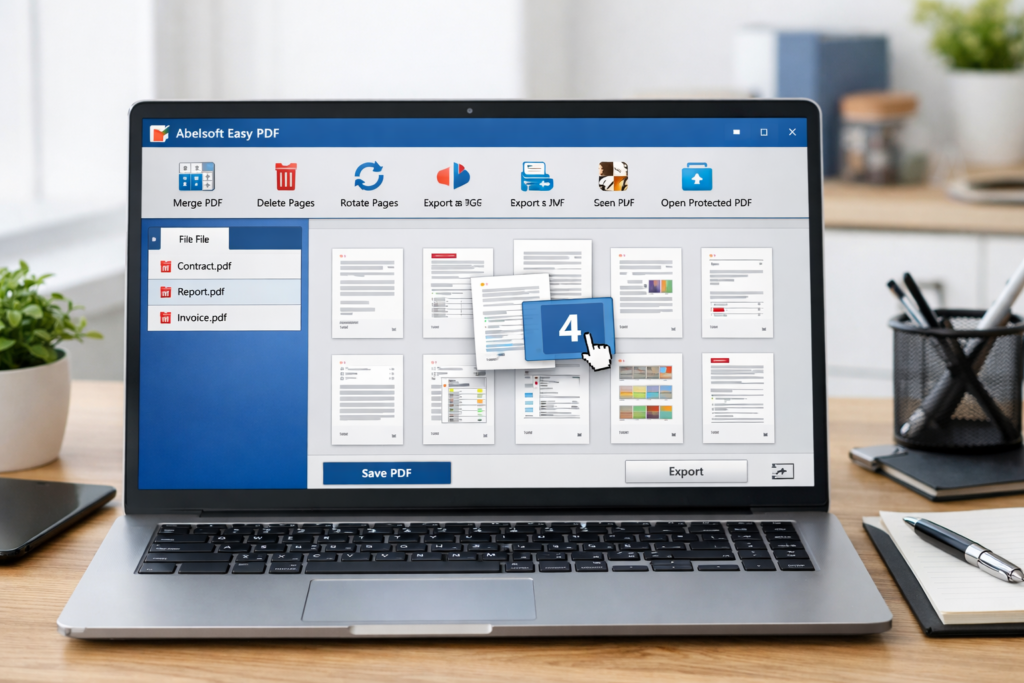
If you want a simpler way to merge, split, rotate, and sign PDF files on Windows without paying for an oversized PDF suite, try Abelssoft Easy PDF here and see whether its workflow fits the way you handle documents every day.
What Is Abelssoft Easy PDF?
Abelssoft Easy PDF is a Windows desktop PDF utility designed to make common document tasks easier. Rather than positioning itself as a giant all-in-one publishing platform, it is built around practical PDF management: merging files, removing pages, rearranging documents, rotating pages, exporting content, and adding signatures.
That matters because most people who search for a tool like this are not looking for something overly technical. They are usually trying to solve a very specific problem:
| Common user problem | What they usually need |
|---|---|
| I have several PDFs and need one final file | PDF merging |
| This PDF includes pages I do not want to send | Page removal |
| The scanned pages are upside down | Page rotation |
| The pages are in the wrong order | Page rearrangement |
| I need to sign a form quickly | PDF signature support |
| I want to save a PDF page as an image | Export to JPG or image output |
Abelssoft Easy PDF is appealing because it addresses these core needs directly. It is made for users who want to open a document, make the needed adjustments, and move on without fighting a complicated interface.
Abelssoft Easy PDF Review: Main Features at a Glance
One of the best things about Easy PDF is that its feature set is easy to understand. This makes it easier to review, easier to recommend, and easier for readers to decide whether it matches their needs.
| Feature | What it does | Why it matters |
|---|---|---|
| Merge PDFs | Combines multiple PDF files into one document | Useful for contracts, reports, applications, invoices, and project files |
| Delete pages | Removes unwanted pages from a PDF | Helps clean up scans, remove blank pages, and trim unnecessary content |
| Reorder pages | Moves pages into the correct sequence | Makes long PDFs look more professional and easier to read |
| Rotate pages | Corrects page orientation | Very helpful for scanned documents and mobile scans |
| Sign PDFs | Adds signatures to documents | Useful for forms, approvals, agreements, and small business paperwork |
| Export pages as images | Converts PDF pages into image output such as JPG | Helpful for presentations, previews, and quick sharing |
| Password-protected PDF handling | Works with protected documents | Useful when dealing with sensitive files or locked paperwork |
| Drag-and-drop workflow | Lets users manage files quickly | Improves usability for beginners and casual users |
That combination makes Easy PDF especially relevant for everyday administrative tasks. It is not just about editing PDFs in the abstract. It is about handling the documents people actually use in daily life: application packets, legal forms, school paperwork, invoices, client files, internal office documents, and scanned records.
Why This Tool Is Useful in Real Life
A lot of software sounds good on paper but does not clearly fit into real workflows. Easy PDF is different because its features map directly to common situations users face every week.
| Real-world situation | How Easy PDF can help |
|---|---|
| Submitting a job or visa application | Merge separate files into one organized PDF |
| Cleaning up a scan from a printer or phone | Delete blank pages and rotate misaligned pages |
| Preparing a proposal or report | Rearrange pages into a cleaner reading order |
| Sending only selected pages from a larger document | Remove pages you do not want to include |
| Signing a form or approval sheet | Add a signature without printing and rescanning |
| Sharing one page visually | Export a PDF page as an image |
This practical usefulness is one of the strongest selling points in this Abelssoft Easy PDF review. Many readers are not shopping for a “PDF ecosystem.” They just need a dependable utility that solves document problems quickly.
That also makes it a strong product for affiliate content. The use case is easy to explain, the problem is relatable, and the benefit is immediate. Readers can quickly understand whether the tool is relevant to them, which is important for both conversion and low-bounce search traffic.
Free Version vs Plus Version
One of the most important questions readers will have is whether the free version is enough or if the Plus version is worth it. This is where a clear comparison helps both SEO and conversions.
| Version | What you get | Main limitations or advantages |
|---|---|---|
| Free / Trial Version | Lets you test the software and basic workflow | Limited to editing a maximum of 3 PDFs simultaneously, includes a donation screen, and does not include the signature function |
| Plus Version | Fuller experience for regular users | Includes signatures, unlimited PDF processing, free email support, and at least 6 months of free updates and new versions |
For occasional users, the free version may be enough to check whether the interface and workflow feel right. But for anyone who works with PDFs regularly, those trial limits can become frustrating fairly quickly. If you handle contracts, application documents, forms, or client files every week, the Plus version is the more realistic option.
The signature feature alone can make the upgrade more attractive, especially for users who regularly need to complete approvals or send signed documents back without printing them first.
Ease of Use: Is Abelssoft Easy PDF Beginner-Friendly?
Yes, and that is one of the software’s biggest advantages.
Some PDF tools feel like professional publishing software. They are powerful, but they can also feel cluttered, technical, and slower to learn. Easy PDF appears to take the opposite approach. Its core appeal is not complexity. Its core appeal is speed, clarity, and a workflow that feels approachable for everyday users.
That matters because ease of use is a real buying factor. A cheaper tool is not necessarily better if the user ends up wasting time learning it. For many readers, the ideal PDF tool is not the one with the longest feature list. It is the one that helps them finish a document task with the fewest steps.
If your typical workflow sounds like this — open a PDF, remove one page, rotate two pages, merge in another file, sign it, and save — then a focused tool like Easy PDF is often easier to justify than a much heavier alternative.
Strengths and Weaknesses
| Pros | Cons |
|---|---|
| Simple and practical feature set | Trial version has noticeable limits |
| Well suited to everyday PDF handling | Signature support is not available in the trial |
| Useful functions like merging, splitting, rotating, and reordering | May feel too lightweight for users seeking advanced enterprise workflows |
| Appealing for beginners and non-technical users | Windows-focused, so not ideal for users who work only on Mac |
| Can help reduce document clutter quickly | Some power users may want broader text-level editing or OCR-heavy tools |
| Good fit for admin, school, business, and home paperwork | Pricing and promotions may vary, so buyers should always check the current offer |
Overall, the tradeoff is easy to understand. Easy PDF gives up some of the “everything under one roof” positioning in exchange for a cleaner and more accessible workflow. For many buyers, that tradeoff is actually a benefit.
Who Should Buy Abelssoft Easy PDF?
Abelssoft Easy PDF is a smart choice for readers who mainly want to manage PDF pages and document structure rather than build or redesign documents from the ground up.
| Best for | May not be ideal for |
|---|---|
| Students handling coursework and application files | Users who need advanced publishing-style PDF creation |
| Freelancers sending proposals, contracts, and signed forms | Large organizations needing highly specialized enterprise workflows |
| Small businesses managing invoices, approvals, and internal docs | Mac-only users |
| Office workers cleaning and combining scanned documents | Users who want a much broader all-in-one document suite |
| Home users dealing with forms, records, and paperwork | Power users who prioritize deep text editing over page-level management |
If you mostly work with page-level PDF tasks, Easy PDF makes sense. If your needs are much more specialized, you may eventually want a broader tool. That said, for a large share of normal users, page-level PDF management is exactly what matters most.
If your main PDF tasks are combining files, deleting pages, fixing page order, rotating scans, and signing documents on Windows, check Abelssoft Easy PDF here because it may be a better fit than paying for a larger PDF platform you will barely use.
Performance, Compatibility, and Daily Workflow
For this kind of software, daily workflow matters more than flashy marketing language. A document tool should feel dependable, direct, and fast to understand. That is one reason Easy PDF has strong recommendation potential. Its value is tied to usability, not hype.
It also helps that the product is clearly aimed at Windows users. If your work happens primarily on a Windows PC, a dedicated desktop utility can feel more stable and more comfortable than depending entirely on browser-based PDF tools for every task.
Another point in its favor is that it appears suitable for handling practical business and administrative workflows. Combining, signing, exporting, removing, and reorganizing PDFs are not niche actions. They are some of the most common things users need when dealing with modern paperwork.
Is Abelssoft Easy PDF Worth the Money?
Whether a PDF tool is worth buying depends less on price alone and more on how often it saves time. If you regularly deal with digital paperwork, even a small time-saving improvement can justify the purchase.
Easy PDF looks most worthwhile for users who want convenience without subscription fatigue and without software overload. If a tool helps you clean up forms, combine files, fix scans, and prepare documents faster every week, that convenience has real value.
It is also easier to recommend a product like this because the benefit is concrete. Readers can imagine using it immediately. That is a strong advantage when writing SEO-driven review content, because it makes the article easier to rank for long-tail “problem-solving” searches such as:
| Keyword angle | User intent behind it |
|---|---|
| Abelssoft Easy PDF review | Wants to know whether the product is worth using |
| merge PDF Windows software | Needs a tool to combine files |
| best PDF splitter and merger for Windows | Comparing solutions |
| rotate PDF pages on Windows | Needs a practical fix for scan orientation |
| PDF signer for Windows | Needs to sign documents digitally |
| Easy PDF free vs Plus | Trying to decide whether to upgrade |
That makes the software not only useful for readers, but also useful for content strategy. It aligns well with informational, commercial, and problem-solving search intent.
Final Verdict
Abelssoft Easy PDF is a strong option for Windows users who want a simple PDF tool focused on practical document handling rather than feature overload.
Its strongest appeal is not that it tries to do everything. Its strongest appeal is that it focuses on the things many users actually need: merging PDFs, removing pages, reordering pages, rotating scans, exporting pages, and signing documents. That makes it especially suitable for freelancers, students, office workers, home users, and small businesses that handle forms, reports, contracts, and application paperwork on a regular basis.
In short, if you want a lightweight Windows PDF tool that solves everyday document problems without burying you in unnecessary complexity, Easy PDF is absolutely worth considering. It may not be the right tool for every advanced workflow, but for everyday PDF organization and quick document preparation, it appears to hit a very practical middle ground.
If you prefer a PDF tool that is focused, beginner-friendly, and built for real-world document tasks instead of unnecessary complexity, take a closer look at Abelssoft Easy PDF here and decide whether it matches the way you work.
FAQ
Can Abelssoft Easy PDF merge multiple PDF files into one?
Yes. One of its core purposes is combining multiple PDF files into a single document, which is especially useful for applications, reports, contracts, and document bundles.
Can I delete pages from a PDF with Easy PDF?
Yes. Easy PDF is designed to help users remove unwanted pages and keep only the pages they need before saving or sharing a file.
Does Abelssoft Easy PDF let you reorder pages?
Yes. Reordering pages is one of the most useful functions in the software, especially for proposals, scanned records, school submissions, and client-facing documents.
Can Abelssoft Easy PDF rotate pages?
Yes. It can help fix misaligned or upside-down PDF pages, which is very common when dealing with printer scans or phone-captured documents.
Does the free version include signatures?
No. The trial version does not include the signature function, which is one of the key reasons regular users may prefer the Plus version.
Who is Abelssoft Easy PDF best for?
It is best for Windows users who need a practical and easy-to-use tool for everyday PDF tasks such as merging, splitting, deleting, rotating, reordering, and signing documents.
About the Author
Xu Xun
Contact: xuxun1208@gmail.com
Last Updated: June 2026