
If you want more views on YouTube, better videos alone are not always enough. In many niches, the real difference comes from packaging: your thumbnail, your title, and how clearly your idea makes people want to click. That is exactly where Pikzels tries to help. Instead of acting like a generic AI art tool, Pikzels is built around the YouTube packaging workflow, helping creators generate, refine, recreate, and improve thumbnails and titles faster.
In this Pikzels review, I will break down what the tool does well, where it still has limitations, who it is best for, and whether it is worth using if your goal is to grow a YouTube channel more efficiently. I will also look at its workflow, pricing model, practical use cases, and the biggest reasons creators may choose it over more general design tools.
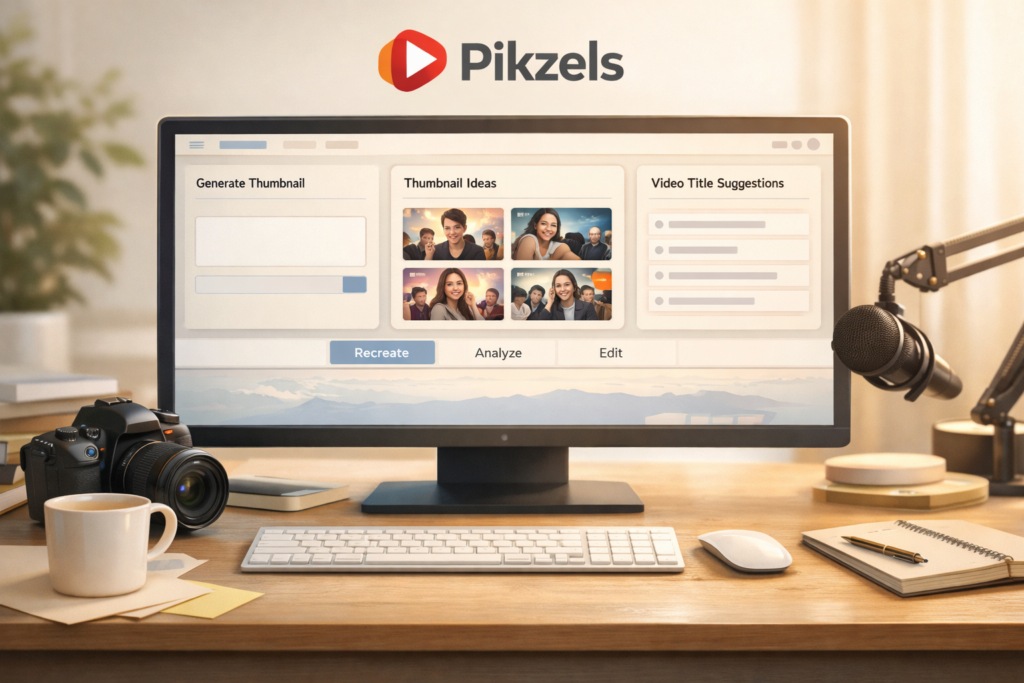
👉 If you want to try a thumbnail-focused workflow instead of relying on a generic AI image tool, [Try Pikzels here].
Quick Answer: Is Pikzels Worth It?
For many YouTube creators, yes. Pikzels is one of the more focused AI tools in this space because it is not trying to be everything. Its biggest advantage is that it centers the parts of the workflow that actually matter for channel growth: thumbnail ideation, thumbnail recreation, thumbnail editing, title support, and packaging analysis. If you want speed, iteration, and a more YouTube-specific workflow, Pikzels is worth a serious look.
That said, it is still an AI product, which means results will not always be perfect on the first try. Creators who expect pixel-level manual control or completely unlimited experimentation may find the credit-based model less flexible than traditional design software. But for speed, concept testing, and packaging-focused creation, Pikzels stands out.
| Category | Verdict |
|---|---|
| Best for | YouTubers who want faster thumbnail and title iteration |
| Biggest strength | YouTube-focused packaging workflow |
| Core tools | Prompt, Recreate, Analyze, Edit, Title, Personas, Styles |
| Good fit for beginners | Yes, especially if you do not want to design everything manually |
| Main trade-off | Credit-based usage means experimentation has a cost |
| Overall | A strong option for creators who care about CTR and packaging speed |
What Is Pikzels?
Pikzels is an AI-powered tool built around YouTube thumbnails and titles. The core idea is simple: instead of forcing creators to use a broad design app or a general AI image generator, Pikzels gives them a workflow focused on the assets most likely to affect click-through rate. That includes generating thumbnail concepts, recreating successful visual patterns, making quick edits, analyzing thumbnail performance potential, and pairing visuals with stronger titles.
This product positioning matters more than it may seem at first. Many creators do not actually need a giant design suite full of unrelated features. They need a tool that helps them make a better thumbnail faster, adjust it without starting from scratch, and turn rough ideas into publishable packaging. That is where Pikzels feels more specialized than many AI tools that simply generate an image and stop there.
It is especially relevant for solo creators, small channel teams, faceless channels, media businesses, and agencies that want to move from idea to thumbnail draft quickly. If your current workflow involves too much back-and-forth between brainstorming, editing, title testing, and visual iteration, Pikzels is clearly trying to reduce that friction.
Core Features Explained
One reason Pikzels is easier to evaluate than many AI tools is that its feature set is fairly practical. It is not hiding behind vague promises about “creativity.” The main tools map closely to real YouTube packaging tasks.
| Feature | What It Does | Why It Matters |
|---|---|---|
| Prompt | Generate thumbnail ideas from a text prompt | Helps you move from idea to concept quickly |
| Recreate | Rebuild or reinterpret an existing thumbnail style or concept | Useful when adapting proven thumbnail formats |
| Edit | Make targeted changes without rebuilding everything | Saves time when a draft is close but not finished |
| Analyze | Review a thumbnail and title from a performance angle | Helps creators think more strategically about clicks |
| Title | Generate or refine YouTube titles | Keeps title and thumbnail aligned as one package |
| Personas | Create more consistent people-based outputs | Helpful for personal brands and face-led channels |
| Styles | Apply or build a recognizable aesthetic | Supports channel consistency and brand identity |
What makes this more useful than a basic image generator is the workflow logic behind it. Thumbnail design is rarely a one-step process. You may start with an idea, notice that the composition is weak, want a stronger expression, need clearer text, and then realize the title does not match the emotional promise of the visual. Pikzels is designed around those kinds of iterations.
Why Pikzels Feels Different From Generic AI Design Tools
The main difference is focus. A general AI image platform can be useful, but it usually leaves the creator to do the packaging thinking alone. Pikzels is more opinionated. It is built for thumbnails, not just images. That means the tool is trying to support the way YouTubers actually work: concept generation, reference adaptation, quick editing, style consistency, and title improvement.
This is important because YouTube growth is not just about visual quality. A thumbnail can look beautiful and still fail if it lacks tension, clarity, emotional pull, or narrative promise. Pikzels tries to move the user closer to that packaging mindset. In practical terms, that makes it more useful for creators who care about CTR than tools that are technically powerful but strategically generic.
Another advantage is speed. Many creators are not professional designers, and even those who are often do not want to spend hours on every upload. If Pikzels helps you generate a usable concept faster, test a stronger direction, or refine a nearly finished idea in minutes instead of hours, that productivity gain can matter just as much as image quality.
Real-World Workflow: How Creators Can Actually Use Pikzels
The best way to understand Pikzels is to think about it as a practical packaging workflow rather than just a generation tool. A creator might start with a rough video concept, turn that into a first thumbnail draft, recreate a stronger visual structure from a reference, edit the weakest parts, test title options, and then refine the final package before publishing.
| Step | Creator Action | What Pikzels Helps With |
|---|---|---|
| 1 | Start with a topic or video idea | Prompt-based thumbnail concept generation |
| 2 | Look for a stronger angle | Recreate a high-performing style or structure |
| 3 | Fix weak visual elements | Edit the image without restarting the whole design |
| 4 | Improve click potential | Analyze the thumbnail and title combination |
| 5 | Match the visual hook with stronger wording | Generate title options |
| 6 | Keep your channel look consistent | Use Personas and Styles |
This is where the product makes the most sense. Many thumbnail tools are fine for one-off generation. Fewer tools help creators move through the actual cycle of concept, revision, packaging, and consistency. That broader workflow is one of Pikzels’ biggest selling points.
Editing and Recreate Features May Be the Biggest Value
New users often focus on prompt-to-thumbnail generation because that is the most obvious feature. In practice, editing and recreation may matter more. Most creators do not need a brand-new concept every time. They need to take a decent idea and make it stronger. They need to adapt an existing winning format, fix the weak areas of a draft, or turn an okay thumbnail into something much more clickable.
That is why Pikzels’ recreate and edit tools are so important. Instead of forcing you to start over whenever something is slightly off, the workflow is built to support iteration. If the face is not strong enough, if the focal point is unclear, if the composition feels crowded, or if the result looks close but still lacks punch, targeted editing becomes far more practical than full regeneration.
For creators who publish often, this can save a surprising amount of time. Even if your first draft is not perfect, being able to refine rather than restart is often the difference between using a tool regularly and abandoning it after the novelty wears off.
Personas and Styles: Useful for Branding and Consistency
Consistency is underrated in YouTube packaging. Many channels grow faster when viewers can recognize their visual identity quickly. That does not mean every thumbnail should look the same, but it does mean there should be some coherence across expressions, composition patterns, typography style, or overall tone.
Pikzels tries to address that through Personas and Styles. For creator-led channels, Personas can help make people-based thumbnails more consistent. For channels that rely on a certain aesthetic, Styles help reduce randomness and push outputs closer to a recognizable look. This is particularly valuable for personal brands, educational creators, commentary channels, and businesses that want more brand continuity.
These features are also useful from a scaling perspective. If you are managing multiple uploads or multiple channels, repeatability matters. A workflow that creates random-looking results every time is harder to build around. A workflow that nudges output toward consistency is much easier to operationalize.
Title Generation Makes Pikzels More Strategic
One of the most useful things about Pikzels is that it does not treat the thumbnail as a standalone asset. On YouTube, the title and thumbnail work together. A great thumbnail with a weak title underperforms. A strong title with an unclear thumbnail also underperforms. The point is not simply to create a nice image but to package an idea so it gets clicked.
That is why the title feature matters. It helps creators align the wording and the visual hook instead of handling them as separate tasks. If your thumbnail implies tension, transformation, a challenge, surprise, or a before-and-after promise, your title should support that same emotional direction. Pikzels makes that alignment easier than juggling several disconnected tools.
For many creators, that is one of the most valuable advantages of the platform. A tool that improves packaging logic can often create better results than a tool that merely produces prettier graphics.
Pikzels Pricing: What to Expect
Pikzels uses a credit-based pricing model rather than an unlimited-use design model. That means your usage is tied to how much generation, editing, analysis, or other feature activity you do inside the platform. Monthly and annual billing options are presented, and the pricing structure is built around credits rather than a simple unlimited subscription.
This approach has pros and cons. On the positive side, it creates a more measurable usage system. It can be a good fit for creators who want clear resource tracking and who use the tool with some intentionality. On the downside, it means random experimentation can become expensive if you are not careful with your workflow or prompts.
Rather than thinking about Pikzels as a tool for endless mindless generations, it makes more sense to view it as a packaging workflow tool. The better your references, prompts, and editing decisions are, the more value you are likely to get from the credit system.
| Pricing Point | What to Know |
|---|---|
| Billing model | Credit-based |
| Billing options | Monthly and annual plans are available |
| Premium tier | A Premium plan is shown on the pricing page |
| Language support | The pricing page highlights support for generating thumbnails and titles in any language |
| Practical takeaway | Best value comes from deliberate iteration, not wasteful trial-and-error |
Because SaaS pricing can change, I always recommend checking the latest official pricing page before publishing or buying. That is especially important if you plan to compare Pikzels with alternatives or mention plan details in a time-sensitive buying guide.
Who Should Use Pikzels?
| User Type | Is Pikzels a Good Fit? | Why |
|---|---|---|
| Solo YouTubers | Yes | It reduces design friction and speeds up thumbnail ideation |
| Faceless channels | Yes | Useful for concept generation, recreate, and title support |
| Creator-led personal brands | Yes | Personas and consistent styling can be very helpful |
| Small media teams | Yes | Supports faster iteration across multiple uploads |
| Agencies | Often yes | Can streamline packaging workflows across channels |
| Professional designers wanting full manual control | Maybe not | AI workflows are not the same as precision-first design software |
| Users wanting a general all-purpose design platform | Maybe not | Pikzels is most valuable when used specifically for YouTube packaging |
If your main challenge is getting from “I have a video idea” to “I have a strong title and thumbnail package” faster, Pikzels is likely a good fit. If your main challenge is detailed brand design across many formats beyond YouTube, then a broader design stack may still be necessary.
Pros and Cons
| Pros | Cons |
|---|---|
| Built specifically for YouTube packaging | Credit-based usage may not suit unlimited experimenters |
| Combines thumbnails and titles in one workflow | AI outputs can still vary in quality |
| Useful recreate and edit features | Some users will still want more manual precision |
| Helpful for speed and iteration | Best results still depend on having a clear idea and direction |
| Supports Personas and Styles for consistency | Not a full replacement for every design tool |
What I Like Most About Pikzels
The strongest part of Pikzels is not just that it can generate a thumbnail. Many tools can generate something. The real value is that Pikzels seems built around the actual packaging loop: create, recreate, edit, analyze, and improve. That is much closer to how creators really work than a one-and-done image generation system.
I also like that it supports title thinking alongside visual thinking. Too many creators treat thumbnails and titles as separate jobs and end up with mismatched messaging. When both are aligned, the channel usually presents a clearer promise to the viewer, and that often translates into stronger click potential.
Finally, the product feels more useful for repeat workflows than many flashy AI apps. If a tool only impresses you once, it is not much use. If it saves you time over dozens of uploads, that is when it becomes valuable.
Where Pikzels Still Has Limitations
No honest Pikzels review should pretend the platform is perfect. Like other AI tools, output quality is not guaranteed every time. Some generations will be stronger than others. Some creators will still need additional manual editing, and some will wish for even more predictable consistency in certain workflows.
The credit model also changes how you use the tool. When every iteration has a cost, you become more strategic. That is not necessarily bad, but it does mean Pikzels works best when you approach it with some direction rather than using it as an endless random idea machine.
Another limitation is that this is still a specialized platform. That is a strength if your goal is YouTube packaging. It is less of a strength if you expect it to replace every tool in your broader design stack. In most cases, creators will get the most value from Pikzels when they use it for the job it was clearly built to do.
Is Pikzels Good for SEO, AI Search, and Overall Content Growth?
Indirectly, yes. Pikzels is not an SEO keyword research platform, but it can improve a very important part of content growth: the packaging that gets people to click. Better thumbnails and stronger titles can improve the first stage of performance, especially for channels that rely on YouTube search, suggested traffic, or recommendation surfaces where packaging strongly affects user behavior.
It can also support a better content system overall. When creators can produce and refine packaging faster, they can publish more efficiently, test more intelligently, and improve their creative decision-making over time. That does not replace good content, but it helps good content get a better chance to compete.
For creators who care about discoverability across both traditional search and AI-driven recommendation environments, strong packaging still matters. Clear ideas, strong emotional framing, curiosity without confusion, and better alignment between title and image remain powerful advantages.
Is There an Affiliate Program?
Yes. Pikzels has an official affiliate program, which makes it relevant not only for creators who want to use the tool but also for bloggers, YouTubers, and affiliate marketers who want to promote it. That adds another layer of usefulness for anyone building content around creator tools, YouTube growth tools, AI content workflows, or thumbnail optimization.
From a monetization perspective, that matters because products with a clear use case and recurring value are often easier to write about than vague AI tools with no obvious buyer intent. Pikzels has a more concrete audience: creators who want better packaging and more views.
Final Verdict
Pikzels is one of the more interesting AI tools for YouTube creators because it is clearly built around a real problem: creating thumbnails and titles that get clicked without wasting excessive time. Its biggest advantage is not just AI generation. It is the packaging-first workflow that connects thumbnail ideas, reference recreation, targeted edits, title support, and visual consistency into one system.
If you want an all-purpose design platform, Pikzels may feel too specialized. If you want a faster, more practical thumbnail workflow for YouTube, that specialization is exactly the point. For solo creators, growth-focused channels, and teams that care about speed and iteration, Pikzels is absolutely worth considering.
My overall take is simple: if thumbnails are slowing you down, if your titles and visuals often feel disconnected, or if you want a more efficient way to package video ideas, Pikzels is a strong tool to test. It is not magic, but it is purpose-built, and that alone makes it more relevant than many broader AI tools for YouTube creators.
FAQ
What is Pikzels mainly used for?
Pikzels is mainly used for YouTube packaging tasks such as generating thumbnails, recreating visual concepts, editing existing drafts, analyzing packaging quality, and improving titles.
Is Pikzels good for beginners?
Yes. It is especially useful for beginners who want a faster way to create YouTube thumbnails without relying entirely on manual design tools.
Does Pikzels only create thumbnails?
No. It also supports title-related workflow and broader packaging tasks, which is one reason it feels more strategic than a simple image generator.
Is Pikzels better than a generic AI image tool?
For YouTube thumbnails specifically, many creators will likely find it more practical because it is built around the packaging workflow rather than general image generation.
Should you still check the official pricing page before buying?
Yes. Pricing and plan details can change, so it is always smart to confirm the latest official information before subscribing or publishing exact price comparisons.
About the Author
Xu Xun
Contact: xuxun1208@gmail.com
Last Updated: June 2026